Shift+Right Click the axes icons in the Transform Panel to select the values you want to set. The backgrounds of the number boxes will turn blue. Enter a value in any one of the boxes, and press ENTER.
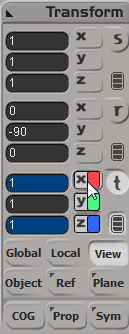


Shift+Right Click the axes icons in the Transform Panel to select the values you want to set. The backgrounds of the number boxes will turn blue. Enter a value in any one of the boxes, and press ENTER.
 eX-SI
eX-SI 
classic yet extremely useful.