
Here’s how to use a pop-up (transient) explorer to allow users to select multiple objects in the scene.
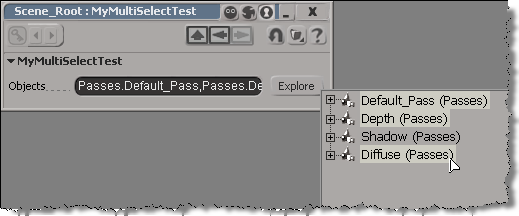
In this approach, you have a text box and a button.
The OnClicked callback for the button would use OpenTransientExplorer to pop up an explorer where the user can select multiple objects. OpenTransientExplorer returns a collection, so you can store that in a string parameter.
null = None
false = 0
true = 1

def XSILoadPlugin( in_reg ):
	in_reg.Author = "blairs"
	in_reg.Name = "MyMultiSelectTestPlugin"
	in_reg.Major = 1
	in_reg.Minor = 0

	in_reg.RegisterProperty("MyMultiSelectTest")
	#RegistrationInsertionPoint - do not remove this line

	return true

def XSIUnloadPlugin( in_reg ):
	strPluginName = in_reg.Name
	Application.LogMessage(str(strPluginName) + str(" has been unloaded."),constants.siVerbose)
	return true

def MyMultiSelectTest_Define( in_ctxt ):
	oCustomProperty = in_ctxt.Source
	oCustomProperty.AddParameter2("Objects",constants.siString,"",null,null,null,null,constants.siClassifUnknown,constants.siPersistable + constants.siKeyable)
	return true

# Tip: Use the "Refresh" option on the Property Page context menu to
# reload your script changes and re-execute the DefineLayout callback.
def MyMultiSelectTest_DefineLayout( in_ctxt ):
	oLayout = in_ctxt.Source
	oLayout.Clear()
	oLayout.AddRow()
	oLayout.AddItem("Objects")
	oLayout.AddButton("Explore")
	oLayout.EndRow()
	return true

def MyMultiSelectTest_OnInit( ):
	Application.LogMessage("MyMultiSelectTest_OnInit called",constants.siVerbose)

def MyMultiSelectTest_OnClosed( ):
	Application.LogMessage("MyMultiSelectTest_OnClosed called",constants.siVerbose)

def MyMultiSelectTest_Param_OnChanged( ):
	Application.LogMessage("MyMultiSelectTest_Param_OnChanged called",constants.siVerbose)
	oParam = PPG.Param
	paramVal = oParam.Value
	Application.LogMessage(str("New value: ") + str(paramVal),constants.siVerbose)

def MyMultiSelectTest_Param1_OnChanged( ):
	Application.LogMessage("MyMultiSelectTest_Param1_OnChanged called",constants.siVerbose)
	oParam = PPG.Param1
	paramVal = oParam.Value
	Application.LogMessage(str("New value: ") + str(paramVal),constants.siVerbose)

def MyMultiSelectTest_Explore_OnClicked( ):
	Application.LogMessage("MyMultiSelectTest_Explore_OnClicked called",constants.siVerbose)
	sel = Application.OpenTransientExplorer( Application.ActiveProject.ActiveScene.Passes, constants.siSEFilterAllNodesNoParams, 0, False, True )
	PPG.Objects.Value = sel
For testing, I use the Plugin Tree (in the Plugin Manager) to create an instance of the property: just right-click the custom property and click Create.
That runs this command:
Application.SIAddProp("MyMultiSelectTest", "", "siDefaultPropagation", "", "")
 eX-SI
eX-SI 