
By default, buttons are left-aligned.
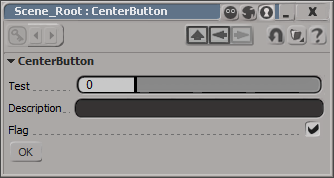
I don’t think there is any way to center a control on a layout. At least not one that I can find. You could set an X position, which will look centered until a user resizes the PPG.
item = oLayout.AddButton( L"MyButton", L"ddd" ) ;
item.PutAttribute( siUICX, <x position in pixels>)
Or you could use this hack, which uses group width percentages to approximate the centering a button.
var oGroup = oLayout.AddGroup("", false, 40);
oLayout.EndGroup();

// button is left-aligned within its group
// so the centering is not 'true'
var oGroup = oLayout.AddGroup("", false, 20);
var oButton = oLayout.AddButton( "OK" );
oLayout.EndGroup();

var oGroup = oLayout.AddGroup("", false, 30);
oLayout.EndGroup();

oLayout.EndRow();

 eX-SI
eX-SI 