
I installed the RTM (release to manufacturing) version of Softimage 2011 Subscription Advantage Pack, including MatchMover and Composite awhile ago, and I ran MatchMover a number of times with no problem.
Then the other day I re-installed 3ds Max 2011 to switch from Network to Standalone licensing, for a case I was working on. After that, when I tried to run MatchMover, I’d get a message about my 3ds Max license being expired:

But in C:\flexlm\MatchMoverLicense.log, I saw that MatchMover was logging Maya licensing information:
====== BEGIN MAYA LICENSE DIAGNOSTICS Wed Oct 20 08:43:37 2010 ======
623848 ::: 2
623905
623911
623907
623909
623801 ::: m2010.016 win64, built Mar 19 2010 04:05:31
623802 ::: links in AdLM but not Flint
623833 ::: 'adlm'
623858 ::: 'en_US'
623912
623913
623824 ::: MAYA_LICENSE_METHOD 'standalone'
623823 ::: MAYA_LICENSE 'adlm-128c1-2011.0.0.f'
623826 ::: MAYA_ALT_EN
623830 ::: MAYA_LOCATION 'C:/Program Files/Autodesk/MatchMover2011'
623866 ::: 'C:/Program Files/Autodesk/MatchMover2011/adlm/en_US'
623846 ::: AdLM 1.3.34.0 (D034) win64
623807 ::: standalone MA 128C1 2011.0.0.F
623109 --- MA 128C1 2011.0.0.F 19
623837 ::: 0
623834 ::: 0
623838 :::
623805 :::
====== END MAYA LICENSE DIAGNOSTICS Wed Oct 20 08:43:37 2010 ======
So, I opened a command prompt and did this:
cd "C:\Program Files\Autodesk\MatchMover 2011 Subscription Advantage Pack"
set ADSKFLEX_LICENSE_FILE=@my-license-server
MatchMoverApp.exe
which gave me this Maya license error 20:
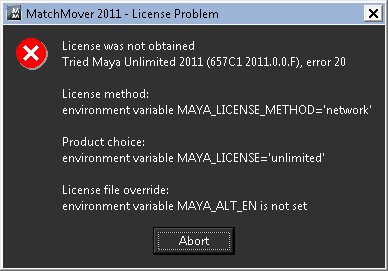
After poking around with Process Monitor for awhile, I opened the registry editor and renamed these these registry keys:
HKEY_LOCAL_MACHINE\SOFTWARE\Autodesk\Maya\2011\MAYA-1
HKEY_LOCAL_MACHINE\SOFTWARE\Autodesk\Maya\2011.5\MAYA-1
to something like “xxxMAYA-1”.
After that, MatchMover started and took Softimage license.
A few minutes later someone from Development sent me a much better workaround: set the ADSK_MATCHMOVER_LICENSE environment variable to Softimage.
 eX-SI
eX-SI 