
The scene name and the name of the .scn file are usually the same, but if you do something like rename the scene file in the file system, you’ll end up with something like this. Note that the [Scene] token isn’t resolving to the correct file name anymore.
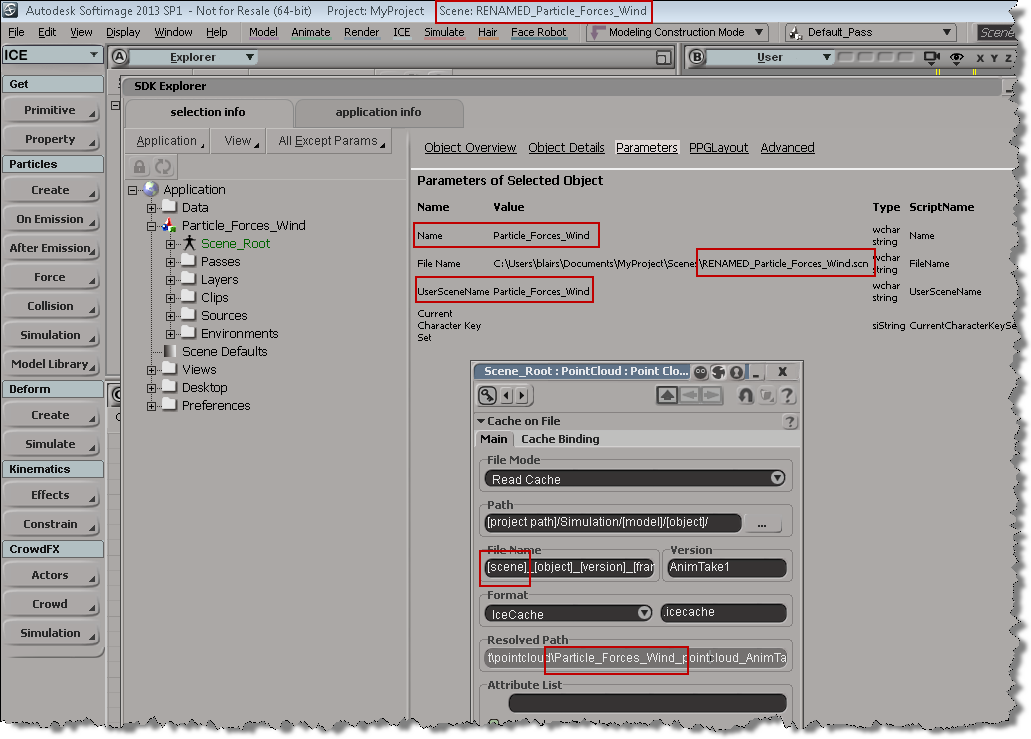
# In the file system, I renamed "Particle_Forces_Wind" to "RENAMED_Particle_Forces_Wind"
# So, open RENAMED_Particle_Forces_Wind and run this:
scn = Application.ActiveProject.ActiveScene
scn.Parameters("Name").Value = "RENAMED_Particle_Forces_Wind"
Running the Python snippet above will fix the naming problem:

 eX-SI
eX-SI 
If you don’t want to type manually your scene name, you can use this snippet to get your file name and rename your scene.
#Python
sFilenamePath = Application.ActiveProject.ActiveScene.filename.value
sProjectPath = str( Application.ActiveProject.ActiveScene.parent )
Filename = sFilenamePath [ len(sProjectPath)+8 : len(sFilenamePath)-4 ]
Application.ActiveProject.ActiveScene.Name = Filename