Integer division in ICE


Dividing an integer N by itself doesn’t always give you 1.
IntegerDivision1
I think it’s a problem in the Divide by Scalar node (the division is probably returning a scalar like 0.99999999, and then that is truncated to zero when it is converted to an integer).

A workaround is to do all your division with scalars, and then use modulo to determine whether you Round or Floor the result. Here’s an example compound by Guillaume Laforge:
IntegerDivisionCompound

IntegerDivision3

Missing ICE nodes in the preset manager


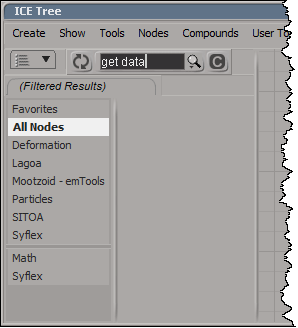
I’ve noticed this a handful of times, where a node like Get Data isn’t found in the preset manager. Clicking the Update button always fixes it for me.
get_data_missing
The last time this happened, instead of clicking Update, I started Process Monitor and did a few more searches in the preset manager. In my case, Softimage searching only the compounds, not the presets in %XSI_HOME%\Data\DSPresets\ICENodes. That’s why nodes like Get Data weren’t found.

Clicking Update forced Softimage to search both the compounds and presets.

Context matters: Using weightmaps with point clouds


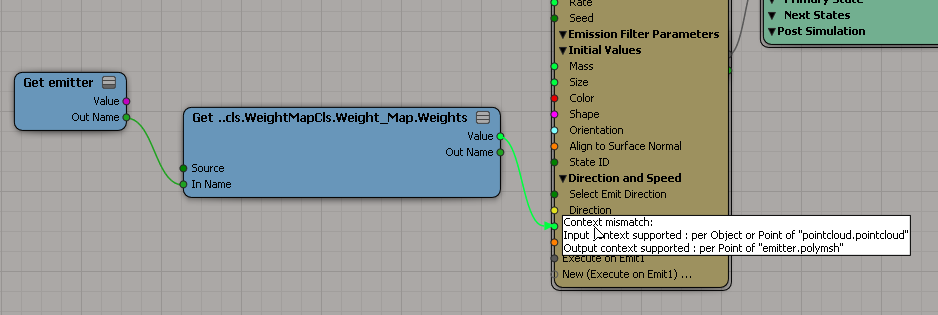
A weightmap is per-point, but it’s per-point on the emitting geometry, not the point cloud. So you can’t just do a plain “get weights” if you want to use the weightmap to control particle values like Velocity or Speed.
weightmap_context_mismatch

Instead, you use get a location, like the particle emit location, and then get the weightmap value at that location. Then you’ll have a particle per-point context to work with.
weightmap_at_location
When you get the weight at a location, you get an interpolated weight value.

Emitting strands from a polygon cluster


Here’s a simple ICE tree that emits strands from a polygon cluster.
emit_strands
A general technique for these kinds of filtered emissions is to delete the points you don’t want. In this case, we check Cluster.IsElement. The tricky part is that Cluster.IsElement is a bool-per-polygon attribute, so we need to get into a per-point context. To do that, we get the emit location, which is per-point, and then at that location, the value of Cluster.IsElement. Now we’re in a per-point context, and we can use those per-point boolean values to delete points.

Note the use of Not instead of an If. We know IsElement is False for points that were not emitted from the polygon cluster, so we can logically negate it with Not to get True and feed that into Delete Point.

In pseudocode, we do this:

if not( IsElement ) delete point

instead of

if (IsElement == False) then delete point

Of course, for filtering we could just drill down into Emit Strands and set the filter on the Generate Sample Set nodes.
generatesampleset_filter

Getting values and fcurves for the port parameters of an ICE node


ICE nodes have ports, and the ports have parameters. It’s the parameters that you work with in an ICE node PPG.

For simple types such as float, integer and boolean, you can access the port parameter value through ICENodeInputPort.Value. However, for more complex types, like a 3D vector, you need to go through the ICENodeInputPort.Parameters.

In either case (simple or complex types), to get an Fcurve, you get a parameter and then use Parameter.Source.

For example, suppose you have a Scalar node:
ports_params_Scalar
To get the value from a Scalar node, you’d do this:

si = Application
node = si.Dictionary.GetObject( "pointcloud.pointcloud.ICETree.ScalarNode" )
port = node.InputPorts(0)

# For scalars, you can just use the port.Value property
print port.Value

# Or you could go through the Parameters
print port.Parameters(0).Value
# 0.428628623486
# 0.428628623486

# It's a little confusing because the port and the parameter have the same name:
print port.FullName
print port.Parameters(0).FullName
# pointcloud.pointcloud.ICETree.ScalarNode.value


# Now get the Fcurve
fcv = param.Source

Now consider the case of a 3D Vector node, where you have one port (value) and three parameters (value_x, value_y, and value_z):
ports_params_3DVector
In this case, you cannot use ICENodeInputPort.Value, so you have to go through the parameters collection:

si = Application
node = si.Dictionary.GetObject( "pointcloud.pointcloud.ICETree.3DVectorNode" )
port = node.InputPorts(0)
print port.FullName # pointcloud.pointcloud.ICETree.3DVectorNode.value
param = port.Parameters( 0 )
print param.FullName # pointcloud.pointcloud.ICETree.3DVectorNode.value_x
print param.Value # 0.933080613613

# Now get the Fcurve
fcv = param.Source

hat tip: Alan Fregtman