Here’s a quick video walk-through of the procedure described here in the docs.
Walk through of building a Lagoa effect from scratch
Reply

Here’s a quick video walk-through of the procedure described here in the docs.
As Guillaume points out in the comments to my previous post, you can easily switch to other version of the Simulation Root by right-clicking the node, pointing to Versions, and choosing version 1.0.
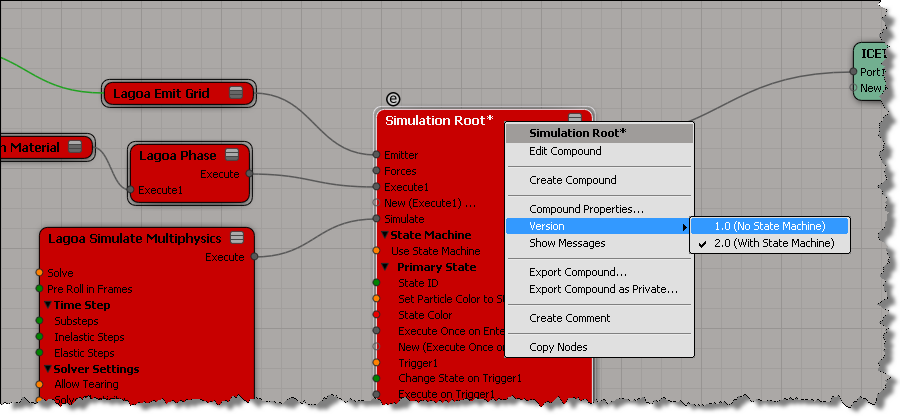
If you’re trying to build a Lagoa effect from scratch, as described here, you may hit a little gotcha:

If you look into the Lagao presets, you’ll see that they get around this by using a simplified version of the Simulation Root:

You can import this compound from here:
$XSI_HOME\Addons\ICEFlowBuilder\Data\Compounds\Particles\Simulation Root.xsicompound
UPDATE: In the comments, Guillaume points out that you can simply right-click the Simulation Root node to change versions:

Based on a recent thread on the XSI mailing list, here’s a simple example of using raycast to find points on the other side of a mesh.
In a nutshell:
Resizing an implicit cube using ICE. Possibly a “stupid ICE trick” 😉
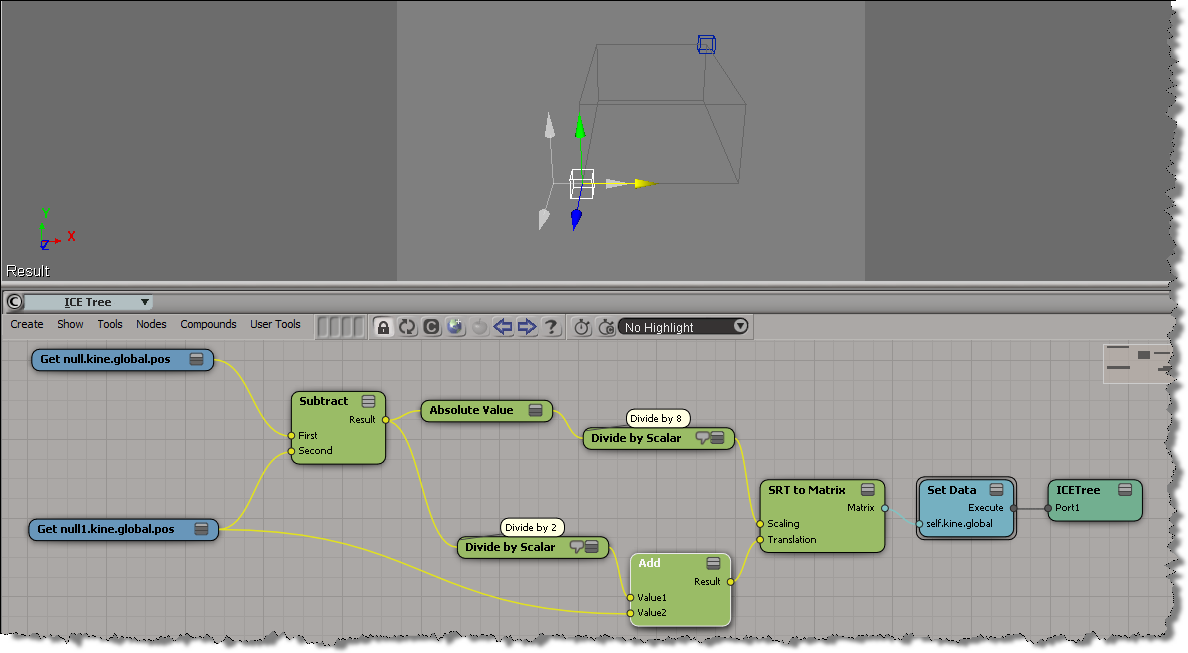
h/t Eric Mootz and his emFlock tutorials (which use expressions to do the same thing).
In my first try at this, I used the PointReferenceFrame for the orientation of the copies.
This time, I’m rotating around the global Y axis, so all the copies “point” the same way.

Here’s a simple example that puts a mesh at each point of an arc curve.
The PointReferenceFrame is a 3×3 matrix, so you have to extract the SRT to get the rotation.
I cheated by rotating the original object instead of applying an adjustment in the ICE Tree.

Here’s one way to to build an array that contains a sequence of numbers like 1,5,9,13, …, where each number in the sequence is the previous number + 4.

A quick look into the type and context of ports and how sometimes you have to “force” (or “initialize”) the type and context. Hey, ICE can’t always resolve everything automagically 😉
Related: See this xsibase thread , and this Paul Smith video tutorial.
FYI, this is by design. The Simulate Rigid Bodies node doesn’t support sub-frame simulation.
 eX-SI
eX-SI 