Using arrays to avoid Repeat part II


Part I is here

Another building block for using arrays instead of Repeat loops: an array that looks like [0,0,0,0, 1,1,1,1, 2,2,2,2, …].

Again, the trick is to use this array as the indices for Select in Array.

Here’s how to build this kind of array:
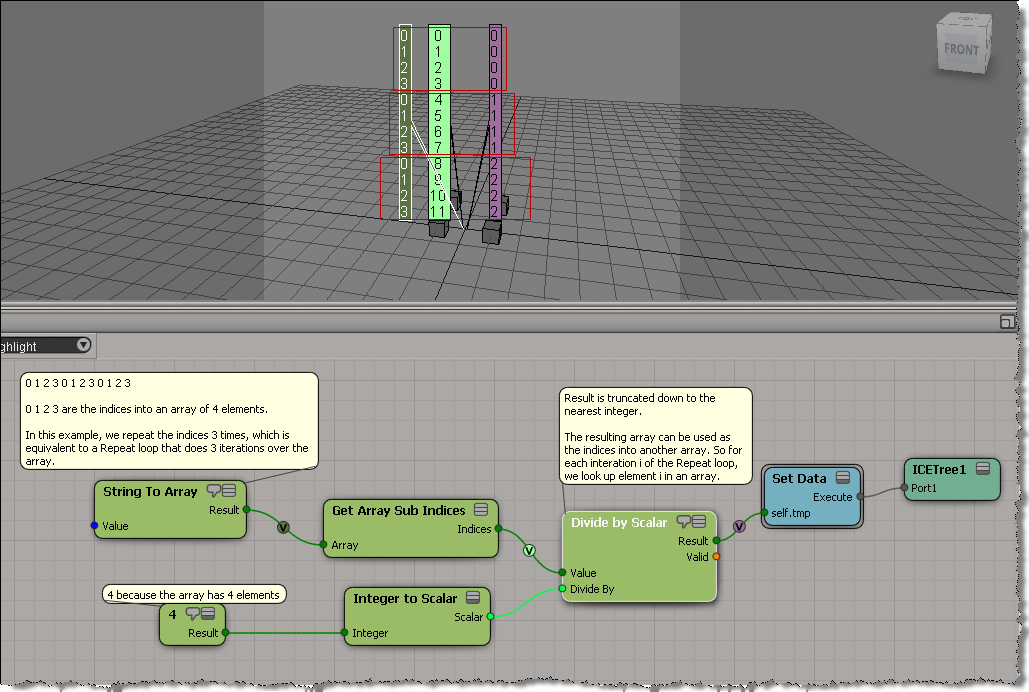
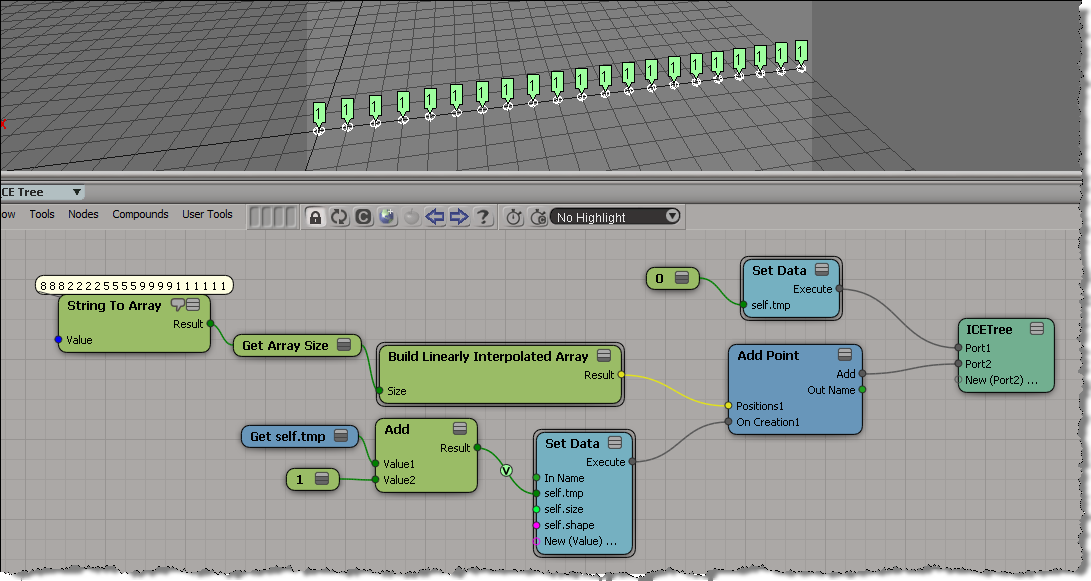
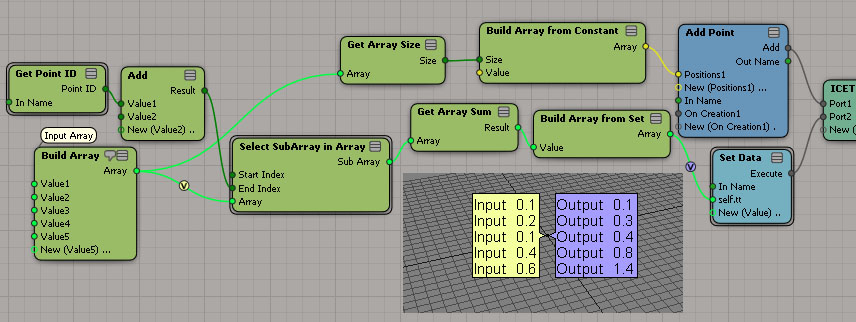
Here’s a simple example. I get the positions of the objects in a group, and then use those positions to add points in a point cloud. Basically, I have a group of objects, and an array of vectors (the interpolated array). When I add a point, I take an object position and add a vector to it to get the point position.

In pseudo-code:

For each object in group
      for each vector in array
             Add Point
             Point Position = vector + object position 

If that ICE tree is hard to follow, then it may help to use some attributes to store intermediate values(arrays). That way you can separate out some branches of the tree:

ICE brain teaser


Early this week, this ICE “brain teaser” was posted on the XSI mailing list.

Given an array like this:
8,8,8,2,2,2,2,5,5,5,5,9,9,9,9,1,1,1,1,1,1
how can can I –without using any loops–convert it to an array like this
1,1,1,2,2,2,2,3,3,3,3,4,4,4,4,5,5,5,5,5,5

Martin Chatterjee came up with a nice solution using arrays.

As an exercise, I tried to do it using a [non-simulated] point cloud. Basically, the idea is to use the particle self.ID data set to index into the array without using a Repeat node.

Here’s what I ended up with. First, I set a boolean flag on each point to indicate whether the corresponding array element is the same as the previous, and then I do a cumulative sum of array elements.

My first try at this ended up as an ICE tree version of this algorithm, plugged into the On Creation port of Add Point.

var a = [8,8,8,2,2,2,2,5,5,5,5,9,9,9,9,1,1,1,1,1,1];
var a1 = new Array(a.length);

var val = -1;
var ix = -1;
for (var i=0;i<a.length;i++)
{
	if ( a[i] != val )
	{
		val = a[i];
		ix++;
	}
	a1[i] = ix;
}
LogMessage( a );
LogMessage( a1 );
// INFO : 8,8,8,2,2,2,2,5,5,5,5,9,9,9,9,1,1,1,1,1,1
// INFO : 0,0,0,1,1,1,1,2,2,2,2,3,3,3,3,4,4,4,4,4,4

But that didn’t work, because as I found out, I wasn’t able to carry attribute values over from one point to the next. In the example below, you can see that self.tmp is local to each point (which means it starts off at zero for each point). Instead of incrementing self.tmp each time, I end up setting it to 1 every time.

Finding closest point with boolean flag equal True


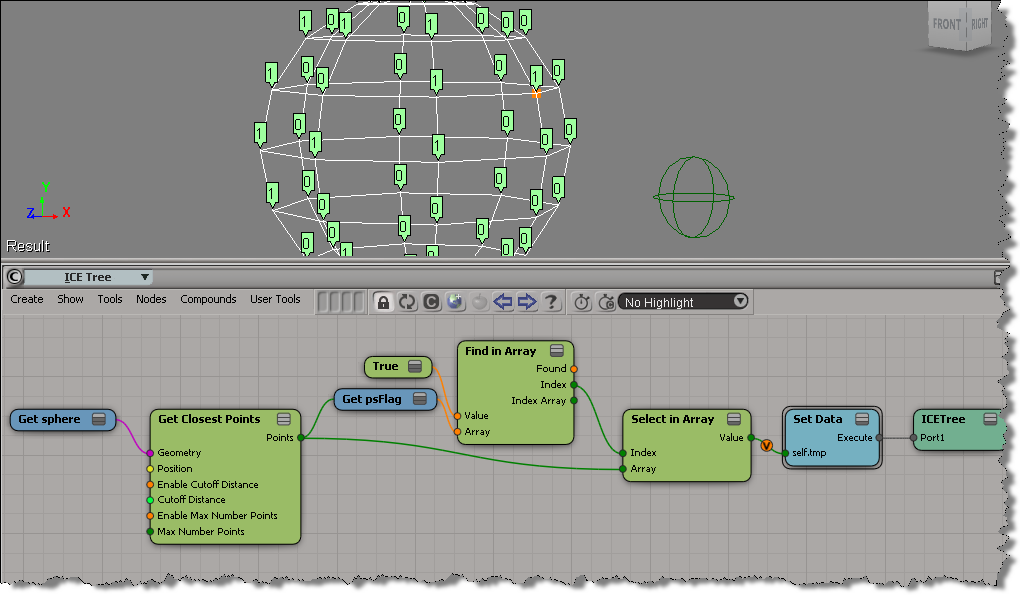
Here’s an example (from a question posted on the XSI list back in 2009) that illustrates some aspects of using arrays in ICE.

  • Get Closest Points returns a sorted array of locations, with the closest locations coming first in the array.
  • Find in Array finds the index of the first (and hence closest) point with the psFlag attribute set to True.
  • With that index, you use Select in Array to get the location of the closest point with psFlag=True.

Quick tip for using Select SubArray in Array


The docs for Select SubArray in Array say that

  • Start Index is The start index of the subarray to return.
  • End Index is The end index of the subarray to return.

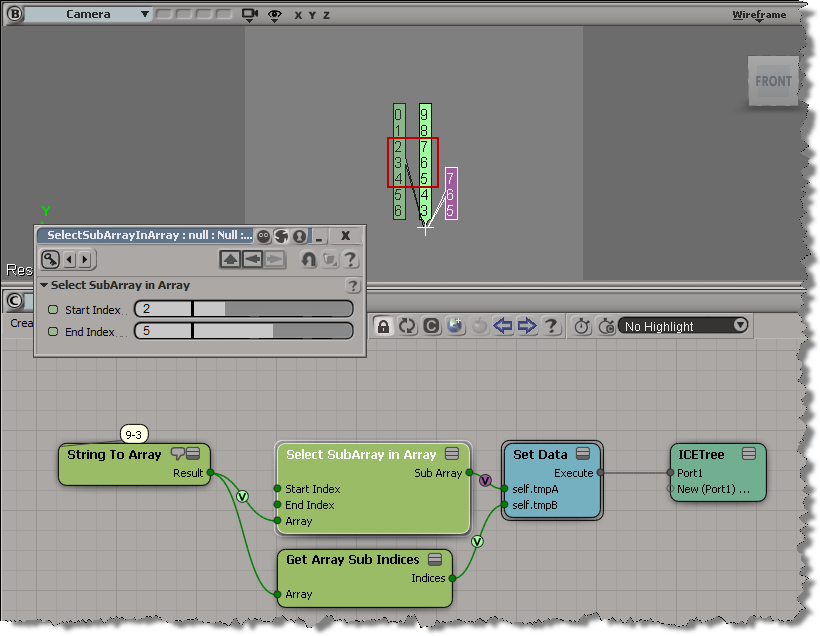
But the start index is inclusive, while the end index is not.

In standard range notation: [start, end)

That means if start index = 2 and end index = 5, then Select SubArray in Array selects elements 2, 3, and 4 from the input array.

The case of Find in Array that didn’t find anything


So, the other day I was trying to use Find in Array , but it wasn’t finding anything. At first I thought there was wrong with the data I was feeding into Find in Array, but then I did a quick test of Find in Array and found out what was going on.

By default (in 2012 SAP at least), the Epsilon is 0 and Find in Array doesn’t find anything. For example, here Find in Array doesn’t find the vector (0, 0, 0) in the array, even though (0,0,0) is in the array three times:

If you bump up the epsilon to 0.001, then Find in Array does find the specified value:

It’s often a good idea to isolate a branch, or create a simple test ICE tree, to figure out how things work.