Scripting – Getting the target in a context menu callback


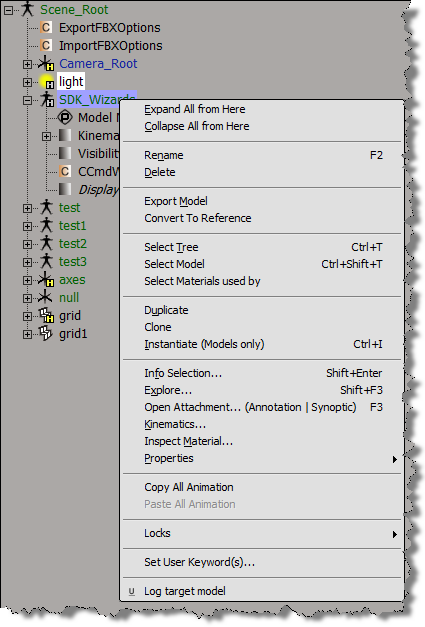
If you use AddCallbackItem to implement a contextual menu, then you can get the objects to which the context menu applies. A menu item callback gets a Context object from Softimage, and that Context contains a Target context attribute. Target specifies the selected objects, or the object under the mouse:

  • If more than one object is selected, then the Target attribute is a collection of all selected objects.
  • Otherwise, the Target attribute is a collection that contains just the object under the mouse.

Here’s a Python example of a context menu implemented with AddCallbackItem.

import win32com.client
from win32com.client import constants

null = None
false = 0
true = 1

def XSILoadPlugin( in_reg ):
	in_reg.Author = "blairs"
	in_reg.Name = "Test_CommandPlugin"
	in_reg.Major = 1
	in_reg.Minor = 0

	in_reg.RegisterCommand("Test_Command","Test_Command")
	in_reg.RegisterMenu(constants.siMenuSEModelContextID,"Model_Context_Menu",false,false)
	in_reg.RegisterMenu(constants.siMenuSEObjectContextID,"Object_Context_Menu",false,false)
	#RegistrationInsertionPoint - do not remove this line

	return true

def XSIUnloadPlugin( in_reg ):
	strPluginName = in_reg.Name
	Application.LogMessage(str(strPluginName) + str(" has been unloaded."),constants.siVerbose)
	return true

def Model_Context_Menu_Init( in_ctxt ):
	oMenu = in_ctxt.Source
	oMenu.AddCallbackItem( "Log target model", "SE_ContextCallback" )
	return true

def Object_Context_Menu_Init( in_ctxt ):
	oMenu = in_ctxt.Source
	oMenu.AddCallbackItem( "Log target object", "SE_ContextCallback" )
	return true
#
# Menu item callback
#
def SE_ContextCallback( in_ctxt ):
	target = in_ctxt.GetAttribute("Target")

	# Target attribute returns an XSICollection
	for o in target:
		Application.LogMessage( o.FullName )
Overriding SPDL defaults


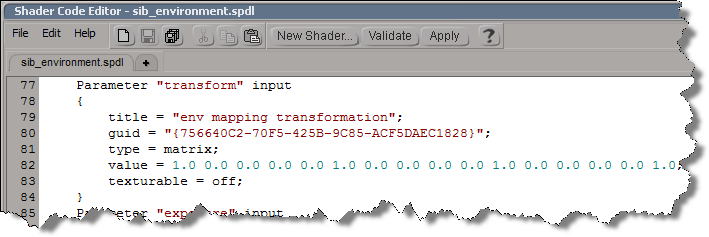
In the old days, if you didn’t like some default shader parameter setting, you had to edit a SPDL file and generate a new preset. As of 2011, you can use the ObjectModel (OM) to dynamically update the shader definition.

For example, if you run this Python snippet in the script editor, then the next time you create an Environment shader, it will have some different defaults:

  • Environment Mode will default to Cylinder
  • Transformation will have a connection icon
  • Background Intensity will default to 0.5
from siutils import si		# Application
from siutils import log		# LogMessage
from siutils import disp	# win32com.client.Dispatch
from siutils import C		# win32com.client.constants

# Get ShaderDef for the Environment shader
sProgID = "Softimage.sib_environment.1.0"
oDef = si.GetShaderDef( "Softimage.sib_environment.1.0" )

# Get ShaderParamDef for the Tranformation parameter
oTransform = oDef.InputParamDefs.GetParamDefByName( "transform" )

# Make it texturable so it has a connection icon
oTransform.Texturable = True


# Make Cylinder the default Environment mode
oParam = oDef.InputParamDefs.GetParamDefByName( "mode" )
oParam.DefaultValue = 1

# Change the default background intensity to 0.5
oParam = oDef.InputParamDefs.GetParamDefByName( "background_intensity" )
oParam.DefaultValue = 0.5

So, that’s how you update a shader definition. Now, all you have to do is stick that code into a siOnCreateShaderDef event plugin, and every time you create an Environment shader, it will have the defaults you want

import win32com.client
from win32com.client import constants

null = None
false = 0
true = 1

def XSILoadPlugin( in_reg ):
	in_reg.Author = "blairs"
	in_reg.Name = "ShaderDef Plug-in"
	in_reg.Major = 1
	in_reg.Minor = 0

	in_reg.RegisterEvent("CreateShaderDef",constants.siOnCreateShaderDef)

	return true

def XSIUnloadPlugin( in_reg ):
	strPluginName = in_reg.Name
	return true

# Callback for the CreateShaderDef event.
def CreateShaderDef_OnEvent( in_ctxt ):
	oDef = in_ctxt.GetAttribute("ShaderDef")
	sProgID = str(in_ctxt.GetAttribute("ProgID"))
	if "Softimage.sib_environment.1.0" in sProgID:
		oDef.InputParamDefs.GetParamDefByName( "transform" ).Texturable = True

# 	Return value is ignored as this event can not be aborted.
	return true

Tip: Use the SDK Explorer (CTRL+SHIFT+4) to get the ProgID of a shader.

Scripting the output file format for viewport captures


Here’s how to set the default value for the FormatType list in the Capture Viewport dialog box.

from siutils import si		# Application
from siutils import log		# LogMessage
from siutils import disp	# win32com.client.Dispatch
from siutils import C		# win32com.client.constants

# Set the capture options
oViewportCapture = si.Dictionary.GetObject("ViewportCapture")
paramFormatType = si.Dictionary.GetObject( "ViewportCapture.FormatType" )

# Set default to JPEG
paramFormatType.Value = 5

# Display Viewport Capture dialog
si.CaptureViewport( 2, True )


# FormatType values
# -----------------
# 0 Alias
# 1 AVI
# 2 BMP
# 3 Cineon (DPX)
# 4 Cineon (FIDO)
# 5 JPEG
# 6 Memory mapped
# 7 mental ray color
# 8 OpenEXR
# 9 PGM
# 10 Photoshop PSD
# 11 Pict
# 12 PNG
# 13 PPM
# 14 Quicktime
# 15 SGI
# 16 Softimage .pic
# 17 Son Playstation2 TIM2/CLUT2
# 18 Targa
# 19 Tiff
# 20 Valve
# 21 Wavefront
# 22 YUV

If you are scripting a non-interactive viewport capture, you don’t use FormatType. Instead, the output file format is determined by the file extension of the output file name.
Here’s a Python version of the example on the CaptureViewport reference page.

from siutils import si		# Application
from siutils import log		# LogMessage
from siutils import disp	# win32com.client.Dispatch
from siutils import C		# win32com.client.constants
import win32com.client.dynamic

# Get the current frame
fc = si.ActiveProject.Properties("Play Control").Parameters("Current").Value

# Set the capture options
oViewportCapture = si.Dictionary.GetObject("ViewportCapture")

# Capture a 1-frame sequence 
start = oViewportCapture.NestedObjects("Start Frame")
win32com.client.dynamic.Dispatch(start).Value = fc

end = oViewportCapture.NestedObjects("End Frame")       
win32com.client.dynamic.Dispatch(end).Value = fc

# Specify the output file name
# For scripted captures, the output file format is determined by the extension
name = oViewportCapture.NestedObjects("File Name")
win32com.client.dynamic.Dispatch(name).Value = "C:\\test.jpg"

# No dialog
si.CaptureViewport( 2, False );

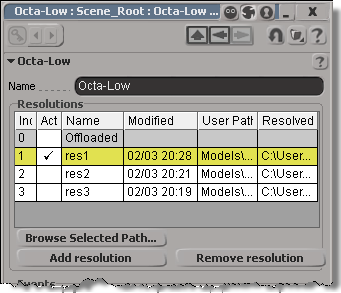
Scripting – Getting reference model Resolutions


You can get at the Resolutions through scripting (via NestedObjects or Dictionary.GetObject), but you can get the resolution name and file only.

from siutils import si		# Application
from siutils import sidict	# Dictionary
from siutils import sisel	# Selection
from siutils import log		# LogMessage

def getResolutionFileName( m, res ):
	if ( m.Type == "#model" and m.Parameters("referenced_model").Value==True):
		return sidict.GetObject( m.FullName + ".resolutions." + res + ".file" ).Value
		
log( getResolutionFileName( sisel(0), 'res1' ) )
log( getResolutionFileName( sisel(0), 'res2' ) )
log( getResolutionFileName( sisel(0), 'res3' ) )
		
# INFO : Models\Octa-Low.emdl
# INFO : Models\Octa-Med.emdl
# INFO : Models\Octa-High.emdl

Going through NestedObjects is a bit more of a hassle:

from siutils import si		# Application
from siutils import sidict	# Dictionary
from siutils import sisel	# Selection
from siutils import log		# LogMessage

import win32com.client.dynamic

def getResolutions( m ):
	if ( m.Type == "#model" and m.Parameters("referenced_model").Value==True):
		return m.NestedObjects( "Resolutions" ).NestedObjects

resolutions = getResolutions( sisel(0) )

for r in resolutions:
	name = sidict.GetObject( r.FullName + ".name" ).Value
	file = sidict.GetObject( r.FullName + ".file" ).Value
	log( name )
	log( file )

	# This errors out with the dynamic dispatch fix:
	name = r.NestedObjects( "name" )
	log( si.ClassName( name ) )
	log( win32com.client.dynamic.Dispatch(name).Value )

Beware of ICE optimizations


It seemed like such a nice, simple way to filter polygons:

  • Use ICE to check the polygon area and then set a boolean attribute.
  • Write a custom subcomponent filter to filter based on that ICE attribute.

With ICE, it’s pretty easy to check if the PolygonArea is within a certain range:

But, beware of ICE optimizations!

Because that ICE attribute isn’t used anywhere else in the scene, ICE doesn’t evaluate that tree, so my boolean attribute is never defined, and my custom filter therefore fails. I have to do something like Show Values to force evaluation:

Note: In Show Values, I used Show Values for Tagged Components Only to cut down the visual clutter.

FWIW, here’s a Python example of a custom subcomponent filter:

# psCustomFilter Plug-in
# Initial code generated by Softimage SDK Wizard
# Executed Wed Nov 23 11:31:56 EST 2011 by blairs
# 
# Tip: To add a command to this plug-in, right-click in the 
# script editor and choose Tools > Add Command.
import win32com.client
from win32com.client import constants

from siutils import si		# Application
from siutils import sidesk	# Desktop
from siutils import sidict	# Dictionary
from siutils import sifact	# XSIFactory
from siutils import simath	# XSIMath
from siutils import siproj	# ActiveProject2
from siutils import sisel	# Selection
from siutils import siuitk	# XSIUIToolkit
from siutils import siut	# XSIUtils
from siutils import log		# LogMessage
from siutils import disp	# win32com.client.Dispatch
from siutils import C		# win32com.client.constants


null = None
false = 0
true = 1

def XSILoadPlugin( in_reg ):
	in_reg.Author = "blairs"
	in_reg.Name = "psCustomFilter Plug-in"
	in_reg.Major = 1
	in_reg.Minor = 0

	in_reg.RegisterFilter("psCustomFilter",constants.siFilterSubComponentPolygon)
	#RegistrationInsertionPoint - do not remove this line

	return true

def XSIUnloadPlugin( in_reg ):
	strPluginName = in_reg.Name
	Application.LogMessage(str(strPluginName) + str(" has been unloaded."),constants.siVerbose)
	return true

# Match callback for the psCustomFilter custom filter.
def psCustomFilter_Match( in_ctxt ):
	Application.LogMessage("psCustomFilter_Match called",constants.siVerbose)

# 	Return value indicates if the input object matches the filter criterias.
	return true

# Subset callback for the psCustomFilter custom filter.
def psCustomFilter_Subset( in_ctxt ):
	log("psCustomFilter_Subset called",constants.siVerbose)

	out_coll = disp( "XSI.Collection" )
	
	in_coll = in_ctxt.GetAttribute( "Input" )
	for item in in_coll:
		log( item )
		polys = []
		for p in item.SubComponent.ComponentCollection:
			log( p.Index )

			attr = p.Parent.ICEAttributes("psCustomPolyFilter")
			if not attr.IsDefined:
				log( "Cannot apply filter. psCustomPolyFilter attribute is not defined" )
			if attr.IsDefined and attr.DataArray[ p.Index ] == -1:
				#log( "%d : %s" % ( p.Index, attr.DataArray[ p.Index ] ) )
				polys.append( p.Index )

		if len(polys) > 0:
			out_coll.Add( item.SubComponent.Parent3DObject.ActivePrimitive.Geometry.CreateSubComponent(C.siPolygonCluster, polys ) )


	in_ctxt.SetAttribute( "Output", out_coll )

# 	Return value indicates if a subset of the input objects matches the filter criterias.
	return true

Using the PolygonArea ICE attribute to select similar polygons


After seeing this select similar post on xsibase, I wrote this Python example that uses the PolygonArea ICE attribute to find polygons with similar areas. I didn’t want to use a custom preference or any ppg, so this script looks for [more-or-less] equal areas rather than for a value range. It’d probably be more useful to look for areas within a certain range (but that would require user input).

To use this script, select a polygon and then run the script. It’ll select all polygons with the “same” area.

This ss_SelectSimilarPolys add-on uses a threshold to define an area range (and it uses PolygonArea too). RCTools also lets you specify an area range, along with a number of other things like number of edges and poly orientation, in its custom Polygon selection filter.

from siutils import si		# Application
from siutils import sidict	# Dictionary
from siutils import sisel	# Selection
from siutils import log		# LogMessage
from siutils import C		# win32com.client.constants

# Number of decimal places
# For example, do I match .776 or .78 ?
# With 2 decimal places, anything in the range (7.75, 7.85) will be caught by .78
gPrecision = 2

# Need this for .Polygons later...
def dispFix( badDispatch ):
	import win32com.client.dynamic
	# Re-Wraps a bad dispatch into a working one:
	return win32com.client.dynamic.Dispatch(badDispatch)


# Get selected polygons
polys = sisel(0).SubComponent.ComponentCollection

# Get index of first selected polygon
ix = polys(0).Index

# Get primitive of parent 3D object
prim = sisel(0).SubComponent.Parent3DObject.ActivePrimitive
prim = dispFix(prim)

# Get PolygonArea DataArray (which is a tuple)
attr = prim.GetICEAttributeFromName( "PolygonArea" )
areaData = attr.DataArray

# Round PolygonArea to the specified precision
roundedAreas = [round(x,gPrecision) for x in areaData]

# Get the area that you want to match
areaToMatch = roundedAreas[ ix ]

# Get all polys with a similar PolygonArea and select them
#
# Function findall from http://effbot.org/zone/python-list.htm
def findall(L, value, start=0):
        # generator version
        i = start - 1
        try:
			while 1:
				i = L.index(value, i+1)
				yield i
        except ValueError:
            pass
			
for ix in findall(roundedAreas, areaToMatch ):
	sisel.Add( prim.Geometry.Polygons( ix ) )

ICE attributes: user-defined versus built-in


ICE attributes are categorized as built-in or user-defined, so you would assume you could easily find your own custom attributes by checking the AttributeCategory property. However, try this: create an empty point cloud and run this script:

si = Application
attrs = si.Selection(0).ActivePrimitive.Geometry.ICEAttributes;

# There's also a "unknown" category but I'll ignore that here
for attr in attrs:
	si.LogMessage( "Attribute: %s, IsDefined: %s, AttributeCategory: %s" % (attr.Name, attr.IsDefined, "Built-in" if attr.AttributeCategory == 1 else "User-defined" ) )

You’ll see that while some attributes, like NbPoints, PointPostion, and PointVelocity are “built-in” as you would expect, most of the attributes are in the “user-defined” category.

For example, size and shape are listed as user-defined attributes. Why’s that?

I think it is because those attributes are dynamic attributes added by [factory-default] ICE compounds. Until you plug in those compounds, the compounds don’t exist and aren’t initialized (in other words, they are not defined yet). They’re not really built into the system (and the attribute explorer is hard-coded to show them as a convenience).

Built-in attributes like PointPosition are intrinsic attributes.

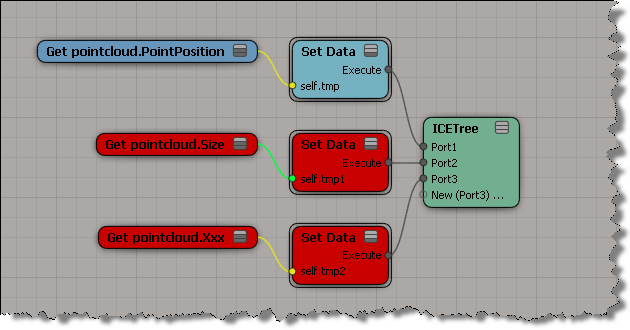
Consider this ICE tree on my empty point cloud. The Size attribute is just like my own custom Xxx attribute, whereas the built-in PointPosition attribute resolves nicely.

If you want to distinguish your own attributes, I’d use a prefix for the attribute names. For example, I sometimes use a “ps” (for Product Support) prefix or a “sisupp” prefix.