Scripting – Shuffling a collection to randomly select by percentage


randompercentageVia a tech-artists.org tweet, I came across some MAXScript for randomly selecting a specified percentage of mesh elements (for example, give me a random selection that includes 35% of all vertices).

I converted it to Python in Softimage. Note that I don’t really shuffle a collection: you can’t set items in a collection, so there’s no way to swap items. Instead, I put the collection in a list and shuffle the list.

Shuffling actually makes this harder than it has to be. Check out Alan’s nice script for a better way to do this.

si = Application
log = si.LogMessage
sisel = si.Selection
#http://creativescratchpad.blogspot.ca/2011/06/select-random-elements-by-percentage.html

import random

#
# Return a list that includes a randomly selected
# percentage of the items in a collection
#
def get_random_percentage( collection, percentage ):
	v = [x for x in collection]

	# random shuffle
	for i in range( len(v) ):
		j = random.randint( i, len(v)-1 )
		v[i], v[j] = v[j], v[i]

	# select by percentage
	step = 100/percentage
	w = []
	for i in xrange( 0, len(v), step ):
		w.append( v[i] )

#	print len(w)
#	print (percentage/100.0) * len(v)
	
	return w


Application.SelectObj("torus", "", True)
# Select a random 50% of the vertices
x = get_random_percentage( sisel(0).ActivePrimitive.Geometry.Vertices, 50 )
si.SelectObj(x)

print sisel(0).SubComponent.ComponentCollection.Count

# Suppose you had 2000 cubes.
# Select a random 25% of those 2000...
Application.SelectObj("cube*", "", True)
x = get_random_percentage( sisel, 25 )
si.SelectObj(x)

I learned a couple of things about MAXScript:

  • MAXScript arrays are 1-based
  • In the MaxScript docs, there aren’t any function/method reference pages. You have to go to a “value” page (eg Number Values) and there you’ll find all the methods. That’s fine once you know, but it was confusing at first when I didn’t see anything in the TOC for Functions or Methods.
Saturday Snippet – XSICollections and CollectionItems


When you stick something, like say a Vertex, into an XSICollection, you get a CollectionItem. But you can get back to the Vertex if you know how (via the SubComponent
).

si = Application
log = si.LogMessage
sisel = si.Selection
import win32com.client

oColl = win32com.client.Dispatch( "XSI.Collection" )
o = sisel(0)

print si.ClassName( o.ActivePrimitive.Geometry.Vertices(0) )
# Vertex

#oColl.Add( o.ActivePrimitive.Geometry.Vertices(0) )
oColl.AddItems( o.ActivePrimitive.Geometry.Vertices )
print si.ClassName( oColl(0) )
# CollectionItem

print si.ClassName( oColl(0).SubComponent.ComponentCollection(0) )
# Vertex

a = o.ActivePrimitive.Geometry.Vertices(0)
b = oColl(0).SubComponent.ComponentCollection(0)
print a.IsEqualTo(b)
# True
print b.IsEqualTo(a)
# True

Saturday snippet – Getting local properties of scene items


This snippet gets the local properties of anything in the selection list that has local properties.

from win32com.client import constants as C

for o in Application.Selection:
	localProps = (o.LocalProperties if o.IsClassOf( C.siSceneItemID ) else None)
	if localProps != None:
		for p in localProps:
			print p 

LocalProperties is a property of any SceneItem, so all you have to do is check whether the selected object implements the SceneItem interface.

Saturday snippet – Wrapping an Undo


Two ways…

OneUndo decorater by Cesar Saez

from functools import wraps  
    
def OneUndo(function):  
   @wraps(function)  
   def _inner(*args, **kwargs):  
     try:  
       Application.BeginUndo()  
       f = function(*args, **kwargs)  
     finally:  
       Application.EndUndo()  
       return f  
   return _inner
#
# And a basic example...
# 
@OneUndo 
def CreateNulls(p_iCounter=100):
     lNulls = []
     for i in range(p_iCounter):
       lNulls.append( Application.ActiveSceneRoot.AddNull() )
     return lNulls

CreateNulls()

Undo with statement by ethivierge

from win32com.client import constants as c
from win32com.client.dynamic import Dispatch as d
 
xsi = Application
log = xsi.LogMessage
collSel = xsi.Selection
 
 
class xsiUndo():
    def __enter__(self):
        xsi.BeginUndo()
 
    def __exit__(self, type, value, traceback):
        xsi.EndUndo()
 
 
def testFunc():
    log("running test")
 
 
with xsiUndo():
    testFunc()

Saturday Snippet: Finding the Python and PyWin version


Courtesy of Eric Thivierge:

import sys
import os
import distutils
import distutils.sysconfig
site_packages = distutils.sysconfig.get_python_lib(plat_specific=1)
build_no = open(os.path.join(site_packages, "pywin32.version.txt")).read().strip()
print "Python version:   " + sys.version
print "PyWin32 version:  " + build_no

See also Supported versions of Python and PyWin

Saturday snippet: short-circuit evaluation


If you’re new[ish] to scripting, here’s a Python snippet that illustrates short-circuit evaluation of boolean expressions.

In this snippet, short-circuit evaluation is used to avoid errors. For example, if there is no such ICE attribute (nb is not None) then there is no attempt to try and use the ICE attribute methods like IsDefined.

The expression in the print statement also relies on operator precedence (not has higher precedence than and, so everything works as expected).

# Assume a polymesh is selected...
o = Application.Selection(0)

# Check the intrinsic ICE attribute
nb =  o.ActivePrimitive.ICEAttributes("NbPoints")
print nb is not None and nb.IsDefined and nb.DataArray[0] <= 0

The above snippet also relies on operator precedence (not has higher precedence than and, so everything works as expected).

Since or has higher precedence than and, you could write something like this:

nb.IsDefined and nb.DataArray[0] <= 0 or o.ActivePrimitive.Geometry.Polygons.Count <= 0

But I’d probably put in the parentheses just to be clear:

(nb.IsDefined and nb.DataArray[0] <= 0) or o.ActivePrimitive.Geometry.Polygons.Count <= 0

Copying the global transform into a 4×4 Matrix ICE node


I saw–via an email notification–the question “how do I use the Global Transform of an object to create a 4×4 Matrix” posted on xsibase (sorry, I don’t go to xsibase anymore because of the “attack site” and “malware” warnings).

One way to do this is to add a “Copy Global Transform” command to the ICE node context menu. After you install this plugin, right click a 4×4 matrix node in an ICE tree, and it will copy the Global Transform from the first object in the selection list.

Note: error checking and stuff like that is left as an exercise for the reader (or for another blog post).

Here’s the plugin code for 2013. For 2012 or earlier, you have to change the AddCallbackItem2 call to AddCallbackItem.

si = Application
import win32com.client
from win32com.client import constants as C

null = None
false = 0
true = 1

def XSILoadPlugin( in_reg ):
	in_reg.Author = "blairs"
	in_reg.Name = "CopyTransfo2MatrixNodePlugin"
	in_reg.Major = 1
	in_reg.Minor = 0

	in_reg.RegisterMenu(C.siMenuICENodeContextID,"CopyTransfo2MatrixNode_Menu",false,false)

	return true

def XSIUnloadPlugin( in_reg ):
	strPluginName = in_reg.Name
	Application.LogMessage(str(strPluginName) + str(" has been unloaded."),C.siVerbose)
	return true

def CopyTransfo2MatrixNode_Init( in_ctxt ):
	oCmd = in_ctxt.Source
	oCmd.Description = ""
	oCmd.ReturnValue = true

	oArgs = oCmd.Arguments
	oArgs.AddWithHandler("Arg0","Collection")
	return true

def CopyTransfo2MatrixNode_Menu_Init( in_ctxt ):
	oMenu = in_ctxt.Source
	oMenu.AddCallbackItem2("Copy Global Transform","CopyTransfo2MatrixNode")
	return true
	
def CopyTransfo2MatrixNode( in_ctxt ):
	oNodeName = in_ctxt.GetAttribute("Target")

	o = si.Selection(0)
	t = o.Kinematics.Global.GetTransform2( None )
	m = t.Matrix4.Get2()

	# Get a matrix node
	n = si.Dictionary.GetObject( oNodeName )
	
	n.Parameters( "value_00" ).Value = m[0]
	n.Parameters( "value_01" ).Value = m[1]
	n.Parameters( "value_02" ).Value = m[2]
	n.Parameters( "value_03" ).Value = m[3]

	n.Parameters( "value_10" ).Value = m[4]
	n.Parameters( "value_11" ).Value = m[5]
	n.Parameters( "value_12" ).Value = m[6]
	n.Parameters( "value_13" ).Value = m[7]

	n.Parameters( "value_20" ).Value = m[8]
	n.Parameters( "value_21" ).Value = m[9]
	n.Parameters( "value_22" ).Value = m[10]
	n.Parameters( "value_23" ).Value = m[11]

	n.Parameters( "value_30" ).Value = m[12]
	n.Parameters( "value_31" ).Value = m[13]
	n.Parameters( "value_32" ).Value = m[14]
	n.Parameters( "value_33" ).Value = m[15]

Scene names and .scn file names


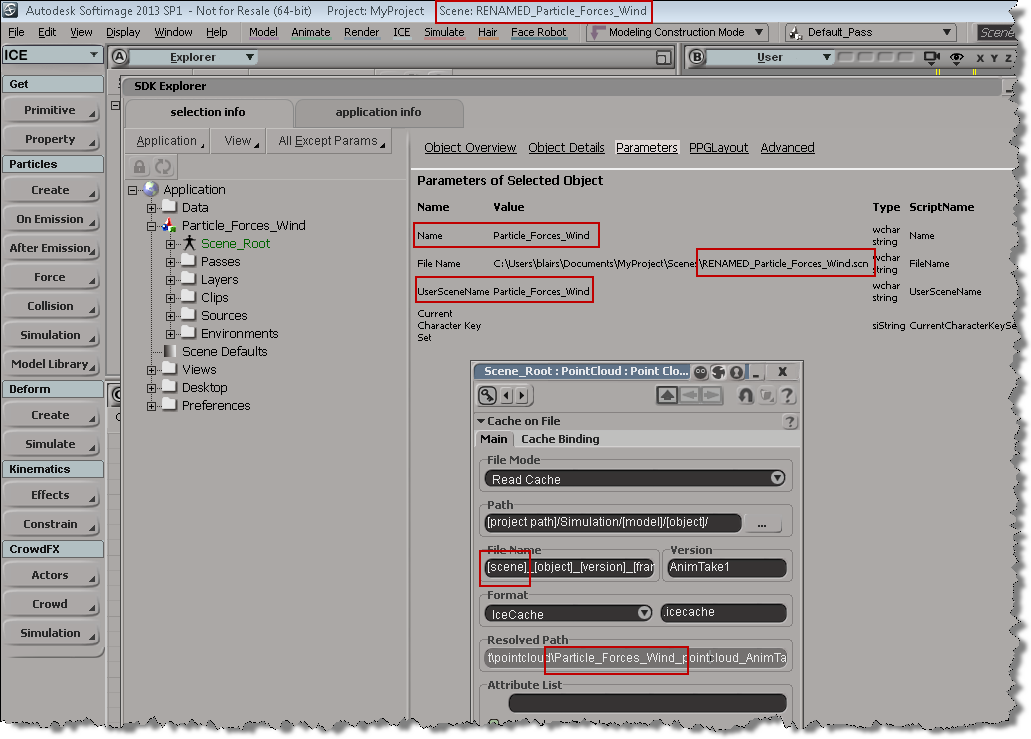
The scene name and the name of the .scn file are usually the same, but if you do something like rename the scene file in the file system, you’ll end up with something like this. Note that the [Scene] token isn’t resolving to the correct file name anymore.

# In the file system, I renamed "Particle_Forces_Wind" to "RENAMED_Particle_Forces_Wind"
# So, open RENAMED_Particle_Forces_Wind and run this:
scn = Application.ActiveProject.ActiveScene
scn.Parameters("Name").Value = "RENAMED_Particle_Forces_Wind"

Running the Python snippet above will fix the naming problem:

Scripting – How to get the active objects for component selection


When you’re in a component selection mode (such as Edge, Polygon, or Point), the active objects are highlighted in orange. The “active objects” are the objects that are “active for component selection”.

When Softimage is in a component selection mode, the Selection will either by empty or it will contain CollectionItems (one for each object with selected components).

So, how do you get the active objects? Here’s one way, using the little known, magical “.[obj].”:

# Python
import win32com.client
oActiveObjects = win32com.client.Dispatch( "XSI.Collection" )
oActiveObjects.Items = ".[obj]."
// JScript
var oActiveObjects = new ActiveXObject( "XSI.Collection" );
oActiveObjects.Items = ".[obj].";

Using wildcards and string expressions to find objects by name


From Ciaran on the XSI mailing list, here’s a good example of how to find all light nulls whose names contain “lamp” or “light”:

oLightNulls =  oModel.FindChildren2("{*light*,*lamp*}",c.siNullPrimType)

The curly brackets {} are used in a string expression to specify a list of objects.

That String Expressions page still looks pretty much the same as it did back in 1999, when I first wrote it!