Friday Flashback #240


Creation of Liquid Images
Reprinted by courtesy of “Graphis Magazine”

If Daniel Langlois was one of his own animated creations, he would be trailing speed lines in a blur of gravity-defying motion. Over the past seven years, this entrepreneur has dreamed up and created Softimage Inc., the leading developer of animation software for entertainment, which he sold to Microsoftfor 130 million dollars of stock in 1994. According to Langlois he’s just getting started.

by Steven Katz

While he is best known as one of Canada’s leading executives, Langlois is a filmmaker and animator by training. Softimage is his way of creating the ideal digital workspace – one that he would like to be using when he returns to filmmaking in the future. According to Langlois, “My background in design is at the center of everything I do”.

His background includes watching the animation of Chuck Jones and Tex Avery while he was growing up, but like most Canadians he was also exposed to the National Film Board of Canada, long considered an influential center for independent animation. Shortly after graduating college, Langlois worked at the NFB as a special effects animator/computer programmer/director for six years (1979-1986) at a time when the power of digital processing was just being recognized. One of his earliest projects was to make NFB’s primitive 2D computer system easier to use.

Langlois discovered that he was more interested in 3D animation and shifted his design emphasis to extending the 3D system at the NFB. His experience in 3D led to his participation in Tony de Peltrie, an independent film project that began production in 1983. Even today, this entirely computer-generated short subject stands out for more recent high-octane offerings which dominated animation festivals because it concentrates on character and mood rather than eye-popping illusions. Langlois served as character designer and co-director on de Peltrie for over three years to create just six-and-a half minutes of animation. This was at a time when the concept of a user interface was just being introduced to the computer world and every character gesture had to be written in code. With no commercial animation software applications on the market, Langlois realized that if he were to continue as a digital artist he would require better tools. In 1986 he founded Softimage and within a year introduced the Creative Environment running on SGI hardware.

“Whenever you edit a 3D project and it’s not finished you should be able to go in
and change it.” says founder and visionary Daniel Langlois of the need to integrate software, “You need the best tool on any frame at any time.”
Whale, Gribouille
https://vimeo.com/138974496

The Creative Environment was the first animation software designed specifically for character animation. With virtually no competition in this special area. Softimage soon became the standard commercial software in Hollywood and in production houses worldwide. The new company also benefited from arriving on the scene at the beginning of what will probably be viewed as the early stage of an animation Renaissance. Langlois’ software has been used in some of the most successful commercial movies of all time including Jurassic Park and Back to the Future and is being adopted by many of the major players in the video game industry. Langlois’ success as a toolmaker has postponed his work as a filmmaker, but he is still working on achieving the perfect tool set. He is quite aware that even with Softimage’s flagship product, the Creative Environment, 3D animation is tremendously complex and is not the fluid, intuitive experience he strives for.

Whether Langlois needed Microsoftto achieve his goals in an interesting question, but having the backing of the largest software company in the world allows Langlois to make bolder moves in the face of increased competition. Every major animation application available today in concentrating on the entertainment industry and Softimage has serious rivals. You can measure the advances made over the last few years by the “must have” features that the big three, Alias, Prisms, and the recently merged TDI and Wavefront, add with each new software upgrade. There is a considerable similarity between these products and a tendency to concentrate on effects-based capabilities such as particle systems and inverse kinematics while the basic operating systems and interfaces remain the same. Taking the longer view, and now with the security of a massive parent company, Langlois is introducing the next generation of digital tools this year.

For Langlois, the key concept in any new software is accessibility-accessibility in price and ease of use. Digital Studio is the first software to place the entire digital filmmaking process in a single integrated environment. The final suite of Digital Studio tools will include: digital ink and Paint, 2D image editing, compositing, 3D animation, audio, and online editing in a truly resolution-independent system. Nearly all of the above capabilities exist in current Softimage products, but Langlois is creating entirely new tools so that the individual parts of Digital Studio will work together intimately and seamlessly at the system level without compromise.

Even at major post-production facilities (the first market for DS), digital production is a fragmented process tying Macintosh, SGI, and traditional analog devices together. For any given project, artists frequently move through 3 or 4 software packages to create, paint, and edit animations. This is usually a cumbersome and unnecessarily awkward process that constantly interrupts the creative flow.

If you were now to test drive Digital Studio, you would find yourself behind the wheel of a hyphenated tool set (compositing, image editing, sound and picture editing, 3D animation, 2D animation) all wrapped in one interface. At the core of the DS environment is the timeline, the standard graphic representation of sequential images in most production software. Before DS, animators learned a different timeline interface for each step of a project separating the production process into component parts. But this separation is a severe creative limitation. Since all aspects of an animation interact, an artist should be able to adjust any aspect of the sound or picture in a continuing process of refinement. In the computer products now available, this kind of immediate feedback and interaction is cumbersome at best.

Water Women, SVC
https://vimeo.com/138974497

Digital Studio solves the problem by providing a single timeline whether you’re working in 3D, 2D, compositing, editing, or recording an audio track. Any tool for any part of the process is immediately available to the artist. All files and changes are recorded in the same format so the artist can play back synched audio, with levels of compositing and 3D sources at any moment in the process. Editing will no longer merely be the process in which finished elements are brought together, when the content of footage cannot be modified. In DS, an animation can be accessed during editing and the necessary animation or modeling tools will be available to make changes. Conversely, at the visualization stage of a project, an animator can easily check his shots in a sequence because the editing tools and any other source material are available without switching interfaces. In short, Langlois has conceived Digital Studio as an extension of the imagination: non-linear, multi-faceted, unrestricted by arbitrary standards and formats.

Embodied in this approach to digital art is Langlois’ wistful ideal that an artist have the tools to express a personal vision.

While this is in keeping with the independent tradition encouraged by the NFB, it also points to the paradox in Langlois’ vision. Digital Studio is designed to empower the individual, but few independent artists can afford Softimage products or the SGI hardware they run on. The irony of this is not wasted on Langlois. His answer is the plan to port Digital Studio to Windows NT; with a tentative release date of early 1996. Strategically, then, Langlois’ Microsoftdeal seems and inspired middle game strategy to give Softimage access to the largest installed base of computer users while maintaining a product line for high-end production facilities.

As it turns out, this is merely a return to the plan Langlois had originally charted in 1985 when he began developing the Creative Environment for the Macintosh. After only six months, Langlois abandoned the Mac and moved to Unix on the SGI, but nearly ten years later both the Mac and PCC offer a viable and more cost-effective alternative for many artists and small facilities. Langlois’ belief is that “The difference between a professional tool and a consumer tool will slowly disappear. As important as Digital Studio will be for production in the 1990s, it is hard to imagine that Microsoftpaid 130 million to enter a niche market. If Langlois is the artist who became an entrepreneur, he may be passing Bill Gates going the opposite way as Gates positions himself to be the first software mogul turned studio head. The Softimage purchase is not really about selling tools. It’s about creating content for home delivery systems that Microsoftis hoping to shape and control. For every tool sold, be it Word, Excel, or Digital Studio, there are hundreds, if not thousands, of books and home videos that are created with those tools. Microsoftis already a leading CD-ROM publisher and Gates’ expectation is that some type of set top box may allow Gates to do an end run around the major record, movie, and book publishing companies.

Langlois’ role in this is through the AAT group (Advance Authoring Technology) at Microsoft. Softimage is part of this group with the mission of providing the tools and production expertise Microsoft will need in the next five years as the media infrastructure undergoes radical change. Projects in this area include set top box and distribution technology for the home and office.

Since interactive media offers users the ability to shape the direction of the material they consume, they will also require new interfaces and the underlying tools required to make true interactivity compelling. It is not hard to imagine a time when the content of a work of fiction or game is judged as much by the innovation and the accessibility of the interface as the traditional elements of character and plot. If this happens, toolmakers will share intimately in the content creation process. So in a sense, the evolution of the new media may ultimately allow Langlois to become one of the first toolmaker/artists.

Digital Studio was conceived with this future in mind thought Langlois thinks it is too early to know what shape the aesthetic of interactivity will take. In charting a path for this uncertain future. Langlois has developed Digital Studio with an underlying operating system that will give him maximum flexibility in shaping the product for the special needs of interactive entertainment.

In its first release, however, Digital Studio must succeed as an innovative tool in a traditional, post-production setting. The grand synthesis of art and technology/creator and consumer is still in the earliest stages of evolution and Digital Studio will primarily be of immediate interest to the makers of commercials, network I.D.s and flying logos. Even Digital Studio on the PC will be a strategy to make a more cost-effective product for production facilities rather than non-professionals. It appears that the more interesting, consumer use of this technology is yet to come.
Friday Flashback #234


Customer story from 2001: Giant Killer Robots and Monkeybone

PAGING DR. FREUD: Giant Killer Robots Give You Nightmares with Monkeybone
by Michael Abraham

CS_GKR_1lg

First off: get your mind out of the gutter. Director Henry Selick’s Monkeybone is not the latest offering from the purveyors of porno out there. Sure, Dr. Freud would have a field day with the title alone, but Monkeybone is actually a light-hearted – if occasionally puerile – love story with a particularly imaginative look at the mysteries of the unconscious. The performances are solid, the story is wonderfully twisted, and the visual effects, created by San Francisco’s Giant Killer Robots with more than a little help from SOFTIMAGE®|XSI™, are nothing short of mind-blowing.

All of this does not detract from the fact that the good doctor, were he still breathing, would probably write yet another book solely about this movie. But I digress.

Monkeybone opens into the blissful life of cartoonist Stu Miley (Brendan Fraser), whose wisecracking, decidedly risqué comic strip features a mischievous monkey who is typically doing something disgusting. The strip is a huge hit, of course, and is about to be turned into a national TV show. Stu is finally ready to propose to Julie (the beautiful Bridget Fonda) but is the victim of a freak accident before he can pop the question.

Lying in a coma, Stu’s spirit ends up in purgatorial Downtown, a nightmarish, carnival landscape populated by mythical gods and creatures that revel in the nightmares of the living. As the nefarious Monkeybone prepares to move from Stu’s psyche into reality using the poor guy’s body to make the trip, Stu realizes that he must outwit none other than Death herself (Whoopi Goldberg in some inspired casting).

The team at Giant Killer Robots was initially approached in early 2000 about contributing a short sequence of shots to the picture, but soon found themselves being awarded an increasing numbers of shots as the movie unfolded. Lead by founders Peter Oberdorfer, Michael Schmitt and John Vegher, each of whom assumed the visual effects lead for different parts of Monkeybone, the project was fully up and running by April 2000.

“We essentially spent the summer working on a very elaborate nightmare sequence involving 18 shots,” says Oberdorfer, the Visual Effects Supervisor who was in charge of texture and lighting on the nightmare sequence, and of animation and compositing of some wild rollercoaster shots. “It also involved a speeding rollercoaster, a ‘brain-eye,’ and a very creepy operating room. After that was complete, we had a brief break from Monkeybone, but were soon called back to do more. I guess we must have done something right.”

“We were provided with creative guidelines for the nightmare sequence, but within those guidelines we were allowed huge flexibility,” says Schmitt, who was Technical Director for tracking, modeling, rendering and final compositing of the Bull bartender shots, which we’ll talk about soon. “They basically said, ‘This is the painting – bring it to life.’ And that’s just what we did.”

One challenging scene from Downtown involved a curmudgeonly bartender appropriately named Bull. Initially, an actor wore a bull-like animatronic mask in the live-action scene, but Selick didn’t care for the final look. Giant Killer Robots offered a decidedly digital solution.

CS_GKR_2lg

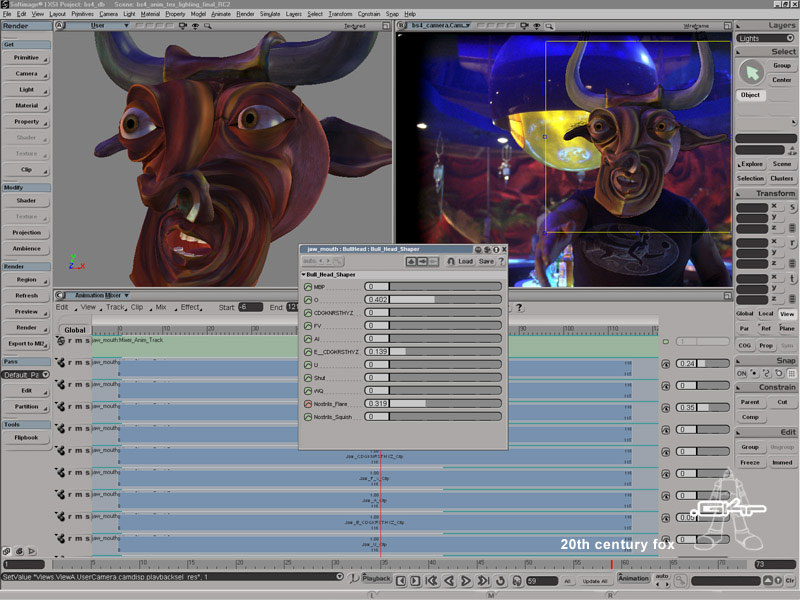
“We erased Bull’s head,” says a casual Vegher, who served as modeling Technical Director and character animator for the shots involving Bull. “We replaced it with a much wilder CG version. There were a great many challenging shots in Monkeybone but, on a per shot basis, this had to have been the toughest one. That was one thing that was really fun about this project. There was a really wide variety of effects being used, so we got to flex our creative muscles. Each shot was a little different from the others, and there were four or five different directions that we had to go in. We used a beta version of SOFTIMAGE|XSI for all the shots we created, then rendered everything in mental ray. By the time we got to modeling, texturing, rendering and animating the Bull mask, we were using SOFTIMAGE|XSI version 1.5.

To simplify the animation and lip synch process, they devised sliders for each phoneme and expression. The sliders worked like the strings of a marionette; each one could be pushed or pulled depending on the desired expression. Of particular help on the Bull mask, according to Oberdorfer, were the new modeling tools in SOFTIMAGE|XSI version 1.5, which allowed them to turn the puppet like mask into a fully expressive CG character.

“SOFTIMAGE|XSI was perfect for what we had to do,” continues Schmitt. “After getting a complete cyber scan of the animatronic mask, we used it as a guideline for creating the new character. We could not have modeled the very intricate mask without XSI’s snap-to-surface tool. The Bull mask took a lot of research and development in all aspects: animation, modeling, rendering, etc. It was a very complex mask and a big challenge. Even with the very high-quality cyber scan, the detail of the mask was pretty rudimentary. We ended up putting the physical mask next to the person doing the modeling that day as a constant reference.”

“We also used the Animation Mixer pretty heavily,” says Vegher. “Being able to create our own custom interface and set up all the phonemes for the mouth and other facial parts was invaluable. Working with animator Jamee Houk, we were able to put together a bunch of shapes developed by Brett Miller and I. Jamee was able to set up a control panel, so that we were working independently, but always referencing the same scene. It made things a lot easier on us.”

Though the Bull mask may have been more complex, the nightmare sequence comprised a full 18 of the eventual 24 shots for which Giant Killer Robots was responsible.

CS_GKR_3lg

CS_GKR_4lg
“The nightmare sequence is really a mini-narrative within the film as a whole,” says Oberdorfer. “It was a shot-by-shot sequence that involved a lot of CG in each shot. That was probably the most difficult task in terms of quantity and in terms of deadline. Even then, we used only SOFTIMAGE|XSI for everything. This was really the perfect project for both using and developing SOFTIMAGE|XSI.”

Friday Flashback #232


Softimage Customer Story: Rising Sun Pictures Goes Big and Gets Fast On Sky Captain and the World of Tomorrow

“SOFTIMAGE|XSI is great to use in a rush. XSI lets me work in a hell-for-leather approach if I need to, and on Sky Captain, I needed to.”

sky_captain1

sky_captain2

Rising Sun Pictures Goes Big
and Gets Fast On Sky Captain
and the World of Tomorrow

RSP Uses SOFTIMAGE|XSI’s
SDK, Animation Editor,
Animation Mixer, Render
Passes, Render Tree and
mental ray to turn a big
job around extra fast.

To read more of our customer stories
visit: http://www.softimage.com

When we last checked in on Australia’s Rising Sun Pictures (RSP), the
intrepid Australian team had just completed work on a film about the effects
of modernization on an old world. Thanks in large part to RSP’s work with
SOFTIMAGE®|XSI®, Edward Zwick’s epic The Last Samurai (2003) seamlessly
blended Samurai blades with Japanese army cannons to tell a poignant tale
of yesterday’s reluctant surrender to the world of tomorrow. With Kerry Conran’s
Sky Captain and the World of Tomorrow (2004), RSP has performed a similar
miracle on starkly different terms.

With undeniably talented eye candy comprising stars Jude Law (as Sky Captain), Gwyneth Paltrow (as intrepid reporter and damsel in distress Polly Perkins) and Angelina Jolie (as Capt. Francesca ‘Franky’ Cook), this was not a project hurting for scenery. Apparently not satisfied with the already lush look of their talent, however, director Conran and producer Jon Avnet elected to make Sky Captain the first film to be shot entirely on bluescreen. Ironically, the duo used the techniques of tomorrow to create a look and story reminiscent of the WWII serial adventures of 1940’s.

Although the film itself was shot over a four-week period back in 2002, VFX Supervisor Scott Anderson and Co-Producer Brooke Breton first approached RSP in February 2004, inviting the facility to work some of their magic on an exceptionally tight timeframe. In all, RSP delivered 150 shots in just nineteen weeks including the ambitious Rocket Interior (RI) sequence on which the RSP team made great use of SOFTIMAGE|XSI.

“This was a big production,” admits Ben Paschke, RSP’s Adelaide-based 3D Supervisor on Sky Captain. “RSP had some thirty-five people at work on Sky Captain, jointly overseen by our Senior Compositor and VFX Supervisor Tim Crosbie, and one of our fearless founders, VFX Supervisor Tony Clark. For this film our SOFTIMAGE|XSI team, however, numbered just four and we had a lot of work to do on the RI sequence.”

“Being able to use Python
scripting on Linux, we can
directly and easily integrate
SOFTIMAGE|XSI into our
existing pipeline.”

The rocket in question turns out to be roughly twice the height of New York’s Empire State building and, as it happens, is hurtling from the silos of an evil villain to a destructive rendez-vous over that little blue planet third from the sun. It is up to Sky Captain and Polly to make sure the rocket is destroyed before the earth. In a scene that would make the SPCA proud, Polly manages to eject a series of containers from the rocket’s interior, each of which in turn release hundreds of small escape pods containing animals. It is, obviously, a scene of epic proportions.

“They wanted the scene to be huge!” says Paschke emphatically. “Much of the modeling was already completed by the time we got our hands on it, but the timeline and sheer volume of shots on the show was a big challenge.
Technically, it was up to us to efficiently turn around a huge number of shots by repurposing models to match our specific shots. This usually meant importing files, then using SOFTIMAGE|XSI to remodel and retexture shots so they could be properly used.”

Not that it was anything like a burden, according to Pashke:
“They were very particular about the final look and finish of the composite and design of the models, but they were also very open to how we might achieve the right look. We ended up having a lot of fun exploring different looks and textures using SOFTIMAGE|XSI. In turn, we were given very clear direction on
lighting and compositing, which really helped us turn the shots around very quickly.”

In addition to great direction and communication from the filmmakers, however, Paschke also credits the SOFTIMAGE|XSI Software Developer’s Kit (SDK) with providing some vital help in efficiently completing the production:

“On every one of our jobs, we end up adding to our custom tools,” says Paschke matter-of-factly. “Being able to use Python scripting on Linux, we can directly and easily integrate SOFTIMAGE|XSI into our existing pipeline. On Sky Captain, most of our geometry processing tasks were handled through very simple, easy-to-write scripts, but without them, we would have been extremely hard pressed to deliver on time.”

For a production this immense, what’s more, streamlined animation was an absolute must. Says Paschke:

“SOFTIMAGE|XSI’s Animation Editor provides a really comfortable interface for working with F-curves. It feels light when you use it and isn’t tedious when you have to perform simple maneuvers. We frequently use the Animation Mixer and ‘animation clips’ to version our work. With the Mixer, we can easily switch to previous versions of a shot’s animation or simultaneously play with multiple versions of the animation. Through it all, we always had to assume that our client would want to chop and change between animation versions at any given time. With the Mixer, we can confidently and quickly tear down and rebuild a shot in order to further experiment with its look.”

And everybody is talking about the look of Sky Captain and the World of Tomorrow. Despite its 1940’s style, the look of the film is decidedly futuristic and lush. No imposed grain or deliberate aging here. Which brings us, of course, to rendering:

“XSI’s integration of mental ray is really great,” says Paschke. “Managing multiple passes in a single scene with minimal rebuilding is very handy indeed. Render Passes are also a great innovation. I like to develop most of the look in a single pass, all the while keeping it light so I can play with it. Once we’re confident in the look and design, XSI makes it relatively simple to break down the integrated look into a series of component passes. Once the foundation passes are out and animation is locked off, it’s very simple process to build helper or matte passes for the composite.”

“The SOFTIMAGE|XSI Render Tree offers a fantastic method for building shaders,” Paschke continues. “On Sky Captain, we turned long renders into quick renders by using XSI’s Render Mapping tool to bake any ray-tracing or heavy parts of a render directly into texture maps on the geometry itself. It took some doing to create all the maps for all those pieces of geometry, but once we did it we were able to save a heap of render time. We were also able to render entirely in Scanline mode.”

In the end, Sky Captain and the World of Tomorrow required that unique blend of seamless artistry and blinding speed on which RSP has established its reputation on such projects as The Last Samurai, Lord of the Rings: The Return of the King, Sky Captain and, coming in 2005, Harry Potter and the Goblet of Fire. It is a reputation of which Paschke and the entire RSP team are justifiably proud:

“It was a wild ride,” says Paschke with a smile. “SOFTIMAGE|XSI is great to use in a rush. XSI lets me work in a hell-for-leather approach if I need to, and on Sky Captain, I needed to.”

Friday Flashback #223


i am 4.
customization • speed • options • power • thought • imagination • integration
SOFTIMAGE|XSI version 4.0 launch 04.19.2004

iam_wallpaper_1280x854

We used both SOFTIMAGE|XSI and Avid|DS extensively in the making of the Britney Spears Toxic video. The intelligent, fast and intuitive interface in XSI, coupled with the overall speed of the software, meant that we could get the job done faster and in a style that our competitors couldn’t match.” – Amy Yukich, Executive Producer, KromA

Avid
make manage move | media

Friday Flashback #219


Las Vegas, Nevada, April 7th 2003
SOFTIMAGE ANNOUNCES SOFTIMAGE|XSI V.3.5 FEATURING SPEED, INTEROPERABILITY AND WORKFLOW ADVANCES

Continued Fast Pace of Customer-Driven New Versions Underscores Company’s Unmatched Commitment to Innovation and the Professional 3-D Market

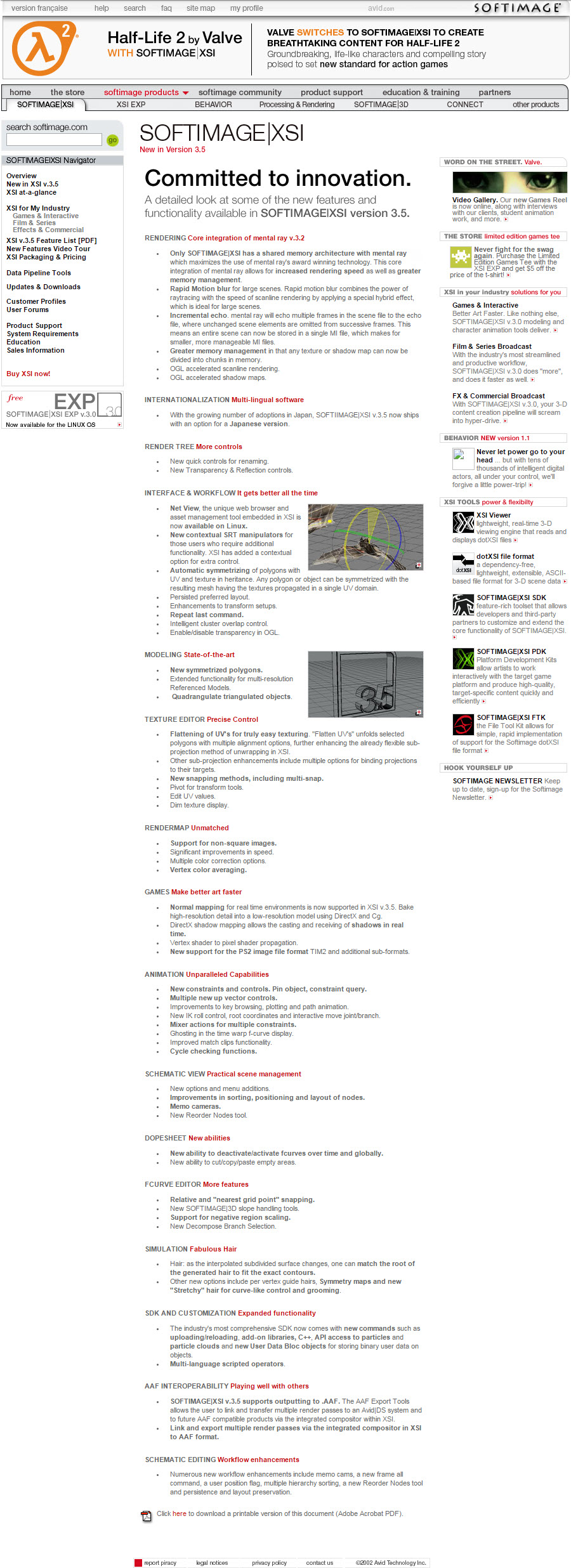
At NAB 2003, Softimage Co., a subsidiary of Avid Technology, Inc., today announced version 3.5 of its SOFTIMAGE®|XSI® software, the industry’s leading nonlinear 3-D production environment.

In addition to including hundreds of new tools and refinements to increase creativity, productivity and reliability in any production, the SOFTIMAGE|XSI v.3.5 environment also seamlessly and completely integrates mental ray v3.2, the new version of the award-winning rendering technology from mental images GmbH & Co. KG.

The latest version of the XSI environment, which follows less than six months after the release of version 3.0, is driven by the production requirements of industry leading customers, including Capcom, Electronic Arts, Industrial Light & Magic (ILM), Konami, Mainframe, Pixel Liberation Front (PLF), Sega, The Mill and Valve, and continues the company’s unmatched pace of development. The SOFTIMAGE|XSI v.3.5 environment further extends Softimage’s position as the professional 3-D market leader in innovation, customer responsiveness and return on investment.

New_in_v3.5_page

Friday Flashback #217


Interview With Alain Laferrière
The Program Manager of Softimage Japan talks about his career at Softimage, the Japanese Industry and XSI 4.0.
June, 28th, 2004, by Raffael Dickreuter, Will Mendez

1088446379_al_1
Alain Laferrière,
Program Manager,
Softimage Japan.

How did you get started in the cg industry?
I got interested in computer imagery from a young age, playing with the first video game consoles and personal computers and following the evolution of CG with a deep interest. The “demo scene” development communities for both C-64 and Amiga computers also brought a lot of innovation in realtime graphics synthesis.
At University of Montreal I studied computer graphics and did a M.Sc. in human-computer interfaces ( agents ). There, I met Réjean Gagné, Richard Laperrière and Dominique Boisvert, who would later implement the Actor Module in SI3D, and many other friends who were, or are still working at Softimage today. After I completed my studies I got a job interview at Softimage and was hired ; it was a dream come true ! I started in the modeling team, then moved on to motion capture & control, then headed the new Games team and now Special Projects Japan.

What do you do on your spare time?
I love music very much and I’ve been DJ’ing on and off since the age of 13, so I buy records and practice mixing. I also like programming personal projects, reading, cooking, nature, going out with friends, going to the gym, etc.

Tell us a bit about the highlights of your 11 year career at Softimage

  • April 14th 1993 – my first day at Softimage !
  • solving a data loss problem with an Ascension “Flock of Birds” motion capture system not working properly with a Onyx computer, which was being used at a Jurassic Park theme park at Unviersal Studios. I implemented a fix in Montreal and I was sent to Los Angeles to configure the system. I had a chance to meet the movie actors and Steven Spielberg made an appearance, it was a very impressive “Hollywood” type first experience for me.
  • then I worked on an interesting project : one of our customers was using a Waldo-like hand manipulation device to radio-control the facial expressions of the robotic heads used for the Teenage Mutant Ninja Turtles movies. The actors had to wear the Turtle heads while servo-motors moved metal blades around their face to flex and animate the head latex skin ; as well as a radio receiver backpack which was hidden in the turtle shell. Since the facial animation had to be redone live at each shot , it was not possible to produce a constant facial animation quality. First, I wrote a motion capture driver for the Waldo device and a designer modeled the turtle head in SI3D and connected the Waldo inputs to its facial animation shapes. Now we were able to record a live facial animation using the Waldo device, then perfect it in SI3D by editing the animation curves. After that, I modified the motion capture communication protocol to support motion control, and wrote a control driver to radio-broadcast the data which was previously motion captured and edited in SI3D. With this pipeline it was possible to author a perfect animation sequence which could be played back identically at each shot. The project had an extra dimension of danger, since there were urban legends of actors getting mutilated by the blades attached inside the robotic heads. Something that keeps your mind busy when your head is inside.. 😉
  • Fall of 1994, I went to Japan with Daniel Langlois for a 2 weeks business trip, which mutated into a large effort between Softimage and SEGA to create a first generation of 3D game authoring tools. I was called to stay there for nearly 3 months in the first trip, and to frequently pay visits to Japan afterwards. I supervised the project and other developers helped me designing and implementing the features ( 3D paint, color reduction, SEGA Saturn Export / Import and Viewer, raycast polygon selection, etc). It was a very intense and exciting coding experience. Following this, SI3D quickly became the standard for 3D game authoring in Japan.
  • RenderMap – a project which I started after talking to a Japanese game designer, who explained me how he was planning to use clay models to create the characters of his next game. They would scan the clay models into high-resolution polygon mesh models with colors at vertices, and then transform into texture data by rendering front and back view images and re-projecting them on the low-resolution model. With this method there is no control over how the texture is being distributed on the geometry, and although it works for polygons facing the camera, the texturing quality quickly degrades as polygons face at an increasing angle. Instead, I thought it would be better to fire rays along the surface to capture the color information and if those rays could hit a high-resolution version of the object, then we could carry the texturing data from high-res to low-res. RenderMap solved this by using mental ray to fire rays at the intersection of triangles and texels ( according to their location on the object ) and accumulating the weighted color contributions to a final color per texel. You could carry the high-res data to a low-res model, by placing the high-res model in the same location as the low-res one, but making it slightly bigger. Since it uses Mental Ray, it also allows to burn procedural effects into texture maps, generate vertex colors, normal maps, etc. My colleague Ian Stewart implemented the much improved version in XSI.

    1088446400_al_3
    Manta model before applying RenderMap – we can see the results of rendering using mental ray in the render region.

    1088446540_al4
    Texture data after being pre-rendred with mental ray using RenderMap.

    1088446556_al_2
    Manta model after applying RenderMap.
  • dotXSI file format – an initiative which I launched over 7 years ago, at a time when our customers were asking us to design a high-level 3D data interchange solution. After much discussions with my colleagues in the Games team, we finally opted for using the Microsoft .X format concept, with many new data templates to support a lot of features which were not covered in basic .X files. Since that time, the format has become very popular in the cg and games markets as a generic data interchange solution between authoring tools and pipelines. I was initially hoping to see a good level of popularity one day, but it has now reached well beyond those early expectations. This was also an opportunity for us to understand the fundamental differences between a high-level generic format and an optimized “memory image” data format which can be loaded and used directly by a game engine without further optimizations. From this, we derived our strategy behind the dotXSI file format and the FTK ( File Transfer Kit ), which is a library to read and write dotXSI files and which can be used to write converters between dotXSI files and optimized memory image formats tailored to any custom game engine ( or between any other format and dotXSI ). I came up with the “.XSI” name suffix, which was later adopted by the marketing team for the name of the XSI product itself, although I had no involvement with this decision.
  • April 99 – moving to Japan
  • various Special Projects with Japanese clients
  • misc. SI3D features like vertex colors, generic user data, GC_ValidateMesh, SI3D 4.0 ; and now XSI tools

Working in Japan: Was it difficult to adjust to a new location and culture?
Not really. I got a good experience of Japan during my first trip ; having a routine and working on-site at SEGA was a chance to feel how life would be living here. I came back again on business trips about a dozen times, my interest growing until I relocated in April 99. Adapting to the Japanese culture is a life-long effort, but Japan is very welcoming so this can be relatively painless. Of course I always miss my friends and family, but fortunately I go back a few times a year and we stay conneced by mail and phone.

What is the biggest difference when working for a company in Japan compared to Canada?
Since I work from home the differences for me are very low. But traditional Japanese companies are more hierarchical than american ones so you have to be aware of that. Also, your ability to connect with a team will completely depend on your ability to communicate in Japanese.

Do companies in Japan and Northern America work closely together on projects?
Many Japanese companies have branch offices in North-America, however I don’t know how much is new production work, regional adaptation or collaboration on a joint project.

How do Japanese customers differ from Canadian customers?
The main difference of course is the language. And Japanese companies employ many designers and programmers, so there are many sources of feedback to report issues and submit suggestions for improvements. Sometimes there are misunderstandings, missing information in order to reproduce a problem or understand what a specific request is about or why it’s important, so I keep an eye on all incoming feedback from Japan and work with our support teams in Japan and Montreal and our Japan resellers to make sure we have all the information needed to fully understand and address customer requirements.

Another difference is related to the fact that most customers in Japan are game developers. It is normally easier for film companies to switch pipelines from one 3D application to another than for game companies, because the final output for film is a rendered movie while for games is most often data which needs to be compatible with a run-time game engine. A large portion of our customers in Japan are game developers, so they tend to migrate pipelines at a slower pace than for customers in other markets since they need to validate the workflow and data compatibility with a new pipeline before they can adopt it in production. Japanese customers are very thorough in their analysis of new technologies and do not migrate without serious consideration. XSI has already been used in production for a while by many Japanese companies, and its popularity is now accelerating. This is very exciting to see !

When dealing with high profile gaming companies how do you meet their demands for new features that are not implemented?
We gather all incoming feedback from Japan, prioritize according to severity, popularity and amount of work involved and then plan the next version features. In cases where a customer requires something which is specific to them, like special training ( features, SDK ), assistance to setup / migrate a pipeline or custom development, then there is always the possibility of purchasing R&D time from Softimage through our Special Projects team.

Part of your job is “managing escalation of critical issues”. can you give us an example?
If a customer reports something very bad like a production showstopper or something which prevents the adoption of XSI in production, then we may escalate the issue internally and implement a fix which is provided to the customer as a QFE ( Quick Fix Engineering ). This is a service available to customers under maintenance. QFEs done in answer to issues in our last released product are always integrated in the next public release : either a point release ( Service Pack ) or the next main version.

Softimage 3D has been a long time favorite by Japanese companies and we are seeing some migration to XSI, Why has it been so hard for them to move to XSI more quickly ?
There is a cost involved in migrating since you need to train designers and port your pipeline ( workflow, plugins ) from one application to another. We released our first generation of game tools in SI3D at the time where the 1st generation of game consoles were coming out : SEGA Saturn, Sony PlayStation, Nintendo 64. Since we designed this in conjunction with SEGA, it quickly became the de-facto standard for 3D game authoring in Japan. Then, Alias released Maya in 1998. Although the first version was not ready for production use ( Japanese customers called it “mada”, i.e. “not yet” ), Alias had 2 years to work on Maya until we released XSI 1.0. Of course, we lost some users from SI3D to Maya during this period. It was a hard time for us, but we wanted to build a solid architecture from the beginning rather than something we would need to patch along the way. Now we can see this bet is paying off, as our development speed has greatly improved and is now imposing a pace of innovation which is getting difficult for our competitors to follow. With XSI 4.0 which includes the new poweful and affordable Foundation product, and many new advanced features throughout our product line, we have everthing we need to accelerate the expansion of our user community.

What features that you originally developed for SI3D have found their way into XSI?
Polygon raycasting, vertex colors, generic user data, polygon reduction, dotXSI support, RenderMap, pipeline tools ( export, viewing ), etc. These were implemented in XSI by my colleagues in Montreal. I wrote a few things for XSI like a User Normal Editing interactive tool and some realtime shader examples which I published on XSINet. Now I am studying the new Xgs and CDH features of XSI 4.0 ( which I think are really cool btw ! ).

What features excel in XSI for game companies?
Character modeling and CDK ( Character Development Kit ), polygonal modeling, polygon reduction, texturing, RenderMap / RenderVertex, CDH ( Custom Display Host ) and Xgs ( Graphics Synthesizer ), Realtime Shaders, dotXSI pipeline and FTK, ability to attach generic user data to scene elements and have it automatically supported through the dotXSI pipeline, general ease and flexibility of customization using the XSI Net View, Relational Views, Synoptic Views, and finally, the XSI SDK itself which is rich and now provides strong support for UI customization, among many new things in 4.0.

Will 4.0 change the gaming industry in Japan , and gaming industry in general?
Definitely. The low price point of our new Foundation product is opening up access to XSI to middle and low-end segments of cg production. It will also become easier for 2nd and 3rd parties to collaborate with high-end clients using XSI on joint projects.

As for the features of 4.0, there are many innovations which bring exciting new opportunities to our users. For example, the new rigid body dynamics are based on ODE ( Open Dynamics Engine ), an open source royalty-free solution. It is possible for game users to adopt ODE in their run-time engine and create realtime simulations which are entirely compatible with how things behave in XSI ( or you could simply plot / bake and export the animation if you do not want to recompute it in the game engine ). Also, the CDK ( Character Development Kit ) brings all the tools needed for making custom character animation rigs.

The CDH ( Custom Display Host ) allows an external application to communicate with XSI and display its output into a XSI view. It is possible for XSI to drive an external application and vice-verca ; this external application could be a game engine synchronized with XSI, or any custom tool which can be interacted with from within XSI. The Xgs ( XSI Graphics Synthesizer ) allows to create scene-level realtime rendering effects and can communicate with realtime shaders for advanced effects.

The Polygon Reduction tool in 4.0 is simply amazing, Texture Layers provide a very powerful workflow for multi-texturing management, Material Libraries simplify material management and the SDK is both rich and powerful.

XSI v4.0 is our biggest release ever since v1.0. It contains many other interesting features which are not listed here, as well as a large number of fixes for issues which were reported by our customers around the world.

What advice would you give to an artist of Northern America or Europe who wants to start working in Japan?
Learn the whole package. Designers in Japan do not tend to specialize in one thing, but instead are called to work on many different aspects of production : modeling, character design, animation, texturing, custom data editing, etc. The more flexible and proficient you are with the package, the easier you will connect with a Japanese production team.

Learn Japanese. Even though you can usually always find a few Japanese persons in each company who can speak a good level of English, it is more an exception than the rule and it would be better not to rely on that to bridge the gap with your Japanese colleagues. The better you understand and speak Japanese, the more chances you will have to connect with the team and contribute to the project. An american friend of mine who worked in a game company in Tokyo learned conversational Japanese very quickly because he was completely immersed in a Japanese working environment, but if you can learn some before heading to Japan it will make things a lot smoother and expand your opportunities.

Friday Flashback #215


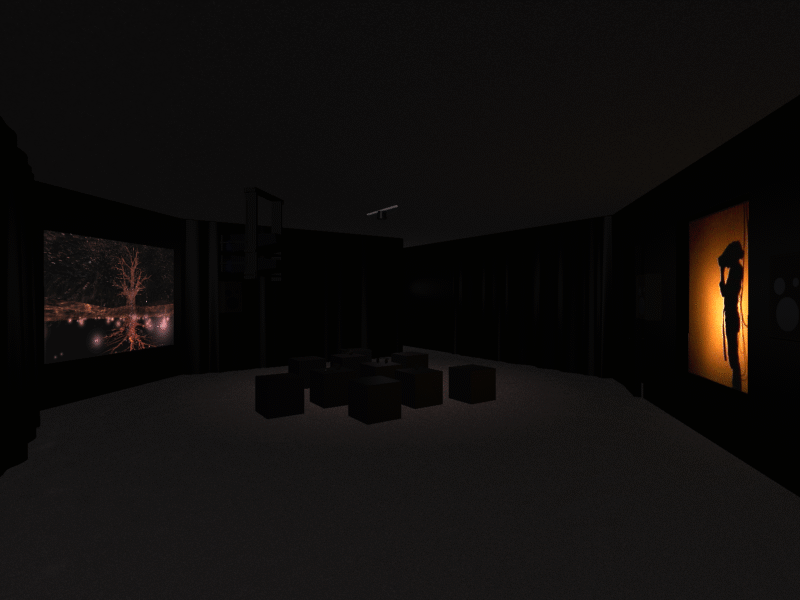
Produced by Softimage in Montréal, 1994-1995, Osmose was an immersive, virtual environment utilizing 3D computer graphics and interactive 3D sound, a head-mounted display and real-time motion tracking based on breathing and balance.

john
John Harrison, “immersed” in Osmose development

install
Installation at Musée d’art contemporain de Montréal

georges
Georges Mauro,immersed in Osmose*

shadow
Shadow of immersant as seen by audience

treepondred
Scene from Osmose

What is Osmose

” …By changing space, by leaving the space of one’s usual sensibilities, one enters into communication with a space that is psychically innovating. For we do not change place, we change our nature.”
–Gaston Bachelard, The Poetics of Space, 1964 Clearing with Tree

Osmose is an immersive, virtual environment utilizing 3D computer graphics and interactive 3D sound, a head-mounted display and real-time motion tracking based on breathing and balance.
tree
Tree

Created by a team led by artist Char Davies, Director of Visual Research at Softimage (Montréal), Osmose is a space for exploring the perceptual interplay between self and world, i.e. a place for facilitating awareness of one’s own self as embodied consciousness in enveloping space. This work challenges conventional approaches to virtual reality and explores what Davies believes to be the most intriguing aspect of the medium, namely its capacity to allow us to explore what it means, essentially, to “be-in-the-world”.

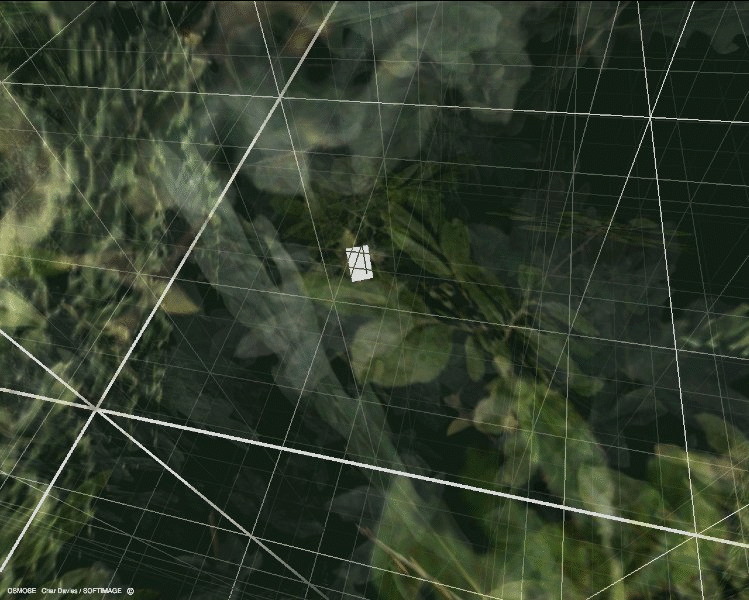
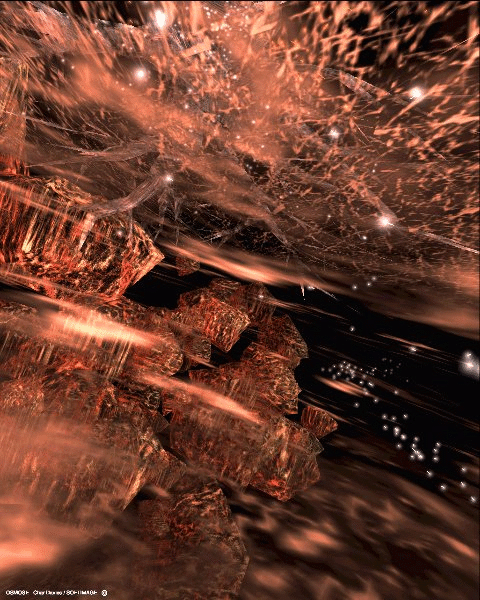
Immersion in Osmose begins with the donning of the head-mounted display and motion-tracking vest. The first virtual space encountered is a three-dimensional Cartesian Grid which functions as an orientation space. With the immersant’s first breaths, the grid gives way to a clearing in a forest. There are a dozen world-spaces in Osmose, most based on metaphorical aspects of nature. These include Clearing, Forest, Tree, Leaf, Cloud, Pond, Subterranean Earth, and Abyss. There is also a substratum, Code, which contains much of the actual software used to create the work, and a superstratum, Text, a space consisting of quotes from the artist and excerpts of relevant texts on technology, the body and nature. Code and Text function as conceptual parentheses around the worlds within. Through use of their own breath and balance, immersants are able to journey anywhere within these worlds as well as hover in the ambiguous transition areas in between. After fifteen minutes of immersion, the LifeWorld appears and slowly but irretrievably recedes, bringing the session to an end.

forest
The Forest

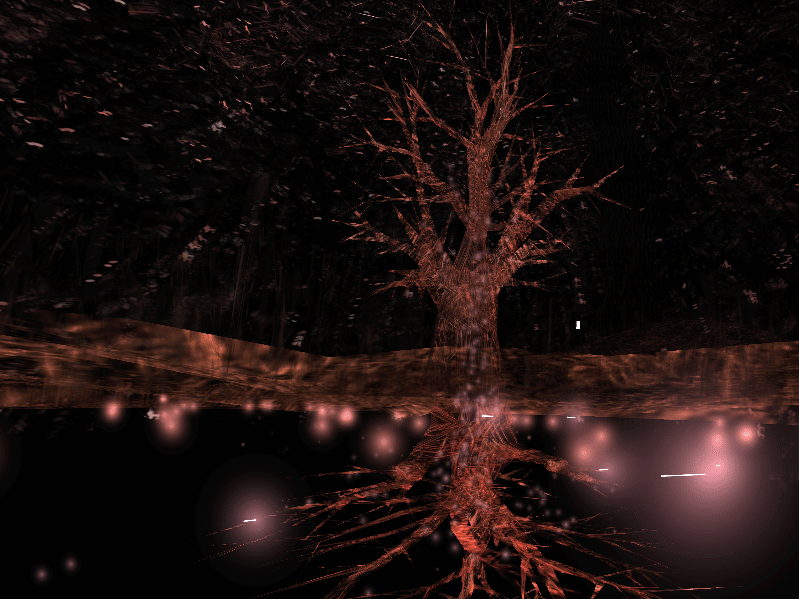
In contrast to the hard-edged realism of conventional 3D computer graphics, the visual aesthetic of Osmose is soft, luminous and transparent, consisting of translucent textures and flowing particles. Figure/ground relationships are spatially ambiguous, and transitions between worlds are subtle and slow. This mode of representation serves to ‘evoke’ rather than illustrate and is derived from Davies’ previous work as a painter. The sounds (447K WAV) (1.8M AIFF) within Osmose are spatially multi-dimensional and have been designed to respond to changes in the immersant’s location, direction and speed: the source of their complexity is a sampling of a male and female voice.

rosetree
Tree in transition

The user-interface of Osmose is based on full-body immersion in 360 degree spherical, enveloping space, through use of a head mounted display. Solitude is a key aspect of the experience, as the artist’s goal is to connect the immersant not to others but to the depths of his or her own self. In contrast to interface techniques such as joysticks, Osmose incorporates the intuitive processes of breathing and balance as the primary means of navigating within the virtual world. By breathing in, the immersant is able to float upward, by breathing out, to fall, and by subtlely altering the body’s centre of balance, to change direction, a method inspired by the scuba diving practice of buoyancy control. The experience of being spatially-enveloped, of floating rather than flying or driving is key. Whereas in conventional VR, the body is often reduced to little more than a probing hand and roving eye, immersion in Osmose depends on the body’s most essential living act, that of breath — not only to navigate, but more importantly — to attain a particular state-of-being within the virtual world. In this state, usually achieved within ten minutes of immersion, most immersants experience a shift of awareness in which the urge for action is replaced by contemplative free-fall. Being supercedes doing.

rocks
The Subterrainean

lifeworld
The Lifeworld

Based on the responses of several thousand individuals who have been immersed in Osmose since the summer of 1995, the after-effect of immersion in Osmose can be quite profound. Many individuals feel as if they have rediscovered an aspect of themselves, of being alive in the world, which they had forgotten, the experiencing of which they find to be very emotional, leading some to even weep after immersion. Such response has confirmed the artist’s belief that traditional interface boundaries between machine and human can be transcended even while re-affirming our corporeality, and that Cartesian notions of space as well as illustrative realism can effectively be replaced by more evocative alternatives. Immersive virtual space, when stripped of its conventions, can provide an intriguing spatio-temporal context in which to explore the self’s subjective experience of “being-in-the-world” — as embodied consciousness in an enveloping space where boundaries between inner/outer, and mind/body dissolve.

The public installation of Osmose includes large-scale stereoscopic video and audio projection of imagery and sound transmitted in real-time from the point-of-view of the individual in immersion (the “immersant”): this projection enables an audience, wearing polarizing glasses, to witness each immersive journey as it unfolds. Although immersion takes place in a private area, a translucent screen equal in size to the video screen enables the audience to observe the body gestures of the immersant as a poetic shadow-silhouette.
Credits

Charlotte.Davies: Concept and direction
Georges.Mauro: Creation of graphics
John.Harrison: Virtual Reality software programming
D.Blaszczak: Sound design and programming
rb@accessone.com: Music composition and programming