
Here’s a JScript snippet that finds render tree nodes that are not connected to anything in the render tree.
LogMessage( isConnected( Selection(0) ) );

function isConnected( o )
{
	var oDR = XSIUtils.DataRepository ;

	var strOpInfo = oDR.GetConnectionStackInfo( o )
//	LogMessage( strOpInfo );
	var oTopNode = ParseXML( strOpInfo ) ;

	var oConnections = oTopNode.childNodes ;
	if ( oConnections.length == 0 )
	{
		return false;
	}
	return true;
}

function ParseXML( strXML )
{
	var oXMLParser = new ActiveXObject("Microsoft.XMLDOM")
	oXMLParser.async = false
	oXMLParser.loadXML( strXML ) ;

	if (oXMLParser.parseError.errorCode != 0)
	{
		logmessage( "Invalid XML " + oXMLParser.parseError.reason , siError ) ;
		return null ;
	}

	// the xsi_file node
	// If this is NULL we must have failed to load the XML
	var oTopNode = oXMLParser.documentElement ;

	return oTopNode ;
}
Most of this JScript came from the SDK Explorer code in $XSI_HOME\Addons\sdkui\Application\Plugins\SDKExplorer.js, because I noticed that disconnected shaders would have an empty connection stack, and I didn’t want to go through all the parameters individually looking for connections.
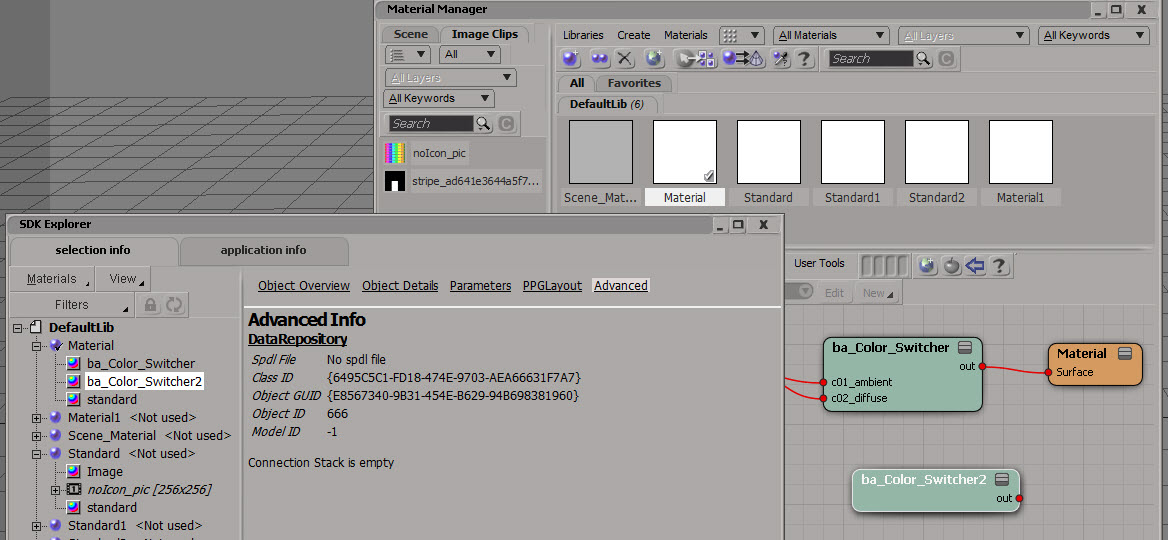
Here’s a Python version that does a little more: it follows the output connections to check whether or not the shader is ultimately connected the material.
# Python Code
import xml.etree.ElementTree as etree

def is_connected( o ):
	if not o.IsClassOf( 52 ):
		print "Input is not a shader"
		return False

	sXML = XSIUtils.DataRepository.GetConnectionStackInfo( o )
	root = etree.fromstring( sXML )
	for connection in root:
		if connection.find('type').text == 'out':
			x = Application.Dictionary.GetObject( connection.find('object').text )
			return True if x.IsClassOf( 64 ) else is_connected( x )

	return False

print is_connected( Application.Selection(0) )
 eX-SI
eX-SI 