Friday Flashback #543
Reply

Koei Co., Ltd.
“Dynasty Warriors Online “
ByTakashi Umezawa
Speaking of Koei, it is a company that has been developing historical strategy simulation games such as “Romance of the Three Kingdoms” and “Nobunaga’s Ambition” since the PC98 heyday. While games for consoles are still the mainstream in Japan, in 1998 , the network game “Nobunaga’s Ambition Internet ” for PCs was released. Dynasty Warriors Online (hereafter referred to as Warriors BB ) , which began service on November 1 , 2006 , is Koei’s latest network game. When I heard that XSI ‘s custom display host (hereafter referred to as CDH ) was used in this development , I immediately interviewed the person who was involved in the development.


How is it different from the past Dynasty Warriors series?
“In a nutshell, this game is a multiplayer online action game. There is a town and a battlefield. In the town, you meet various people, form a party with your friends, and head to the action part, the battlefield. Battlefield. The goal is to repeatedly fight against players of other powers and ultimately lead your own army to unify the chaotic world.”
On October 26th , when we interviewed, users can use it between 5:00 pm and 3:00 am as a pre-opening before the official service, but since the interview was in the morning, we used our internal server to show Musou BB . The user first sets the character to use, but there are quite a lot of choices for this, including gender, physique, facial features, hair, skin color, eye color, and even voice. I was surprised by the sheer number of voice choices to personalize the characters you use in town and in combat, and to make them easier to distinguish. It seems that the main character this time is created with 3000 to 3500 triangles. First, I was asked to explain the color of my skin and my eyes.
“The character model in the game allows the user to arbitrarily set the color of the face, hair, and eyes. This uses the diffuse value of the material, but if it is only this, the texture tends to be poor. , the brightness of the specular is automatically adjusted in conjunction with the diffuse value.For example, if the skin is dark and the specular value is the same as that of white skin, the skin will lose its luster. Therefore, when the diffuse is dark, we investigated how bright the specular should be to make it look like human skin on XSI ‘s CDH.We plotted the results, made it into a function, and incorporated it into the actual device to make it look unnatural. I used to highlight the eyes by hand, but this time I used specular to make them look more lively.”
Also, there are various weapons to choose from. The default equipment is normal, but as the game progresses, various equipment can be obtained, and it will actually be reflected on the character on the screen.

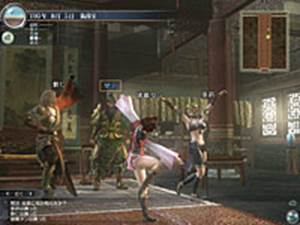
At the beginning of the game, you start from your own house, but in this house there are an armory, a clothing box, a writing desk for exchanging e-mails, and a medal box for viewing medals and play history. This house is also small at first, but it gets bigger and bigger as the game progresses. As soon as I stepped out of my house, I was amazed by the beauty of the town, with its meticulous attention to detail. Even the way the surface of the pond sways and reflects is realistically expressed.
This title is the first title to use real-time shaders for the next generation. When asked, he said, “There are no battle scenes in the city, and when many players gather, it gets a little slow, and even if the frames drop, it’s not a big problem to play, but on the battlefield, it’s important to win or lose . In order not to fall into the gap, we are trying various ideas such as reducing the weight of the data.There was also a proposition to challenge a new expression, so we used a specular map and bloom effect to effectively express the brilliance of the light. The character’s shoulder armor is gold, and you can definitely see the diffuse reflection of the light when it hits the sun. “For the light source, I mainly use two parallel lights, and I also use a hemispherical light. I can’t go as far as image-based lighting, but I aimed for something close to that. First, change over time . The weather also changes like snow, cloudy, fog, etc. The impression of winter and summer changes greatly depending on the path of the sun and the amount of light.Also, at the object level, such as trees blooming and withering. The lighting is particularly elaborate, and we put a lot of effort into shading and environmental effects.We also simulated the diffusion of sunlight called light scattering to create a haze-like effect. It also expresses realistic atmospheric conditions.”

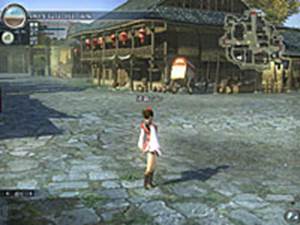

I asked if the background used in the townscape was textured or burned into the vertex color.
“Basically, colors are textures. Other than that, we use real-time shadows called shadow maps. It is possible to express that it is hitting the ground or the character.In the background, vertex colors are also used.Even though there are real-time shadows, there are still many parts where subtle shadows are drawn by hand.However, In areas where the texture is tiling, we can’t draw unique shadows, so we use vertex colors for those areas, which we’ll cover later in the modeling section.”
I see, but when I asked if hardware with suitable specs would be necessary to use all of these graphics, he actually opened the setting screen and explained.
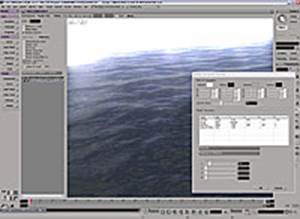
“We want as many users as possible to enjoy it, so we have made it possible to set the graphics options for each city and battlefield according to the user’s play environment. Screen resolution, texture resolution, distant view display, model display, lighting. Various settings are possible, such as diffusion (bloom effect), water quality, real-time shadows, etc. Initially, there was a plan to use reflections, normal maps, etc. for the character, but it is possible that many players will be displayed. Due to the special circumstances of online games, it was not possible.However, the background uses relatively rich polygons.The water surface uses a normal map real-time shader.There are various shaders for this water surface. There are various parameters, and I adjusted and checked the color, transparency, reflectance, etc. on the CDH .”
After this, I moved to the battle scene and was able to actually play for about 10 minutes. “The good thing about Musou is that you can enjoy it even with simple controls,” he said. This game is recommended for those who want to enjoy an exhilarating feeling.

You can check the same thing as the actual machine with XSI !
Next, I asked about the use of CDH , and every time I listened to it, I couldn’t help muttering, “It’s wonderful.” That’s how ideal CDH is used.

“I think the most used function of XSI is CDH . This is mainly for modeling, but when you need to make a temporary check while modeling, you can check various things in real time with XSI without outputting to the actual machine. Musou BB is a real machine = PC , but if it’s a title for PLAYSTASION3 (hereafter referred to as PS3 ), you can see it with the same feeling as the real PS3 machine.Koei’s PC , Xbox 360 ( 360 below ), we are creating a graphics library for games that can be expressed in the same way on all PS3.By loading the engine for Windows on XSI ‘s CDH , it will be possible to preview on XSI .that preview, 360 and PS3. In other words, it uses the same engine as the actual machine, so you can check the appearance on the spot. “It’s a simple explanation, but from the designer’s point of view, it’s a really wonderful environment.
“This is the render tree of the material, and it contains the necessary information for use on the actual machine. We convert that scene into actual machine data with our own converter and load it into the actual machine and the game. That conversion The processing itself is also done within CDH , so it looks the same.”
“First of all, we call the standard shader used in Musou BB , the standard shader.” Here, from CDH , open the shader setting screen and change the color of the ambient parameter Or, if you change the color of the diffuse or change it with the slider, it will be reflected in the same result as the real machine.” You can clearly see that the shading in CDH is changed in real time. “This lighting setup itself is the same as the actual machine. By changing the attributes of this material to increase the intensity of the specular, or by changing the color of the specular, the same thing as in the actual machine can be achieved on the XSI . You can see it in the CDH.In addition, by editing in this CDH, the editing results are reflected in the XSI Render Tree . By outputting the edited material while confirming it, the data remains in the XSI properly and there is no need to rework.This is also the basic concept of CDH and how to use it.” What a wonderful, truly ideal CDH is how to use
“Shaders can also express various expressions, and we created them in-house. There are tools for assigning what kind of shader to the material. For example, if you want to do pixel lighting, apply that shader. and reload the model into CDH , and the specular results are done per pixel instead of per vertex, giving smoother results, what shader to use is ruled by the name of the material, STD is standard, PSTD is a per-pixel effect, etc. In addition, if you want to express reflection, you can select a reflection map, and check the reflectance settings that change according to the model. When requesting parameters, information about what parameters are requested is embedded in the shader. Based on that information, the necessary parameters are automatically created on the CDH UI.
The variables used in the shader are called annotations, and they contain the parameter name, description, required values, and UI type.In the case of reflection shaders, this annotation information is stored in the CDH Reads and allows you to edit and check its parameters.Of course, the data remains in XSI.
DxProgram of Render Tree , which normally writes shader codeUser-defined data picked up from annotations is stored in nodes that write real-time shader code such as . Therefore, shader-specific parameters can also be checked and set in CDH and saved in XSI . In the XSI material settings, a value of 1 or more cannot be entered, but this mechanism is used to save a value of 1 or more as a character string. ”
By storing data that cannot be handled within XSI as character strings, the information is preserved in the material tree information, which seems obvious, but is a very effective method .
“The next one uses a slightly more complicated lighting model, which is considered in units of materials. For example, if you apply a material called copper, you can check the reflection model of copper inside the CDH . Is this using the BRDF idea? “Yes, that’s right. Of course, the result of editing here is embedded in the XSI node. This copper uses a normal map, and the specular appearance changes according to the normal map. And the result is also reflected in the XSI tree.You can check it like this.Recently, not only that, but I think there are shadow maps and post effects on the actual machine . However, it is better to check it with CDH, and it may be the final output only after including such things.Since it is as close to the actual machine as possible, shadows and post effects can be expressed here . We are currently working on developing it, and we are now able to check things like blare effects and depth of field effects within the CDH .”
“Also, lighting effects can be saved as parameters. At this stage, it is a function that will be used in the test function, but lighting and camera information can be saved as text. Lighting types can be parallel light sources, It is possible to output what point light source is used, color, camera position, and read the settings.For example, by having the environment set on the actual machine side written out in a specified format, This CDH reads a setting file that describes how a character will look in a lighting environment in a certain background, making it possible to reproduce the same environment as the actual machine.”
I have no words but to say it’s really great. Designers are lucky to be able to work in such an environment. Few companies can afford to actually develop such a workflow part. It can only be said that it is the result of the efforts of the developers. However, the person who developed it modestly said, “No, rather than saying that I did my best, I just collected the source code from the people who actually made the engine and converter and put it on CDH . ” A designer who used CDH said:
“Musou BB was the first in-house title that used a newly developed shader, so at first I was fumbling around to find out what kind of parameters to give to the shader to create an effective and pleasing “like” texture. It was work, and this CDH function was very useful there as well. We designers moved the sliders on CDH ‘s real-time preview to determine how much value we should give to make it look like it . It contributes greatly to improving the quality of the model. ”
character modeling
Next, I asked the person in charge of character modeling how XSI was used in this project.
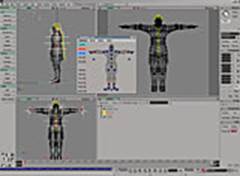
“Here is the custom script toolbar palette that the character team uses . Such toolbars can be created almost automatically by dragging and dropping, such as settings.” “If it’s a simple script-level tool, designers often create it.” The person in charge of characters continued, ” It’s very useful for creating character models.What’s written inside is a simple scripted command history of frequently used functions.Thanks to this, you can work very efficiently.Also, edge The function that allows you to select all at once is very useful for editing hair, etc., and I often use Deform ‘s Smooth function when I want to add specular beautifully when making skin.Even with just the default function, XSI is very After that, it’s Synoptic View.This is what I use when creating images of character poses for publicity and when setting facial animations.With this, animators can It is very convenient because even people other than us can easily create poses.”



Background is User Normal Editing tool and Ambient Occlusion ( ABO )
“The background is the same as the character team, and it was very helpful that the edge loop selection and modeling functions were enhanced,” the person in charge of the background began to explain. “There are a lot of characters in this game, so I thought about what I could do to make them look richer than they could have been. In particular, I use the User Normal Editing tool that is included in XSI.For example, in an easy-to-understand example, this is a tree model, but the left is the default model.The number of polygons is small, and one side The shading of the model in the middle is not beautiful because it is drawn.It was a common technique until now to forcibly turn the normal of the model in the middle upward to make it brighter, but look at the model on the right. As you can see, thanks to User Normal Editing , I was able to edit the normals as I wanted. Then, I would read the adjustments into CDH and check them as I worked.”
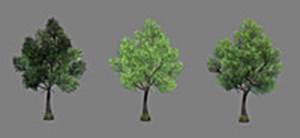
“One more thing, in the background team, the number of polygons is not rich, so we baked shadows into vertex colors. We also used self-shadowing, but when that didn’t work, we used vertex colors. Until now. I used to do that work almost manually, but this time I use XSI ‘s render vertex function, so I can easily bake ABO.Since there are multiple background objects, I’m using it. At the time, I was worried about which side to attach the light to . You can bake shadows that can be handled from.In other words, you can set the vertex color for shadows that can be safely tolerated from any side with a single setting button.This model is baked ABO with the default settings It’s just that, but even with this, it’s quite ready for use in an actual project. After this, we’ll make some adjustments, but there are models that don’t need that, so the work speed has increased and it’s really convenient.”

Indeed, if you look at the model actually used in Musou BB, you can see that the shadows are well cast.
Scripting
Finally, he talked about the usefulness of scripting in XSI.

“After all, the script is relatively easy to understand even for us designers. It can be used in an action-like manner by simply listing commands, or batch processing such as converting multiple databases at once. Using a simple VBS , multiple I also use it quite often to repeat the same process for the model of WARRIORS BB.An example of using it for Musou BB is the fly animation of the camera before the battle stage.For example, a simple slowdown from A to B Even with animation, it takes time and effort to do it programmatically, but this time, it was very easy because I could use the motion data output from XSI as it is.The background coordinate data picked up by the designer was converted into a CSV file . , read it into XSI with a script, create an animation with adjusted function curves with a single button, and automatically convert the data.In addition to this, the script is an idea It can be used very conveniently depending on the ingenuity, so I always use it.”
One of the challenges for programmers is how to provide an efficient environment where designers can work easily. CDH can access custom tools directly from within XSI rather than launching external tools , and can seamlessly integrate information with XSI . In other words, the original tool created by the programmer can be used by the designer as if it were a part of the XSI function without any sense of incongruity. Designers can also handle any task by combining XSI’s excellent modeling and scripting functions, greatly improving work efficiency.
SOFTIMAGE|XSI is powerful software that brings great benefits to both programmers and designers to create the best environment for next-generation game development .
 eX-SI
eX-SI 