Give it up for…SOFTIMAGE|Face Robot 1.5


Give it up for…SOFTIMAGE|Face Robot 1.5
I’ve seen a few cases where a user couldn’t disable Face Robot, because there was no Face Robot module or menu.
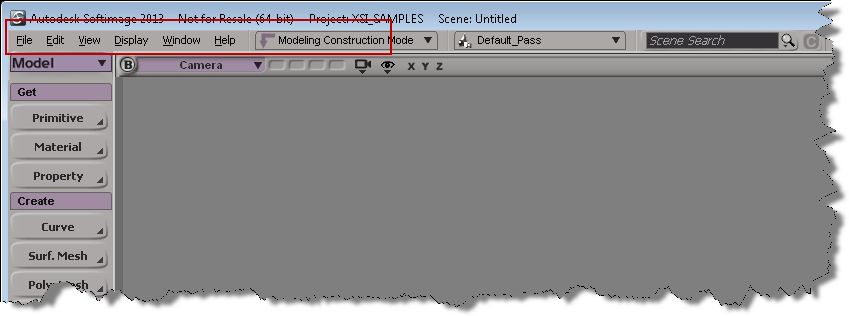
That’s because the module menus were hidden. To show the module menus, right click and empty area on the Softimage menu bar, and click Module Menus.\

Then you can click Face Robot > Disable Face Robot.

A customer reported that on some machines, he would get this error when he opened a certain scene:
// ERROR : 2356 – This plug-in is not installed: FaceConnections
This means that the scene contains some Face Robot properties, but the Face Robot workgroup is not loaded. This can happen, for example, if you enable Face Robot in a scene, then disable Face Robot and save the scene. This leaves some some Face Robot elements left in the scene.
Any time you load this scene into an instance of Softimage where Face Robot is disabled (eg Softimage is not connected to the Face Robot workgroup), you’ll get this error.
To fix this, use the scene explorer to find the Face model and delete the Face model. The Face model has a FaceConnections property, and when Face Robot is not enabled, you will get that error at startup.
When you’re using Face Robot, the Create LipSync command may report this error:
# ERROR : ImportSpeech: phoneme recognition failed
I’ve seen two possible causes for this error:
Courtesy of Mr Jeff Wilson, some tips on attaching Face Robot heads to characters:
“There are a few ways to go about it, depending on the pipeline that you are in.
If you just want to get the end result from Face Robot onto your character and are rendering frames, then the simplest way is to cache the face meshes from FR and bring those caches into your scene file containing the skeleton. This is the most accurate method for getting the animation across. FR ships with Point Oven, but we always used the KP_PointCache plugins from Kai Wolter in production. Kai’s tools write to the PC2 format which both Max and Maya understand. And they are free.
Users in Germany reported problems loading the FR sample scenes. It looked like the scenes were corrupt:

The problem turned out to be the Regional and Language Options, specifically the decimal symbol.
 eX-SI
eX-SI 