To fix the problems with the Syflex Pin compound, try changing the Pin compound to look like this:

h/t Gerard

To fix the problems with the Syflex Pin compound, try changing the Pin compound to look like this:
h/t Gerard
In this video, I use the ICE tree performance timers to compare two different ways of converting between the local coordinate systems of two objects.
On the XSI mailing list, a poster asked:
If I have a sphere and I want to get the point positions from the sphere and
see what their point positions are in reference to another null’s transforms
how would I do that?
It’s basically a two-step procedure. First convert the point positions from the local coordinate system of the sphere to global coordinates. Then, second, convert the global coordinates into the local coordinate system of the null.

It’s a little more efficient to combine the two matrix combinations, and then apply that to the point positions:

Here’s a video walkthrough of how to build an ICE tree that converts point positions from the local coordinate system (aka reference frame) of one object to the local coordinate system of a second object.
http://vimeo.com/24275969
For ICE beginners. A look at a few different ways to emit particles from the vertices (aka points) of an emitter object.
http://vimeo.com/24214573
Assuming that the PolygonIndex and PolygonPosition sets are in the same order, then given some polygon indices, you could get the corresponding polygon positions by using the indices to index into the PolygonPosition array.
Here, I’m using PolygonInsideNull, which is a set of polygon indices:

Here’s another screenshot that I took to verify that I was getting the right positions.
The purple numbers are the PolygonPosition and PolygonIndex arrays:
Continue reading
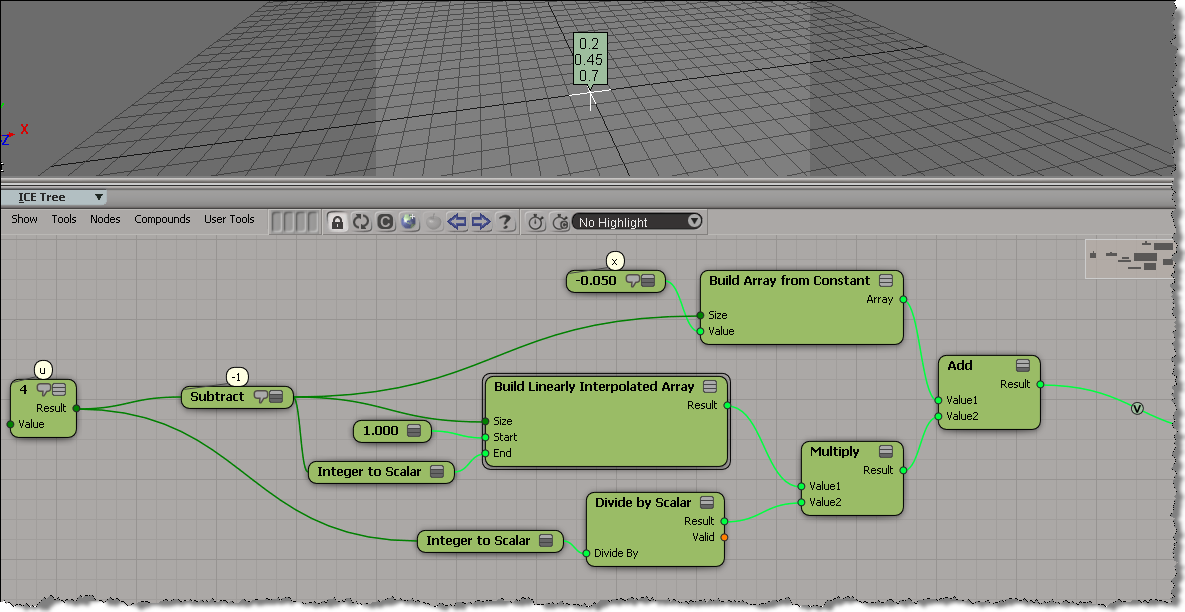
Here’s a simple example of using an array instead of a loop in an ICE tree.
In general, for performance, you’d like to avoid repeats and loops in ICE.
This post is in repsonse to this thread.
var u = 4;
var x = -.05;
for (i=1; i <= u-1; i++) {
	x = x + 1/u ;
	LogMessage( x );
}
// INFO : 0.2
// INFO : 0.45
// INFO : 0.7
Here’s a little recursive function that checks whether the selected ICE node is part of a branch that is connected to the terminal ICE Tree node.
I used IsConnected to check whether a node is connected to some other node, and then I traverse the output ports, getting the connected nodes, until I reach the ICE Tree node (or not).
var o = Selection(0);
//LogMessage( o.IsConnected );
LogMessage( "isBranchConnected()="+isBranchConnected(o) );


// Given an ICE node, check if the node is part
// of a branch connected to the ICE Tree node
function isBranchConnected( oNode )
{
	if ( !oNode.IsConnected )
	{
		return false;
	}
	else if ( oNode.Type == "ICETree" )
	{
		return true;
	}
	else
	{
		oEnum = new Enumerator( oNode.OutputPorts ) ;
		for (;!oEnum.atEnd();oEnum.moveNext() )
		{
			var oSelItem = oEnum.item() ;
			oEnum1 = new Enumerator( oSelItem.ConnectedNodes ) ;
			for (;!oEnum1.atEnd();oEnum1.moveNext() )
			{
				var oSelItem1 = oEnum1.item() ;
				return isBranchConnected( oSelItem1 );
			}
		}
	}
}
And here’s a Python version. With Python, I always have the nagging feeling that my code code be better.
# Given an ICE node, check if the node is part
# of a branch connected to the ICE Tree node
def isBranchConnected( oNode ):
	if not oNode.IsConnected :
		return False
	elif oNode.Type == "ICETree" :
		return True;
	else:
		for port in oNode.OutputPorts:
			for node in port.ConnectedNodes:
				return isBranchConnected( node )


o = Application.Selection(0);
Application.LogMessage( "isBranchConnected()=" + str(isBranchConnected(o)) );
Repost of the 11 May webinar by Mark Schoennagel:
Based on this xsibase thread, here’s a little video that shows how to make the particles in one cloud act like the children of a particle in another point cloud. Basically, the idea is to have the same behavior as objects in a hierarchy, where the children “inherit” the transformations of the parent.
One thing I forgot to mention in the video is that because both point clouds are at the origin, I don’t have to worry about converting between two different local coordinate systems (aka reference frames).
Example scene here.
 eX-SI
eX-SI 