Softimage 2014 What’s Fixed Word Cloud


Here’s a word cloud for the bugs fixed list. This isn’t the raw word count; I did a few things like adding repeats of the word “Fixed” for every SOFT id number, and repeats of the category name (eg “ICE”) for every fix in that category.

So the size of the word “ICE” is a combination of the number of ICE fixes (32) plus the number of occurrences of the word “ICE” in the bug descriptions (29).

whatsfixed2014

The word “FIXED” is a bit distracting, so here’s a version without it:
whatsfixed2014_1

Wednesday word cloud: Softimage scripting commands


This word cloud shows the scripting names of the commands in Application.Commands (Softimage 2013 SP1)
CommandScriptingNames_2013sp1
You can see that some scripting names are repeated quite a few times:

  • ApplyTopoOp (66)
  • ApplyOp (47)
  • ApplyGenOp (44)
  • ToggleValue (43)
  • ApplyShader (37)

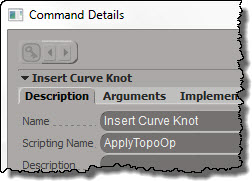
Some scripting commands, like Insert Curve Knot, are instances of a generic command like ApplyTopoOp:
InsertCurveKnotDescription
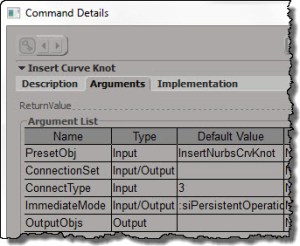
but with hard-coded arguments:
InsertCurveKnotArguments

See also Why ApplyOp doesn’t pop up a PPG.

Here’s a list of the TopoOp commands:

for c in Application.Commands:
	if c.ScriptingName == "ApplyTopoOp":
		print "%s : %s" % (c.ScriptingName, c.Name )
		
# ApplyTopoOp : Apply Topology Operator
# ApplyTopoOp : Insert Curve Knot
# ApplyTopoOp : Subdivide Edge
# ApplyTopoOp : Raise Nurbs Curve Degree
# ApplyTopoOp : Extrude Comp. Axis
# ApplyTopoOp : Filter Polygons
# ApplyTopoOp : Collapse
# ApplyTopoOp : Inset Polygons
# ApplyTopoOp : Subdivide Polygon
# ApplyTopoOp : Slice Polygons
# ApplyTopoOp : Offset Polygons
# ApplyTopoOp : Dice Object
# ApplyTopoOp : Surface Snip
# ApplyTopoOp : Invert Selected Polygons
# ApplyTopoOp : Delete Trim
# ApplyTopoOp : Duplicate Polygons Along Curve
# ApplyTopoOp : Curve Remove Knot
# ApplyTopoOp : Extrude Component Along Normal
# ApplyTopoOp : Dissolve Component
# ApplyTopoOp : Boolean Difference
# ApplyTopoOp : Boolean Union
# ApplyTopoOp : Boolean Intersection
# ApplyTopoOp : Local Subdivision
# ApplyTopoOp : Insert Surface Knot
# ApplyTopoOp : Remove Surface Knot
# ApplyTopoOp : Polygon Reduction
# ApplyTopoOp : Bevel
# ApplyTopoOp : Delete Component
# ApplyTopoOp : Quadrangulate
# ApplyTopoOp : Dissolve & Clean Adjacent Vertices
# ApplyTopoOp : Symmetrize Polygons
# ApplyTopoOp : Disconnect Component
# ApplyTopoOp : Set Curve Knot Multiplicity
# ApplyTopoOp : Bridge Edges
# ApplyTopoOp : Apply DelMeshPoint
# ApplyTopoOp : Invert All Normals
# ApplyTopoOp : Curve Inverse
# ApplyTopoOp : Surface Shift
# ApplyTopoOp : Curve Shift
# ApplyTopoOp : Surface Curve Shift
# ApplyTopoOp : Surface Swap
# ApplyTopoOp : Filter Edges
# ApplyTopoOp : Curve Reparameterize
# ApplyTopoOp : Surface Reparameterize
# ApplyTopoOp : Add Edge
# ApplyTopoOp : Add Polygon
# ApplyTopoOp : Nurbs Curve Delete Point
# ApplyTopoOp : Nurbs Surface Delete Point
# ApplyTopoOp : Mesh Surface Delete Point
# ApplyTopoOp : Surface Open/Close
# ApplyTopoOp : Curve Open/Close
# ApplyTopoOp : Delete Edge
# ApplyTopoOp : Surface Stitch
# ApplyTopoOp : Surface Extend to Curve
# ApplyTopoOp : Surface Clean
# ApplyTopoOp : Curve Stitch
# ApplyTopoOp : Curve Clean
# ApplyTopoOp : Surface Curve Inverse
# ApplyTopoOp : Extrude Component Along Curve
# ApplyTopoOp : Weld Edges
# ApplyTopoOp : Filter Points
# ApplyTopoOp : Weld Points to Target
# ApplyTopoOp : Delete Particle
# ApplyTopoOp : Trim by Projection
# ApplyTopoOp : Dice Polygons
# ApplyTopoOp : Bridge Polygon	

Autodesk Upgrade pricing changes


Effective 1 February 2013, Autodesk will simplify its upgrade pricing model. Starting next month, all upgrades will cost 70% of the current price for a new license.

The “Upgrade from Previous Releases” option will have an Autodesk SRP of approximately seventy percent (70%) of the current new License Autodesk SRP*, regardless of which of the six previous releases is being upgraded. Autodesk product releases more than six releases prior to the current release will no longer be eligible for upgrade.

For Softimage, I imagine the “six previous releases” covers only the Autodesk releases: 2012, 2011, 2010, 7.5, and maybe 7.01. I doubt it will cover 6.5, but you should check with your reseller to make sure.

And oh yeah, since it’s Wednesday, here’s a word cloud. I cheated a bit added more “70”s so it would stand out.
wordcloud_upgrade_policy

Wednesday word cloud: Autodesk NDA


Another Wednesday, another word cloud. This time, for the Autodesk NDA (Non-Disclosure Agreement) that all attendees must sign if they want to attend the next Softimage Creatives user group, where Autodesk Softimage Product Manager Cory Mogk will be presenting.

wordcloud_autodesk_nda_50

In this document of 1983 words, the top words are:

  • autodesk (53)
  • receiving (46)
  • information (46)
  • party (41)
  • confidential (39)
  • agreement (30)

In other words, these are the top words and phrases: “autodesk”, “receiving party”, “confidential information”, and “agreement”. Nothing surprising there.

Wednesday word clouds – 2012 activity on the Softimage mailing list


Two word clouds to help visualize the activity on the Softimage mailing list during 2012: who was posting, and what were they posting about?

What were the popular topics?
Note that I removed “Softimage”, which was by far the most common word in the post titles (aka Subject), but which doesn’t really indicate the topic of discussion.
wc_subject_50_no_Softimage

Who was active on the list?
There were approximately 450 different people who posted during 2012. This word cloud shows the 100 top names, so assuming most people have no middle names, this is more-or-less the 50 most active posters on the list.
wc_from_100

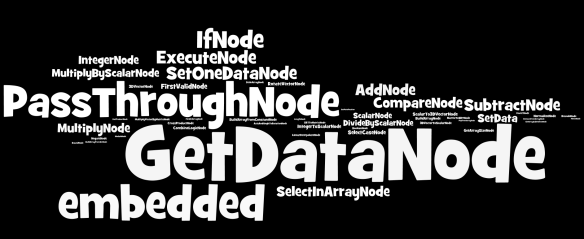
Wednesday Word Cloud – ICE node usage in shipped compounds


Here’s a word cloud of the top 50 nodes used in the ICE compounds that ship with Softimage 2013
NodesInShippedCompounds
That’s 3303 Get Data nodes, 2051 “embedded” nodes, 1889 PassThroughs, and 1071 If nodes.

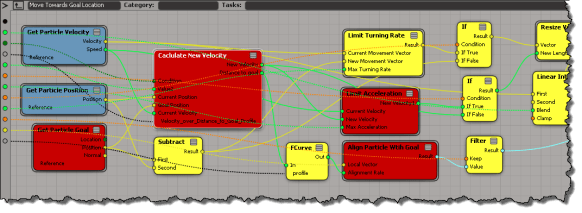
Embedded nodes are compounds that are embedded directly inside another compound (instead of being references to a .xsicompound file on disk). Like Calculate New Velocity, Limit Turning Rate, Limit Acceleration, and Align Particle with Goal in this compound:
EmbeddedCompounds

Not all embedded compounds are that interesting though. There’s over a thousand embedded compounds in the ICEFlowBuilder compounds; where even Set Data was embedded (probably so that the ICEFlowBuilder compounds wouldn’t break if something changed in an external compound, which did happen a few times).