New in Softimage 2013: Filtering XSICollections


In Softimage 2013, the XSICollection object now has a Filter method, so you can filter XSICollections by type, family, or path name.

oFilteredCollection = XSICollection.Filter( [Type], [Families], [Path] )

I updated my find all cameras script to use XSICollection.Filter, and here’s the timing results (form the same scene, but in 2013).

# INFO : getCameras_FindObjects finished in 0.033000 seconds
# INFO : Found 8301 cameras
# INFO : getCameras_FindObjects_w_Filter finished in 0.269000 seconds
# INFO : Found 24 cameras
# INFO : getCameras_FindObjects_w_SIFilter finished in 0.044000 seconds
# INFO : Found 24 cameras
# INFO : getCameras_FindObjects2 finished in 0.001000 seconds
# INFO : Found 49 cameras
# INFO : getCameras_FindObjects2_w_Filter finished in 0.003000 seconds
# INFO : Found 24 cameras
# INFO : getCameras_FindChildren2 finished in 0.149000 seconds
# INFO : Found 24 cameras
# INFO : getCameras_SelectAllUsingFilter finished in 0.035000 seconds
# INFO : Found 24 cameras
  • FindObjects2 is fastest, with SelectAllUsingFilter a mildly surprising second (again note that I’m calling SelectAllUsingFilter with AffectSelectionList=False, so I’m not actually selecting anything).
    FindObjects2_w_Filter		0.003000 seconds
    SelectAllUsingFilter		0.035000 seconds
    FindObjects_w_SIFilter		0.044000 seconds
    FindChildren2			0.149000 seconds
    FindObjects_w_Filter		0.269000 seconds
    
  • FindObjects finds a lot more than just cameras; it finds lots of nulls too because that GUID isn’t unique to cameras
  • In this context, SIFilter is faster than the XSICollection.Filter method

Here’s the updated script for Softimage 2013:

import time
si = Application
log = si.LogMessage
from win32com.client import constants as C

import win32com.client
oCameraColl = win32com.client.Dispatch( "XSI.Collection" )

si.SetValue("preferences.scripting.cmdlog", False, "")


def timeExecution(func):
    def closure(*args, **kwargs):
        startTime = time.time()
        try:
            ret = func(*args, **kwargs)
        except Exception, e:
            delta = time.time() - startTime
            log('Failed in %f seconds' % delta)
            raise
        delta = time.time() - startTime
        log('%s finished in %f seconds' % (func.__name__, delta))
        return ret
    return closure 

@timeExecution
def getCameras_FindObjects():
	oCameraColl = Application.FindObjects( "", "{5FC0CCAE-3DC8-11D0-9449-00AA006D3165}" )
	return oCameraColl.Count

@timeExecution
def getCameras_FindObjects_w_Filter():
	oCameraColl = Application.FindObjects( "", "{5FC0CCAE-3DC8-11D0-9449-00AA006D3165}" )
	oCameraColl = oCameraColl.Filter( "camera" )
	oCameraColl.RemoveItems( oCameraColl.Filter( "", "", "CopyPaste*" ) )
	oCameraColl.RemoveItems( oCameraColl.Filter( "", "", "View*" ) )
	return oCameraColl.Count

@timeExecution
def getCameras_FindObjects_w_SIFilter():
	oCameraColl = Application.FindObjects( "", "{5FC0CCAE-3DC8-11D0-9449-00AA006D3165}" )
	oCameraColl = si.SIFilter( oCameraColl, "camera" )
	oCameraColl.RemoveItems( oCameraColl.Filter( "", "", "CopyPaste*" ) )
	oCameraColl.RemoveItems( oCameraColl.Filter( "", "", "View*" ) )
	return oCameraColl.Count


@timeExecution
def getCameras_FindObjects2():
	c = si.FindObjects2( C.siCameraID )
	return c.Count

@timeExecution
def getCameras_FindObjects2_w_Filter():
	cams = si.FindObjects2( C.siCameraID )
	oCameraColl.Items = cams
	oCameraColl.RemoveItems( cams.Filter( "", "", "CopyPaste*" ) )
	oCameraColl.RemoveItems( cams.Filter( "", "", "View*" ) )
	return oCameraColl.Count


@timeExecution
def getCameras_FindChildren2():
	cams = si.ActiveSceneRoot.FindChildren2("", "camera")
	return cams.Count

@timeExecution
def getCameras_SelectAllUsingFilter():
	cams = si.SelectAllUsingFilter("Camera", "siIgnoreComponentVisibility", False, "")
	return cams.Count


@timeExecution
def getCameras_Model_FindObjects():
	cams = si.ActiveSceneRoot.FindObjects( C.siCameraID )
	return cams.Count


log( 'Found %d cameras' % getCameras_FindObjects() )
log( 'Found %d cameras' % getCameras_FindObjects_w_Filter() )
log( 'Found %d cameras' % getCameras_FindObjects_w_SIFilter() )
log( 'Found %d cameras' % getCameras_FindObjects2() )
log( 'Found %d cameras' % getCameras_FindObjects2_w_Filter() )
log( 'Found %d cameras' % getCameras_FindChildren2() )
log( 'Found %d cameras' % getCameras_SelectAllUsingFilter() )

Scripting – Finding all cameras in a scene


In scripting, there’s several ways to find all the cameras in a scene.

I put together a little script to do some timing of the different ways of finding cameras.
Here’s a quick summary (using a scene with about 10k 3d objects). YMMV.

See this related thread on the XSI list. If you need to find scenes cameras frequently, then one suggestion (from Matt Lind) was to tag the scene cameras with a custom property, and then use FindObjects/FindObjects2 on that.

import time
si = Application
log = si.LogMessage
from win32com.client import constants as C

import win32com.client
oCameraColl = win32com.client.Dispatch( "XSI.Collection" )

si.SetValue("preferences.scripting.cmdlog", False, "")

#
# From http://www.softimageblog.com/archives/357
#
def timeExecution(func):
    def closure(*args, **kwargs):
        startTime = time.time()
        try:
            ret = func(*args, **kwargs)
        except Exception, e:
            delta = time.time() - startTime
            log('Failed in %f seconds' % delta)
            raise
        delta = time.time() - startTime
        log('%s finished in %f seconds' % (func.__name__, delta))
        return ret
    return closure 

@timeExecution
def getCameras_Application_FindObjects2():
	c = si.FindObjects2( C.siCameraID )
	return c.Count

@timeExecution
def getCameras_Application_FindObjects2_w_Filter():
	cams = si.FindObjects2( C.siCameraID )
	oCameraColl.Items = cams
	oCameraColl.RemoveItems( cams.Filter( "", "", "CopyPaste*" ) )
	oCameraColl.RemoveItems( cams.Filter( "", "", "View*" ) )

	return oCameraColl.Count


@timeExecution
def getCameras_FindChildren2():
	cams = si.ActiveSceneRoot.FindChildren2("", "camera")
	return cams.Count

@timeExecution
def getCameras_SelectAllUsingFilter():
	cams = si.SelectAllUsingFilter("Camera", "siIgnoreComponentVisibility", False, "")
	return cams.Count

@timeExecution
def getCameras_FindObjects():
	cams = Application.FindObjects( "", "{5FC0CCAE-3DC8-11D0-9449-00AA006D3165}" )

	# That GUID returns lots of other objects besides cameras
	cams = si.SIFilter( cams, 'camera' )

	# Unfortunately, XSICollection doesn't have a Filter method
#	oCameraColl.Items = cams
#	oCameraColl.RemoveItems( cams.Filter( "", "", "CopyPaste*" ) )
#	oCameraColl.RemoveItems( cams.Filter( "", "", "View*" ) )
	return cams.Count

# This finds cameras directly under a model only
@timeExecution
def getCameras_Model_FindObjects():
	cams = si.ActiveSceneRoot.FindObjects( C.siCameraID )
	return cams.Count


log( 'Found %d cameras' % getCameras_FindObjects() )
log( 'Found %d cameras' % getCameras_Application_FindObjects2() )
log( 'Found %d cameras' % getCameras_Application_FindObjects2_w_Filter() )
log( 'Found %d cameras' % getCameras_FindChildren2() )
log( 'Found %d cameras' % getCameras_SelectAllUsingFilter() )
Here’s some numbers from a scene with 9857 objects

# INFO : getCameras_FindObjects finished in 0.034000 seconds
# INFO : Found 68 cameras

# INFO : getCameras_FindObjects2 finished in 0.002000 seconds
# INFO : Found 68 cameras

# INFO : getCameras_FindObjects2_w_Filter finished in 0.005000 seconds
# INFO : Found 24 cameras

# INFO : getCameras_FindChildren2 finished in 0.153000 seconds
# INFO : Found 24 cameras

# INFO : getCameras_SelectAllUsingFilter finished in 0.034000 seconds
# INFO : Found 24 cameras

Polygon Islands, arrays, and indices


I was skimming through Guillaume’s posts on polygon islands and arrays, and in particular I was looking at the Get Lowest Point Index by Islands compound. That’s a pretty neat technique for sure, but I had to think about it a bit before I really understood what was going on…

So as an exercise I took a different approach. I used scripting to find the polygon islands and generate an array of island indices for the polygons, and then plugged that into ICE:

For the script, I adapted a script posted by Alan Fregtman to return a list of lists (a list of islands, and for each island, a list of poly indices).

Here’s the code:

from siutils import si		# Application
from siutils import log		# LogMessage
from siutils import disp	# win32com.client.Dispatch
from siutils import C		# win32com.client.constants
 
def getPolygonIslands( o ):
	
	if not o or o.type != "polymsh" :
		log( "Cannot work without an object" )
		return
		
	selFilter = si.Filters("Polygon_Island")
	thisPoly = XSIFactory.CreateActiveXObject("XSI.Collection")

	# List of lists
	islands = []
	
	# List of polygons that have already been checked
	usedArr = []
	
	for poly in o.ActivePrimitive.Geometry.Polygons:
		if poly.Index not in usedArr:
			thisPoly.Add(poly)
			island = selFilter.Subset(thisPoly)
			island = si.Dictionary.GetObject(island).SubComponent.ComponentCollection.IndexArray
			usedArr.extend(island)
			islands.append( island )
			thisPoly.RemoveAll()
			
	return islands
	
islands = getPolygonIslands( si.Selection(0) )

log( islands )
# INFO : [(0, 6, 7, 10, 11), (1, 2, 3, 4, 5, 18, 20, 22), (8, 9, 12, 13, 14, 15, 16, 17, 19, 21, 23, 24)]

# I use a dict instead or pre-initializing a list of the required size
dict = {}
for i in range(len(islands)):
	for j in range(len(islands[i])):
		dict[islands[i][j]] = str(i)
		
log( ",".join( dict.itervalues()) )
# INFO : 0,1,1,1,1,1,0,0,2,2,0,0,2,2,2,2,2,2,1,2,1,2,1,2,2

To get that into an ICE Tree, I put together a little plugin that adds a menu command to the ICE Tree > User Tools menu.

By using a menu item callback, I can get the ICE Tree view from the callback context, and then from the view, the ICE Tree operator via the container view attribute.

I scripted the creation of the little ICE tree, and that’s pretty tedious work. If I was going to distribute something like this, I think I’d include a pre-built compound in an addon.

# GetPolygonIslandsPlugin
# Initial code generated by Softimage SDK Wizard
# Executed Wed Mar 21 06:36:33 EDT 2012 by blairs
# 
from siutils import si		# Application
from siutils import log		# LogMessage
from siutils import disp	# win32com.client.Dispatch
from siutils import C		# win32com.client.C

null = None
false = 0
true = 1

def XSILoadPlugin( in_reg ):
	in_reg.Author = "blairs"
	in_reg.Name = "GetPolygonIslandsPlugin"
	in_reg.Major = 1
	in_reg.Minor = 0

	in_reg.RegisterCommand("GetPolygonIslands","GetPolygonIslands")
	in_reg.RegisterMenu(C.siMenuICEViewToolsID,"GetPolygonIslands_Menu",false,false)
	#RegistrationInsertionPoint - do not remove this line

	return true

def XSIUnloadPlugin( in_reg ):
	strPluginName = in_reg.Name
	Application.LogMessage(str(strPluginName) + str(" has been unloaded."),C.siVerbose)
	return true

def GetPolygonIslands_Init( in_ctxt ):
	oCmd = in_ctxt.Source
	oCmd.Description = ""
	oCmd.ReturnValue = true

	oArgs = oCmd.Arguments
	oArgs.AddWithHandler("object","SingleObj")
	return true

def GetPolygonIslands_Execute( object ):

	Application.LogMessage("GetPolygonIslands_Execute called",C.siVerbose)

	if not object or object.type != "polymsh" :
		log( "GetPolygonIslands: Cannot work without an object" )
		return
		
	selFilter = si.Filters("Polygon_Island")
	thisPoly = XSIFactory.CreateActiveXObject("XSI.Collection")

	# List of lists
	islands = []
	
	# List of polygons that have already been checked
	usedArr = []
	
	for poly in object.ActivePrimitive.Geometry.Polygons:
		if poly.Index not in usedArr:
			log( poly.Index )
			thisPoly.Add(poly)
			island = selFilter.Subset(thisPoly)
			island = si.Dictionary.GetObject(island).SubComponent.ComponentCollection.IndexArray
			usedArr.extend(island)
			islands.append( island )
			thisPoly.RemoveAll()
			
	return islands

def GetPolygonIslands_Menu_Init( in_ctxt ):
	oMenu = in_ctxt.Source
	oMenu.AddCallbackItem( "Get Polygon Islands Index Array", "OnGetPolygonIslands" )
	return true

def OnGetPolygonIslands( in_ctxt ):

	Application.LogMessage("OnGetPolygonIslands called",C.siVerbose)

	view = in_ctxt.GetAttribute( "Target" )
	op = si.Dictionary.GetObject( view.GetAttributeValue( "container" ) )

	log( "Getting polygon islands. This may take a few seconds..." )
	islands = si.GetPolygonIslands( op.Parent3DObject )

	log( "Building polygon island index list" )
	dict = {}
	for i in range(len(islands)):
		for j in range(len(islands[i])):
			dict[islands[i][j]] = str(i)
			
	s = ",".join( dict.itervalues() )
	
	# Temporarily disable command logging
	bLog = si.Preferences.GetPreferenceValue( "scripting.cmdlog" )
	if bLog == True:
			si.Preferences.SetPreferenceValue( "scripting.cmdlog", False )

	# Add String node to ICE tree
	oStringNode = si.AddICENode("$XSI_DSPRESETS\\ICENodes\\StringNode.Preset", op.FullName )
	oStringNode.Parameters( "value_string" ).Value = s

	#
	# Set up ICE branch to set the attributes:
	# self._polyPolygonIslandIndex 
	# self._vertPolygonIslandIndex attributes
	#
	oStringToArray = si.AddICENode("StringToArray", op.FullName)
	si.ConnectICENodes( oStringToArray.InputPorts("Value"), oStringNode.OutputPorts("result") )

	oSelectInArrayNode = si.AddICENode("$XSI_DSPRESETS\\ICENodes\\SelectInArrayNode.Preset", op.FullName)
	oIntegerNode = si.AddICENode("$XSI_DSPRESETS\\ICENodes\\IntegerNode.Preset", op.FullName)
	si.ConnectICENodes( oSelectInArrayNode.InputPorts("array"), oIntegerNode.OutputPorts("result") )
	si.ConnectICENodes( oSelectInArrayNode.InputPorts("array"), oStringToArray.OutputPorts("result") )
	si.DeleteObj( oIntegerNode )
	
	oGet_Polygon_Index = si.AddICECompoundNode("Get Polygon Index", op.FullName)
	si.ConnectICENodes(oSelectInArrayNode.InputPorts("index"), oGet_Polygon_Index.OutputPorts("Polygon_Index"))

	oSetDataNode = si.AddICECompoundNode("Set Data", op.FullName )
	si.SetValue( oSetDataNode.FullName + ".Reference", "self._polyPolygonIslandIndex", "")
	si.AddPortToICENode(oSetDataNode.FullName + ".Value", "siNodePortDataInsertionLocationAfter")
	si.SetValue(oSetDataNode.FullName + ".Reference1", "self._vertPolygonIslandIndex", "")

	si.ConnectICENodes( oSetDataNode.InputPorts("Value"), oSelectInArrayNode.OutputPorts("value") )
	
	oSelectInArrayNode = si.AddICENode("$XSI_DSPRESETS\\ICENodes\\SelectInArrayNode.Preset", op.FullName)
	oSelectInArrayNode1 = si.AddICENode("$XSI_DSPRESETS\\ICENodes\\SelectInArrayNode.Preset", op.FullName)
	oGetDataNode = si.AddICENode("$XSI_DSPRESETS\\ICENodes\\GetDataNode.Preset", op.FullName)
	si.SetValue( oGetDataNode.FullName + ".reference", "this.VertexToPolygons", "")

	si.ConnectICENodes(oSelectInArrayNode.InputPorts("array"), oGetDataNode.OutputPorts("value") )

	si.ConnectICENodes( oSelectInArrayNode1.InputPorts("index"), oSelectInArrayNode.OutputPorts("value") )
	si.ConnectICENodes( oSelectInArrayNode1.InputPorts("array"), oStringToArray.OutputPorts("result") )
	si.ConnectICENodes( oSetDataNode.InputPorts("Value1"), oSelectInArrayNode1.OutputPorts("value") )

	# Put back original pref value for command logging
	si.Preferences.SetPreferenceValue( "scripting.cmdlog", bLog )

	return true

Python versus JScript for Softimage scripting


I used to prefer JScript, because I was familiar with it from HTML scripting and I liked that it used curly brackets {} like C++.

But this is reason enough to prefer Python for scripting in Softimage:

// Log number of selected components
LogMessage( VBArray(Selection(0).SubElements).toArray().length )

In Python, you don’t have to deal with the VBArray stuff:

Application.LogMessage( len( Application.Selection(0).SubElements ) )

And when you have convenience shortcuts defined, it becomes even nicer:

log( len( si.Selection(0).SubElements ) )

Python example constraining nulls to components


Just a little example that uses the Object Model to create a null and a ObjectToCluster constraint for each selected component (point, edge, polygon, …).
Note line 13. I can use CollectionItem.SubElements to get the indices of the selected components.

from win32com.client import constants as C
si = Application
log = si.LogMessage


if si.Selection.Count > 0 and si.ClassName(si.Selection(0)) == 'CollectionItem' and si.Selection(0).SubComponent is not None:

	# pnt, poly, edge, ...
	clusterType = si.Selection(0).Type.replace( 'SubComponent','' )
	o = si.Selection(0).SubComponent.Parent3DObject
	
	for i in si.Selection(0).SubElements:
		c = o.ActivePrimitive.Geometry.AddCluster( clusterType, "", [i] )
		n = si.ActiveSceneRoot.AddNull()
		n.Kinematics.AddConstraint( "ObjectToCluster", c )

Changing the default startup layout


To have Softimage start up with a certain layout, you don’t really have to do anything. When you exit Softimage, it writes the current layout to your preferences file, so that the next time you start Softimage it starts up with that same layout.

For example, if I change to the Tools Development Environment layout and exit Softimage, then my %XSI_USERHOME%\Data\Preferences\default.xsipref file will include this line:

xsiprivate.UI_LAYOUT_DEFAULT	= Tools Development Environment

So when I start Softimage again, it will start up in the Tools Development Environment.

Here’s how to access that preference in scripting:

# Python
from win32com.client import Dispatch as disp
from win32com.client import constants as C
si = disp('XSI.Application' )
log = si.LogMessage


log( C.siUILayoutDefault )
log( si.GetUserPref( C.siUILayoutDefault ) )
log( si.Preferences.GetPreferenceValue( "xsiprivate.UI_LAYOUT_DEFAULT" ) )

# INFO : UI_LAYOUT_DEFAULT
# INFO : Compositing

OO AddPointToNull in Python


Someone posted Olivier Ozoux’s 11-year-old AddNulltoPoints script to xisbase the other day. You can see from the install instructions that this script is old-school.

'################################################################################
'NAME: Add Null To Point v2.0
'AUTHOR: Olivier Ozoux <oliviero@softimage.com>
'LAST MODIFIED: 2001-05-22
'
'v2.0 is a complete rewrite using the Object Model where possible
'
'INSTALL
'
'1. Copy the SPDL file:
'	{5CD342AD-2FB1-4646-9D14-3E82C805177D}.spdl
'	to the spdl directory of XSI (for example):
'	C:\Softimage\XSI_1.5\Application\spdl
'
'2. Copy the Preset file:
'	AddNullToPointDialog.Preset
'	to the Preset Property directory of XSI (for example):
'	D:\Softimage\XSI_1.5\DSPresets\Properties
'
'3. Restart XSI
'
'4. Run the Script or Create a Command/Button on a toolbar
'	
'
'This tool will create a single Null for each point of the selected object(s).
'(you can also select a point cluster, or tag points). Then based on the dialog
'choice, it will either Constrain the Null to the Point using Object to Cluster
'constraint, or Deform the point to the Null with a Cluster Center operator.
'
'-Olivier Ozoux
'###############################################################################

To get rid of the SPDL and preset, I took a few minutes and updated it to Python.

#
# Softimage 2013 and later
#
from sipyutils import si			# win32com.client.Dispatch('XSI.Application')
from sipyutils import log		# LogMessage
from sipyutils import C			# win32com.client.constants
si = si()


#
# Softimage 2012
#
#from siutils import si		# Application
#from siutils import log		# LogMessage
#from siutils import disp	# win32com.client.Dispatch
#from siutils import C		# win32com.client.constants

#
# For Softimage 2011
# 
#from win32com.client import Dispatch as disp
#from win32com.client import constants as C
#si = disp('XSI.Application')
#log = si.LogMessage

def CreateUIDialog():

	oDialog = si.ActiveSceneRoot.Properties( 'AddNullToPoint' )
	
	if oDialog is None:
		oDialog = si.ActiveSceneRoot.AddProperty( 'CustomProperty', False, 'AddNullToPoint' )
		oDialog.AddParameter2("CnsType",C.siInt4,0,0,100,0,100,C.siClassifUnknown,C.siPersistable + C.siKeyable)
		oDialog.AddParameter2("NullName",C.siString,"",None,None,None,None,C.siClassifUnknown,C.siPersistable + C.siKeyable)
		oDialog.AddParameter2("ParentObj",C.siBool,True,None,None,None,None,C.siClassifUnknown,C.siPersistable + C.siKeyable)

		oLayout = oDialog.PPGLayout
		oLayout.Clear()
		oLayout.AddEnumControl( 'CnsType', [ 'Null to Point (Object to Cluster)', 0, 'Point to Null (Cluster Center)', 1 ], 'Constraint Type', C.siControlRadio )
		oLayout.AddGroup( 'Options' )
		oLayout.AddItem( 'NullName' )
		oLayout.AddItem( 'ParentObj' )
		oLayout.EndGroup()
		
		oDialog.Parameters( 'NullName' ).Value = '<obj>_pnt'
	
	return oDialog
	

def addNullToPoint( oSel, Mode, Name, Parent ):
	oRoot = si.ActiveSceneRoot
	if oSel.Type in [ 'polymsh', 'crvlist', 'surfmsh' ]:
		aIndex = [x for x in range( oSel.ActivePrimitive.Geometry.Points.Count ) ]
		oGeom = oSel.ActivePrimitive.Geometry
		oPoints = oGeom.Points
	elif oSel.Type == 'pntSubComponent':
		aIndex = oSel.SubElements
		oSel = oSel.SubComponent.Parent3DObject
		if oSel.Type in [ 'polymsh', 'crvlist', 'surfmsh' ]:
			oGeom = oSel.ActivePrimitive.Geometry
			oPoints = oGeom.Points
		else:
			log( 'Not a geometric object' )
			return
	elif oSel.Type == 'pnt':
		aIndex = oSel.Elements.Array
		oGeom = oSel.Parent
		oPoints = oGeom.Points
		oSel = oSel.Parent3DObject
	else:
		log( 'Not a geometric object' )
		return

	pntName = Name.replace( '<obj>', oSel.Name )

	for i in aIndex:
		oCls = oGeom.AddCluster( 'pnt', 'pnt' + str( i ), [i] )
		oNull = oSel.AddNull( 'pntName' + str( i ) )
		#TODO

		if Mode == 0:
			# Constrain the Null to the Cluster
			oNull.Kinematics.AddConstraint( "ObjectToCluster", oCls, False )
		elif Mode == 1:
			#Move the Null in position
			oNull.Kinematics.Local.Parameters("posx").Value = oPoints(i).Position.X
			oNull.Kinematics.Local.Parameters("posy").Value = oPoints(i).Position.Y
			oNull.Kinematics.Local.Parameters("posz").Value = oPoints(i).Position.Z

			# Create ClusterCenter
			si.ApplyOperator( "ClusterCenter", str(oCls) + ";" + str(oNull), 0 )

		#Cut The Null if needed
		if Parent == False:
			si.CutObj( oNull )

def AddNullToPointProc():
	oDialog = CreateUIDialog()
	retval = si.InspectObj( oDialog, "", "", C.siModal )

	mode = oDialog.Parameters("CnsType").Value
	name = oDialog.Parameters("NullName").Value
	parent = oDialog.Parameters("ParentObj").Value
	
	for oSel in si.Selection:
			addNullToPoint( oSel, mode, name, parent )


AddNullToPointProc()

Scripting – Getting the target in a context menu callback


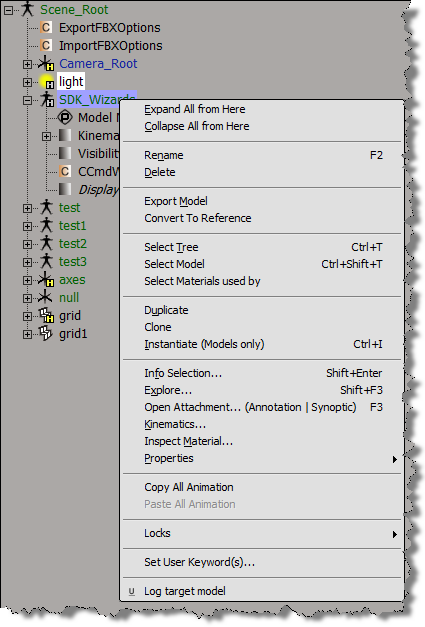
If you use AddCallbackItem to implement a contextual menu, then you can get the objects to which the context menu applies. A menu item callback gets a Context object from Softimage, and that Context contains a Target context attribute. Target specifies the selected objects, or the object under the mouse:

  • If more than one object is selected, then the Target attribute is a collection of all selected objects.
  • Otherwise, the Target attribute is a collection that contains just the object under the mouse.

Here’s a Python example of a context menu implemented with AddCallbackItem.

import win32com.client
from win32com.client import constants

null = None
false = 0
true = 1

def XSILoadPlugin( in_reg ):
	in_reg.Author = "blairs"
	in_reg.Name = "Test_CommandPlugin"
	in_reg.Major = 1
	in_reg.Minor = 0

	in_reg.RegisterCommand("Test_Command","Test_Command")
	in_reg.RegisterMenu(constants.siMenuSEModelContextID,"Model_Context_Menu",false,false)
	in_reg.RegisterMenu(constants.siMenuSEObjectContextID,"Object_Context_Menu",false,false)
	#RegistrationInsertionPoint - do not remove this line

	return true

def XSIUnloadPlugin( in_reg ):
	strPluginName = in_reg.Name
	Application.LogMessage(str(strPluginName) + str(" has been unloaded."),constants.siVerbose)
	return true

def Model_Context_Menu_Init( in_ctxt ):
	oMenu = in_ctxt.Source
	oMenu.AddCallbackItem( "Log target model", "SE_ContextCallback" )
	return true

def Object_Context_Menu_Init( in_ctxt ):
	oMenu = in_ctxt.Source
	oMenu.AddCallbackItem( "Log target object", "SE_ContextCallback" )
	return true
#
# Menu item callback
#
def SE_ContextCallback( in_ctxt ):
	target = in_ctxt.GetAttribute("Target")

	# Target attribute returns an XSICollection
	for o in target:
		Application.LogMessage( o.FullName )

Overriding SPDL defaults


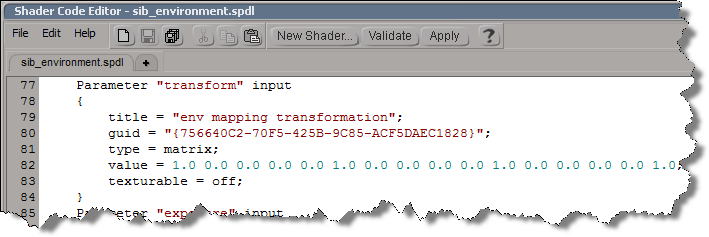
In the old days, if you didn’t like some default shader parameter setting, you had to edit a SPDL file and generate a new preset. As of 2011, you can use the ObjectModel (OM) to dynamically update the shader definition.

For example, if you run this Python snippet in the script editor, then the next time you create an Environment shader, it will have some different defaults:

  • Environment Mode will default to Cylinder
  • Transformation will have a connection icon
  • Background Intensity will default to 0.5
from siutils import si		# Application
from siutils import log		# LogMessage
from siutils import disp	# win32com.client.Dispatch
from siutils import C		# win32com.client.constants

# Get ShaderDef for the Environment shader
sProgID = "Softimage.sib_environment.1.0"
oDef = si.GetShaderDef( "Softimage.sib_environment.1.0" )

# Get ShaderParamDef for the Tranformation parameter
oTransform = oDef.InputParamDefs.GetParamDefByName( "transform" )

# Make it texturable so it has a connection icon
oTransform.Texturable = True


# Make Cylinder the default Environment mode
oParam = oDef.InputParamDefs.GetParamDefByName( "mode" )
oParam.DefaultValue = 1

# Change the default background intensity to 0.5
oParam = oDef.InputParamDefs.GetParamDefByName( "background_intensity" )
oParam.DefaultValue = 0.5

So, that’s how you update a shader definition. Now, all you have to do is stick that code into a siOnCreateShaderDef event plugin, and every time you create an Environment shader, it will have the defaults you want

import win32com.client
from win32com.client import constants

null = None
false = 0
true = 1

def XSILoadPlugin( in_reg ):
	in_reg.Author = "blairs"
	in_reg.Name = "ShaderDef Plug-in"
	in_reg.Major = 1
	in_reg.Minor = 0

	in_reg.RegisterEvent("CreateShaderDef",constants.siOnCreateShaderDef)

	return true

def XSIUnloadPlugin( in_reg ):
	strPluginName = in_reg.Name
	return true

# Callback for the CreateShaderDef event.
def CreateShaderDef_OnEvent( in_ctxt ):
	oDef = in_ctxt.GetAttribute("ShaderDef")
	sProgID = str(in_ctxt.GetAttribute("ProgID"))
	if "Softimage.sib_environment.1.0" in sProgID:
		oDef.InputParamDefs.GetParamDefByName( "transform" ).Texturable = True

# 	Return value is ignored as this event can not be aborted.
	return true

Tip: Use the SDK Explorer (CTRL+SHIFT+4) to get the ProgID of a shader.

Scripting the output file format for viewport captures


Here’s how to set the default value for the FormatType list in the Capture Viewport dialog box.

from siutils import si		# Application
from siutils import log		# LogMessage
from siutils import disp	# win32com.client.Dispatch
from siutils import C		# win32com.client.constants

# Set the capture options
oViewportCapture = si.Dictionary.GetObject("ViewportCapture")
paramFormatType = si.Dictionary.GetObject( "ViewportCapture.FormatType" )

# Set default to JPEG
paramFormatType.Value = 5

# Display Viewport Capture dialog
si.CaptureViewport( 2, True )


# FormatType values
# -----------------
# 0 Alias
# 1 AVI
# 2 BMP
# 3 Cineon (DPX)
# 4 Cineon (FIDO)
# 5 JPEG
# 6 Memory mapped
# 7 mental ray color
# 8 OpenEXR
# 9 PGM
# 10 Photoshop PSD
# 11 Pict
# 12 PNG
# 13 PPM
# 14 Quicktime
# 15 SGI
# 16 Softimage .pic
# 17 Son Playstation2 TIM2/CLUT2
# 18 Targa
# 19 Tiff
# 20 Valve
# 21 Wavefront
# 22 YUV

If you are scripting a non-interactive viewport capture, you don’t use FormatType. Instead, the output file format is determined by the file extension of the output file name.
Here’s a Python version of the example on the CaptureViewport reference page.

from siutils import si		# Application
from siutils import log		# LogMessage
from siutils import disp	# win32com.client.Dispatch
from siutils import C		# win32com.client.constants
import win32com.client.dynamic

# Get the current frame
fc = si.ActiveProject.Properties("Play Control").Parameters("Current").Value

# Set the capture options
oViewportCapture = si.Dictionary.GetObject("ViewportCapture")

# Capture a 1-frame sequence 
start = oViewportCapture.NestedObjects("Start Frame")
win32com.client.dynamic.Dispatch(start).Value = fc

end = oViewportCapture.NestedObjects("End Frame")       
win32com.client.dynamic.Dispatch(end).Value = fc

# Specify the output file name
# For scripted captures, the output file format is determined by the extension
name = oViewportCapture.NestedObjects("File Name")
win32com.client.dynamic.Dispatch(name).Value = "C:\\test.jpg"

# No dialog
si.CaptureViewport( 2, False );