Why you cannot use shortcuts to access the ViewportCapture settings


In the comments, G asks:

Why do you have do this:

si = Application
oViewportCapture = si.Dictionary.GetObject( "ViewportCapture" )
oViewportCapture.NestedObjects( "Start" ) = 10

and not this:

si = Application
oViewportCapture = si.Dictionary.GetObject( "ViewportCapture" )
oViewportCapture.Start = 10

CaptureOptions
The answer is that the ViewportCapture object is not a ProjectItem, and so does not support the Parameters property. ViewportCapture is a CollectionItemLegacy object (and before that, it was an SIObject).

si = Application
p = si.Dictionary.GetObject( "ViewportCapture.Start" )
p.Value = 10
#si.SetValue( "ViewportCapture.Start", 10 )

Scripting – Creating an empty polygon mesh


There’s several ways to create an empty polygon mesh with the Object Model.

from sipyutils import si			# win32com.client.Dispatch('XSI.Application')
from sipyutils import log		# LogMessage
from sipyutils import C			# win32com.client.constants

si = si()
o = si.Selection(0)

if o.IsClassOf( C.siX3DObjectID ):
	o.AddPolygonMesh()
	o.AddPrimitive( "EmptyPolygonMesh"  )
	o.AddGeometry( "EmptyPolygonMesh" )

AddPolygonMesh() courtesy of Vladimir

Getting crash, dirty exit, and clean exit counts


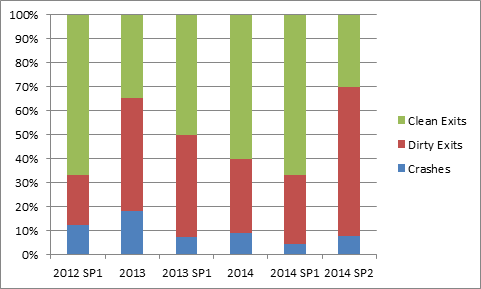
This morning I saw a post taking a poll on how often 2014 SP2 crashes. So, here’s some crash numbers from my system:
CER_data_2
There’s a big difference in the number of sessions, so a percentage chart might make it easier to compare the versions:
CER_data_1

Crashes are actual crashes caught by CER. What I called “dirty exits” are exits or crashes not caught by CER. For example, killing xsi.exe in the Task Manager is a dirty exit. Clean exits are when you quit Softimage normally (for example, when you click File > Exit or the Close X icon).

I used this Python snippet to extracts the CER crash data from the registry.

#HKEY_USERS\S-1-5-21-1384716164-225505876-396224183-1000\
#   Software\Softimage\SOFTIMAGE|SICORE Engine\C:|Program Files|Autodesk|Softimage 2014 SP2|Application|bin\ProductInfo

from _winreg import *

# dicts keyed by Softimage version
dCrashes = {}
dCleanCloses = {}
dStarts = {}

#
# Get the CER crash data for each SI version
# under the SOFTIMAGE|SICORE Engine key
# 
def enum_sicore( subkey ):
	try:
		i = 0
		k = OpenKey( HKEY_USERS, "%s\Software\Softimage\SOFTIMAGE|SICORE Engine" % subkey,  0, KEY_READ )
		while True:
			subkey1 = EnumKey(k, i)
			
			# extract product name eg "Softimage 2014 SP2"
			s = subkey1.rsplit( '|' )[3]
			
			pi_key = OpenKey( k, "%s\%s" % (subkey1,"ProductInfo"), 0, KEY_READ )

			value = QueryValueEx(pi_key, "crashCount" )
			dCrashes[ s ] = value[0]

			value = QueryValueEx(pi_key, "SessionCleanCloseCount" )
			dCleanCloses[ s ] = value[0]

			value = QueryValueEx(pi_key, "SessionStartCount" )
			dStarts[ s ] = value[0]

			i += 1
	except WindowsError:
		# WindowsError: [Errno 259] No more data is available    
		pass

#
# For each user
#  
try:
	i = 0
	while True:
		subkey = EnumKey(HKEY_USERS, i)
		enum_sicore( subkey )
		i += 1
except WindowsError:
	# WindowsError: [Errno 259] No more data is available    
	pass
	
#
# Print out the numbers
#
crashes = 0
exits = 0
starts = 0

for key in dCrashes:
	print key
	print "   Crashes: %d" % dCrashes[key]
	print "   Dirty Exits: %d" % (dStarts[key] - dCleanCloses[key])
	print "   Starts: %d" % dStarts[key]
	
	crashes += dCrashes[key]
	exits += (dStarts[key] - dCleanCloses[key])
	starts += dStarts[key]

# Print out CSV for export into Excel for charting
for key in dCrashes:
	print "%s, %d, %d, %d" % (key, dCrashes[key], dStarts[key] - dCleanCloses[key], dStarts[key])

Scripting: Changing the default value of a shader color channel


This snippet changes the default value of a single color channel (R in this case) an existing shaderdef:

from siutils import si        # Application
from siutils import log        # LogMessage
from siutils import disp    # win32com.client.Dispatch
from siutils import C        # win32com.client.constants

def dispFix( badDispatch ):
    import win32com.client.dynamic
    # Re-Wraps a bad dispatch into a working one:
    return win32com.client.dynamic.Dispatch(badDispatch)

# Get ShaderDef for the Environment shader
sProgID = "Softimage.mia_material_phen.1.0"
oDef = si.GetShaderDef( sProgID )

# Get ShaderParamDef for the Tranformation parameter
oReflectivity = oDef.InputParamDefs.GetParamDefByName( "reflectivity" )

# Change the default value
oReflectivity.DefaultValue = 0.333

oRefl_Color = oDef.InputParamDefs.GetParamDefByName( "refl_color" )
print si.ClassName( oRefl_Color )

x = dispFix(oRefl_Color).SubParamDefs
oRed = x.GetParamDefByName( "red" )
print oRed.DefaultValue
oRed.DefaultValue = 0.325

If you are adding a new shaderdef, you can do it like this:

shaderParamDefOptions.SetDefaultValue( [0.5, 0.3, 0.2] )

hat tip: Vladimir and Vincent on the Softimage mailing list

Syntax highlighting in the text editor widget


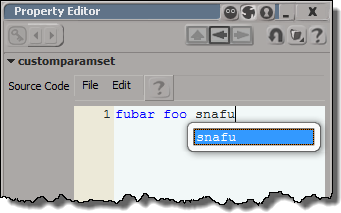
Syntax highlighting works only if you set the siUILanguage to one of cpp, c#, HTML, JScript, PerlScript, Python, VBScript, or XML. Then the language keywords are highlight, plus any keywords you add with the siUIKeywords attribute.

Syntax_highlight

from sipyutils import si			# win32com.client.Dispatch('XSI.Application')
from sipyutils import C			# win32com.client.constants

si=si()

p = XSIFactory.Createobject( 'CustomProperty' )
oParam = p.AddParameter3("TextEditorWidget", C.siString, '')

oLayout = p.PPGLayout
oLayout.Clear()

oItem = oLayout.AddItem( "TextEditorWidget", "Source Code", C.siControlTextEditor)
oItem.SetAttribute( "Language", "JScript" )
oItem.SetAttribute(C.siUIFont, "Courier New")
oItem.SetAttribute(C.siUIKeywords, "foo bar fubar snafu")
oItem.SetAttribute(C.siUIAutoComplete, "fubar");
oItem.SetAttribute(C.siUICommentFont, "Courier New")
oItem.SetAttribute(C.siUICommentColor, 0x75715e)
oItem.SetAttribute(C.siUIPreprocessorColor, 0x808080)
oItem.SetAttribute(C.siUIToolbar, True)
oItem.SetAttribute(C.siUIFontSize, 10)
oItem.SetAttribute(C.siUIHeight, 500)
oItem.SetAttribute(C.siUIBackgroundColor, 0xf8f8f2)
oItem.SetAttribute(C.siUIForegroundColor, 0x272822)
oItem.SetAttribute(C.siUIHorizontalScroll, True)
oItem.SetAttribute(C.siUIVerticalScroll, True)
oItem.SetAttribute(C.siUILineNumbering, True)
oItem.SetAttribute(C.siUILineWrap, False)
oItem.SetAttribute("UseSpacesForTab", True)
oItem.SetAttribute("TabSize", 2) 

si.inspectobj( p )

Scripting: Finding all materials that contain a specific shader


Given a shader, it’s not too hard to find all materials that use (aka “own”) an instance of that shader. Here’s a Python snippet that does just that.

Note that I don’t check whether or not the shader is actually used. This snippet finds all instances, whether they are used or not (last week I posted another snippet for checking whether a shader instances was ultimately connected to the material).

from sipyutils import si			# win32com.client.Dispatch('XSI.Application')
from sipyutils import disp		# win32com.client.Dispatch
from sipyutils import C			# win32com.client.constants
si = si()

def get_materials_that_use_shader( s ):	
	mats = disp( "XSI.Collection" )	
	oShaderDef = si.GetShaderDef( s.ProgID )
	for i in oShaderDef.ShaderInstances:
		try:
			mats.Add( i.Owners(0) )
		except Exception:
			pass

	mats.Unique = True
	return mats

#
# Find all materials that use a specific shader
#
s = si.Selection(0)
if s.IsClassOf( C.siShaderID ):
	mats = get_materials_that_use_shader( s )
	for m in mats:
		print( "%s in %s" % (m.Name, m.Owners(0)) )
else:
	si.LogMessage( "Cannot find shader instances. Please select a shader." )

# Material in Sources.Materials.DefaultLib
# Material1 in Sources.Materials.DefaultLib
# Material2 in Sources.Materials.DefaultLib
# Material3 in Sources.Materials.DefaultLib
# Material7 in Sources.Materials.DefaultLib
# Material6 in Sources.Materials.DefaultLib
# Material5 in Sources.Materials.DefaultLib
# Material4 in Sources.Materials.DefaultLib

Finding shader nodes with no connections


Here’s a JScript snippet that finds render tree nodes that are not connected to anything in the render tree.

LogMessage( isConnected( Selection(0) ) );

function isConnected( o )
{
	var oDR = XSIUtils.DataRepository ;

	var strOpInfo = oDR.GetConnectionStackInfo( o )
//	LogMessage( strOpInfo );
	var oTopNode = ParseXML( strOpInfo ) ;

	var oConnections = oTopNode.childNodes ;
	if ( oConnections.length == 0 )
	{
		return false;
	}
	return true;
}

function ParseXML( strXML )
{
	var oXMLParser = new ActiveXObject("Microsoft.XMLDOM") 
	oXMLParser.async = false	
	oXMLParser.loadXML( strXML ) ;

	if (oXMLParser.parseError.errorCode != 0) 
	{
		logmessage( "Invalid XML " + oXMLParser.parseError.reason , siError ) ;	
		return null ;
	}

	// the xsi_file node
	// If this is NULL we must have failed to load the XML
	var oTopNode = oXMLParser.documentElement ;

	return oTopNode ;
}

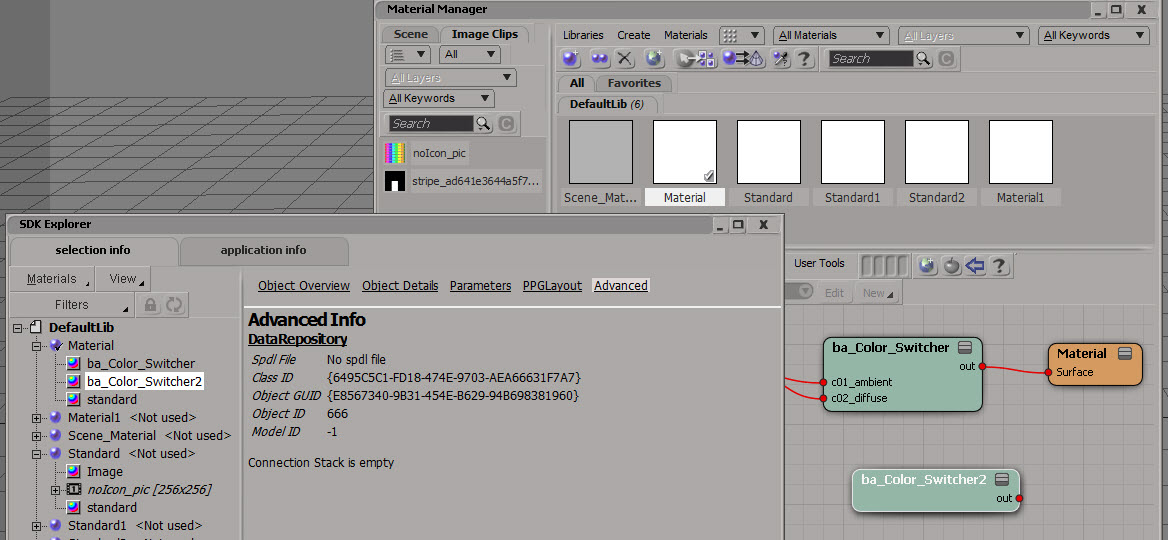
Most of this JScript came from the SDK Explorer code in $XSI_HOME\Addons\sdkui\Application\Plugins\SDKExplorer.js, because I noticed that disconnected shaders would have an empty connection stack, and I didn’t want to go through all the parameters individually looking for connections.
SDK_Explorer_Connection_stack_is_empty

Here’s a Python version that does a little more: it follows the output connections to check whether or not the shader is ultimately connected the material.

# Python Code
import xml.etree.ElementTree as etree

def is_connected( o ):
	if not o.IsClassOf( 52 ):
		print "Input is not a shader"
		return False
		
	sXML = XSIUtils.DataRepository.GetConnectionStackInfo( o )
	root = etree.fromstring( sXML )
	for connection in root:
		if connection.find('type').text == 'out':
			x = Application.Dictionary.GetObject( connection.find('object').text )
			return True if x.IsClassOf( 64 ) else is_connected( x )
				
	return False

print is_connected( Application.Selection(0) )

Finding materials used by a model


Here’s one way to get the materials used by model. Note that this will also get any materials applied to clusters.

si=Application

def get_mdl_materials( m ):
	from win32com.client import constants as c
	return m.FindObjects( c.siMaterialID )

Application.GetPresetModel("Man_Character", "Man_Character", "", "Character.Character_Designer")
for m in get_mdl_materials( si.Dictionary.GetObject( 'Man_Character' ) ):
	print m

And here’s an old-school way that uses a couple of string expressions:

si=Application
mdl = si.Dictionary.GetObject( 'Man_Character' )

import win32com.client
mats = win32com.client.Dispatch( "XSI.Collection" )
mats.Items = '{0}.{1},{0}.{2}'.format(mdl.Name, "*.cls.*.material", "*.material")

for m in mats:
	print (m)