Saturday snippet – Getting local properties of scene items


This snippet gets the local properties of anything in the selection list that has local properties.

from win32com.client import constants as C

for o in Application.Selection:
	localProps = (o.LocalProperties if o.IsClassOf( C.siSceneItemID ) else None)
	if localProps != None:
		for p in localProps:
			print p 

LocalProperties is a property of any SceneItem, so all you have to do is check whether the selected object implements the SceneItem interface.

Getting the ICE tree view from a menu callback


How do you get the ICE Tree view in a menu callback? For example, if you add a menu item to the ICE Tree > User Tools, how does the menu item callback get the ICE Tree view?

The answer is actually in code I posted before, but that was in a blog post titled Getting the selected ICE nodes. So, with that title, you wouldn’t necessarily think to look there.

So what’s the answer? Uses Context.GetAttribute( “Target” ). For custom menus in the views like the ICE Tree view, the Fcurve Editor, and the Material Manager, the Target attribute is the View object. And once you have the View object, you can get the View attributes.

#
# Callback added to the menu item with Menu.AddCallbackItem
#
def My_menuItem_Callback( in_ctxt ):

	# Get the ICE Tree view
	oView = in_ctxt.GetAttribute("Target")
	
	# 
	LogMessage( 'View: ' + oView.Name )
	
	# get the selected nodes
	nodes = oView.GetAttributeValue('selection')
	LogMessage( 'Selected nodes: ' + nodes )

Soapbox alert…
This post illustrates why indexes are a good thing…with them, you can find information no matter what page or heading contains the information.
For ICE trees, you’d have index entries something like this:

  • ICE tree
    • view attributes
      • target
      • container
    • selected nodes, getting
    • view, getting
    • ICETree node, getting

Saturday snippet – Wrapping an Undo


Two ways…

OneUndo decorater by Cesar Saez

from functools import wraps  
    
def OneUndo(function):  
   @wraps(function)  
   def _inner(*args, **kwargs):  
     try:  
       Application.BeginUndo()  
       f = function(*args, **kwargs)  
     finally:  
       Application.EndUndo()  
       return f  
   return _inner
#
# And a basic example...
# 
@OneUndo 
def CreateNulls(p_iCounter=100):
     lNulls = []
     for i in range(p_iCounter):
       lNulls.append( Application.ActiveSceneRoot.AddNull() )
     return lNulls

CreateNulls()

Undo with statement by ethivierge

from win32com.client import constants as c
from win32com.client.dynamic import Dispatch as d
 
xsi = Application
log = xsi.LogMessage
collSel = xsi.Selection
 
 
class xsiUndo():
    def __enter__(self):
        xsi.BeginUndo()
 
    def __exit__(self, type, value, traceback):
        xsi.EndUndo()
 
 
def testFunc():
    log("running test")
 
 
with xsiUndo():
    testFunc()

Scripting – Writing the DataArray of an ICE attribute


Here’s a little Python snippet that shows how to write to the DataArray of an ICE attribute.

from siutils import si
si = si()					# win32com.client.Dispatch('XSI.Application')
from siutils import log		# LogMessage
from siutils import disp	# win32com.client.Dispatch
from siutils import C		# win32com.client.constants

pc = si.GetPrim("PointCloud", "", "", "")
a = pc.ActivePrimitive.AddICEAttribute("MyScalarArray", C.siICENodeDataFloat, C.siICENodeStructureArray, C.siICENodeContextSingleton  )
a.DataArray = [[ 0.03, 3.33, 2.22, 3.333 ]]

a = pc.ActivePrimitive.AddICEAttribute("MyLong", C.siICENodeDataLong, C.siICENodeStructureSingle, C.siICENodeContextSingleton  )
a.DataArray = [3.1416*1000]

a = pc.ActivePrimitive.AddICEAttribute("MyScalar", C.siICENodeDataFloat, C.siICENodeStructureSingle, C.siICENodeContextSingleton  )
a.DataArray = [3.1416]

#
# Add some Attribute Display properties
# to show the attribute values
#

p = pc.AddProperty( "AttributeDisplay", False, "" )
p.Parameters( "attrname" ).Value = "MyScalar"

p = pc.AddProperty( "AttributeDisplay", False, "" )
p.Parameters( "attrname" ).Value = "MyLong"
p.Parameters( "offsety" ).Value = 16

p = pc.AddProperty( "AttributeDisplay", False, "" )
p.Parameters( "attrname" ).Value = "MyScalarArray"
p.Parameters( "offsety" ).Value = 32

I tried to do the same thing in JScript, but I couldn’t get it to work for arrays. Very frustrating.

pc = GetPrim("PointCloud", "", "", "");

a = pc.ActivePrimitive.AddICEAttribute("MyScalarArray", siICENodeDataFloat, siICENodeStructureArray, siICENodeContextSingleton  )

a.DataArray = [[ 0.03, 3.33, 2.22, 3.333 ]]
// WARNING : 3390 - This ICEAttribute doesn't refer to a 2D array: <Attribute: MyScalarArray>
//

a.DataArray = [ 0.03, 3.33, 2.22, 3.333 ]
// WARNING : 3392 - Invalid offset specified while extracting data from this attribute: <Attribute: MyScalarArray>
// <Offset: 108384008>
// 


// But this does works
a = pc.ActivePrimitive.AddICEAttribute("MyLong", siICENodeDataLong, siICENodeStructureSingle, siICENodeContextSingleton  )
a.DataArray = [3000]

PS You can find some usage of DataArray in the CrowdFX plugin (in the Softimage install dir).

Saturday snippet: XSICollection has no class


Calling Application.ClassName() on an XSICollection object returns “Object”, not the class name. Remember this when you’re using ClassName() to check what type of object is being handled in some piece of script.

# See http://docs.python.org/2/tutorial/errors.html#handling-exceptions
try:
	from win32com.client import Dispatch as disp
	from win32com.client import constants as C
	log = disp('XSI.Application').LogMessage
except ImportError: # pywin not installed
	pass
	
si = disp('XSI.Application') 
x = disp( "XSI.Collection" )

log( si.ClassName( x ) )

# INFO : Object

A long time ago, it was decided not to fix this, because the fix would break existing scripts. Back in those old days, the VBScript function TypeName() was used instead of Application.ClassName(), so you had a fair amount of VBScript that was checking whether TypeName() returned “Object”. (Calling TypeName() on most Softimage objects returns the class name)

You can see an example of this type [haha!] of thing in Application\DSScripts\animation.vbs:

        if TypeName( oObjectList ) = "Object" then
            set out_objs = oObjectList.Item(0)
        else
            set out_objs = oObjectList
        end if
 

Saturday Snippet: Finding the Python and PyWin version


Courtesy of Eric Thivierge:

import sys
import os
import distutils
import distutils.sysconfig
site_packages = distutils.sysconfig.get_python_lib(plat_specific=1)
build_no = open(os.path.join(site_packages, "pywin32.version.txt")).read().strip()
print "Python version:   " + sys.version
print "PyWin32 version:  " + build_no

See also Supported versions of Python and PyWin

Supported versions of Python


The “officially” supported versions of Python are the versions that ship with Softimage.

  • On Windows:

    Python 2.6.4 & PyWin 212
    We didn’t go with 2.7 because of a bug in PyWin 214.

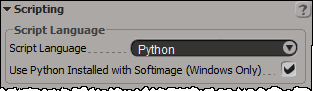
    You can use Python 2.7 if you have it installed on your system: just disable the internal Python in the scripting preferences.

    Softimage won’t work with Python 3.x

  • On Linux:

    Python 2.5
    Softimage ships with Python 2.5 because we needed to compile [and distribute] the pywin32 module for a specific Python version on Linux.

Saturday snippet: short-circuit evaluation


If you’re new[ish] to scripting, here’s a Python snippet that illustrates short-circuit evaluation of boolean expressions.

In this snippet, short-circuit evaluation is used to avoid errors. For example, if there is no such ICE attribute (nb is not None) then there is no attempt to try and use the ICE attribute methods like IsDefined.

The expression in the print statement also relies on operator precedence (not has higher precedence than and, so everything works as expected).

# Assume a polymesh is selected...
o = Application.Selection(0)

# Check the intrinsic ICE attribute
nb =  o.ActivePrimitive.ICEAttributes("NbPoints")
print nb is not None and nb.IsDefined and nb.DataArray[0] <= 0

The above snippet also relies on operator precedence (not has higher precedence than and, so everything works as expected).

Since or has higher precedence than and, you could write something like this:

nb.IsDefined and nb.DataArray[0] <= 0 or o.ActivePrimitive.Geometry.Polygons.Count <= 0

But I’d probably put in the parentheses just to be clear:

(nb.IsDefined and nb.DataArray[0] <= 0) or o.ActivePrimitive.Geometry.Polygons.Count <= 0

Finding empty polygon meshes


Now that there are intrinsic ICE attributes like NbPoints and NbPolygons, there a couple of ways you can check for an empty mesh:

# Assume a polymesh is selected...
o = Application.Selection(0)

# Check the intrinsic ICE attribute
nb =  o.ActivePrimitive.ICEAttributes("NbPoints")
print nb.IsDefined and nb.DataArray[0] <= 0

# Check using the object model
print o.ActivePrimitive.Geometry.Points.Count <= 0

The typical way to package this up for users it to define a filter. Then a user just has to select the filter and press CTRL+A. Here’s the Match callback for a filter that finds empty polygon meshes. Note that I switched to checking the number of polygons. That way, if somehow there was something weird like a mesh with just one point, you’d still find it.

The intrinsic attribute NbPolygons should always exist, but just to be sure I check IsDefined, and if that is False, I fall back to checking Geometry.Polygons.Count.

# Match callback for the EmptyPolygonMesh custom filter.
def EmptyPolygonMesh_Match( in_ctxt ):
	Application.LogMessage("EmptyPolygonMesh_Match called",constants.siVerbose)

	o = in_ctxt.GetAttribute( 'Input' )
	if o.type == 'polymsh':
		nb =  o.ActivePrimitive.ICEAttributes("NbPolygons")
		return (nb.IsDefined and nb.DataArray[0] <= 0) or o.ActivePrimitive.Geometry.Polygons.Count <= 0
	else:
		return False

I packaged the filter as an addon. Get it here.

Importing multiple FBX files with drag-and-drop


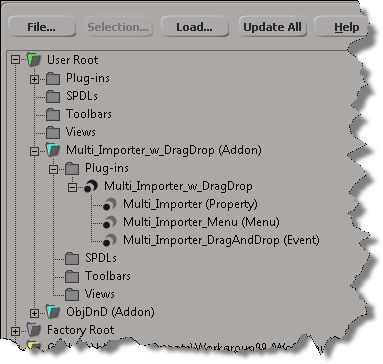
As an exercise, I updated Tim Crowson’s Multi_ImporterPPG addon with a DragAndDrop event, so you can import multiple files with a single drag-and-drop. You can download the modified version here.

Here’s the DragAndDrop event handler. The doit() function is also used by the Import menu command; I just had to generalize it a bit to work in either case (menu or drag-and-drop).

def Multi_Importer_DragAndDrop_OnEvent( in_ctxt ):

	action = in_ctxt.GetAttribute( "DragAndDropAction" )
	source = in_ctxt.GetAttribute( "DragSource" )

	if action == constants.siSourceDragAction:
		if re.search( r"\obj$", source, re.I ):
			in_ctxt.SetAttribute( "DragSourceSupported", True )
		elif re.search( r"fbx$", source, re.I ): 
			in_ctxt.SetAttribute( "DragSourceSupported", True )
		elif re.search( r"emdl$", source, re.I ): 
			in_ctxt.SetAttribute( "DragSourceSupported", True )
		elif re.search( r"lwo$", source, re.I ): 
			in_ctxt.SetAttribute( "DragSourceSupported", True )
		else:
			in_ctxt.SetAttribute( "DragSourceSupported", False )
		
	
	if action == constants.siSourceDropAction:

		Application.SetValue('preferences.Interaction.autoinspect', False, '')

		if not Application.ActiveSceneRoot.Properties( 'Multi_Importer' ):
			vtcol = Application.AddProp('Multi_Importer','Scene_Root')
			p = Application.Dictionary.GetObject( vtcol.Value("Value") )

			# Set the flag that hides certain parts of the PPG layout
			p.Parameters("bMenuCommand").Value = False

			# Inspect the PPG in modal mode
			Application.InspectObj( vtcol.Value("Value"), "", "", 4 )

			p.Parameters("bMenuCommand").Value = True
			
		p = Application.ActiveSceneRoot.Properties('Multi_Importer')

		options = { 
			'OBJgrouping' : p.Parameters('importOBJgrouping').Value,
			'OBJhrc' : p.Parameters('importOBJhrc').Value,
			'importOBJnormals' : p.Parameters('importOBJNormals').Value,
			'includeOBJmat' : p.Parameters('includeOBJMaterial').Value,
			'includeOBJuv' : p.Parameters('includeOBJUV').Value,
			'includeOBJwrap' : p.Parameters('includeOBJUVWrap').Value,
			'fbxScale' : p.Parameters('fbxScale').Value,
			'importEMDLasRef' : p.Parameters('importEMDLasRef').Value,
			'lwoScaleFactor' : p.Parameters('lwoScaleFactor').Value
			}
		
		doit( source, options )
	
	return True