Softimage 2013 Python shortcuts gotcha


Softimage 2013 includes some changes to the Python shortcuts:

from siutils import si
si = si()					# win32com.client.Dispatch('XSI.Application')
from siutils import log		# LogMessage
from siutils import disp	# win32com.client.Dispatch
from siutils import C		# win32com.client.constants

The big difference is that si shortcut is now a function that returns the Application object. We had to make this change to fix some weird memory leak (the si object was out of scope in the module where it was created, and the Python parser could not properly delete it upon exit).

Here’s a suggested workaround from the Dev team to maintain backward-compatibility:

# ---python code begin ---
from siutils import si

if Application.Version().split('.')[0]>= "11":
	si = si()					# win32com.client.Dispatch('XSI.Application')

from siutils import log		# LogMessage
from siutils import disp	# win32com.client.Dispatch
from siutils import C		# win32com.client.constants
# --- python code end ---

The if block executes only if the current Softimage version is later than 11, which corresponds to 2013 or later.

hat tip: SS

ObjectIDs and objects that don’t exist


As noted by iamVFX on si-community, the new Python method Application.GetObjectFromID2 doesn’t deal well with IDs that don’t match an object that exists in the scene (in fact, it crashes Softimage). The JScript version, Application.GetObjectFromID simply returns null in that situation.

So, it is probably best to use DataRepository.HasData to check if the ID represents a real object.

Note that Dictionary.GetObject can also be used to get objects by ID.

from siutils import si
si = si()					# win32com.client.Dispatch('XSI.Application')
from siutils import log		# LogMessage
from siutils import disp	# win32com.client.Dispatch
from siutils import C		# win32com.client.constants


MAX_IDS = 2000

for i in range(0,MAX_IDS):
	if XSIUtils.DataRepository.HasData( i ):
		try:
			o =  si.GetObjectFromID2( i )
			log( "%s : %s" % (str(i), o.FullName) )
		except:
			o = Application.Dictionary.GetObject( "object<%s>" % str(i) )
			s = "%s : GetObjectFromID2 failed. Dictionary.GetObject found %s (%s)" % (str(i), o.Name, si.ClassName(o))
			log( s )
	else:
		log( "%s : No object with this ID exists" % str(i) )

A new, blank Softimage 2013 scene has 757 objects. For your reading pleasure, the full list is below the fold.
Continue reading

New Python methods in 2013


A few people have asked me about the new “Python-specific” methods added in the Softimage 2013 SDK.

Basically, these new “Python-specific” methods are wrappers for the existing methods. What the new, Python-specific versions do is make sure you get back an object that supports all the advertised methods and properties of the class hierarchy.

For example, Menu is a subclass of MenuItem, and Menu adds new methods like AddCommandItem().

Menu.AddItem() returns a Menu object that supports all the MenuItem methods and properties, but doesn’t support the Menu methods and properties, such as Menu.AddCommandItem().

Menu.AddItem2() , on the other hand, returns an object that supports all the MenuItem and Menu methods and properties.

I blogged about the Menu.AddItem() problem awhile back.

Python-specific methods

  • Clip.AddProperty2 – Creates and adds a UserDataBlob or CustomProperty to a Clip object. This method is specific to the python language.
  • Layout.CreateViewFromDefinitionFile2 – Creates a new View object given the path to its definition on disk. This method is similar to Layout.CreateViewFromDefinitionFile but specific to the python language.
  • Layout.FindView2 – Finds an existing View object given a name in this layout. This method is similar to Layout.FindView but specific to the python language.
  • Menu.AddItem2 – Adds a menu item at to end of the menu. This method is similar to Menu.AddItem but specific to the python language.
  • Menu.AddCommandItem2 – Adds a menu item at the end of the menu and attaches a command. This method is similar to Menu.AddCommandItem but specific to the python language.
  • Menu.AddCallbackItem2 – Adds a menu item to the end of the menu and attaches a callback function. This method is similar to Menu.AddCallbackItem but specific to the python language.
  • ICENode.GetPortFromName2 – Returns the ICENodePort object that matches a specific port name. This method is similar to ICENode.GetPortFromName but specific to the python language.
  • ICENode.GetPortFromIndex2 – Returns the ICENodePort object specified by a port index, group index and group instance index. This method is similar to ICENode.GetPortFromIndex but specific to the python language.
  • Operator.GetPort3 – Returns the specified Port object for the operator. This method is similar to Operator.GetPort2 but specific to the python language.
  • Override.AddParameterEntry2 – Adds a new entry to override the input parameter and returns the new overriding parameter. This method is similar to Override.AddParameterEntry but specific to the python language.
  • Primitive.GetGeometry3 – Returns a Geometry object containing the object’s geometry. This method is similar to Primitive.GetGeometry2 but specific to the python language.
  • SceneItem.GetPropertyFromName2 – Returns a property, given its scripting name. This method is similar to SceneItem.GetPropertyFromName but specific to the python language.
  • SceneItem.GetLocalPropertyFromName2 – Returns a local property, given its scripting name. This method is similar to SceneItem.GetLocalPropertyFromName but specific to the python language.
  • ShaderArrayParamDef.ItemDef2 – Returns the underlying ShaderParamDef or ShaderStructParamDef object for this array item. This method is similar to ShaderArrayParamDef.ItemDef but specific to the Python language.
  • ShaderArrayParameter.Item2 – Returns the specified ShaderParameter item in this array. This method is similar to ShaderArrayParameter.Item but specific to the Python language.
  • ShaderParamDefContainer.AddParamDef2 – This method is similar to ShaderParamDefContainer.AddParamDef but specific to the Python language.
  • ShaderParamDefContainer.GetParamDefByName2 – Returns the ShaderParamDef that matches the specified name from this container. This method is similar to ShaderParamDefContainer.GetParamDefByName but specific to the Python language.
  • ShaderParameter.Definition2 – Returns the shader parameter definition as a ShaderParamDef object. This method is similar to ShaderParameter.Definition but specific to the Python language.
  • View.FindView2 – Finds an existing View object given a name. This method is similar to View.FindView but specific to the Python language.
  • X3DObject.GetActivePrimitive3 – Returns the 3D object’s active Primitive for a given frame. This method is similar to X3DObject.GetActivePrimitive2 but specific to the Python language.
  • XSIApplication.ActiveProject3 – Returns or sets the active XSIProject object. This method is similar to XSIApplication.ActiveProject2 but specific to the Python language.
  • XSIApplication.GetObjectFromID2 – Returns the object matching the specified ID. This method is similar to XSIApplication.GetObjectFromID but specific to the python language.
  • XSIFactory.CreateObjectFromPreset2 – Creates an object from a preset and optional preset family name. This method is similar to XSIFactory.CreateObjectFromPreset but specific to the Python language.

What’s new in the 2013 SDK


I see that some of you have found the 2013 docs.
For your convenience, here’s a list of the new commands and Object Model methods, but with actual links 🙂

New Commands

New Methods (Object Model)

  • ICEAttribute.DataArray – Sets a 1D Array object containing the data defined by an attribute.
  • ICEAttribute.DataArray2D – Sets a 2D Array object containing the 2D data defined by an attribute.
  • XSICollection.Filter – Returns a subset of this collection as a new collection of objects matching the filter criteria.
  • Clip.AddProperty2 – Creates and adds a UserDataBlob or CustomProperty to a Clip object. This method is specific to the python language.
  • Geometry.AddICEAttribute – Adds and returns a new attribute data on a geometry.
  • Geometry.RemoveICEAttribute – Removes a non-built-in attribute from a geometry if not required by an ICETree.
  • Layout.CreateViewFromDefinitionFile2 – Creates a new View object given the path to its definition on disk. This method is similar to Layout.CreateViewFromDefinitionFile but specific to the python language.
  • Layout.FindView2 – Finds an existing View object given a name in this layout. This method is similar to Layout.FindView but specific to the python language.
  • Menu.AddItem2 – Adds a menu item at to end of the menu. This method is similar to Menu.AddItem but specific to the python language.
  • Menu.AddCommandItem2 – Adds a menu item at the end of the menu and attaches a command. This method is similar to Menu.AddCommandItem but specific to the python language.
  • Menu.AddCallbackItem2 – Adds a menu item to the end of the menu and attaches a callback function. This method is similar to Menu.AddCallbackItem but specific to the python language.
  • ICENode.GetPortFromName2 – Returns the ICENodePort object that matches a specific port name. This method is similar to ICENode.GetPortFromName but specific to the python language.
  • ICENode.GetPortFromIndex2 – Returns the ICENodePort object specified by a port index, group index and group instance index. This method is similar to ICENode.GetPortFromIndex but specific to the python language.
  • Operator.GetPortAt – Returns the specified Port object. This method is similar to Operator.PortAt but specific to the python language.
  • Operator.GetPort3 – Returns the specified Port object for the operator. This method is similar to Operator.GetPort2 but specific to the python language.
  • Override.AddParameterEntry2 – Adds a new entry to override the input parameter and returns the new overriding parameter. This method is similar to Override.AddParameterEntry but specific to the python language.
  • Primitive.GetGeometry3 – Returns a Geometry object containing the object’s geometry. This method is similar to Primitive.GetGeometry2 but specific to the python language.
  • ProjectItem.AddICEAttribute – Adds and returns a new attribute data on this object.
  • ProjectItem.RemoveICEAttribute – Removes a non-built-in attribute from a geometry if not required by an ICETree.
  • SceneItem.GetPropertyFromName2 – Returns a property, given its scripting name. This method is similar to SceneItem.GetPropertyFromName but specific to the python language.
  • SceneItem.GetLocalPropertyFromName2 – Returns a local property, given its scripting name. This method is similar to SceneItem.GetLocalPropertyFromName but specific to the python language.
  • ShaderArrayParamDef.ItemDef2 – Returns the underlying ShaderParamDef or ShaderStructParamDef object for this array item. This method is similar to ShaderArrayParamDef.ItemDef but specific to the Python language.
  • ShaderArrayParameter.Item2 – Returns the specified ShaderParameter item in this array. This method is similar to ShaderArrayParameter.Item but specific to the Python language.
  • ShaderParamDefContainer.AddParamDef2 – This method is similar to ShaderParamDefContainer.AddParamDef but specific to the Python language.
  • ShaderParamDefContainer.GetParamDefByName2 – Returns the ShaderParamDef that matches the specified name from this container. This method is similar to ShaderParamDefContainer.GetParamDefByName but specific to the Python language.
  • ShaderParameter.Definition2 – Returns the shader parameter definition as a ShaderParamDef object. This method is similar to ShaderParameter.Definition but specific to the Python language.
  • View.FindView2 – Finds an existing View object given a name. This method is similar to View.FindView but specific to the Python language.
  • X3DObject.GetActivePrimitive3 – Returns the 3D object’s active Primitive for a given frame. This method is similar to X3DObject.GetActivePrimitive2 but specific to the Python language.
  • XSIApplication.ActiveProject3 – Returns or sets the active XSIProject object. This method is similar to XSIApplication.ActiveProject2 but specific to the Python language.
  • XSIApplication.GetObjectFromID2 – Returns the object matching the specified ID. This method is similar to XSIApplication.GetObjectFromID but specific to the python language.
  • XSIFactory.CreateObjectFromPreset2 – Creates an object from a preset and optional preset family name. This method is similar to XSIFactory.CreateObjectFromPreset but specific to the Python language.
  • ShaderParamDefOptions.SetReadOnly – Sets the Read Only capability of the Shader parameter.
  • XSIApplication.GetCustomPropertyCount – Returns the Custom Property count for a given type.

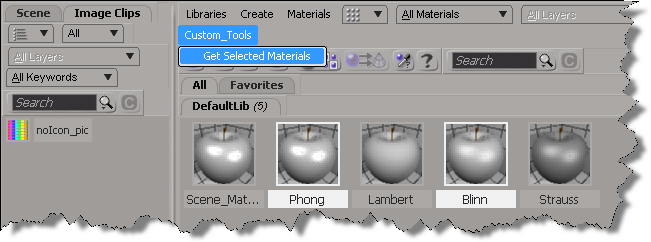
New in Softimage 2013: Getting the selected materials in the Material Manager


In 2013, you can use the selection view attribute to get the materials that are selected in the Material Manager.

Here’s a python custom menu item that shows how to do it. In summary, you do this:

  • Add a custom menu in the Manager Manager
  • Use a callback item, so you can get the view from the context
  • Use selection view attribute to get the names of the selected materials
import win32com.client
from win32com.client import constants

null = None
false = 0
true = 1

def XSILoadPlugin( in_reg ):
	in_reg.Author = "blairs"
	in_reg.Name = "MaterialsManagerPlugin"
	in_reg.Major = 1
	in_reg.Minor = 0

	in_reg.RegisterMenu(constants.siMenuMaterialManagerTopLevelID,"Custom_Tools",false,false)
	#RegistrationInsertionPoint - do not remove this line

	return true

def XSIUnloadPlugin( in_reg ):
	strPluginName = in_reg.Name
	Application.LogMessage(str(strPluginName) + str(" has been unloaded."),constants.siVerbose)
	return true

def Custom_Tools_Init( in_ctxt ):
	oMenu = in_ctxt.Source
	oMenu.AddCallbackItem("Get Selected Materials","OnGetSelected")
	return true

def OnGetSelected( c ):
	view = c.GetAttribute( "Target" )
	Application.LogMessage( view )
	
	Application.LogMessage( view.GetAttributeValue( "selection" ) )
	for mat in view.GetAttributeValue( "selection" ).split(","):
		Application.LogMessage(  mat )

	return true

New in Softimage 2013: Script the codec for viewport captures


In Softimage 2013, you can use the ViewportCapture.DSCodec parameter to set the codec for your viewport captures.

http://vimeo.com/39630053

DSCodec is an string that encodes the codec ID and parameters. To get the DSCodec value, do a viewport capture and set the Codec. Softimage will log the DSCodec value in the script history:

# INFO : ViewportCapture.DSCodec: AAAAFnNwdGxycHphAAAAAAAQAAACAAAAABR0cHJsAAACAAAeAAAAAAAYAAAAGGRyYXQAAAAAAAAAUwAAAQAAAAEAAAAACW1wc28AAAAADG1mcmEAAAAAAAAADHBzZnIAAAAAAAAACWJmcmEAAAAACm1wZXMAAAAAABxoYXJkAAAAAAAAAAAAAAAAAAAAAAAAAAAAAAAKc2RuZQAAAAAADGNtZnJhcHBsAAAAAA==

Here’s a Python snippet that shows how to set the DSCodec parameter:

from siutils import si
si = si()					# win32com.client.Dispatch('XSI.Application')
from siutils import log		# LogMessage
from siutils import disp	# win32com.client.Dispatch
from siutils import C		# win32com.client.constants

def dispFix( badDispatch ):
	    import win32com.client.dynamic
	    # Re-Wraps a bad dispatch into a working one:
	    return win32com.client.dynamic.Dispatch(badDispatch)

oViewportCapture = dispFix(si.Dictionary.GetObject( "ViewportCapture" ))
oViewportCapture.NestedObjects("File Name").Value = "C:\\test.mov";

oDSCodec = oViewportCapture.NestedObjects("DSCodec")

#log( oDSCodec.Value )
# INFO : ViewportCapture.DSCodec: AAAAFnNwdGxycHphAAAAAAAQAAACAAAAABR0cHJsAAACAAAeAAAAAAAYAAAAGGRyYXQAAAAAAAAAUwAAAQAAAAEAAAAACW1wc28AAAAADG1mcmEAAAAAAAAADHBzZnIAAAAAAAAACWJmcmEAAAAACm1wZXMAAAAAABxoYXJkAAAAAAAAAAAAAAAAAAAAAAAAAAAAAAAKc2RuZQAAAAAADGNtZnJhcHBsAAAAAA==

oDSCodec.Value = "AAAAFnNwdGxycHphAAAAAAAQAAACAAAAABR0cHJsAAACAAAeAAAAAAAYAAAAGGRyYXQAAAAAAAAAUwAAAQAAAAEAAAAACW1wc28AAAAADG1mcmEAAAAAAAAADHBzZnIAAAAAAAAACWJmcmEAAAAACm1wZXMAAAAAABxoYXJkAAAAAAAAAAAAAAAAAAAAAAAAAAAAAAAKc2RuZQAAAAAADGNtZnJhcHBsAAAAAA=="

New in Softimage 2013: Filtering XSICollections


In Softimage 2013, the XSICollection object now has a Filter method, so you can filter XSICollections by type, family, or path name.

oFilteredCollection = XSICollection.Filter( [Type], [Families], [Path] )

I updated my find all cameras script to use XSICollection.Filter, and here’s the timing results (form the same scene, but in 2013).

# INFO : getCameras_FindObjects finished in 0.033000 seconds
# INFO : Found 8301 cameras
# INFO : getCameras_FindObjects_w_Filter finished in 0.269000 seconds
# INFO : Found 24 cameras
# INFO : getCameras_FindObjects_w_SIFilter finished in 0.044000 seconds
# INFO : Found 24 cameras
# INFO : getCameras_FindObjects2 finished in 0.001000 seconds
# INFO : Found 49 cameras
# INFO : getCameras_FindObjects2_w_Filter finished in 0.003000 seconds
# INFO : Found 24 cameras
# INFO : getCameras_FindChildren2 finished in 0.149000 seconds
# INFO : Found 24 cameras
# INFO : getCameras_SelectAllUsingFilter finished in 0.035000 seconds
# INFO : Found 24 cameras
  • FindObjects2 is fastest, with SelectAllUsingFilter a mildly surprising second (again note that I’m calling SelectAllUsingFilter with AffectSelectionList=False, so I’m not actually selecting anything).
    FindObjects2_w_Filter		0.003000 seconds
    SelectAllUsingFilter		0.035000 seconds
    FindObjects_w_SIFilter		0.044000 seconds
    FindChildren2			0.149000 seconds
    FindObjects_w_Filter		0.269000 seconds
    
  • FindObjects finds a lot more than just cameras; it finds lots of nulls too because that GUID isn’t unique to cameras
  • In this context, SIFilter is faster than the XSICollection.Filter method

Here’s the updated script for Softimage 2013:

import time
si = Application
log = si.LogMessage
from win32com.client import constants as C

import win32com.client
oCameraColl = win32com.client.Dispatch( "XSI.Collection" )

si.SetValue("preferences.scripting.cmdlog", False, "")


def timeExecution(func):
    def closure(*args, **kwargs):
        startTime = time.time()
        try:
            ret = func(*args, **kwargs)
        except Exception, e:
            delta = time.time() - startTime
            log('Failed in %f seconds' % delta)
            raise
        delta = time.time() - startTime
        log('%s finished in %f seconds' % (func.__name__, delta))
        return ret
    return closure 

@timeExecution
def getCameras_FindObjects():
	oCameraColl = Application.FindObjects( "", "{5FC0CCAE-3DC8-11D0-9449-00AA006D3165}" )
	return oCameraColl.Count

@timeExecution
def getCameras_FindObjects_w_Filter():
	oCameraColl = Application.FindObjects( "", "{5FC0CCAE-3DC8-11D0-9449-00AA006D3165}" )
	oCameraColl = oCameraColl.Filter( "camera" )
	oCameraColl.RemoveItems( oCameraColl.Filter( "", "", "CopyPaste*" ) )
	oCameraColl.RemoveItems( oCameraColl.Filter( "", "", "View*" ) )
	return oCameraColl.Count

@timeExecution
def getCameras_FindObjects_w_SIFilter():
	oCameraColl = Application.FindObjects( "", "{5FC0CCAE-3DC8-11D0-9449-00AA006D3165}" )
	oCameraColl = si.SIFilter( oCameraColl, "camera" )
	oCameraColl.RemoveItems( oCameraColl.Filter( "", "", "CopyPaste*" ) )
	oCameraColl.RemoveItems( oCameraColl.Filter( "", "", "View*" ) )
	return oCameraColl.Count


@timeExecution
def getCameras_FindObjects2():
	c = si.FindObjects2( C.siCameraID )
	return c.Count

@timeExecution
def getCameras_FindObjects2_w_Filter():
	cams = si.FindObjects2( C.siCameraID )
	oCameraColl.Items = cams
	oCameraColl.RemoveItems( cams.Filter( "", "", "CopyPaste*" ) )
	oCameraColl.RemoveItems( cams.Filter( "", "", "View*" ) )
	return oCameraColl.Count


@timeExecution
def getCameras_FindChildren2():
	cams = si.ActiveSceneRoot.FindChildren2("", "camera")
	return cams.Count

@timeExecution
def getCameras_SelectAllUsingFilter():
	cams = si.SelectAllUsingFilter("Camera", "siIgnoreComponentVisibility", False, "")
	return cams.Count


@timeExecution
def getCameras_Model_FindObjects():
	cams = si.ActiveSceneRoot.FindObjects( C.siCameraID )
	return cams.Count


log( 'Found %d cameras' % getCameras_FindObjects() )
log( 'Found %d cameras' % getCameras_FindObjects_w_Filter() )
log( 'Found %d cameras' % getCameras_FindObjects_w_SIFilter() )
log( 'Found %d cameras' % getCameras_FindObjects2() )
log( 'Found %d cameras' % getCameras_FindObjects2_w_Filter() )
log( 'Found %d cameras' % getCameras_FindChildren2() )
log( 'Found %d cameras' % getCameras_SelectAllUsingFilter() )

Scripting – Finding all cameras in a scene


In scripting, there’s several ways to find all the cameras in a scene.

I put together a little script to do some timing of the different ways of finding cameras.
Here’s a quick summary (using a scene with about 10k 3d objects). YMMV.

See this related thread on the XSI list. If you need to find scenes cameras frequently, then one suggestion (from Matt Lind) was to tag the scene cameras with a custom property, and then use FindObjects/FindObjects2 on that.

import time
si = Application
log = si.LogMessage
from win32com.client import constants as C

import win32com.client
oCameraColl = win32com.client.Dispatch( "XSI.Collection" )

si.SetValue("preferences.scripting.cmdlog", False, "")

#
# From http://www.softimageblog.com/archives/357
#
def timeExecution(func):
    def closure(*args, **kwargs):
        startTime = time.time()
        try:
            ret = func(*args, **kwargs)
        except Exception, e:
            delta = time.time() - startTime
            log('Failed in %f seconds' % delta)
            raise
        delta = time.time() - startTime
        log('%s finished in %f seconds' % (func.__name__, delta))
        return ret
    return closure 

@timeExecution
def getCameras_Application_FindObjects2():
	c = si.FindObjects2( C.siCameraID )
	return c.Count

@timeExecution
def getCameras_Application_FindObjects2_w_Filter():
	cams = si.FindObjects2( C.siCameraID )
	oCameraColl.Items = cams
	oCameraColl.RemoveItems( cams.Filter( "", "", "CopyPaste*" ) )
	oCameraColl.RemoveItems( cams.Filter( "", "", "View*" ) )

	return oCameraColl.Count


@timeExecution
def getCameras_FindChildren2():
	cams = si.ActiveSceneRoot.FindChildren2("", "camera")
	return cams.Count

@timeExecution
def getCameras_SelectAllUsingFilter():
	cams = si.SelectAllUsingFilter("Camera", "siIgnoreComponentVisibility", False, "")
	return cams.Count

@timeExecution
def getCameras_FindObjects():
	cams = Application.FindObjects( "", "{5FC0CCAE-3DC8-11D0-9449-00AA006D3165}" )

	# That GUID returns lots of other objects besides cameras
	cams = si.SIFilter( cams, 'camera' )

	# Unfortunately, XSICollection doesn't have a Filter method
#	oCameraColl.Items = cams
#	oCameraColl.RemoveItems( cams.Filter( "", "", "CopyPaste*" ) )
#	oCameraColl.RemoveItems( cams.Filter( "", "", "View*" ) )
	return cams.Count

# This finds cameras directly under a model only
@timeExecution
def getCameras_Model_FindObjects():
	cams = si.ActiveSceneRoot.FindObjects( C.siCameraID )
	return cams.Count


log( 'Found %d cameras' % getCameras_FindObjects() )
log( 'Found %d cameras' % getCameras_Application_FindObjects2() )
log( 'Found %d cameras' % getCameras_Application_FindObjects2_w_Filter() )
log( 'Found %d cameras' % getCameras_FindChildren2() )
log( 'Found %d cameras' % getCameras_SelectAllUsingFilter() )

Here’s some numbers from a scene with 9857 objects

# INFO : getCameras_FindObjects finished in 0.034000 seconds
# INFO : Found 68 cameras

# INFO : getCameras_FindObjects2 finished in 0.002000 seconds
# INFO : Found 68 cameras

# INFO : getCameras_FindObjects2_w_Filter finished in 0.005000 seconds
# INFO : Found 24 cameras

# INFO : getCameras_FindChildren2 finished in 0.153000 seconds
# INFO : Found 24 cameras

# INFO : getCameras_SelectAllUsingFilter finished in 0.034000 seconds
# INFO : Found 24 cameras

Polygon Islands, arrays, and indices


I was skimming through Guillaume’s posts on polygon islands and arrays, and in particular I was looking at the Get Lowest Point Index by Islands compound. That’s a pretty neat technique for sure, but I had to think about it a bit before I really understood what was going on…

So as an exercise I took a different approach. I used scripting to find the polygon islands and generate an array of island indices for the polygons, and then plugged that into ICE:
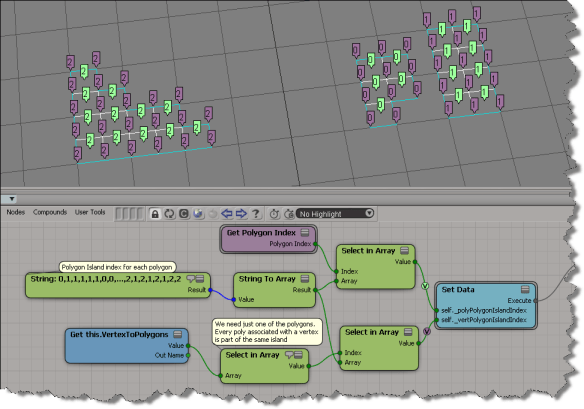
For the script, I adapted a script posted by Alan Fregtman to return a list of lists (a list of islands, and for each island, a list of poly indices).

Here’s the code:

from siutils import si		# Application
from siutils import log		# LogMessage
from siutils import disp	# win32com.client.Dispatch
from siutils import C		# win32com.client.constants
 
def getPolygonIslands( o ):
	
	if not o or o.type != "polymsh" :
		log( "Cannot work without an object" )
		return
		
	selFilter = si.Filters("Polygon_Island")
	thisPoly = XSIFactory.CreateActiveXObject("XSI.Collection")

	# List of lists
	islands = []
	
	# List of polygons that have already been checked
	usedArr = []
	
	for poly in o.ActivePrimitive.Geometry.Polygons:
		if poly.Index not in usedArr:
			thisPoly.Add(poly)
			island = selFilter.Subset(thisPoly)
			island = si.Dictionary.GetObject(island).SubComponent.ComponentCollection.IndexArray
			usedArr.extend(island)
			islands.append( island )
			thisPoly.RemoveAll()
			
	return islands
	
islands = getPolygonIslands( si.Selection(0) )

log( islands )
# INFO : [(0, 6, 7, 10, 11), (1, 2, 3, 4, 5, 18, 20, 22), (8, 9, 12, 13, 14, 15, 16, 17, 19, 21, 23, 24)]

# I use a dict instead or pre-initializing a list of the required size
dict = {}
for i in range(len(islands)):
	for j in range(len(islands[i])):
		dict[islands[i][j]] = str(i)
		
log( ",".join( dict.itervalues()) )
# INFO : 0,1,1,1,1,1,0,0,2,2,0,0,2,2,2,2,2,2,1,2,1,2,1,2,2

To get that into an ICE Tree, I put together a little plugin that adds a menu command to the ICE Tree > User Tools menu.

By using a menu item callback, I can get the ICE Tree view from the callback context, and then from the view, the ICE Tree operator via the container view attribute.

I scripted the creation of the little ICE tree, and that’s pretty tedious work. If I was going to distribute something like this, I think I’d include a pre-built compound in an addon.

# GetPolygonIslandsPlugin
# Initial code generated by Softimage SDK Wizard
# Executed Wed Mar 21 06:36:33 EDT 2012 by blairs
# 
from siutils import si		# Application
from siutils import log		# LogMessage
from siutils import disp	# win32com.client.Dispatch
from siutils import C		# win32com.client.C

null = None
false = 0
true = 1

def XSILoadPlugin( in_reg ):
	in_reg.Author = "blairs"
	in_reg.Name = "GetPolygonIslandsPlugin"
	in_reg.Major = 1
	in_reg.Minor = 0

	in_reg.RegisterCommand("GetPolygonIslands","GetPolygonIslands")
	in_reg.RegisterMenu(C.siMenuICEViewToolsID,"GetPolygonIslands_Menu",false,false)
	#RegistrationInsertionPoint - do not remove this line

	return true

def XSIUnloadPlugin( in_reg ):
	strPluginName = in_reg.Name
	Application.LogMessage(str(strPluginName) + str(" has been unloaded."),C.siVerbose)
	return true

def GetPolygonIslands_Init( in_ctxt ):
	oCmd = in_ctxt.Source
	oCmd.Description = ""
	oCmd.ReturnValue = true

	oArgs = oCmd.Arguments
	oArgs.AddWithHandler("object","SingleObj")
	return true

def GetPolygonIslands_Execute( object ):

	Application.LogMessage("GetPolygonIslands_Execute called",C.siVerbose)

	if not object or object.type != "polymsh" :
		log( "GetPolygonIslands: Cannot work without an object" )
		return
		
	selFilter = si.Filters("Polygon_Island")
	thisPoly = XSIFactory.CreateActiveXObject("XSI.Collection")

	# List of lists
	islands = []
	
	# List of polygons that have already been checked
	usedArr = []
	
	for poly in object.ActivePrimitive.Geometry.Polygons:
		if poly.Index not in usedArr:
			log( poly.Index )
			thisPoly.Add(poly)
			island = selFilter.Subset(thisPoly)
			island = si.Dictionary.GetObject(island).SubComponent.ComponentCollection.IndexArray
			usedArr.extend(island)
			islands.append( island )
			thisPoly.RemoveAll()
			
	return islands

def GetPolygonIslands_Menu_Init( in_ctxt ):
	oMenu = in_ctxt.Source
	oMenu.AddCallbackItem( "Get Polygon Islands Index Array", "OnGetPolygonIslands" )
	return true

def OnGetPolygonIslands( in_ctxt ):

	Application.LogMessage("OnGetPolygonIslands called",C.siVerbose)

	view = in_ctxt.GetAttribute( "Target" )
	op = si.Dictionary.GetObject( view.GetAttributeValue( "container" ) )

	log( "Getting polygon islands. This may take a few seconds..." )
	islands = si.GetPolygonIslands( op.Parent3DObject )

	log( "Building polygon island index list" )
	dict = {}
	for i in range(len(islands)):
		for j in range(len(islands[i])):
			dict[islands[i][j]] = str(i)
			
	s = ",".join( dict.itervalues() )
	
	# Temporarily disable command logging
	bLog = si.Preferences.GetPreferenceValue( "scripting.cmdlog" )
	if bLog == True:
			si.Preferences.SetPreferenceValue( "scripting.cmdlog", False )

	# Add String node to ICE tree
	oStringNode = si.AddICENode("$XSI_DSPRESETS\\ICENodes\\StringNode.Preset", op.FullName )
	oStringNode.Parameters( "value_string" ).Value = s

	#
	# Set up ICE branch to set the attributes:
	# self._polyPolygonIslandIndex 
	# self._vertPolygonIslandIndex attributes
	#
	oStringToArray = si.AddICENode("StringToArray", op.FullName)
	si.ConnectICENodes( oStringToArray.InputPorts("Value"), oStringNode.OutputPorts("result") )

	oSelectInArrayNode = si.AddICENode("$XSI_DSPRESETS\\ICENodes\\SelectInArrayNode.Preset", op.FullName)
	oIntegerNode = si.AddICENode("$XSI_DSPRESETS\\ICENodes\\IntegerNode.Preset", op.FullName)
	si.ConnectICENodes( oSelectInArrayNode.InputPorts("array"), oIntegerNode.OutputPorts("result") )
	si.ConnectICENodes( oSelectInArrayNode.InputPorts("array"), oStringToArray.OutputPorts("result") )
	si.DeleteObj( oIntegerNode )
	
	oGet_Polygon_Index = si.AddICECompoundNode("Get Polygon Index", op.FullName)
	si.ConnectICENodes(oSelectInArrayNode.InputPorts("index"), oGet_Polygon_Index.OutputPorts("Polygon_Index"))

	oSetDataNode = si.AddICECompoundNode("Set Data", op.FullName )
	si.SetValue( oSetDataNode.FullName + ".Reference", "self._polyPolygonIslandIndex", "")
	si.AddPortToICENode(oSetDataNode.FullName + ".Value", "siNodePortDataInsertionLocationAfter")
	si.SetValue(oSetDataNode.FullName + ".Reference1", "self._vertPolygonIslandIndex", "")

	si.ConnectICENodes( oSetDataNode.InputPorts("Value"), oSelectInArrayNode.OutputPorts("value") )
	
	oSelectInArrayNode = si.AddICENode("$XSI_DSPRESETS\\ICENodes\\SelectInArrayNode.Preset", op.FullName)
	oSelectInArrayNode1 = si.AddICENode("$XSI_DSPRESETS\\ICENodes\\SelectInArrayNode.Preset", op.FullName)
	oGetDataNode = si.AddICENode("$XSI_DSPRESETS\\ICENodes\\GetDataNode.Preset", op.FullName)
	si.SetValue( oGetDataNode.FullName + ".reference", "this.VertexToPolygons", "")

	si.ConnectICENodes(oSelectInArrayNode.InputPorts("array"), oGetDataNode.OutputPorts("value") )

	si.ConnectICENodes( oSelectInArrayNode1.InputPorts("index"), oSelectInArrayNode.OutputPorts("value") )
	si.ConnectICENodes( oSelectInArrayNode1.InputPorts("array"), oStringToArray.OutputPorts("result") )
	si.ConnectICENodes( oSetDataNode.InputPorts("Value1"), oSelectInArrayNode1.OutputPorts("value") )

	# Put back original pref value for command logging
	si.Preferences.SetPreferenceValue( "scripting.cmdlog", bLog )

	return true

Python versus JScript for Softimage scripting


I used to prefer JScript, because I was familiar with it from HTML scripting and I liked that it used curly brackets {} like C++.

But this is reason enough to prefer Python for scripting in Softimage:

// Log number of selected components
LogMessage( VBArray(Selection(0).SubElements).toArray().length )

In Python, you don’t have to deal with the VBArray stuff:

Application.LogMessage( len( Application.Selection(0).SubElements ) )

And when you have convenience shortcuts defined, it becomes even nicer:

log( len( si.Selection(0).SubElements ) )