Softimage|XSI Advanced 3.5 screenshot: Symmetrize


Softimage|XSI Advanced 3.5 screenshot: Symmetrize
use this coupon This coupon is good for $2,500 U.S. off the end-user price of a DS turnkey system

Back in 1999, a turnkey DS system ran about $130,000 US:
Pricing and Availability
Complete turnkey multi-stream systems, consisting of SOFTIMAGE|DS version 2.1 software and Intergraph Computer Systems StudioZ GT Workstations with dual Pentium III 500 MHz processors, plus video storage from either Intergraph or Avid are now available through authorized SOFTIMAGE|DS resellers. The turnkey solution has a USMSRP of $130,000. Hardware upgrade options are available for existing users of SOFTIMAGE|DS.
SOFTIMAGE|XSI User Profile: Capcom Co., Ltd
LOST PLANET EXTREME CONDITION
If you focused on just a single function then other tools may have seemed better than XSI, but they gave us the impression of functioning in isolation. But in XSI the different functions were fully and naturally connected together, which was very attractive.

SOFTIMAGE|XSI User Profile: Capcom Co., Ltd
LOST PLANET EXTREME CONDITION
Yoichiro Kadoguchi
Translated by: Alun Simpson
The making of Lost Planet was first disclosed at the end of 2005, and ever since, its visual quality has blown away the competition. It was released first in Japan and then in North America, where it immediately became a top-selling title for the Xbox 360. I heard that XSI had been used in the development of Lost Planet, so I decided to interview the Capcom development team and the producer, Jun Takeuchi.
Lost Planet’s Target Market
When I first saw Lost Planet, it didn’t seem to me at all like a Japanese game. Was it your goal from the beginning to develop a game for the non-Japanese market?
Takeuchi: Yes, from the start our design target was to develop a game that would be successful in North America. This was the first time for Capcom to have such an objective. We are pretty happy with what we produced.
Resident Evil and Devil May Cry were also bigger hits overseas than in Japan. I had always thought that all Capcom’s products were designed for overseas.
Takeuchi: In Resident Evil we made the dialog in English with Japanese subtitles only because we thought it would look cooler for the Japanese market, but this also resulted in the game being far more popular overseas than we expected. But like I said, Lost Planet was different because it was our goal from the beginning to be successful in North America.
For a while, I kept being invited to play Halo and Warcraft by people from Capcom. I was sure that if I took them up on the challenge I’d be killed straight away, and I didn’t want to put up with the motion sickness, so I respectfully declined!
Takeuchi: Ah! That was the Lost Planet development team! For a while they were so into those games that I began to wonder if it was interfering with their work! (Laughs) By the way, the latest research findings were incorporated into the Lost Planet design to reduce motion sickness as much possible. You should try it!
Why Did Capcom Choose XSI?
Since Jun is here today, I would like to talk about old times. Some years ago you let us give out a press release saying that Capcom was using XSI as its main tool in game development. At that time, what were your reasons for choosing XSI as your main tool?
Takeuchi: As you know, Capcom used SOFTIMAGE|3D for a long time. During the transitional stage from PS1 to PS2, we had the option of switching to other tools, but in the end we went for XSI. When we selected XSI, the key points for us were the excellent quality of the animation background, the seamless interconnection of each function, and its high scalability.
I’m happy to hear that. But since XSI back then was still in an early version, weren’t there also many functions that were missing?
Takeuchi: Of course, we also had to create many of our own tools! (Laughs) If you focused on just a single function then other tools may have seemed better than XSI, but they gave us the impression of functioning in isolation. But in XSI the different functions were fully and naturally connected together, which was very attractive. By selecting XSI with its excellent productivity, we have been able to smoothly release a number of titles, from Onimusha 3 to the latest Lost Planet.
Softimage also owes a great deal to Capcom, because as a result of their detailed feedback we have been able to further enhance XSI.
When you gave the Onimusha 3 presentation at Siggraph, you mentioned the Onimusha engine. Did you use the Onimusha engine for Lost Planet?
Takeuchi: The Onimusha engine was created for the PS2. Since then, Capcom has been preparing for the next generation of engines, and has been investing quite a lot of resources in their development. MT Framework is a part of this development series, operating on the Xbox 360 and the PS3. As well as Lost Planet, we used MT Framework for Dead Rising. By the way, although some people say that MT is an abbreviation of “multi-thread”, others say it doesn’t actually stand for anything! (Laughs)
In the questionnaire at the Onimusha 3 presentation one respondent said: “Now I understand the power of the Onimusha engine!”
Takeuchi: (Laughs) I can see how a game developer might think that. But remember that even if the Onimusha engine or the later MT Framework version is used, the actual data are created with XSI. For example, if someone were to look at an animation scene, they may think mistakenly that the data was recorded with motion capture and imported into a game engine. However, at Capcom we have traditionally added motion to game animation by hand. This work is done individually by each designer, so the support of a tool with flexible animation functions such as XSI is indispensable. Further, MT Framework was designed on the premise of it being used together with XSI, so the compatibility is extremely high.
Background in Lost Planet
I’d like to move on to our main topic. One of Lost Planet’s major attractions is its high screen density. About how much was the volume of the data?
Hara: We didn’t use LOD for the background in Lost Planet. For normal landscapes we used 300,000 polygons, while combat scenes required much more data, about 600,000 polygons. We only used about 15,000 to 30,000 polygons when making Onimusha 3, so the amount of data has increased by as much as 20 times since then.
You used effects where objects are broken, and at other time objects fill up the entire screen.
Hara: That’s right. For example, snowfields aren’t flat, so they have to be created as data, and objects that up to now could be created only once must now be created many times for use when they break. Even though the data that can be seen with the human eye is about 600,000 polygons, in fact we are using more.
Did you use PhysX as your physics engine?
Hara: No, we used Havok. When we started development, XSI was still in version 4.0, so it did not support PhysX. Version 5.0 was released during the project, but by that time we had already decided to go with Havoc.
A lot of attention has been focused on the screen effects and motion blur, and the texture applied to each object is certainly very detailed. How do you set this?
Hara: We add albedo, normal mapping, specular mapping and light mapping to each object. Each has a maximum 2K resolution. With the exception of some normal mapping, we used the render mapping function to create the objects. Light mapping was especially laborious. For HDR images, we created light mapping with an empty render map, but the number of images required was extremely high, with 300 required for a single area. Further, we had to adjust the UV to reduce the amount of data, which then meant we had to increase the density of texels in areas that can be easily seen by players. XSI’s unique UV function is extremely useful because it evenly distributes the texel density in polygon units. After this, we further edited the UV. In next generation consoles a relatively large number of polygons will be used, so we are now thinking about using a method other than mapping.
Characters
You based the main character, Wayne, on the Korean movie star, Lee Byung Hun. Doesn’t basing a character on an actor make facial animation even more difficult?
Kawano: Yes. It might have been different had we been able to use Face Robot, but when it was released by Softimage we were already in the middle of production. We considered using lip synch with a certain amount of automation, but when we tried it out we weren’t satisfied with the results. In the end we created the basic patterns and then applied animation to create the expressions. Please take a look at one of the scenes.
Did you use the GATOR function?
Kawano: When we created Lee Byung Hun’s face model, we first performed a 3D scan and recorded the shape data and texture. But as you know, although data obtained from 3D scans might seem at first glance to be OK, because the system generates polygons and UV automatically, the data is quite contaminated when viewed from a game data perspective. As such, we used the polygon data and UV that we had created as a model, and then used the GATOR function to transfer the data.
An important part of Lost Planet’s density is the excellent quality of its character animation. In particular, enemy movements that can so often be problematic, such as rotating and attacking while twisting and jumping, all seem to be effortlessly produced. How did you achieve this level of animation?
Nasu: As you know, when rotation control in bone animation exceeds the normal operating range, it becomes extremely difficult. It would be possible to use motion capture, but as Jun said earlier, at Capcom the animators manually add motion to games. Even if we were to edit motion capture data, we would still have to deal with the problem of curve discontinuity. Instead, we resolved the rotation axis problems by changing the order of rotation. XSI allows the XYZ order to be freely changed from the normal sequence, so we used this function when we thought that problems might occur. Animation layers can be used in XSI 6, and we have high hopes for this function.
Thank you very much! I’d also like to know how you added dynamic motions such as the those of enemy tentacles.
Nasu: Previously, when creating the movement of a tentacle or hand we defined all the bones and applied movements to an effector at the front end and then propagated the movement to the rest of the hand by applying a time difference to each bone. But with this method it was difficult to capture the bending caused by the rebound if the tentacle hit the floor or an object, and it was hard to represent the scenery. For this reason, in Lost Planet we used XSI’s spine skeleton. When using the spine we can control both the front and rear ends in both directions, making control very easy when it hits an object.
How did you make the tentacle extend?
Egawa: The default spine skeleton is restricted so that it cannot be extended, but if the expression in this section is rewritten then it can be. This modification enables the tentacle length to be changed. However, this time I only used one spine at a time. Using multiple spines together instead of just one should enable more complex movements and allow a greater degree of freedom, such as moving in a vortex. I want to try this out next time.
Animation
How do you add animation manually?
Nasu: I like moving the animation little by little in the animation editor, so my work is mostly based around this tool. Some people like adding animation to a rough f-curve and then adjusting the timing on the dope sheet. It all depends on the person. I also use an animation mixer a lot. In fact, I can’t imagine trying to work without it! (Laughs)
I believe that Capcom uses real-time IK. In such cases, what is your workflow when using the animation mixer? I guess you don’t convert it into FK?
Egawa: We plot each frame of the animation mixer editing results and reconvert the animation to IK information. However, there were too many key frames for the final output, so we used a tool we had prepared for thinning out the data. When we use the animation mixer, we use the time warp function to add brakes, or we edit animation that we already have, such as weighted motion, to create new movements. We perform motion blending with MT Framework. We blend and adjust each animation item on the animation mixer to ensure high-quality blending.
Hopes for Future XSI Versions
Does Capcom have any feedback to XSI?
(From left) Animator: Akihiko Nasu, Animator: Koichi Egawa, Character Modeler: Takahiro Kawano
Nasu: Oh yes! Almost more than I can tell you. I’d like to say that whenever XSI is upgraded, even the most detailed areas are properly corrected, so we have confidence in the process. For example, in an earlier version there was a problem where the snapshot information in the animation editor was not maintained if a different object was selected, but it was properly corrected in a later version. Although these small, detailed updates tend to be obscured when big new functions are released, for us animators they are extremely important. We hope that XSI updates in the future will continue to make our work easier. Ah, that reminds me, there was something I wanted to ask you after this interview. Do you have time?
Hmm, I might be here all night…! (Everyone laughs)
Visit the Capcom website
Visit the official LOST PLANET EXTREME CONDITION website
You can also read this story in Japanese on the Softimage Japan website.
Character Wayne by (C) Lee Byung Hun/FANTOM CO., LTD,
(C) CAPCOM CO., LTD. 2006 ALL RIGHTS RESERVED.
1996: With Softimage 3D…imagination soars
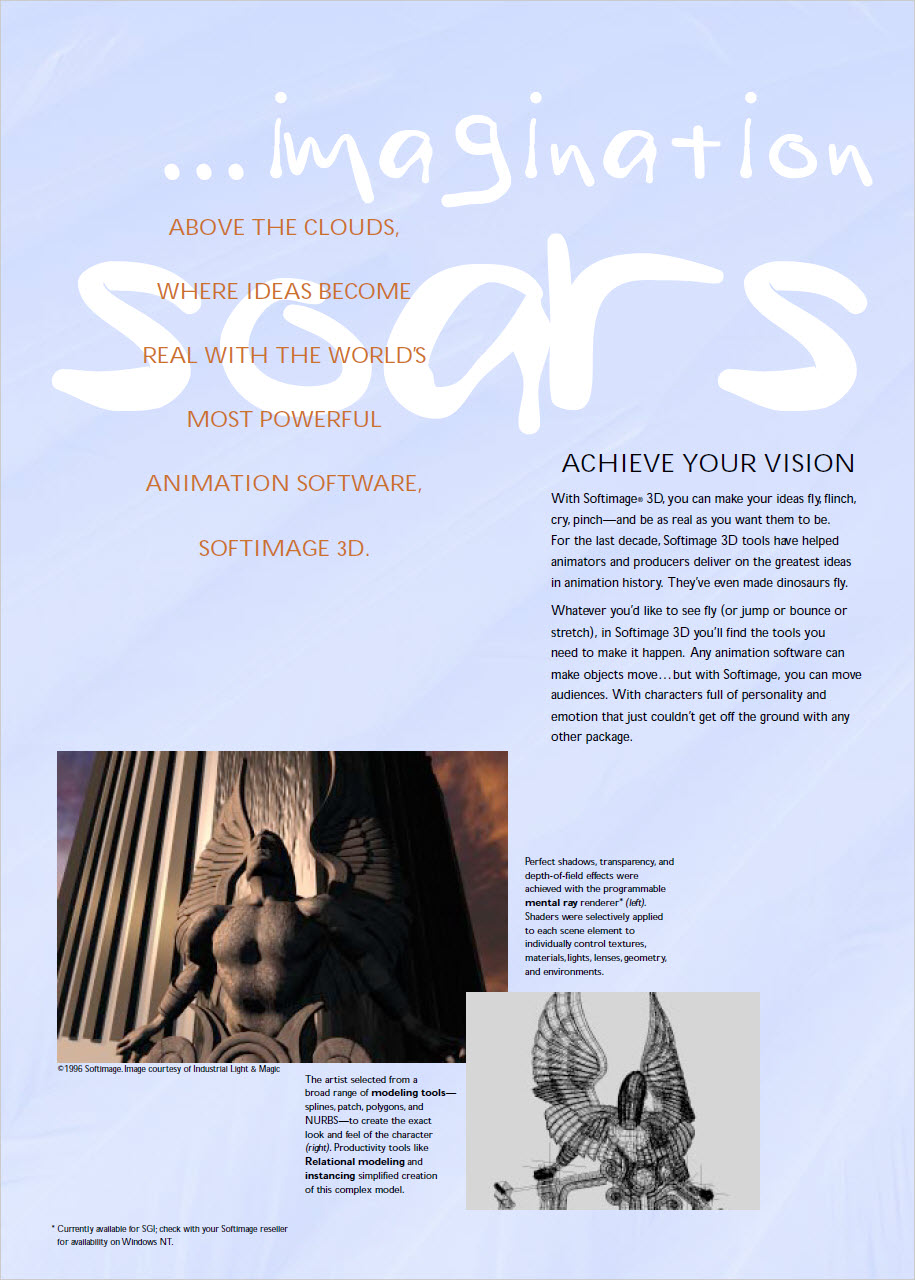
Note the asterisk on “the programmable mental ray renderer”:
*Currently available for SGI; check with your Softimage reseller for availability on Windows NT
What’s New from ten years ago on the softimage.com home page

SOFTIMAGE|3D Used in All Three Motion Pictures Nominated for Achievement in Visual Effects; Softimage Founder Honored With Academy Award Plaque


Images from the Dec 1 2002 waybackmachine archive of xsibase
MONTREAL – Feb. 11, 1998 – Softimage Inc., a wholly owned subsidiary of Microsoft Corp., today announced that SOFTIMAGE®|3D was used for character animation in all three films nominated Feb. 10 in the category of Achievement in Visual Effects for the 70th annual Academy Awards. The special effects in “Lost World,” “Starship Troopers” and “Titanic” were made possible by the incredibly rich set of tools that SOFTIMAGE|3D provides for digital artists.
Industrial Light & Magic used SOFTIMAGE|3D to terrify and delight audiences with realistic animated dinosaurs in “Lost World”; Tippet Studios created futuristic ‘bugs’ with it for “Starship Troopers”; and Digital Domain made use of the software to create hundreds of digitally animated passengers aboard “Titanic.” The nominees were chosen from the Academy short list of seven films. The four other films under consideration – “Batman and Robin,” “Contact,” “The Fifth Element” and “Men in Black” – also took advantage of SOFTIMAGE|3D to create an amazing array of fantastic effects and character animation.
“This has been an exciting year for us at Softimage, and we’re thrilled that so many of our customers are being recognized by the Academy,” said Softimage President Moshe Lichtman. “Digital artists using SOFTIMAGE|3D have continually broken new ground in creativity and quality. The power of SOFTIMAGE|3D is stunningly portrayed in the special effects brought to life in these films.”
The winning film will be announced at the Academy Award ceremony, televised from Los Angeles on Monday, March 23, 1998, at 7 p.m. PST.
Softimage Technology Lauded by Academy
Softimage congratulates its founder, Daniel Langlois, who – along with Rejean Gagné, Richard Laperriere and Dominique Boisvert – received a Scientific and Engineering Award from the Academy on Jan. 7, 1998. This award honors outstanding contributions that have made a technological impact on the film industry. Langlois, Gagné, Laperriere and Boisvert received the Academy plaque for creating the Actor component of the SOFTIMAGE|3D computer animation system. This component provided breakthroughs in animation control and efficiency that led to the widespread use of Softimage in visual effects and animation production through the introduction of Inverse Kinematics into the animation industry.
About SOFTIMAGE|3D
SOFTIMAGE|3D, the flagship of the Softimage product line, has consistently set the benchmarks for fully integrated professional 3-D modeling, animation and rendering software. The choice of professionals who demand the highest-quality content, Softimage has consistently raised the bar from which other systems are measured. “Sumatra” is Softimage’s revolutionary, next-generation 3-D software. It is the world’s first non-linear animation system, extending the current work flow of 3-D animation more fluidly into the overall production process.
About Softimage
Founded in 1986, Softimage develops software for media-rich applications including video, film, interactive games and CD-ROM applications. Products include SOFTIMAGE|DS (video production); SOFTIMAGE|3D (3-D animation); SOFTIMAGE|EDDIE (compositing) and Toonz (2-D cel animation). The company was acquired in 1994 by Microsoft. Additional information about Softimage and Microsoft can be found via the Internet at (http://www.softimage.com/) and http://www.microsoft.com/, respectively.
Founded in 1975, Microsoft (Nasdaq “MSFT”) is the worldwide leader in software for personal computers. The company offers a wide range of products and services for business and personal use, each designed with the mission of making it easier and more enjoyable for people to take advantage of the full power of personal computing every day.
From the 2006 whitepaper “Getting Into Character: Building Performances
for Next-Generation Productions”:
Softimage Co.:
20 Years of Character Animation Innovation
Founded in 1986, Softimage has always been the company that character
animators look to for intuitive tools that allow them to work artistically.
Our founding principles are rooted in the idea that, regardless of its
technological underpinnings, 3D content creation is a fundamentally
artistic pursuit – that technology should empower artists, not restrict
them. For the last twenty years Softimage has set a breakneck pace of
innovation that has driven the 3D industry forward.

Everything you need (Foundation), everything you want (Essentials), everything there is (Advanced)
The XSI 4.0 price guide:

See also flashback #81

539 topics, 4055 posts, 271 different posters
Top 25 Threads
*number of posts in bold
Top 25 Posters
* number of posts in bold
December 2002
the softimage store
open for business (happy holidays!)

 eX-SI
eX-SI 