Preset Manager and custom material presets


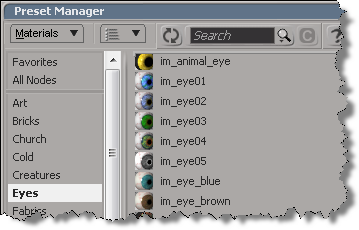
Just in case you were wondering how to add new material presets to the Preset Manager, because I was and I spent a bunch of time trying…

The Preset Manager won’t pick up presets from anywhere else but the factory location (%XSI_HOME%\Data\DSPresets\Materials).

At first I thought I was doing something wrong. Then I used Process Manager to confirm that Softimage wasn’t loading presets from my User location. Then I checked for old bug reports/feature requests, and I double-checked the actual code for the preset manager.

There’s an environment variable XSI_DSPRESETS that specifies the location of the material presets, but you cannot use it to override the factory location. Even if you change that environment variable, Softimage reads only the factory Data\DSPresets\Materials folder.

ICE Modeling – Extruding a random polygon


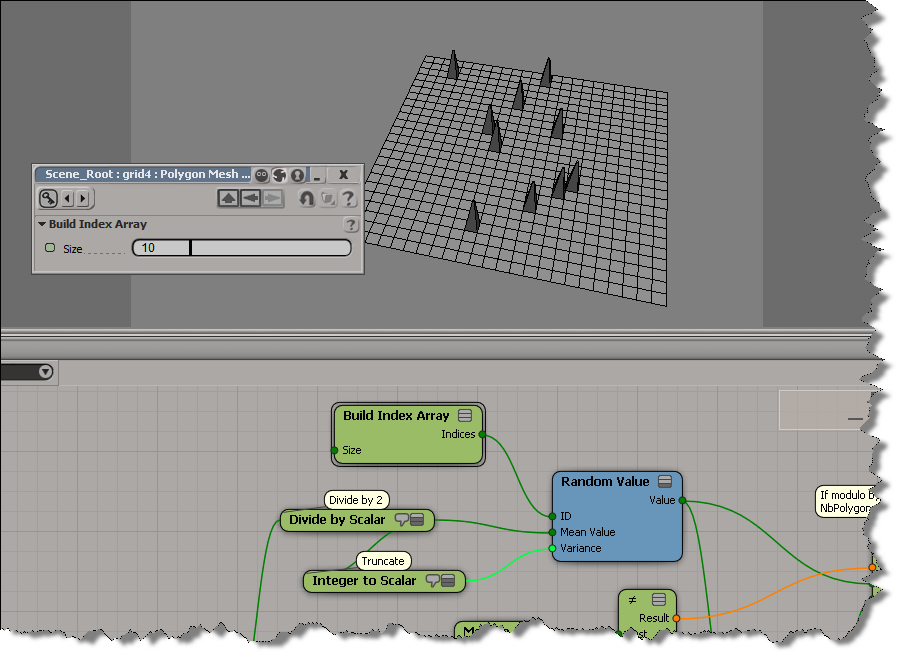
All you have to do is plug a Random Value node into the Polygon Index port, and then set the Mean Value and Variance. If you then play around with the ID (of the Random Value), you’ll get a different polygon extrusion.

Most of this tree is for setting the Mean and Variance. If I have an odd number of polygons, say 81, then a mean of 40 and a variance of 40 will cover the range of polygon indices (0-80). But if I have an even number of polygons, say 80, then a mean of 40 and variance of 40 might give me an index of 80, which is out of range.

To randomly extrude more than one polygon, just feed a bunch of IDs into the Random Value node, like this:

I increased the number of polygons to avoid getting the same random number multiple times.

Python print statement in Softimage 2013


If you’re using an external install of Python, you’ll probably notice that the print statement doesn’t work in Softimage 2013. That’s because Softimage 2013 was compiled with Visual C++ 2010, and Python wasn’t.

We recompiled the built-in Python that ships with Softimage 2012, so if you use that Python, the print statement works.

Workaround courtesy of Jo benayoun:

import sys
class STDOutHook(object):
	def __init__(self):
		pass
	def write(self, data):
		# py engine adds a newline at the end of the data except if
		# the statement was ended by a comma.
		data = "" if data == "\n" else data

		if data != "":
			Application.LogMessage(data)
		return None

sys.stdout = STDOutHook()

print "Hello"
print "\n"       # wont work due to the workaround
print "World",

I found this same workaround by googling “python print redirect stdout”. For example, here.

Softimage 2013 Python shortcuts gotcha


Softimage 2013 includes some changes to the Python shortcuts:

from siutils import si
si = si()					# win32com.client.Dispatch('XSI.Application')
from siutils import log		# LogMessage
from siutils import disp	# win32com.client.Dispatch
from siutils import C		# win32com.client.constants

The big difference is that si shortcut is now a function that returns the Application object. We had to make this change to fix some weird memory leak (the si object was out of scope in the module where it was created, and the Python parser could not properly delete it upon exit).

Here’s a suggested workaround from the Dev team to maintain backward-compatibility:

# ---python code begin ---
from siutils import si

if Application.Version().split('.')[0]>= "11":
	si = si()					# win32com.client.Dispatch('XSI.Application')

from siutils import log		# LogMessage
from siutils import disp	# win32com.client.Dispatch
from siutils import C		# win32com.client.constants
# --- python code end ---

The if block executes only if the current Softimage version is later than 11, which corresponds to 2013 or later.

hat tip: SS

Friday Flashback #67


Pull-quote from a 2002 datasheet for Softimage|3D 4.0:

“Nothing was comparable to SOFTIMAGE|3D, so we stuck with it again—and I’m glad we did. Softimage offers everything we need, and the animators here know the tools so well that we can play with different combinations, so it’s rare to get into a jam.

In fact, we’ve gotten crazy clever with it!”
Dan Taylor
Animation Director, ILM on Jurassic Park III

Here’s the actual datasheet. It’s kinda text-heavy, but as I remember it, the image quality of screenshots in PDFs was not so great back then.

The datasheet has one mention of XSI: SOFTIMAGE|3D also offers an easy upgrade path to the next-generation SOFTIMAGE|XSI™ nonlinear animation (NLA) system.