Screenshots of the week


Installer images


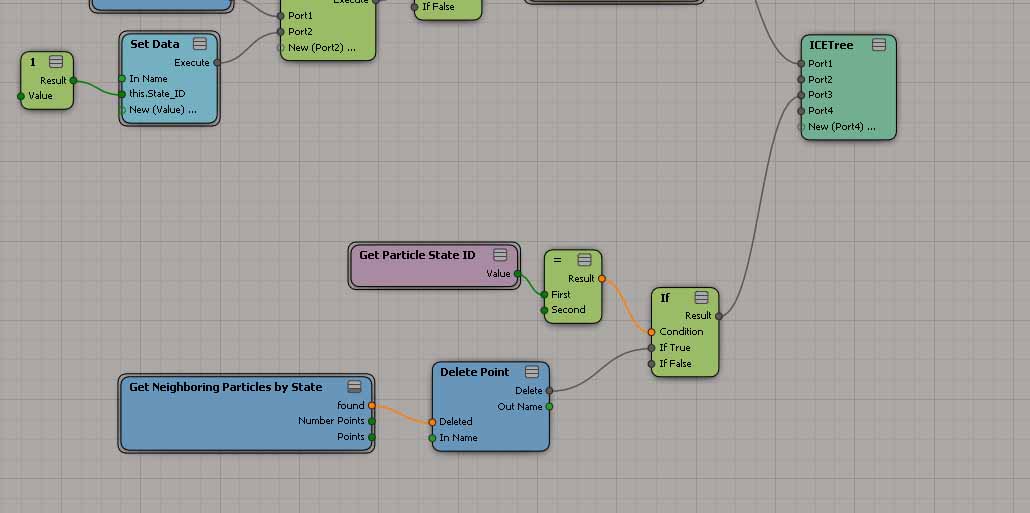
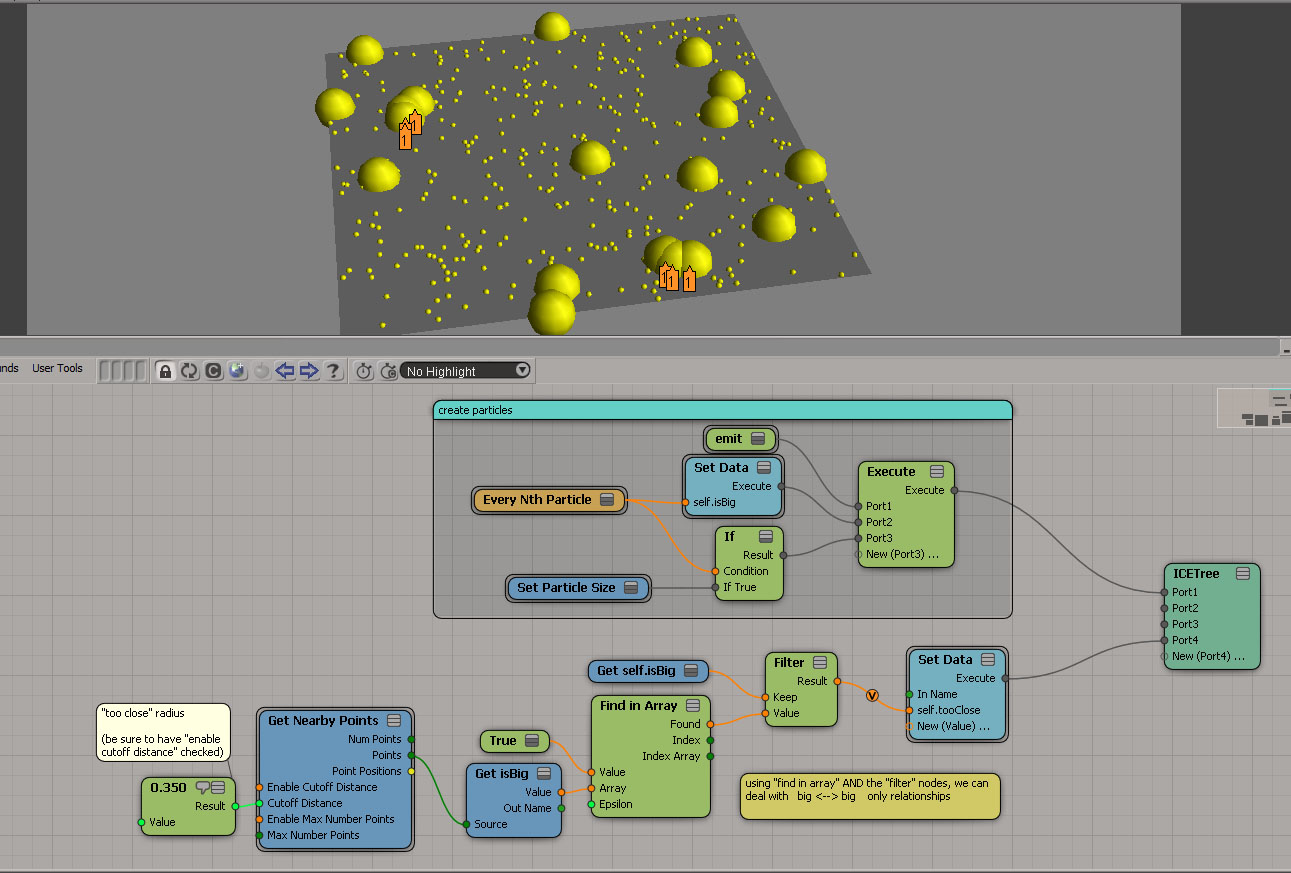
Test distance between every Nth particles (XSI mailing list)

by Chris Marshall
Set the state id’s of the bigger particles to something different than the smaller ones.
Then use the setup in the jpeg, which basically uses the Get Neighbouring Particles by State compound, testing the distance between the big particles using the Cutoff Distance.

by Peter Agg

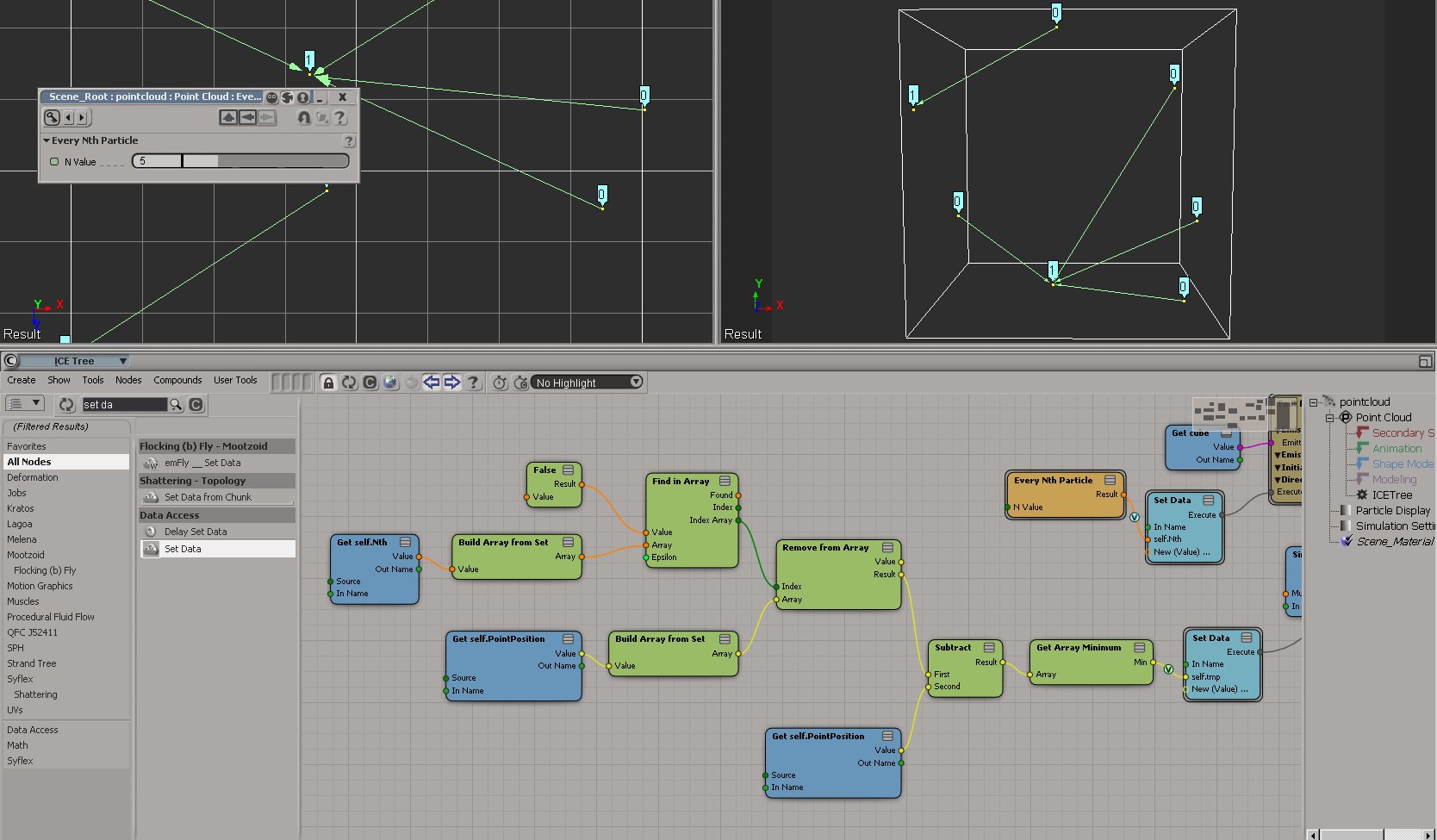
by Fabricio Chamon

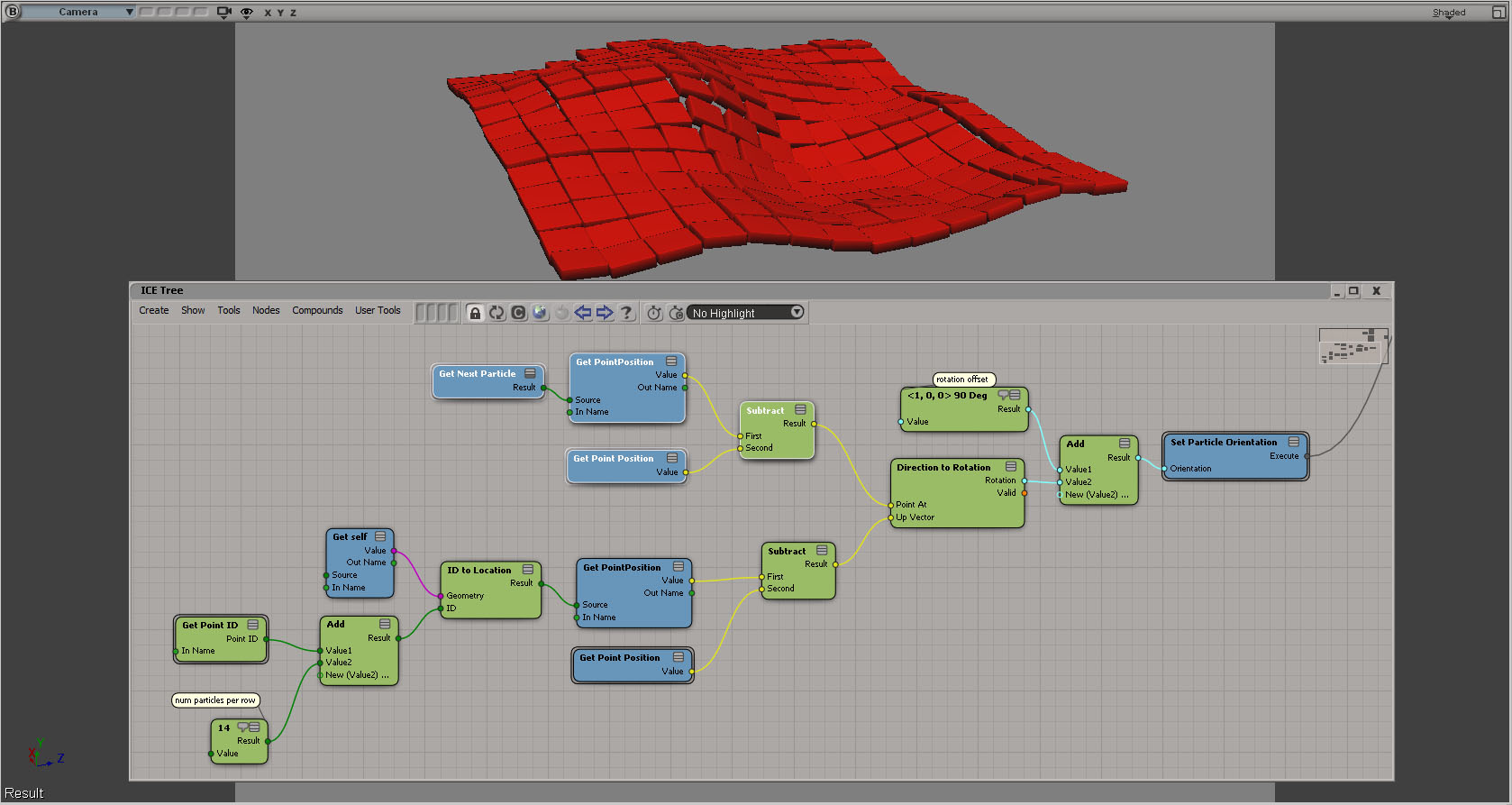
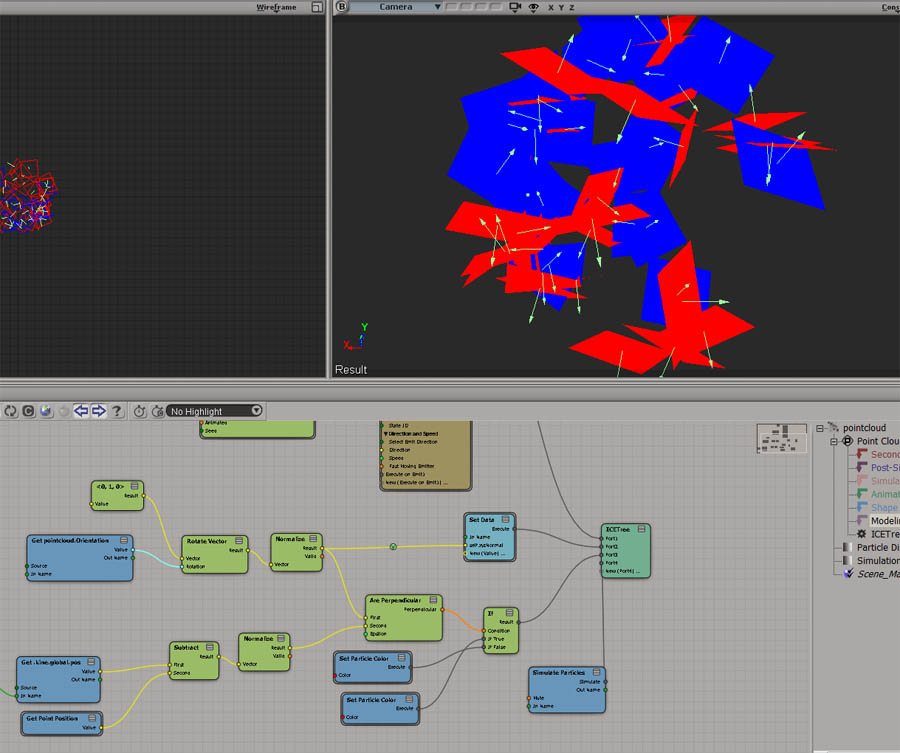
ICE: Rotating particle based on neighbors position?
by Fabricio Chamon

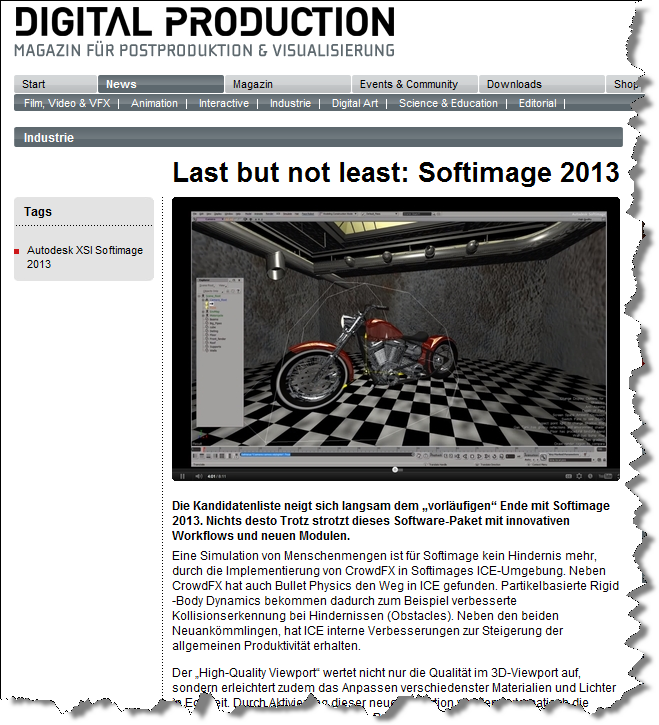
Last but not least

Disabling Customer Error Reporting (CER)


In general, we’d prefer you didn’t disable the CER reports. But if you’re in the middle of debugging a plugin that constantly crashes, for example, you might want to temporarily disable the CERs.

To disable CER reporting, edit the Softimage setenv.bat file and add this:

SI_DISABLE_CER=1

Maya, and presumbably 3ds Max, work the same way.

MAYA_DISABLE_CER=1

What’s new in the 2013 SDK


I see that some of you have found the 2013 docs.
For your convenience, here’s a list of the new commands and Object Model methods, but with actual links 🙂

New Commands

New Methods (Object Model)

  • ICEAttribute.DataArray – Sets a 1D Array object containing the data defined by an attribute.
  • ICEAttribute.DataArray2D – Sets a 2D Array object containing the 2D data defined by an attribute.
  • XSICollection.Filter – Returns a subset of this collection as a new collection of objects matching the filter criteria.
  • Clip.AddProperty2 – Creates and adds a UserDataBlob or CustomProperty to a Clip object. This method is specific to the python language.
  • Geometry.AddICEAttribute – Adds and returns a new attribute data on a geometry.
  • Geometry.RemoveICEAttribute – Removes a non-built-in attribute from a geometry if not required by an ICETree.
  • Layout.CreateViewFromDefinitionFile2 – Creates a new View object given the path to its definition on disk. This method is similar to Layout.CreateViewFromDefinitionFile but specific to the python language.
  • Layout.FindView2 – Finds an existing View object given a name in this layout. This method is similar to Layout.FindView but specific to the python language.
  • Menu.AddItem2 – Adds a menu item at to end of the menu. This method is similar to Menu.AddItem but specific to the python language.
  • Menu.AddCommandItem2 – Adds a menu item at the end of the menu and attaches a command. This method is similar to Menu.AddCommandItem but specific to the python language.
  • Menu.AddCallbackItem2 – Adds a menu item to the end of the menu and attaches a callback function. This method is similar to Menu.AddCallbackItem but specific to the python language.
  • ICENode.GetPortFromName2 – Returns the ICENodePort object that matches a specific port name. This method is similar to ICENode.GetPortFromName but specific to the python language.
  • ICENode.GetPortFromIndex2 – Returns the ICENodePort object specified by a port index, group index and group instance index. This method is similar to ICENode.GetPortFromIndex but specific to the python language.
  • Operator.GetPortAt – Returns the specified Port object. This method is similar to Operator.PortAt but specific to the python language.
  • Operator.GetPort3 – Returns the specified Port object for the operator. This method is similar to Operator.GetPort2 but specific to the python language.
  • Override.AddParameterEntry2 – Adds a new entry to override the input parameter and returns the new overriding parameter. This method is similar to Override.AddParameterEntry but specific to the python language.
  • Primitive.GetGeometry3 – Returns a Geometry object containing the object’s geometry. This method is similar to Primitive.GetGeometry2 but specific to the python language.
  • ProjectItem.AddICEAttribute – Adds and returns a new attribute data on this object.
  • ProjectItem.RemoveICEAttribute – Removes a non-built-in attribute from a geometry if not required by an ICETree.
  • SceneItem.GetPropertyFromName2 – Returns a property, given its scripting name. This method is similar to SceneItem.GetPropertyFromName but specific to the python language.
  • SceneItem.GetLocalPropertyFromName2 – Returns a local property, given its scripting name. This method is similar to SceneItem.GetLocalPropertyFromName but specific to the python language.
  • ShaderArrayParamDef.ItemDef2 – Returns the underlying ShaderParamDef or ShaderStructParamDef object for this array item. This method is similar to ShaderArrayParamDef.ItemDef but specific to the Python language.
  • ShaderArrayParameter.Item2 – Returns the specified ShaderParameter item in this array. This method is similar to ShaderArrayParameter.Item but specific to the Python language.
  • ShaderParamDefContainer.AddParamDef2 – This method is similar to ShaderParamDefContainer.AddParamDef but specific to the Python language.
  • ShaderParamDefContainer.GetParamDefByName2 – Returns the ShaderParamDef that matches the specified name from this container. This method is similar to ShaderParamDefContainer.GetParamDefByName but specific to the Python language.
  • ShaderParameter.Definition2 – Returns the shader parameter definition as a ShaderParamDef object. This method is similar to ShaderParameter.Definition but specific to the Python language.
  • View.FindView2 – Finds an existing View object given a name. This method is similar to View.FindView but specific to the Python language.
  • X3DObject.GetActivePrimitive3 – Returns the 3D object’s active Primitive for a given frame. This method is similar to X3DObject.GetActivePrimitive2 but specific to the Python language.
  • XSIApplication.ActiveProject3 – Returns or sets the active XSIProject object. This method is similar to XSIApplication.ActiveProject2 but specific to the Python language.
  • XSIApplication.GetObjectFromID2 – Returns the object matching the specified ID. This method is similar to XSIApplication.GetObjectFromID but specific to the python language.
  • XSIFactory.CreateObjectFromPreset2 – Creates an object from a preset and optional preset family name. This method is similar to XSIFactory.CreateObjectFromPreset but specific to the Python language.
  • ShaderParamDefOptions.SetReadOnly – Sets the Read Only capability of the Shader parameter.
  • XSIApplication.GetCustomPropertyCount – Returns the Custom Property count for a given type.

New in Softimage 2013: Getting the selected materials in the Material Manager


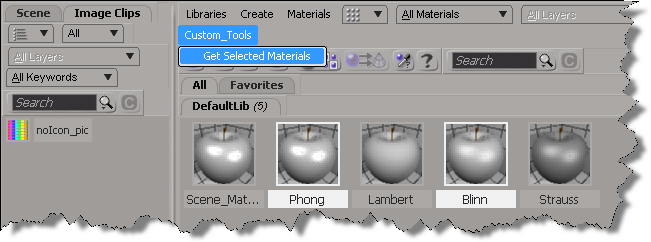
In 2013, you can use the selection view attribute to get the materials that are selected in the Material Manager.

Here’s a python custom menu item that shows how to do it. In summary, you do this:

  • Add a custom menu in the Manager Manager
  • Use a callback item, so you can get the view from the context
  • Use selection view attribute to get the names of the selected materials
import win32com.client
from win32com.client import constants

null = None
false = 0
true = 1

def XSILoadPlugin( in_reg ):
	in_reg.Author = "blairs"
	in_reg.Name = "MaterialsManagerPlugin"
	in_reg.Major = 1
	in_reg.Minor = 0

	in_reg.RegisterMenu(constants.siMenuMaterialManagerTopLevelID,"Custom_Tools",false,false)
	#RegistrationInsertionPoint - do not remove this line

	return true

def XSIUnloadPlugin( in_reg ):
	strPluginName = in_reg.Name
	Application.LogMessage(str(strPluginName) + str(" has been unloaded."),constants.siVerbose)
	return true

def Custom_Tools_Init( in_ctxt ):
	oMenu = in_ctxt.Source
	oMenu.AddCallbackItem("Get Selected Materials","OnGetSelected")
	return true

def OnGetSelected( c ):
	view = c.GetAttribute( "Target" )
	Application.LogMessage( view )
	
	Application.LogMessage( view.GetAttributeValue( "selection" ) )
	for mat in view.GetAttributeValue( "selection" ).split(","):
		Application.LogMessage(  mat )

	return true

The case of the write-protected disk


Here’s the answer to the Cannot create projects or scenes – The disk is write-protected case I mentioned in my last week on the frontline post.

If you get this “the disk is write protected” error when you try to save a scene, it’s probably because you are trying to save your scene in the XSI_SAMPLES project. The XSI_SAMPLES folder is in the Softimage installation folder (in C:\Program Files\Autodesk), so you usually don’t have write permissions to XSI_SAMPLES.

You need a project to save a scene, so create a new project somewhere where you have write permissions, for example, in your Documents folder.

Then save your scene.

New in Softimage 2013: Script the codec for viewport captures


In Softimage 2013, you can use the ViewportCapture.DSCodec parameter to set the codec for your viewport captures.

http://vimeo.com/39630053

DSCodec is an string that encodes the codec ID and parameters. To get the DSCodec value, do a viewport capture and set the Codec. Softimage will log the DSCodec value in the script history:

# INFO : ViewportCapture.DSCodec: AAAAFnNwdGxycHphAAAAAAAQAAACAAAAABR0cHJsAAACAAAeAAAAAAAYAAAAGGRyYXQAAAAAAAAAUwAAAQAAAAEAAAAACW1wc28AAAAADG1mcmEAAAAAAAAADHBzZnIAAAAAAAAACWJmcmEAAAAACm1wZXMAAAAAABxoYXJkAAAAAAAAAAAAAAAAAAAAAAAAAAAAAAAKc2RuZQAAAAAADGNtZnJhcHBsAAAAAA==

Here’s a Python snippet that shows how to set the DSCodec parameter:

from siutils import si
si = si()					# win32com.client.Dispatch('XSI.Application')
from siutils import log		# LogMessage
from siutils import disp	# win32com.client.Dispatch
from siutils import C		# win32com.client.constants

def dispFix( badDispatch ):
	    import win32com.client.dynamic
	    # Re-Wraps a bad dispatch into a working one:
	    return win32com.client.dynamic.Dispatch(badDispatch)

oViewportCapture = dispFix(si.Dictionary.GetObject( "ViewportCapture" ))
oViewportCapture.NestedObjects("File Name").Value = "C:\\test.mov";

oDSCodec = oViewportCapture.NestedObjects("DSCodec")

#log( oDSCodec.Value )
# INFO : ViewportCapture.DSCodec: AAAAFnNwdGxycHphAAAAAAAQAAACAAAAABR0cHJsAAACAAAeAAAAAAAYAAAAGGRyYXQAAAAAAAAAUwAAAQAAAAEAAAAACW1wc28AAAAADG1mcmEAAAAAAAAADHBzZnIAAAAAAAAACWJmcmEAAAAACm1wZXMAAAAAABxoYXJkAAAAAAAAAAAAAAAAAAAAAAAAAAAAAAAKc2RuZQAAAAAADGNtZnJhcHBsAAAAAA==

oDSCodec.Value = "AAAAFnNwdGxycHphAAAAAAAQAAACAAAAABR0cHJsAAACAAAeAAAAAAAYAAAAGGRyYXQAAAAAAAAAUwAAAQAAAAEAAAAACW1wc28AAAAADG1mcmEAAAAAAAAADHBzZnIAAAAAAAAACWJmcmEAAAAACm1wZXMAAAAAABxoYXJkAAAAAAAAAAAAAAAAAAAAAAAAAAAAAAAKc2RuZQAAAAAADGNtZnJhcHBsAAAAAA=="

Screenshots of the week


Shed: Making of Bell Fibe

Neural net
by Mossman

Changing contexts
by gustavoeb

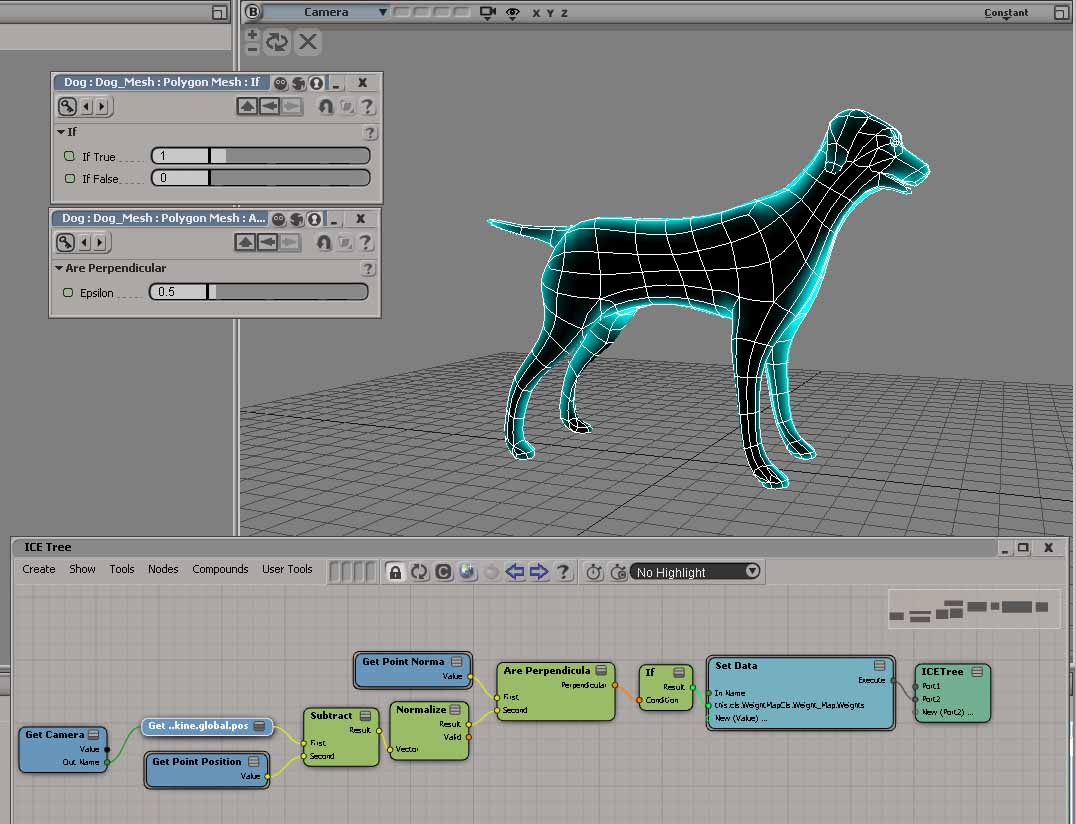
ICE trig maths, camera facing angles
by Rob Chapman

ICE trig maths, camera facing angles
by peter_b
“with the combination of the normal at the surface, the orientation of the particle and the vector from point to camera – and dot / cross products, you can do plenty different things.”

Motion Tools v0.3
by gustavoeb

Filter volume emission by weightmap
by patrick nethercoat

LK Lightning 1.5.0 is out!

New in Softimage 2013: Filtering XSICollections


In Softimage 2013, the XSICollection object now has a Filter method, so you can filter XSICollections by type, family, or path name.

oFilteredCollection = XSICollection.Filter( [Type], [Families], [Path] )

I updated my find all cameras script to use XSICollection.Filter, and here’s the timing results (form the same scene, but in 2013).

# INFO : getCameras_FindObjects finished in 0.033000 seconds
# INFO : Found 8301 cameras
# INFO : getCameras_FindObjects_w_Filter finished in 0.269000 seconds
# INFO : Found 24 cameras
# INFO : getCameras_FindObjects_w_SIFilter finished in 0.044000 seconds
# INFO : Found 24 cameras
# INFO : getCameras_FindObjects2 finished in 0.001000 seconds
# INFO : Found 49 cameras
# INFO : getCameras_FindObjects2_w_Filter finished in 0.003000 seconds
# INFO : Found 24 cameras
# INFO : getCameras_FindChildren2 finished in 0.149000 seconds
# INFO : Found 24 cameras
# INFO : getCameras_SelectAllUsingFilter finished in 0.035000 seconds
# INFO : Found 24 cameras
  • FindObjects2 is fastest, with SelectAllUsingFilter a mildly surprising second (again note that I’m calling SelectAllUsingFilter with AffectSelectionList=False, so I’m not actually selecting anything).
    FindObjects2_w_Filter		0.003000 seconds
    SelectAllUsingFilter		0.035000 seconds
    FindObjects_w_SIFilter		0.044000 seconds
    FindChildren2			0.149000 seconds
    FindObjects_w_Filter		0.269000 seconds
    
  • FindObjects finds a lot more than just cameras; it finds lots of nulls too because that GUID isn’t unique to cameras
  • In this context, SIFilter is faster than the XSICollection.Filter method

Here’s the updated script for Softimage 2013:

import time
si = Application
log = si.LogMessage
from win32com.client import constants as C

import win32com.client
oCameraColl = win32com.client.Dispatch( "XSI.Collection" )

si.SetValue("preferences.scripting.cmdlog", False, "")


def timeExecution(func):
    def closure(*args, **kwargs):
        startTime = time.time()
        try:
            ret = func(*args, **kwargs)
        except Exception, e:
            delta = time.time() - startTime
            log('Failed in %f seconds' % delta)
            raise
        delta = time.time() - startTime
        log('%s finished in %f seconds' % (func.__name__, delta))
        return ret
    return closure 

@timeExecution
def getCameras_FindObjects():
	oCameraColl = Application.FindObjects( "", "{5FC0CCAE-3DC8-11D0-9449-00AA006D3165}" )
	return oCameraColl.Count

@timeExecution
def getCameras_FindObjects_w_Filter():
	oCameraColl = Application.FindObjects( "", "{5FC0CCAE-3DC8-11D0-9449-00AA006D3165}" )
	oCameraColl = oCameraColl.Filter( "camera" )
	oCameraColl.RemoveItems( oCameraColl.Filter( "", "", "CopyPaste*" ) )
	oCameraColl.RemoveItems( oCameraColl.Filter( "", "", "View*" ) )
	return oCameraColl.Count

@timeExecution
def getCameras_FindObjects_w_SIFilter():
	oCameraColl = Application.FindObjects( "", "{5FC0CCAE-3DC8-11D0-9449-00AA006D3165}" )
	oCameraColl = si.SIFilter( oCameraColl, "camera" )
	oCameraColl.RemoveItems( oCameraColl.Filter( "", "", "CopyPaste*" ) )
	oCameraColl.RemoveItems( oCameraColl.Filter( "", "", "View*" ) )
	return oCameraColl.Count


@timeExecution
def getCameras_FindObjects2():
	c = si.FindObjects2( C.siCameraID )
	return c.Count

@timeExecution
def getCameras_FindObjects2_w_Filter():
	cams = si.FindObjects2( C.siCameraID )
	oCameraColl.Items = cams
	oCameraColl.RemoveItems( cams.Filter( "", "", "CopyPaste*" ) )
	oCameraColl.RemoveItems( cams.Filter( "", "", "View*" ) )
	return oCameraColl.Count


@timeExecution
def getCameras_FindChildren2():
	cams = si.ActiveSceneRoot.FindChildren2("", "camera")
	return cams.Count

@timeExecution
def getCameras_SelectAllUsingFilter():
	cams = si.SelectAllUsingFilter("Camera", "siIgnoreComponentVisibility", False, "")
	return cams.Count


@timeExecution
def getCameras_Model_FindObjects():
	cams = si.ActiveSceneRoot.FindObjects( C.siCameraID )
	return cams.Count


log( 'Found %d cameras' % getCameras_FindObjects() )
log( 'Found %d cameras' % getCameras_FindObjects_w_Filter() )
log( 'Found %d cameras' % getCameras_FindObjects_w_SIFilter() )
log( 'Found %d cameras' % getCameras_FindObjects2() )
log( 'Found %d cameras' % getCameras_FindObjects2_w_Filter() )
log( 'Found %d cameras' % getCameras_FindChildren2() )
log( 'Found %d cameras' % getCameras_SelectAllUsingFilter() )