Using Delay Set Data to set attributes that depend on each other


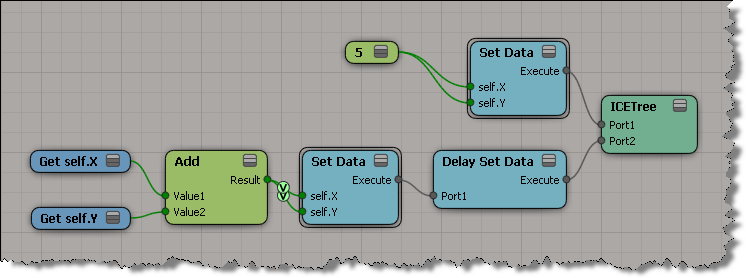
Here’s the screenshots to illustrate the example described on the Delay Set Data reference page.

“For example, if you want to swap values of A and B, just using two Get Data nodes and two Set Data nodes (A=B and B=A) would result in both attributes having the same value.”

“However, if you connect the Set Data nodes in the Delay Set Data node, the Set Data operations will be executed at the same time, thus setting the values before any of the Set Data nodes are executed. ”

Understanding how and when to use Delay Set Data


I never really looked into Delay Set Data, so I never really understood what it did. I just assumed that it delayed setting data until something else happened. What it really does is handle situations where a multi-output port is connected to multiple Set Data ports.

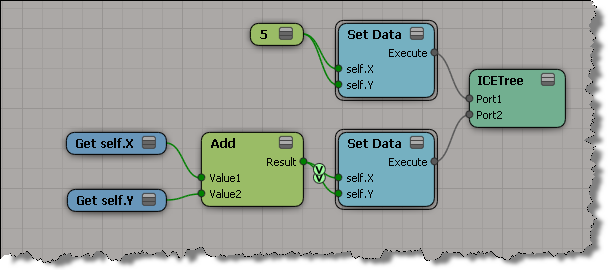
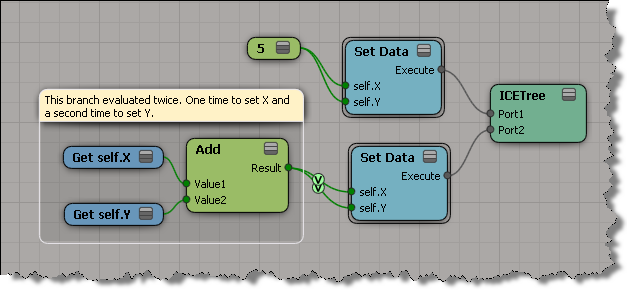
Consider this ICE tree. You might think that X and Y are set to the same value (10), but that’s not what happens. You end up with X=10, and Y=15.

That’s because each Set Data forces an evaluation of the branch connected to the Set Data port. So in a tree like this, where the Add output port is plugged into two Set Data ports, you get two evaluations. First when you set X, and second time when you set Y. Consequently, X is first set to 5, and then to 10, and that all happens before the value of Y is set.
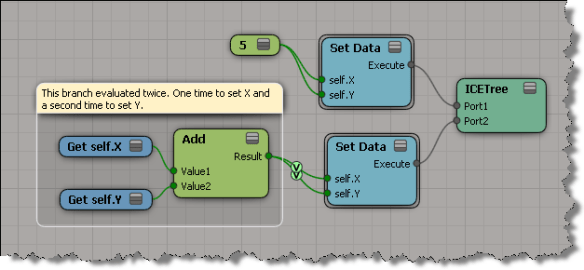
What happens with this ICE tree is like what happens in this Python snippet.

X = 5
Y = 5
X = X + Y
Y = X + Y
print X
print Y
# 10
# 10

Not like this:

X = 5
Y = 5
Y = X = X + Y
print X
print Y
# 10
# 10

To get the expected results and eliminate the extra evaluation, you could change the ICE tree so that the Add node has only one connection to the Set Data. This tree will run faster, because it has one less evaluation of the Add branch.

The Delay Set Data node addresses this issue by caching (for each Set Data port connection) the values from the first evaluation of the branch, and then setting the values all at once.

WARNING : 3000 – Objects were not saved normally


Occasionally I’ll see reports of this kind of error. Sometimes I see it when I’m investigating some other problem in a scene.

// WARNING : 3000 - Save: [1] objects were not saved normally
// WARNING : 3000 - -- [Framebuffer<1004>] was saved, but is disconnected from the scene. (Floating object)

You can use Dictionary.GetObject to get the floating object and interrogate it:

var x = Dictionary.GetObject( "Framebuffer<1004>" );
LogMessage( ClassName(x) );
LogMessage( x.Parent );
// INFO : C:\Program Files\Autodesk\Softimage 2012.SAP\Application\bin\XSI.exe
LogMessage( x.Parent3DObject == null );
// INFO : True
LogMessage( x.Owners.Count );
// INFO : 0
LogMessage( x.RenderChannel );
// INFO : Normal
//LogMessage( x.GetResolvedPath(0) );
// ERROR : 21000 - Unspecified failure - [line 15]

And you could even delete the floating object before you save the scene:

DeleteObj( Dictionary.GetObject( "Framebuffer<1004>" ) );

However, there is a scene debugging preference that allows you to “skip the loading of floating objects”. This preference was added back in 2004 or so to deal with “ghost models” (which are basically floating or disconnected objects).

You could also try printver -cleanfloating to remove floating objects. I don’t know if that still works, I haven’t used it three or four years.

Another thing you can try is to merge your scene into a new scene. The warning could be a “false positive”. If the warning is gone after the merge, then it was indeed a false positive (which means that something, such as the schematic view, was still holding on to a reference to a deleted object).

The case of the While loop that didn’t evaluate


In this case, an ICE While loop wasn’t working as expected.
The customer was using Max Repeat to do something like this, but in ICE:

x = 2
cond = x > 0

i = 0
while cond:
	print i
	i = i + 1
	if i > 10: break

Unfortunately, in ICE, the While loop was never executed.

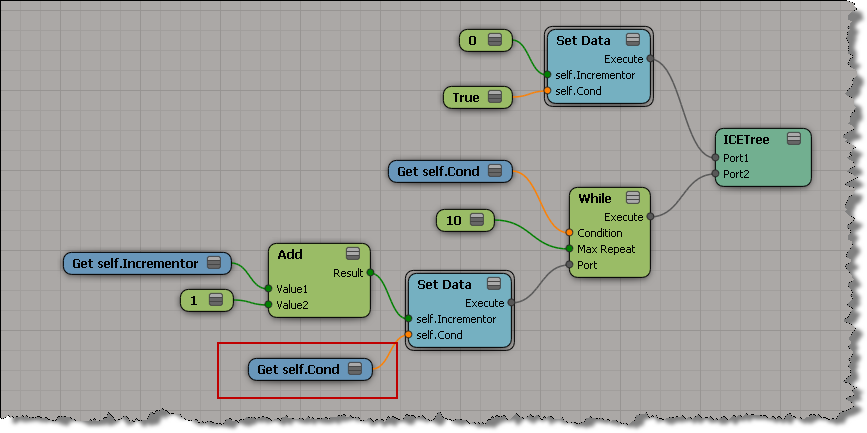
It’s not a problem with the While loop, it’s a problem with the ICE tree evaluation (it’s a bit too lazy). I’ve seen things like this before, and I usually create a separate ICE tree to workaround it:
http://vimeo.com/33968117

On the mailing list, Guillaume suggested a couple of other workarounds. First, use Delay Set Data.
The word “Delay” in the node name throws me off…I wouldn’t think to use it, but after reading up on it, I can see why you would think to use that node (it does evaluation).

If you set the condition boolean in the While loop, that works too:

Top 10 things to learn for the ICE newbie


Last week there was a Top 5 things to learn about ICE? thread on the mailing list:

If you ICE experts out there had to recommend the top 5 (first) things to learn about ICE what would they be? I’m looking for cornerstone/pedestal type foundation items. I’m going to put some time into really learning ICE and I’d like to know what the most valuable concepts are.

There were several good responses, so I’ve combined them all and added a few more to make it a “top 10” (rather than a top 7). Also, I added some links to relevant videos (mostly my own). I’d also recommend you watch Paul Smith’s tutorials, starting with 1. What does ICE do?.

Also, see these video tutorials: