Converting point positions between coordinate systems


On the XSI mailing list, a poster asked:

If I have a sphere and I want to get the point positions from the sphere and
see what their point positions are in reference to another null’s transforms
how would I do that?

It’s basically a two-step procedure. First convert the point positions from the local coordinate system of the sphere to global coordinates. Then, second, convert the global coordinates into the local coordinate system of the null.

It’s a little more efficient to combine the two matrix combinations, and then apply that to the point positions:

Here’s a video walkthrough of how to build an ICE tree that converts point positions from the local coordinate system (aka reference frame) of one object to the local coordinate system of a second object.
http://vimeo.com/24275969

Getting PolygonPosition from the PolygonIndex


Assuming that the PolygonIndex and PolygonPosition sets are in the same order, then given some polygon indices, you could get the corresponding polygon positions by using the indices to index into the PolygonPosition array.
Here, I’m using PolygonInsideNull, which is a set of polygon indices:

Here’s another screenshot that I took to verify that I was getting the right positions.
The purple numbers are the PolygonPosition and PolygonIndex arrays:
Continue reading

Maya Entertainment Creation Suite 2012 Review: Greater Interoperability | AWN | Animation World Network


The big news with Premium is they have added Softimage to the bundle. You now get Face Robot for dealing with complex face rigging, the simply incredible ICE visual programming system and the much talked about and drooled over Lagoa Multiphysics dynamic solver system written in ICE. I know what youre thinking: I have not used Softimage since Maya 1.0 came out, why would I now? Well, Autodesk made it easy to add its very powerful toolset to the pipeline with one click Send To functions letting you push and pull data between the other suite software via the updated .FBX format. Also helpful are the Maya navigation and hotkeys for a quick transition. Want to use ICE to make amazing effects and send it over to Maya? No problem. I think it is time to add some Softimage artists to your “to be hired” list if you havent done it yet.

via Maya Entertainment Creation Suite 2012 Review: Greater Interoperability | AWN | Animation World Network.

Using arrays instead of loops in ICE


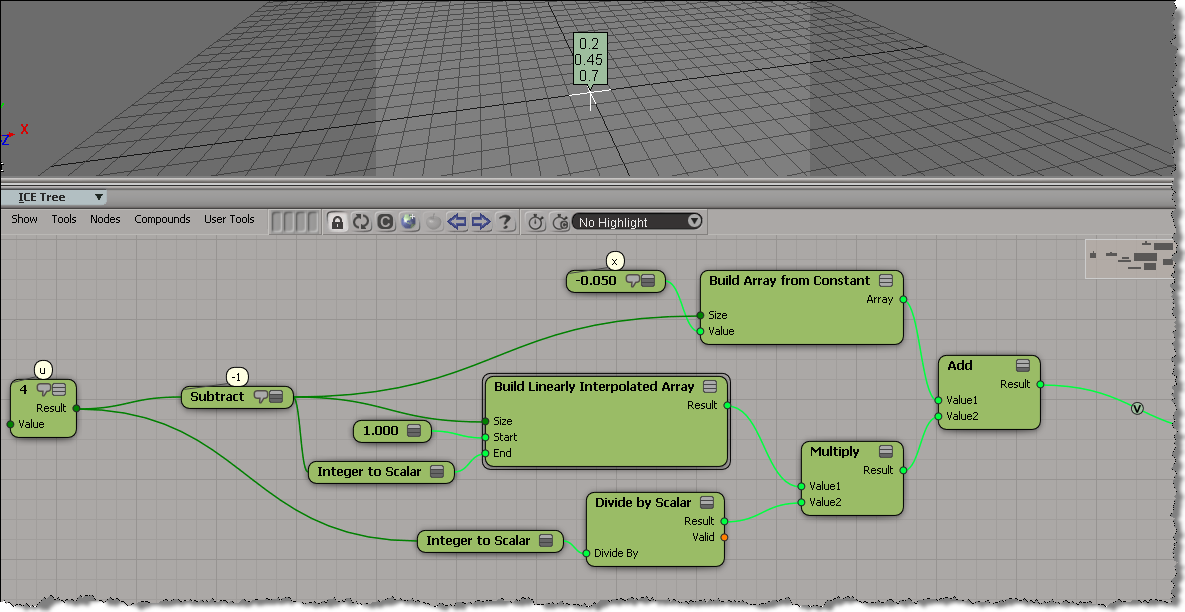
Here’s a simple example of using an array instead of a loop in an ICE tree.
In general, for performance, you’d like to avoid repeats and loops in ICE.
This post is in repsonse to this thread.

var u = 4;
var x = -.05;
for (i=1; i <= u-1; i++) {
	x = x + 1/u ;
	LogMessage( x );
}
// INFO : 0.2
// INFO : 0.45
// INFO : 0.7