Some days it seems like every customer scene I open gives me this error:

This plug-in is not installed:Arnold Render Options
6

Some days it seems like every customer scene I open gives me this error:
While I was cleaning out my basement, I found Computer Graphics World, Feb 1998, sitting on top of my pile of decades-old Sports Illustrateds.
On the cover, Geri from Pixar was created using a new surface modeling technology called “subdivision surfaces”.

In the Spotlight, “Maya…appears to have positioned itself as a true competitor with the likes of major players such as Softimage…”

Click to view full page from CGW
Formerly code-named Digital Studio, Softimage/DS is “a complete turnkey system [that] costs approximately $100,000”

Click to view full page from CGW
Feature article: Unraveling Riven
To achieve the “next level of graphic reality…Cyan switched from Mac-based Vision3D from Strata, which was used to develop Myst, to the SGI version of Softimage 3D.”
This huge set, which consists of more than 2 million faces and 20,000-plus models, required two hours just to load in Softimage.

On the XSI mailing list, a poster asked:
If I have a sphere and I want to get the point positions from the sphere and
see what their point positions are in reference to another null’s transforms
how would I do that?
It’s basically a two-step procedure. First convert the point positions from the local coordinate system of the sphere to global coordinates. Then, second, convert the global coordinates into the local coordinate system of the null.

It’s a little more efficient to combine the two matrix combinations, and then apply that to the point positions:

Here’s a video walkthrough of how to build an ICE tree that converts point positions from the local coordinate system (aka reference frame) of one object to the local coordinate system of a second object.
http://vimeo.com/24275969
For ICE beginners. A look at a few different ways to emit particles from the vertices (aka points) of an emitter object.
http://vimeo.com/24214573
Assuming that the PolygonIndex and PolygonPosition sets are in the same order, then given some polygon indices, you could get the corresponding polygon positions by using the indices to index into the PolygonPosition array.
Here, I’m using PolygonInsideNull, which is a set of polygon indices:

Here’s another screenshot that I took to verify that I was getting the right positions.
The purple numbers are the PolygonPosition and PolygonIndex arrays:
Continue reading
The big news with Premium is they have added Softimage to the bundle. You now get Face Robot for dealing with complex face rigging, the simply incredible ICE visual programming system and the much talked about and drooled over Lagoa Multiphysics dynamic solver system written in ICE. I know what youre thinking: I have not used Softimage since Maya 1.0 came out, why would I now? Well, Autodesk made it easy to add its very powerful toolset to the pipeline with one click Send To functions letting you push and pull data between the other suite software via the updated .FBX format. Also helpful are the Maya navigation and hotkeys for a quick transition. Want to use ICE to make amazing effects and send it over to Maya? No problem. I think it is time to add some Softimage artists to your “to be hired” list if you havent done it yet.
From Autodesk Japan, a case study (autodesk.co.jp/macrossf).

© 2011 Bikkuuesuto / Macross F Production Committee, The Movie
Softimage, Maya, 3ds Max, and MotionBuilder were all used in this production.
Even the Softimage screenshots look great.
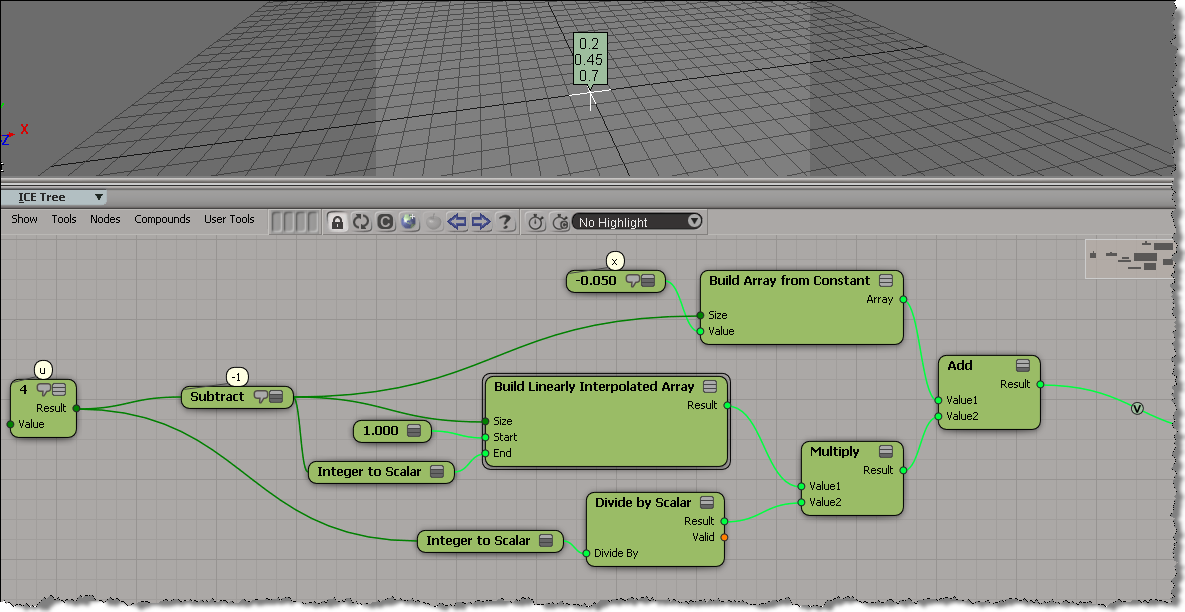
Here’s a simple example of using an array instead of a loop in an ICE tree.
In general, for performance, you’d like to avoid repeats and loops in ICE.
This post is in repsonse to this thread.
var u = 4;
var x = -.05;
for (i=1; i <= u-1; i++) {
	x = x + 1/u ;
	LogMessage( x );
}
// INFO : 0.2
// INFO : 0.45
// INFO : 0.7

 eX-SI
eX-SI 