Sumatra splash screen

Possibly just a mock up.
Friday Flashback #153
6

Sumatra splash screen
Possibly just a mock up.

12060 posts
1388 discussions
460 different posters
Top Ten discussion threads
Number of posts in bold.
Top Ten posters
Number of posts in bold.
The top 10 posters accounted for 23% of all posts; the top 25 for 40%.
Century club
Top 5 most active days
The WordPress.com stats helper monkeys prepared a 2013 annual report for this blog.

Here’s an excerpt:
The Louvre Museum has 8.5 million visitors per year. This blog was viewed about 240,000 times in 2013. If it were an exhibit at the Louvre Museum, it would take about 10 days for that many people to see it.
Kaboom! “In SOFTIMAGE|3D, the Effects > Kaboom custom effect in the Motion module allows you to explode complete hierarchies using dynamics and collision detection. Now you too can create your own earth-shattering kabooms!”
1997 screenshot
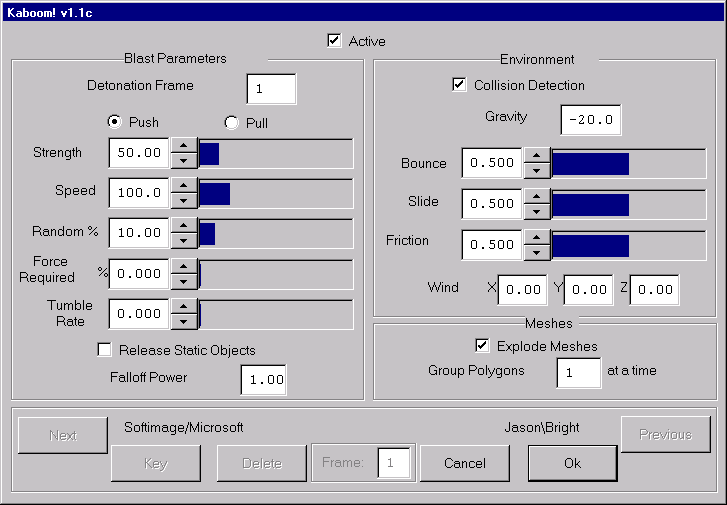
Exploding Hierarchies with Kaboom
The Effects > Kaboom custom effect in the Motion module allows you to explode complete hierarchies using dynamics and collision detection. Now you too can create your own earth-shattering kabooms!
Features include:
Using the Kaboom Effect
The Kaboom effect explodes the currently selected hierarchy. Dynamic calculations are done on the object, including gravity, wind, and collision detection with a ground plane. Objects can collide with the ground plane (from either side), bounce, and slide (continuous contact). Polygon mesh objects can be exploded into their constituent polygons.
Here’s an example of how to use the Kaboom effect:
For a full description of parameters, see this command’s description in the Reference Guide.
Tips for Using the Kaboom Effect
Things to Try
shallow water simulation coupled with lagoa multiphysics
http://vimeo.com/82292791
Fabric Engine for plugin developers (Eric Mootz first look)
http://vimeo.com/82296039
Depth map visualisation
by P Dairy via si-community
Not new, but re-posted this week.

Xmas-style XSI logo from 2004

If you ask me, these are all bad ideas:
Fixing DLL problems involves doing some troubleshooting to figure out the root cause of the problem. Often, an error message about a DLL is just a symptom.
For missing DLLs, don’t download the DLL from some dll-download site. Usually a re-install of your software package, or an install of the appropriate redistributable package, will fix the problem.
Copying a DLL from one version of an application to another is a little crazy. You’re just asking for trouble 😉
There’s several ways you might put together an ICE tree to delete the polygons inside a null.

You can use the FBXExport command to create the ExportFBXOptions property, and then use either the OM or SetValue to set the FBX options. For example, this Python snippet creates the FBX property by calling FBXExport( “option” ), and then sets the FBX SDK version (for which there is no separate FBXSetExport command).
si = Application
si.FBXExport( "option" )
o = si.Dictionary.GetObject( "ExportFBXOptions" )
o.Parameters( "FBXSDKVersion" ).Value = "FBX201300"
You can do the same thing for FBXImport with FBXImport( “option” ), but I always got an error, even if the property was created.
si = Application

try:
	si.FBXImport( "option" )
except:
	o = si.Dictionary.GetObject( "ImportFBXOptions" )

si.LogMessage( o )
Softimage toolbar
http://vimeo.com/81906535
Softimage ICE – Tutorial – Bend strands; unsimulated gravity
Softimage, OpenVDB and Arnold in cloud modeling test
http://vimeo.com/81459393
VDB WIP
by Mr.Core

Four-point corner pin
by caledonian_tartan


 eX-SI
eX-SI 