Trick question: when was Softimage 3D ported to Windows NT?
Answer: In version 3.0, Softimage 3D was available on Windows NT in early 1996, but Softimage 3D Extreme on Windows NT was available only in mid-1996, in version 3.5.
Here’s what I could cobble together as proof…
Microsoft Delivers High-End 3-D Animation Software for Microsoft Windows NTJan. 16, 1996
REDMOND, Wash., Jan. 16, 1996 — Microsoft Corp. today began shipping a new version of its award-winning 3-D modeling and animation software, Microsoft® Softimage® 3D, for the Windows NT ™operating system. Softimage 3D 3.0 for Windows NT offers the same production-proven 3-D animation environment as Softimage 3D for Silicon Graphics® systems, while delivering workstation-class performance at approximately 50 percent of the overall system cost. With this breakthrough in price/performance, more animators now can take advantage of high-end 3-D animation software.
For more than nine years, Softimage has provided digital-media artists with an intuitive, creative, production-proven 3-D modeling and animation environment for creating characters and scenes for films, commercials, games, interactive multimedia titles and other productions. Softimage products have helped create many of the world’s most innovative, visual effects-rich productions, including films such as “Jurassic Park,” The “Mask,” “Jumanji” and “Casper” ; commercials such as the Shell Dancing Gas Pumps; and interactive games such as Virtua Fighter and Daytona. Softimage has pioneered many of the advanced animation techniques that are used throughout the industry, including inverse kinematics, spline-based modeling and animation, and motion-capture technology. In 1994, the company merged with Microsoft to help bring these 3-D animation capabilities to a broader audience.
“Today marks an important milestone in making high-end 3-D animation capabilities widely available,” said Daniel Langlois, senior director at Microsoft and founder of Softimage. “Because Windows NT offers the same high-performance graphics capabilities as UNIX® -based workstations and all of the benefits of a highly competitive ‘PC economy,’ many more content creators will be able to take advantage of high-end 3-D animation software. And these compelling price/performance figures will get even better over time.”
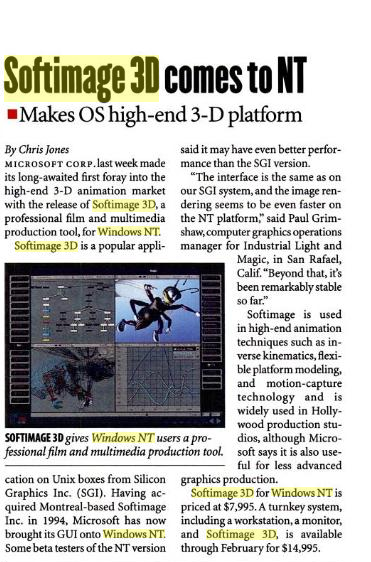
Softimage 3D comes to Windows NT
InfoWorld, 22 January 1996

Microsoft delivers high-end 3-D animation software for Microsoft Windows NT; Softimage 3D for Windows NT provides workstation-class capabilities and performance at approximately half the system cost.
REDMOND, Wash.–(BUSINESS WIRE)–Jan. 16, 1996–
Microsoft Corp. today began shipping a new version of its award-winning 3-D modeling and animation software, Softimage(r) 3D, for the Windows NT(Windows New Technology) A 32-bit operating system from Microsoft for Intel x86 CPUs. NT is the core technology in Windows 2000 and Windows XP (see Windows). Available in separate client and server versions, it includes built-in networking and preemptive multitasking.
Softimage 3D 3.0 for Windows NT offers the same production-proven 3-D animation environment as Softimage 3D for Silicon Graphics(r) systems, while delivering workstation-class performance at approximately 50 percent of the overall system cost. With this breakthrough in price/performance, more animators now can take advantage of high-end 3-D animation software.
Product Overview: Softimage|3D Version 3.0 for Windows NT
January 1996
At its first release, however, Softimage 3D Extreme for Windows NT is not available. Softimage 3D Extreme offers additional features including Softimage Mental Ray distributed rendering, MetaClay for modeling organic shapes, and a particles system for creating fire, smoke and other effects. Softimage 3D Extreme for Windows NT is expected to be available by mid 1996.
SoftimageNT
January 1996, 3D Design magazine
The beta version of SoftImage’s NT has yet to implement some more advanced features, such as Mental Ray and Particle, but SoftImage promises to have them ready when the program ships this quarter.”

SoftimageNT-review-Jan-1996
Microsoft Introduces Major Upgrade to Softimage 3D
May 16, 1996
All major Softimage 3D features are now available on Intel® Pentium® Pro, Alpha and MIPS® RISC 4400-based systems for the Microsoft® Windows NT® operating system and the Silicon Graphics® platform.






 eX-SI
eX-SI 