In this video, I do a walk through of a scene posted by Guillaume Laforge on the XSI mailing list. In the scene, Guillaume uses a point cloud to drive the polygons of a mesh, so that the polygons follow that transformations (pos and ori) of the particles. ICE modeling is used to “break up” the mesh into polygons. Includes a description of how vector subtraction is used to locate points relative to a polygon center.
Tag Archives: ICE
Intro to scene references and Get Data daisy chaining in ICE
Introductory-level video that shows you how to daisy chain Get Data nodes when you’re getting data from a scene.
Daisy chaining (connecting Out Name to In Name) is a way to separate out and isolate the different scene references that combine together to pull in scene data.
ICE brain teaser
Early this week, this ICE “brain teaser” was posted on the XSI mailing list.
Given an array like this:
8,8,8,2,2,2,2,5,5,5,5,9,9,9,9,1,1,1,1,1,1
how can can I –without using any loops–convert it to an array like this
1,1,1,2,2,2,2,3,3,3,3,4,4,4,4,5,5,5,5,5,5
Martin Chatterjee came up with a nice solution using arrays.
As an exercise, I tried to do it using a [non-simulated] point cloud. Basically, the idea is to use the particle self.ID data set to index into the array without using a Repeat node.
Here’s what I ended up with. First, I set a boolean flag on each point to indicate whether the corresponding array element is the same as the previous, and then I do a cumulative sum of array elements.
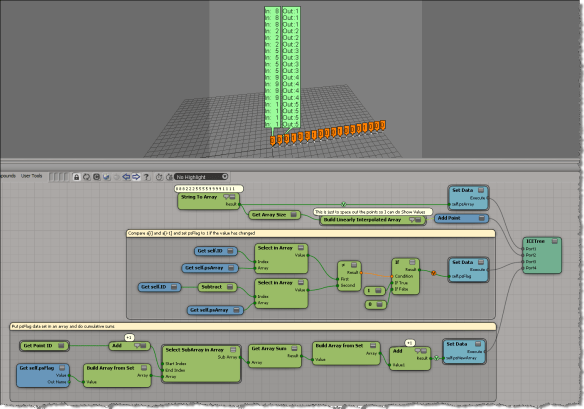
My first try at this ended up as an ICE tree version of this algorithm, plugged into the On Creation port of Add Point.
var a = [8,8,8,2,2,2,2,5,5,5,5,9,9,9,9,1,1,1,1,1,1];
var a1 = new Array(a.length);
var val = -1;
var ix = -1;
for (var i=0;i<a.length;i++)
{
if ( a[i] != val )
{
val = a[i];
ix++;
}
a1[i] = ix;
}
LogMessage( a );
LogMessage( a1 );
// INFO : 8,8,8,2,2,2,2,5,5,5,5,9,9,9,9,1,1,1,1,1,1
// INFO : 0,0,0,1,1,1,1,2,2,2,2,3,3,3,3,4,4,4,4,4,4
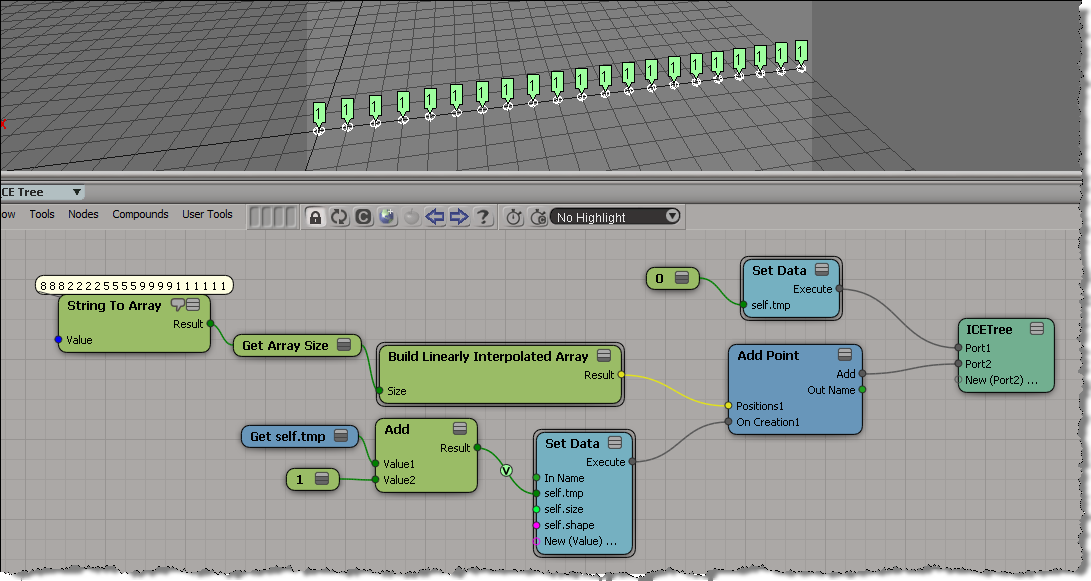
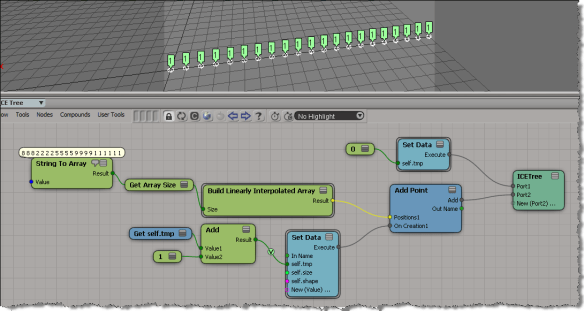
But that didn’t work, because as I found out, I wasn’t able to carry attribute values over from one point to the next. In the example below, you can see that self.tmp is local to each point (which means it starts off at zero for each point). Instead of incrementing self.tmp each time, I end up setting it to 1 every time.
Finding and deleting ICETrees on an object
Here’s a JScript snippet for deleting ICE trees from the objects in a group.
Note that the Primitive.ICETrees property returns all ICE trees that write to the object, including ICE trees on different objects (such as the italicized ICE tree in the screenshot below).

var o = Selection(0);
delICETrees(o, false );
function delICETrees( oGroup, bDelAll )
{
var bFlag = ( bDelAll == null ) ? false : bDelAll;
logmessage(bFlag);
if ( oGroup != null && oGroup.type == "#Group" )
{
oGroupEnum = new Enumerator( oGroup.Members ) ;
for (;!oGroupEnum.atEnd();oGroupEnum.moveNext() )
{
var o = oGroupEnum.item() ;
var p = o.ActivePrimitive;
oICETreeEnum = new Enumerator( p.ICETrees ) ;
for (;!oICETreeEnum.atEnd();oICETreeEnum.moveNext() )
{
var oICETree = oICETreeEnum.item() ;
if ( bFlag || oICETree.Parent3DObject.IsEqualTo( o ) )
{
LogMessage( oICETree.fullname );
// DeleteObj( oICETree );
}
}
}
}
else
{
LogMessage("Select a group" );
}
}
Finding closest point with boolean flag equal True
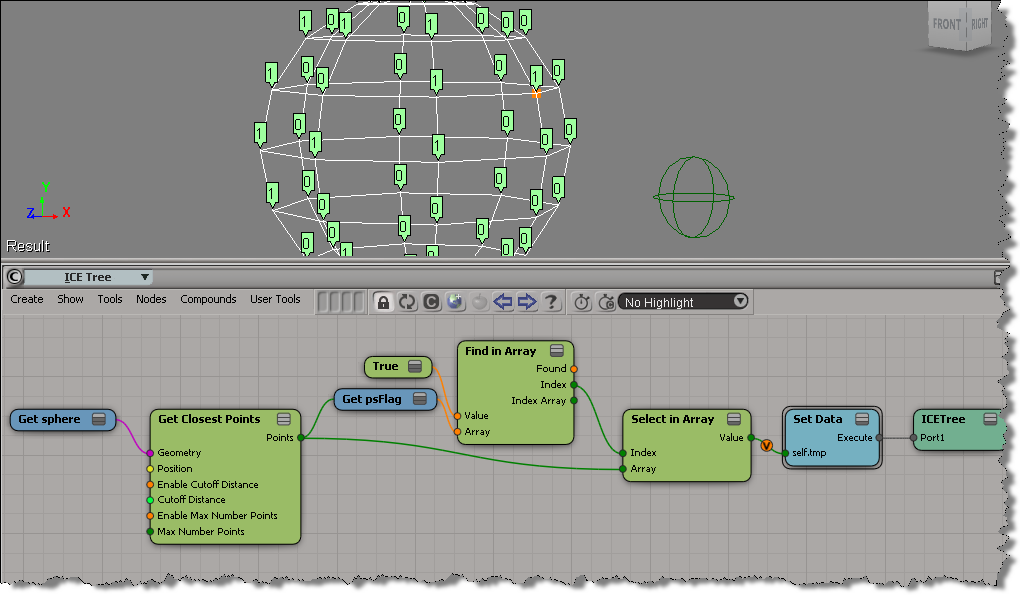
Here’s an example (from a question posted on the XSI list back in 2009) that illustrates some aspects of using arrays in ICE.
- Get Closest Points returns a sorted array of locations, with the closest locations coming first in the array.
- Find in Array finds the index of the first (and hence closest) point with the psFlag attribute set to True.
- With that index, you use Select in Array to get the location of the closest point with psFlag=True.
Tip: Use compounds to organize your ICE trees
Compounds are useful for organizing your ICE trees. Even if you don’t intend to reuse or distribute your compounds, using compounds can help make your ICE trees readable and understandable. Kinda like paragaraphs in written text. Use compounds to separate blocks of functionality, and give your compounds meaningful names. It’ll help later when you come back to an ICE tree you haven’t worked on for awhile.
Consider this basic emission. Looks pretty simple, right? You can tell at a glance what’s happening, and what scene references are used in this ICE tree.

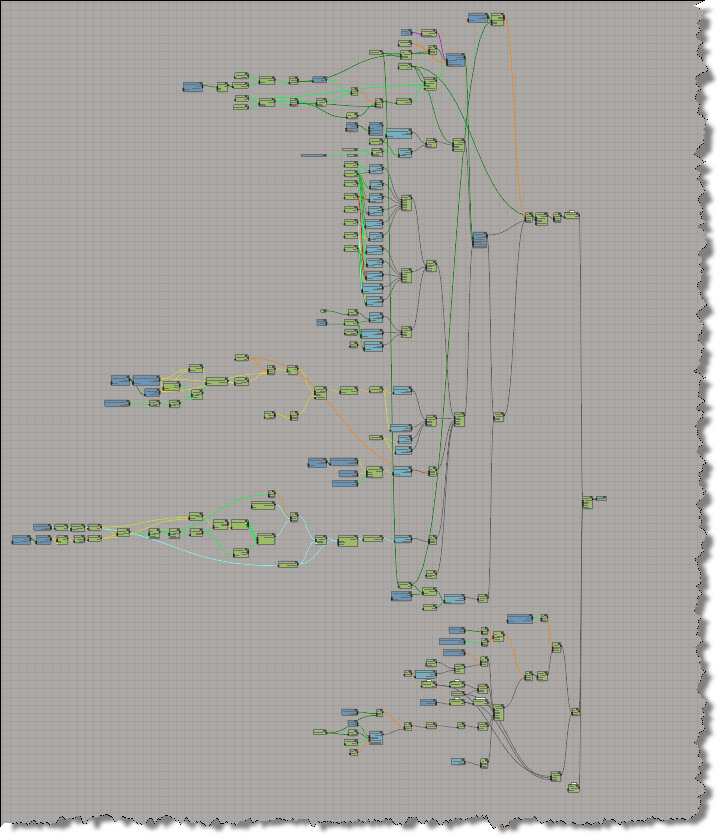
If you explode all the compounds in a Basic Emission, you get something a lot more complicated looking:

Without any compounding, you’re looking at a 195 total nodes (and 46 different nodes).
The case of the While loop that didn’t evaluate
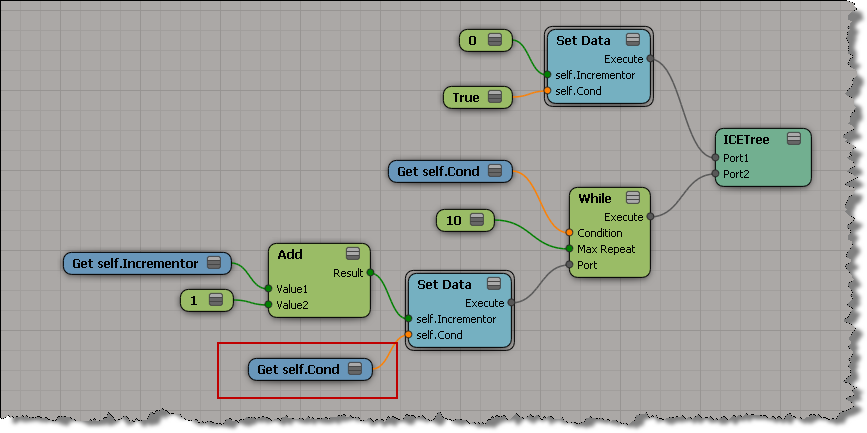
In this case, an ICE While loop wasn’t working as expected.
The customer was using Max Repeat to do something like this, but in ICE:
x = 2 cond = x > 0 i = 0 while cond: print i i = i + 1 if i > 10: break
Unfortunately, in ICE, the While loop was never executed.
It’s not a problem with the While loop, it’s a problem with the ICE tree evaluation (it’s a bit too lazy). I’ve seen things like this before, and I usually create a separate ICE tree to workaround it:
http://vimeo.com/33968117
On the mailing list, Guillaume suggested a couple of other workarounds. First, use Delay Set Data.
The word “Delay” in the node name throws me off…I wouldn’t think to use it, but after reading up on it, I can see why you would think to use that node (it does evaluation).

If you set the condition boolean in the While loop, that works too:

ICE Modeling – rotating copies
In this video, I show how to rotate copies created with Create Copies from Polygon Mesh so that the copies are aligned with the PolygonRefFrame.
http://vimeo.com/33724874
Mentions: PolygonRefFrame, context, Rotate Vector, transformation matrix
ICE Modeling – placing copies on another object
Part 1 of 2. A video walkthrough of how to use ICE modeling to create copies of an object and place them at specific positions on another object (in this case, on the polygon centers).
http://vimeo.com/33667035
Uses: Create Copies from Polygon Mesh, Transform per Copy, Get Copy Index, Build Array from Set, NbPolygons, PolygonPositions
Filtering object selection by volume
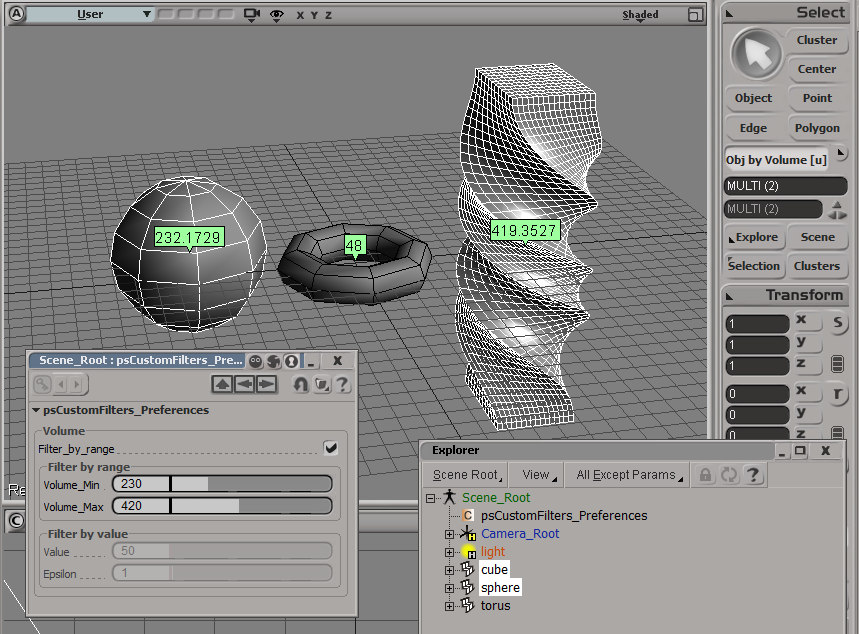
Here’s an addon that uses the ICE Volume attribute to filter object selections. The Volume attribute is always defined (so you don’t need to Show Values or anything for this filter to work).
Note that you have to freeze scaling to get the right volume for an object.
For simplicity, I’m using a custom property (on the scene root) to hold the preferences for the filter.

The filter itself is simple. It just gets the Volume attribute value and compares it to the range of values specified in the PPG.
# Match callback for the psCustomFilters custom filter.
def ObjbyVolume_Match( in_ctxt ):
Application.LogMessage("ObjbyVolume_Match called",constants.siVerbose)
in_object = in_ctxt.GetAttribute( "Input" );
obj = Get3DObject( in_object );
if ( Application.ClassName(obj) != "X3DObject" ):
return false;
v = obj.ActivePrimitive.ICEAttributes("Volume").DataArray[0]
filterProp = GetFilterProp( )
if filterProp.Filter_by_range.Value == True:
bMatch = filterProp.Volume_Min.Value <= v <= filterProp.Volume_Max.Value
else: # Filter by value with an epsilon
min = filterProp.Value.Value - filterProp.Epsilon.Value
max = filterProp.Value.Value + filterProp.Epsilon.Value
bMatch = min <= v <= max
return bMatch