
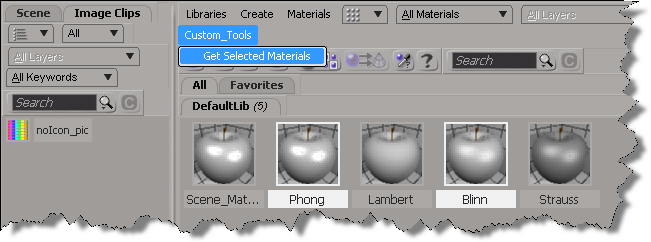
In 2013, you can use the selection view attribute to get the materials that are selected in the Material Manager.
Here’s a python custom menu item that shows how to do it. In summary, you do this:
- Add a custom menu in the Manager Manager
- Use a callback item, so you can get the view from the context
- Use selection view attribute to get the names of the selected materials
import win32com.client
from win32com.client import constants

null = None
false = 0
true = 1

def XSILoadPlugin( in_reg ):
	in_reg.Author = "blairs"
	in_reg.Name = "MaterialsManagerPlugin"
	in_reg.Major = 1
	in_reg.Minor = 0

	in_reg.RegisterMenu(constants.siMenuMaterialManagerTopLevelID,"Custom_Tools",false,false)
	#RegistrationInsertionPoint - do not remove this line

	return true

def XSIUnloadPlugin( in_reg ):
	strPluginName = in_reg.Name
	Application.LogMessage(str(strPluginName) + str(" has been unloaded."),constants.siVerbose)
	return true

def Custom_Tools_Init( in_ctxt ):
	oMenu = in_ctxt.Source
	oMenu.AddCallbackItem("Get Selected Materials","OnGetSelected")
	return true

def OnGetSelected( c ):
	view = c.GetAttribute( "Target" )
	Application.LogMessage( view )

	Application.LogMessage( view.GetAttributeValue( "selection" ) )
	for mat in view.GetAttributeValue( "selection" ).split(","):
		Application.LogMessage(  mat )

	return true
 eX-SI
eX-SI 