Here’s an ICE tree that counts the number of characters in a string.
I use Get Sub String in a While with Counter loop to get one character at a time. The loop repeats until Get Sub String returns nothing.


Here’s an ICE tree that counts the number of characters in a string.
I use Get Sub String in a While with Counter loop to get one character at a time. The loop repeats until Get Sub String returns nothing.
To have Softimage start up with a certain layout, you don’t really have to do anything. When you exit Softimage, it writes the current layout to your preferences file, so that the next time you start Softimage it starts up with that same layout.
For example, if I change to the Tools Development Environment layout and exit Softimage, then my %XSI_USERHOME%\Data\Preferences\default.xsipref file will include this line:
xsiprivate.UI_LAYOUT_DEFAULT = Tools Development Environment
So when I start Softimage again, it will start up in the Tools Development Environment.
Here’s how to access that preference in scripting:
# Python
from win32com.client import Dispatch as disp
from win32com.client import constants as C
si = disp('XSI.Application' )
log = si.LogMessage


log( C.siUILayoutDefault )
log( si.GetUserPref( C.siUILayoutDefault ) )
log( si.Preferences.GetPreferenceValue( "xsiprivate.UI_LAYOUT_DEFAULT" ) )

# INFO : UI_LAYOUT_DEFAULT
# INFO : Compositing
# INFO : Compositing
Someone posted Olivier Ozoux’s 11-year-old AddNulltoPoints script to xisbase the other day. You can see from the install instructions that this script is old-school.
'################################################################################
'NAME: Add Null To Point v2.0
'AUTHOR: Olivier Ozoux <oliviero@softimage.com>
'LAST MODIFIED: 2001-05-22
'
'v2.0 is a complete rewrite using the Object Model where possible
'
'INSTALL
'
'1. Copy the SPDL file:
'	{5CD342AD-2FB1-4646-9D14-3E82C805177D}.spdl
'	to the spdl directory of XSI (for example):
'	C:\Softimage\XSI_1.5\Application\spdl
'
'2. Copy the Preset file:
'	AddNullToPointDialog.Preset
'	to the Preset Property directory of XSI (for example):
'	D:\Softimage\XSI_1.5\DSPresets\Properties
'
'3. Restart XSI
'
'4. Run the Script or Create a Command/Button on a toolbar
'
'
'This tool will create a single Null for each point of the selected object(s).
'(you can also select a point cluster, or tag points). Then based on the dialog
'choice, it will either Constrain the Null to the Point using Object to Cluster
'constraint, or Deform the point to the Null with a Cluster Center operator.
'
'-Olivier Ozoux
'###############################################################################
To get rid of the SPDL and preset, I took a few minutes and updated it to Python.
#
# Softimage 2013 and later
#
from sipyutils import si			# win32com.client.Dispatch('XSI.Application')
from sipyutils import log		# LogMessage
from sipyutils import C			# win32com.client.constants
si = si()


#
# Softimage 2012
#
#from siutils import si		# Application
#from siutils import log		# LogMessage
#from siutils import disp	# win32com.client.Dispatch
#from siutils import C		# win32com.client.constants

#
# For Softimage 2011
#
#from win32com.client import Dispatch as disp
#from win32com.client import constants as C
#si = disp('XSI.Application')
#log = si.LogMessage

def CreateUIDialog():

	oDialog = si.ActiveSceneRoot.Properties( 'AddNullToPoint' )

	if oDialog is None:
		oDialog = si.ActiveSceneRoot.AddProperty( 'CustomProperty', False, 'AddNullToPoint' )
		oDialog.AddParameter2("CnsType",C.siInt4,0,0,100,0,100,C.siClassifUnknown,C.siPersistable + C.siKeyable)
		oDialog.AddParameter2("NullName",C.siString,"",None,None,None,None,C.siClassifUnknown,C.siPersistable + C.siKeyable)
		oDialog.AddParameter2("ParentObj",C.siBool,True,None,None,None,None,C.siClassifUnknown,C.siPersistable + C.siKeyable)

		oLayout = oDialog.PPGLayout
		oLayout.Clear()
		oLayout.AddEnumControl( 'CnsType', [ 'Null to Point (Object to Cluster)', 0, 'Point to Null (Cluster Center)', 1 ], 'Constraint Type', C.siControlRadio )
		oLayout.AddGroup( 'Options' )
		oLayout.AddItem( 'NullName' )
		oLayout.AddItem( 'ParentObj' )
		oLayout.EndGroup()

		oDialog.Parameters( 'NullName' ).Value = '<obj>_pnt'

	return oDialog


def addNullToPoint( oSel, Mode, Name, Parent ):
	oRoot = si.ActiveSceneRoot
	if oSel.Type in [ 'polymsh', 'crvlist', 'surfmsh' ]:
		aIndex = [x for x in range( oSel.ActivePrimitive.Geometry.Points.Count ) ]
		oGeom = oSel.ActivePrimitive.Geometry
		oPoints = oGeom.Points
	elif oSel.Type == 'pntSubComponent':
		aIndex = oSel.SubElements
		oSel = oSel.SubComponent.Parent3DObject
		if oSel.Type in [ 'polymsh', 'crvlist', 'surfmsh' ]:
			oGeom = oSel.ActivePrimitive.Geometry
			oPoints = oGeom.Points
		else:
			log( 'Not a geometric object' )
			return
	elif oSel.Type == 'pnt':
		aIndex = oSel.Elements.Array
		oGeom = oSel.Parent
		oPoints = oGeom.Points
		oSel = oSel.Parent3DObject
	else:
		log( 'Not a geometric object' )
		return

	pntName = Name.replace( '<obj>', oSel.Name )

	for i in aIndex:
		oCls = oGeom.AddCluster( 'pnt', 'pnt' + str( i ), [i] )
		oNull = oSel.AddNull( 'pntName' + str( i ) )
		#TODO

		if Mode == 0:
			# Constrain the Null to the Cluster
			oNull.Kinematics.AddConstraint( "ObjectToCluster", oCls, False )
		elif Mode == 1:
			#Move the Null in position
			oNull.Kinematics.Local.Parameters("posx").Value = oPoints(i).Position.X
			oNull.Kinematics.Local.Parameters("posy").Value = oPoints(i).Position.Y
			oNull.Kinematics.Local.Parameters("posz").Value = oPoints(i).Position.Z

			# Create ClusterCenter
			si.ApplyOperator( "ClusterCenter", str(oCls) + ";" + str(oNull), 0 )

		#Cut The Null if needed
		if Parent == False:
			si.CutObj( oNull )

def AddNullToPointProc():
	oDialog = CreateUIDialog()
	retval = si.InspectObj( oDialog, "", "", C.siModal )

	mode = oDialog.Parameters("CnsType").Value
	name = oDialog.Parameters("NullName").Value
	parent = oDialog.Parameters("ParentObj").Value

	for oSel in si.Selection:
			addNullToPoint( oSel, mode, name, parent )


AddNullToPointProc()
I get asked this question from time to time. It’s actually pretty straightforward to set up…it’s managing the render jobs that may take more effort.

Done. It’s all set up now, but there’s a few things you should check/consider:
xsibatch –render “//server/project/scenes/Example.scn” –frames 1-10
xsibatch –render “//server/project/scenes/Example.scn” –skip
Something mechanical that probably should be in Inventor ??? 😉
by Manny

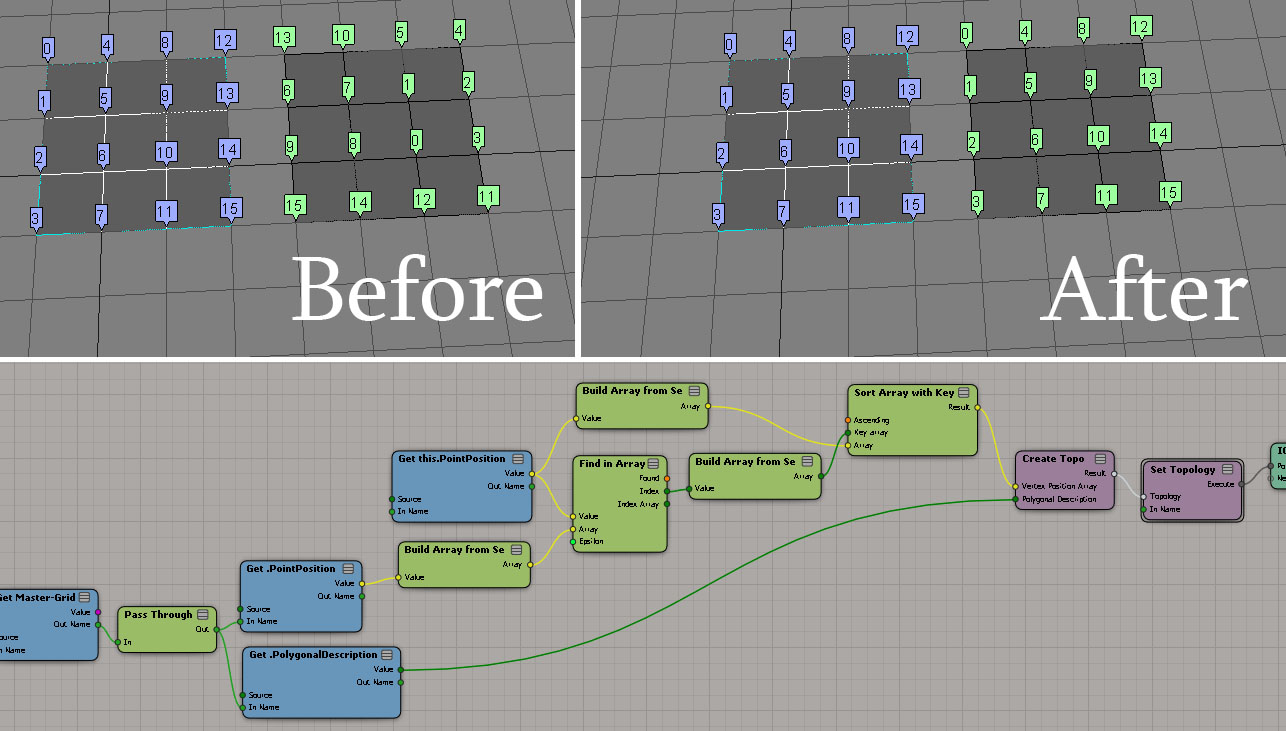
Reordering vertex IDs
by Christian Gotzinger
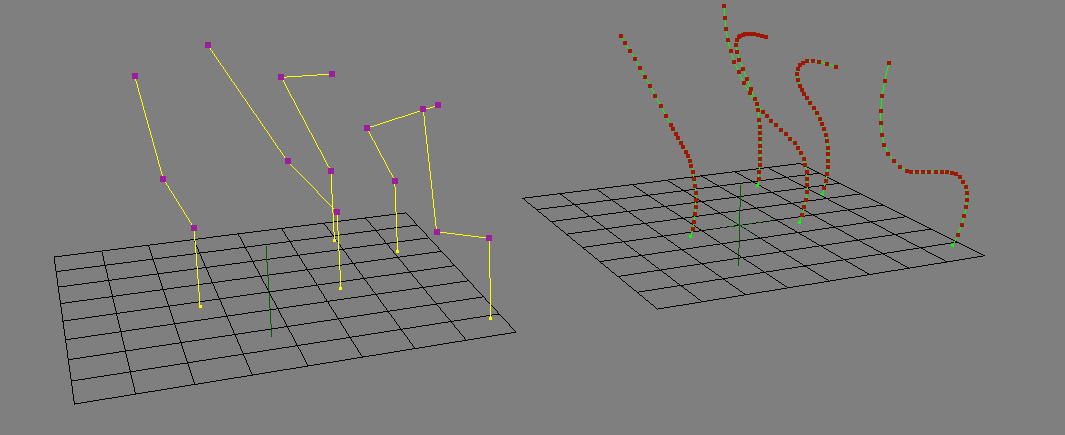
centrifugal Force – velocity only
by wavo

Galaxy effect
by Leo

Resample strand resolution
by Fabricio Chamon

Fx Tree and ICE
by iamVFX

So you installed a plugin, but now you cannot find out how to access the plugin in Softimage.
If the plugin added a menu command, and it’s a scripted plugin, we can find it by checking the plugin code (in the Plugin Manager > Tree, right-click the plugin and click Edit).

Find the definition of XSILoadPlugin.
In the XSILoadPlugin function, look for any calls to RegisterMenu.
def XSILoadPlugin( in_reg ): #{{{
	in_reg.Author = "kim"
	in_reg.Name = "EPSexportPlugin"
	in_reg.Email = ""
	in_reg.URL = ""
	in_reg.Major = 1
	in_reg.Minor = 0

	in_reg.RegisterProperty("EPSexport")
	in_reg.RegisterMenu(constants.siMenuMainFileExportID,"EPSexport_Menu",false,false)

	# register the export command
	# 	KA_EpsExport( Application.Selection, OutputFile, CullBackFaces, doInnerLines, doBorderLines, InnerLineThickness, BorderLineThickness, AutoDiscontinuity, Xres )
	in_reg.RegisterCommand("KA_EpsExport","KA_EpsExport")

	return true
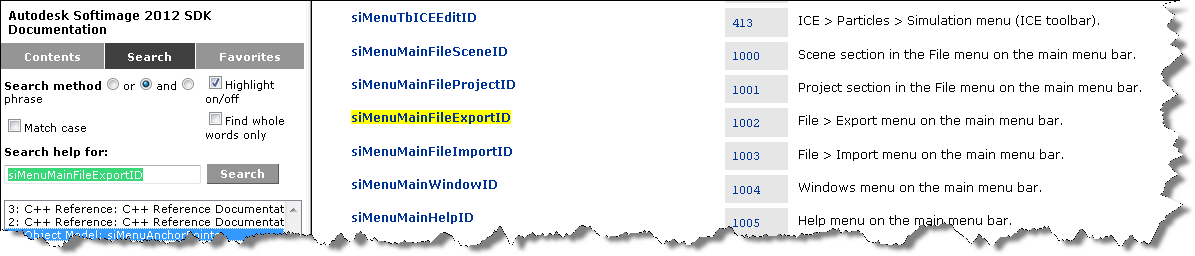
RegisterMenu uses what’s called a “menu anchor” to define a new menu command. In this example, the menu anchor is siMenuMainFileExportID.
Google the menu anchor or search the SDK docs, and you’ll find a page that describes the menu anchors:
The roots of Softimage go back to 1985 and the animated short Tony de Peltrie, which was one of the first (if not the very first) computer-animated films to have a human character with facial expressions. The artist working on Tony de Peltrie was Daniel Langlois, who would go on to start up Softimage, with the goal of creating computer animation software for artists and animators (not programmers 😉
“But the biggest ovations last week were reserved for. Tony de Peltrie. Created by a design team from the University of Montreal, it depicts a once famous musician. tickling the keys and tapping his white leather shoes to the beat of his memories. De Peltrie looks and acts human; his fingers and facial expressions are soft, lifelike and wonderfully appealing.
In creating De Peltrie, the Montreal team may have achieved a breakthrough: a digitized character with whom a human audience can identify.”
— Phillip Elmer-DeWitt, Time Magazine, August 5 th, 1985
John Lasseter, one of the festival’s judges and future director of Toy Story, Toy Story 2, and A Bug’s Life, declared: “Years from now Tony de Peltrie will be looked upon as the landmark piece, where real, fleshy characters were first animated by computer.” (Maclean’s, September 9 th, 1985)
The short went on to win over twenty international awards, and was featured in hundreds of magazines all over the world. Today, Tony de Peltrie is considered to be the godfather of CGI characters.
Daniel Langlois working on Tony de Peltrie (1984)

Computer Graphics World article from October 15:

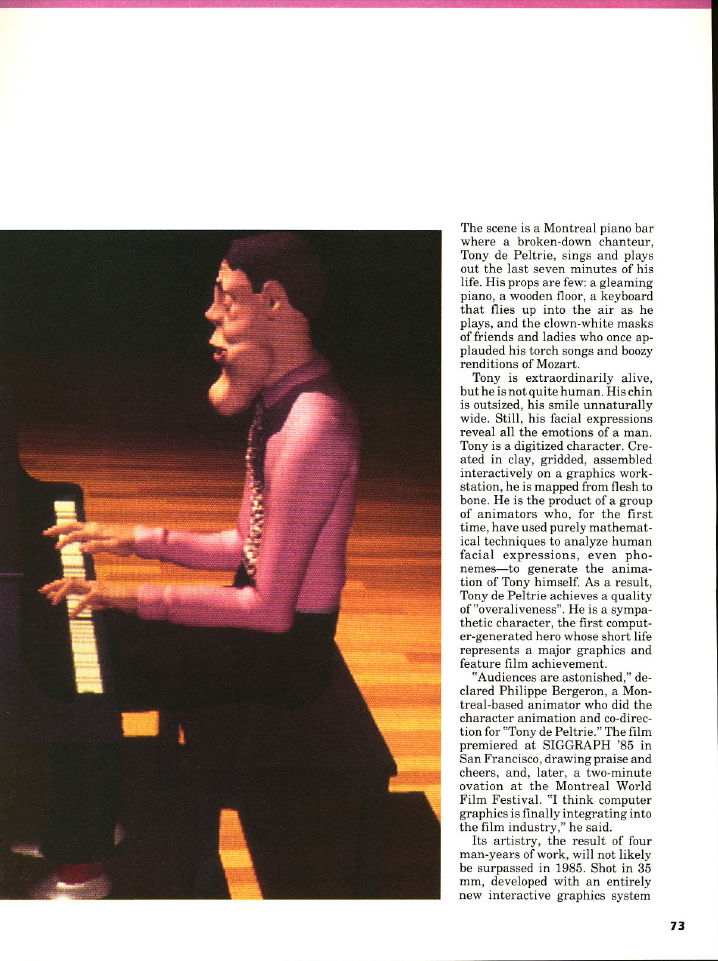


Finally, here’s a textual description of the making of Tony de Peltrie:
The animation was done on a 3-D interactive graphics system, TAARNA, which has been designed for use by people with no computer background. To animate the character, there were two major things that had to be done. Firstly, the facial expressions need to be defined (muscle movements) and secondly, the body motions (skeletal movements) must be layed out.
To get the required realism in the facial expressions, the animators photographed a real person doing 28 different facial expressions. The model had a grid of dark lines drawn on his face to correspond with the control points which would be on the animated figure. Only 20 of the photographs were digitised as the difference between some expressions is to small to warrant the time it would take to put them in. An example is the similarity between facial positions for “m” and for “b”. A clay model was made of Tony and a control grid was drawn onto it. The model was then photographed and digitised. The animators manually went through and matched up corresponding control points. This was not a simple matter as the grid on Tony’s face had a lot more points than the human model so a one to many relationship between the points had to be created. This caused a few problems with the animation which had to be ironed out later on.
Bergeron used an algorithm by Kochanek (SIGGRAPH, 1984) for interpolating between keyframes. This gave the freedom to choose and combine expressions and reduce or exaggerate them for added effect. The speech sequence was recorded onto tape, then the timing for the speech was noted. The timings for the speech were copied onto dope sheets and then the synchronising of speech was done using techniques very similar to traditional cell animation.
For the other parts of the face, a similar approach was taken although there weren’t as many key positions to record. For the eyebrows there were three positions, and for the eyelids, there were four positions.
In general, there isn’t a unique definition for the multiplication of one vector by another, but there are several common “vector products”, such as the dot product and the cross-product.
The dot product of the two vectors (x, y, z) and (a, b, c) is ax + by + cz.
I kinda assumed that in ICE, the Multiply node would give me the same result, but it turns out that Multiply gives (ax, by, cz):
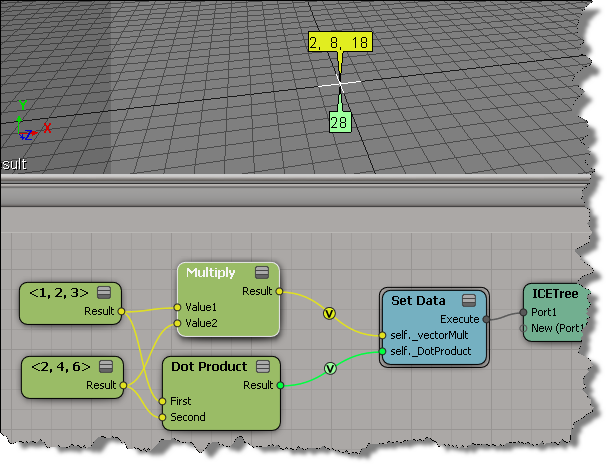
A point with “valence 2” is a point with two incident (neighbour) edges. You could write a script to find these points, but it’s even easier to do with ICE:
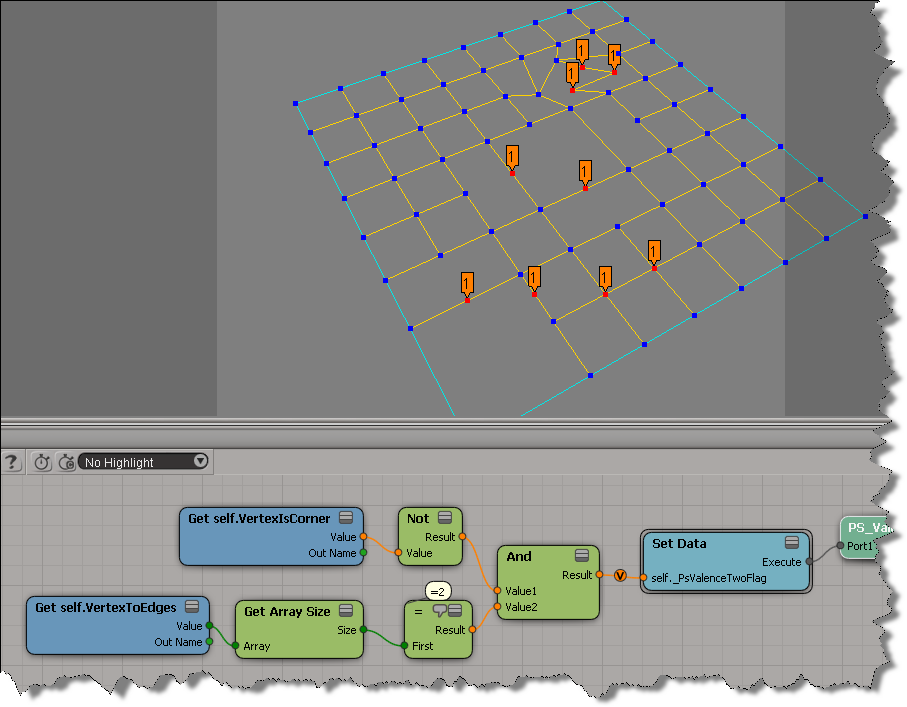
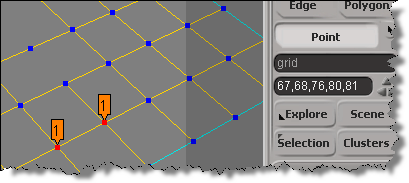
Notice that some of the tagged points look like they have more than 2 neighbour edges. What’s happening there is that there are several vertices on top of each other:
Here’s a Python script that builds the ICE tree and then uses it to select all the interior points with valence 2.
hat tip: Fabricio Chamon
I also did this as a custom filter, maybe I’ll post that later.
from siutils import si
from siutils import log		# LogMessage
from siutils import disp	# win32com.client.Dispatch
from siutils import C		# win32com.client.constants

#
# Build the ICE tree that finds the interior points with valence two
#
def BuildICETree( oObject ):
	oIceTree = si.ApplyOp("ICETree", oObject.FullName, C.siNode, "", "", 0)(0)
	oIceTree.Name = "PS_ValenceTwoFilter"

	oAnd = si.AddICENode("$XSI_DSPRESETS\\ICENodes\\CombineLogicNode.Preset", oIceTree )

	#
	# Get self.VertexIsCorner -> Not -> And
	#
	oNot = si.AddICENode("$XSI_DSPRESETS\\ICENodes\\NotNode.Preset", oIceTree )
	oGetVertexIsCorner = si.AddICENode("$XSI_DSPRESETS\\ICENodes\\GetDataNode.Preset", oIceTree )
	oGetVertexIsCorner.Parameters( "Reference" ).Value =  "self.VertexIsCorner"
	si.ConnectICENodes( oNot.InputPorts("Value"), oGetVertexIsCorner.OutputPorts( "value" ) )
	si.ConnectICENodes( oAnd.InputPorts( "Value1" ), oNot.OutputPorts("result") );

	#
	# Get self.VertexToEdges -> Get Array Size -> = -> And
	#
	oGetVertexToEdges = si.AddICENode("$XSI_DSPRESETS\\ICENodes\\GetDataNode.Preset", oIceTree )
	oGetVertexToEdges.Parameters( "Reference" ).Value =  "self.VertexToEdges"
	oArraySize = si.AddICENode("$XSI_DSPRESETS\\ICENodes\\GetArraySizeNode.Preset", oIceTree )
	oCompare = si.AddICENode("$XSI_DSPRESETS\\ICENodes\\CompareNode.Preset", oIceTree )

	si.ConnectICENodes( oArraySize.InputPorts("Array"), oGetVertexToEdges.OutputPorts("value") )
	si.ConnectICENodes( oCompare.InputPorts("first"), oArraySize.OutputPorts("size") )
	oCompare.InputPorts("second").Value = 2

	si.AddPortToICENode( oAnd.InputPorts("Value1"), "siNodePortDataInsertionLocationAfter")
	si.ConnectICENodes( oAnd.InputPorts("Value2"), oCompare.OutputPorts("result") )

	#
	# Set Data -> ICETree
	#
	oSetData = si.AddICECompoundNode("Set Data", oIceTree )
	si.SetValue( oSetData.FullName + ".Reference", "self._PsValenceTwoFlag", "")

	si.ConnectICENodes( oSetData.InputPorts("Value"), oAnd.OutputPorts( "result" ) )

	si.ConnectICENodes( oIceTree.InputPorts("port1"), oSetData.OutputPorts("Execute") )
	si.DisplayPortValues(oSetData.InputPorts( "Value" ), True, 0, True, "", 0, 0, 0, 1, False, True, 1, 0.5, 0, 1, False, 0, 10000, 1, False, False, 0, 10, False, True, False, 100)

	return oIceTree

#
# Select all points with the ICE attribute _PsValenceTwoFlag=True
#
def SelectInteriorPoints_with_ValenceTwo( oObject ):
	a = oObject.ActivePrimitive.ICEAttributes("_PsValenceTwoFlag")
	if a is not None:
		d = a.DataArray
		if len(d) > 0 and a.IsConstant == False:
			Application.SelectGeometryComponents( "%s.pnt[%s]" %( oObject.FullName, ",".join(["%s" %(ix) for ix in range(len(d)) if d[ix] == -1])  ) )


#--------------------------------------------------------------
# Select interior points with valence 2
#--------------------------------------------------------------


if si.Selection.Count > 0 and si.ClassName( si.Selection(0) ) != "CollectionItem" :
	oObject = si.Selection(0);
else:
	oObject = si.PickObject( "Pick object" )(2)

if oObject != None and oObject.IsClassOf( C.siX3DObjectID ):
	tree = BuildICETree( oObject )
	SelectInteriorPoints_with_ValenceTwo( oObject )
	si.DeleteObj( tree )
Here’s an ICE tree that removes all duplicate values from an array of integers, leaving you with an array of unique integer values:

 eX-SI
eX-SI 