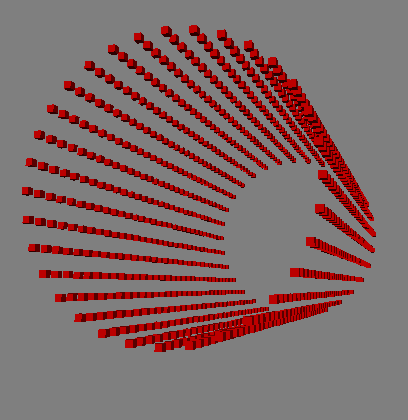
Simple example of a parametric point cloud


Here’s a simple parametric point cloud that shows the two techniques for using arrays instead of Repeats that I blogged about earlier:

Using arrays to avoid Repeat part I
Using arrays to avoid Repeat part II

I used this set of parametric equations to get a cylinder point cloud:

x = sin(u)
y = cos(u)
z = v

where

0 <= u <= 2*PI
-2 <= v <= 2

For this exercise, I simply used Build Interpolated Array to build arrays of U and V values, but I probably should use something like the XYZ_Grid_Generator technique described by Daniel Brassard on si-community.

Here’s a version of the ICE tree with some Show Values.

I use the Modulo technique to build an array of the XY values for all points in the cloud.
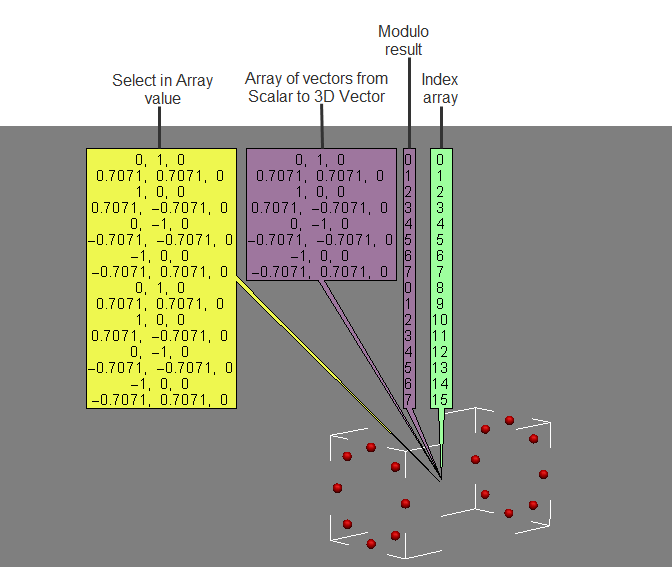
Then I use the Divide by Scalar technique (the integer result is truncated) to build an array of the Z values.

Finally, I add XY vectors to the Z vectors to get the final point positions.
Scripting the output file format for viewport captures


Here’s how to set the default value for the FormatType list in the Capture Viewport dialog box.

from siutils import si		# Application
from siutils import log		# LogMessage
from siutils import disp	# win32com.client.Dispatch
from siutils import C		# win32com.client.constants

# Set the capture options
oViewportCapture = si.Dictionary.GetObject("ViewportCapture")
paramFormatType = si.Dictionary.GetObject( "ViewportCapture.FormatType" )

# Set default to JPEG
paramFormatType.Value = 5

# Display Viewport Capture dialog
si.CaptureViewport( 2, True )


# FormatType values
# -----------------
# 0 Alias
# 1 AVI
# 2 BMP
# 3 Cineon (DPX)
# 4 Cineon (FIDO)
# 5 JPEG
# 6 Memory mapped
# 7 mental ray color
# 8 OpenEXR
# 9 PGM
# 10 Photoshop PSD
# 11 Pict
# 12 PNG
# 13 PPM
# 14 Quicktime
# 15 SGI
# 16 Softimage .pic
# 17 Son Playstation2 TIM2/CLUT2
# 18 Targa
# 19 Tiff
# 20 Valve
# 21 Wavefront
# 22 YUV

If you are scripting a non-interactive viewport capture, you don’t use FormatType. Instead, the output file format is determined by the file extension of the output file name.
Here’s a Python version of the example on the CaptureViewport reference page.

from siutils import si		# Application
from siutils import log		# LogMessage
from siutils import disp	# win32com.client.Dispatch
from siutils import C		# win32com.client.constants
import win32com.client.dynamic

# Get the current frame
fc = si.ActiveProject.Properties("Play Control").Parameters("Current").Value

# Set the capture options
oViewportCapture = si.Dictionary.GetObject("ViewportCapture")

# Capture a 1-frame sequence 
start = oViewportCapture.NestedObjects("Start Frame")
win32com.client.dynamic.Dispatch(start).Value = fc

end = oViewportCapture.NestedObjects("End Frame")       
win32com.client.dynamic.Dispatch(end).Value = fc

# Specify the output file name
# For scripted captures, the output file format is determined by the extension
name = oViewportCapture.NestedObjects("File Name")
win32com.client.dynamic.Dispatch(name).Value = "C:\\test.jpg"

# No dialog
si.CaptureViewport( 2, False );

Friday Flashback #57 SOFTIMAGE|3D custom dialogs


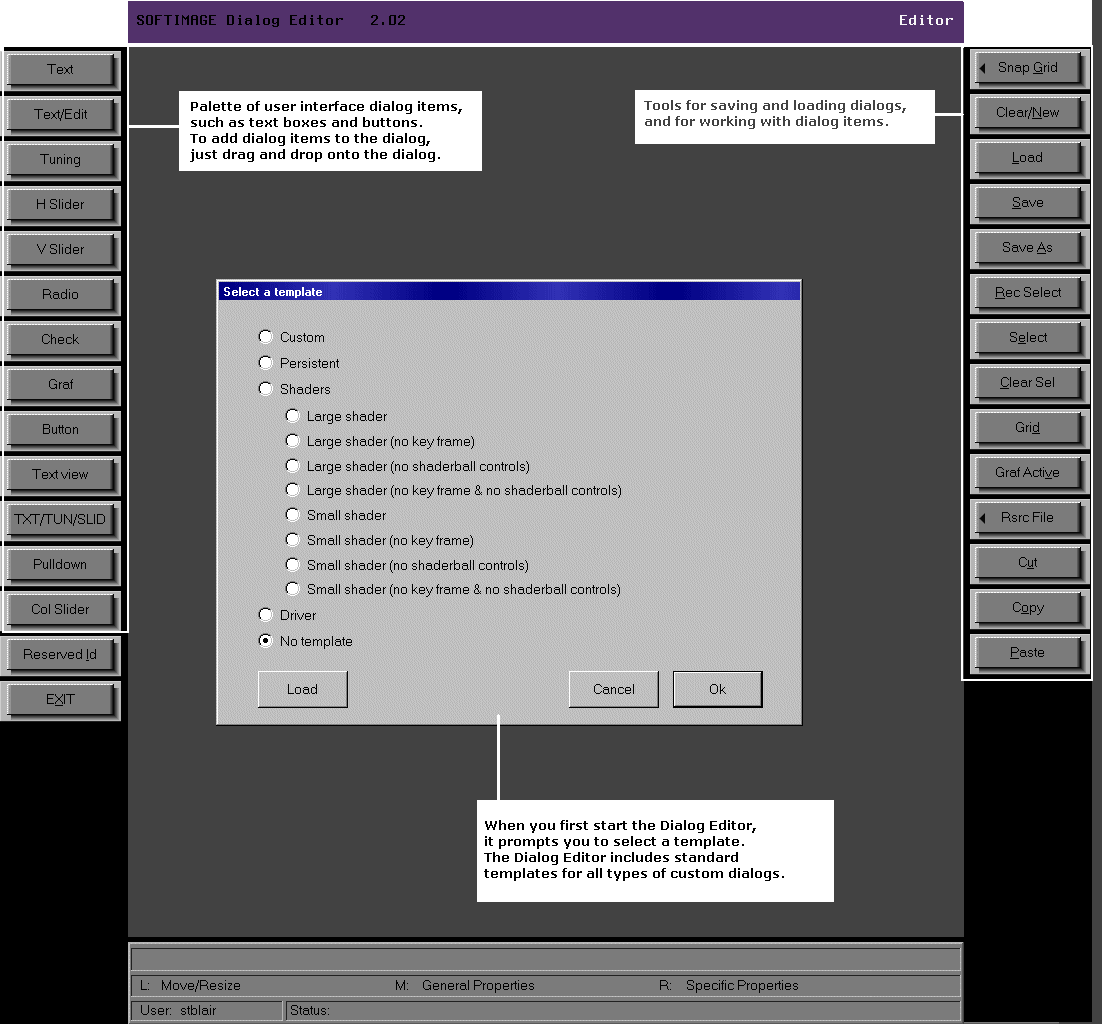
Back in 1999, you would use this dialog editor to build custom dialogs for SOFTIMAGE|3D shaders and plugins:

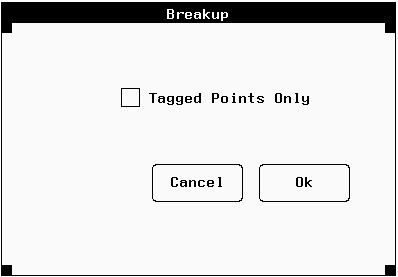
The dialog editor would generate the .cus file that specified the layout of the custom dialog. For example, this simple dialog box:

was defined by this .cus file:

Dialog
1200, "Breakup", 12, 1, -1, 442, 385, 836, 638
1, 2, "Ok", 700, 459, 790, 496, 0
2, 2, "Cancel", 593, 459, 683, 496, 0
3, 0, "", 697, 459, 697, 459, 0
4, 0, "", 697, 459, 697, 459, 0
5, 0, "", 697, 459, 697, 459, 0
6, 0, "", 697, 459, 697, 459, 0
7, 0, "", 697, 459, 697, 459, 0
8, 0, "", 697, 459, 697, 459, 0
9, 0, "", 697, 459, 697, 459, 0
10, 0, "", 697, 459, 697, 459, 0
11, 0, "", 697, 459, 697, 459, 0
12, 3, "Tagged Points Only",590, 565, 772, 580, 0

_SYMBOLS
TAG 12
_END

Using the Schematic view to understand ICE scene setups


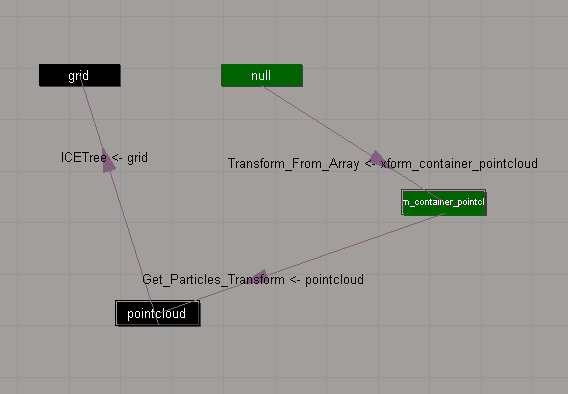
The Schematic view can show you the ICE scene references that “connect” different objects in a scene.

In this example:

  • ICETree on pointcloud has a scene reference to grid
  • Transform_From_Array on null has a scene reference to xform_container_pointcloud.
  • Get_Particles_Transform on xform_container_pointcloud has a scene reference to pointcloud.

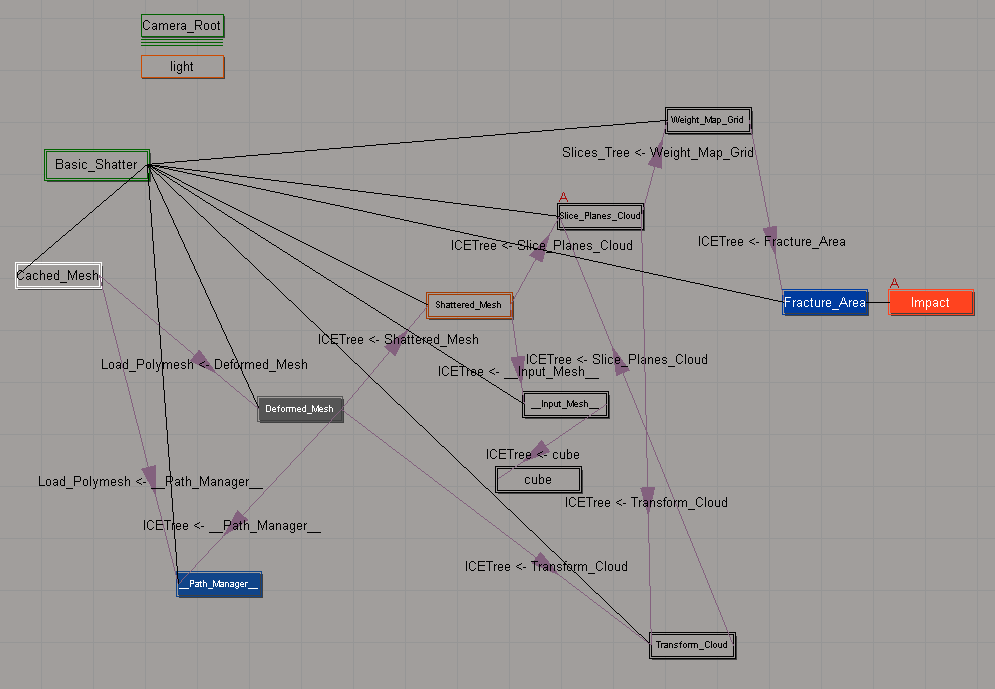
Here’s a slightly more complicated schematic, for the Modeling_Basic_Shattering sample scene:

Scripting – Getting reference model Resolutions


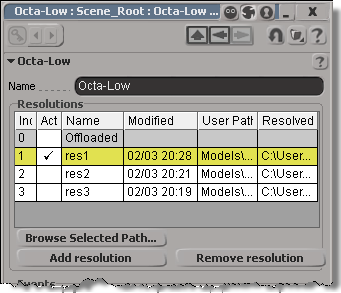
You can get at the Resolutions through scripting (via NestedObjects or Dictionary.GetObject), but you can get the resolution name and file only.

from siutils import si		# Application
from siutils import sidict	# Dictionary
from siutils import sisel	# Selection
from siutils import log		# LogMessage

def getResolutionFileName( m, res ):
	if ( m.Type == "#model" and m.Parameters("referenced_model").Value==True):
		return sidict.GetObject( m.FullName + ".resolutions." + res + ".file" ).Value
		
log( getResolutionFileName( sisel(0), 'res1' ) )
log( getResolutionFileName( sisel(0), 'res2' ) )
log( getResolutionFileName( sisel(0), 'res3' ) )
		
# INFO : Models\Octa-Low.emdl
# INFO : Models\Octa-Med.emdl
# INFO : Models\Octa-High.emdl

Going through NestedObjects is a bit more of a hassle:

from siutils import si		# Application
from siutils import sidict	# Dictionary
from siutils import sisel	# Selection
from siutils import log		# LogMessage

import win32com.client.dynamic

def getResolutions( m ):
	if ( m.Type == "#model" and m.Parameters("referenced_model").Value==True):
		return m.NestedObjects( "Resolutions" ).NestedObjects

resolutions = getResolutions( sisel(0) )

for r in resolutions:
	name = sidict.GetObject( r.FullName + ".name" ).Value
	file = sidict.GetObject( r.FullName + ".file" ).Value
	log( name )
	log( file )

	# This errors out with the dynamic dispatch fix:
	name = r.NestedObjects( "name" )
	log( si.ClassName( name ) )
	log( win32com.client.dynamic.Dispatch(name).Value )

Moving the timeline pointer back to frame 1 with xsibatch


UPDATE: In the comments, Vladimir suggests a better way to do this: use the scntoc. That way, the scene will always open at frame 1.
Use a text editor to add Application.SetValue(“PlayControl.Current”, 1) to the onload script. This script will run when you open the scene, and move the timeline pointer back to frame 1 to avoid the re-simulation.

   <PostLoadScript>
      <Language>Python</Language>
      <Function>postLoad</Function>
      <Script_Content>
	<![CDATA[
Application.SetValue("PlayControl.Current", 1)
	]]></Script_Content>
   </PostLoadScript>

After you save the scene, Softimage will write out the scntoc without the CDATA section (Softimage will replace special characters like < and ” with entities).

   <PostLoadScript>
      <Language>Python</Language>
      <Function></Function>
      <Script_Content>
	
Application.SetValue(&quot;PlayControl.Current&quot;, 1)</Script_Content>
   </PostLoadScript>


So you have a heavy simulation, and you saved the scene with the timeline pointer at frame 1000. Now when you open the scene, you have to sit and wait while the scene re-simulates.

You can fix this by using xsibatch to move the timeline pointer back to frame 1.

It’s probably a good idea to save heavy sim scenes with the timeline pointer at frame 1 😉

  • Save this JScript in a .js file.
    var sScene = "C:\\Users\\blairs\\Support\\Scenes\\Test.scn"
    OpenScene(sScene, null, null);
    SetValue("PlayControl.Current", 1, null);
    SaveScene();
    
  • In a command prompt, use xsibatch -processing -script to run the script:
    xsibatch -processing -script C:\Users\blairs\Documents\resetPlayControlCurrent.js
    

Now you can open your scene without it resimulating.

Tip for using Show Values with the Filter node


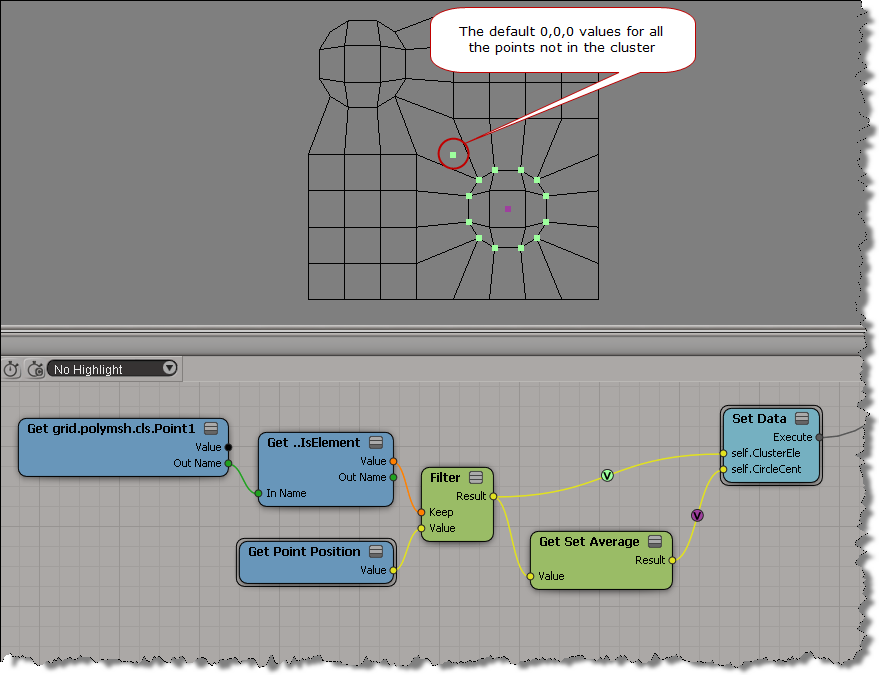
Use the SKip Default Values During Display or Show Values Computed at Current Frame options when you do a Show Values on the output of a Filter node.

With the default Show Values settings, you’ll see default values for the elements that didn’t pass the filter condition:

If you enable SKip Default Values During Display or Show Values Computed at Current Frame , then you see values for the filtered elements only: