Use the carriage return + line feed combination (\r\n):


The User Tools menu in an ICE Tree view has an Add Operator to Menu command that adds your compounds to menus, so you can apply them to the selected object. “Add Operators to Menu” is implemented in VBScript in %XSI_HOME%\Addons\ICEUserTools\Application\Plugins\ICEUserTools.vbs.

Unfortunately, this command wasn’t updated after 2011 Advantage Pack, so it doesn’t know about the new ICE toolbar and menu structure.
So, here’s a Python version that adds ICE operators to either the Particles > Create or Deform > Create menus in the ICE toolbar. When you apply the operators, they will be applied to all selected objects.
http://dl.dropbox.com/u/12898205/AddICEOperatorsToMenus.xsiaddon
The addon adds a “PSS Add Operators to Menu” command to the User Tools menu of the ICE Tree view, so it does add a bit of clutter (since I cannot programmatically remove the original Add Operators to Menu command).
To add operators to menus:
See below the fold for the plugin code.
Continue reading
We have had more than six million downloads of SketchBook mobile. We’ve had almost two million downloads of AutodCAD WS in a fraction of the time SketchBook has been available. Even things like TinkerBox…we’ve had over a million downloads of that. So I think when you look at the numbers they speak for themselves. It shows you just how popular and compelling those devices are.
From Carbine Studios (a Softimage customer), here’s the WildStar™ trialer. Cinematics by Blur (Softimage for rigging/animation/effects and 3ds Max for rendering/other effects).
A look at how scaling, rotation, and translation (SRT) are stored in a transformation matrix.
http://vimeo.com/27863255
I’m not trying to steal anyone’s thunder, just wanted to post something of my own on the subject.
Hat tip to David Wigforss for publishing his series of kinematic tuts.
Here’s a Python snippet that shows how to add a section to a menu like the ICE > Particles > Create menu:
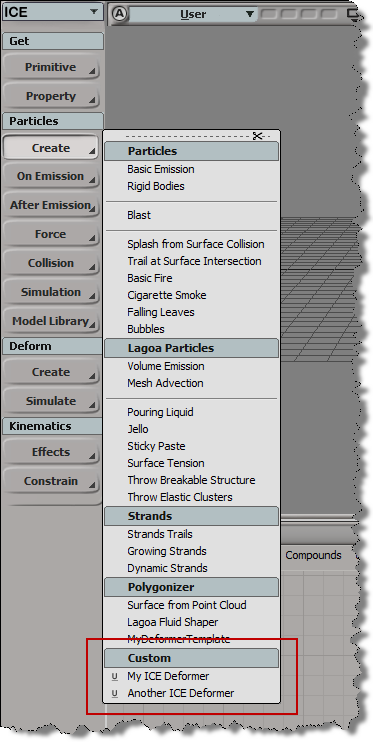
import win32com.client
from win32com.client import constants

null = None
false = 0
true = 1

def XSILoadPlugin( in_reg ):
	in_reg.Author = "blairs"
	in_reg.Name = "NewCommandPlugin"
	in_reg.Major = 1
	in_reg.Minor = 0

	in_reg.RegisterCommand("NewCommand","NewCommand")
	in_reg.RegisterMenu(constants.siMenuTbICEParticlesCreateID,"ICEParticlesCreateCustom_Menu",false,true)

	#RegistrationInsertionPoint - do not remove this line

	return true

def XSIUnloadPlugin( in_reg ):
	strPluginName = in_reg.Name
	return true

def ICEParticlesCreateCustom_Menu_Init( in_ctxt ):
	oMenu = in_ctxt.Source

	# Add section divider
	oItem = oMenu.AddItem( "Custom", constants.siMenuItemSection )
	oItem.SetBackgroundColor(178,191,194)

	# Add custom menu items
	oMenu.AddCommandItem("My ICE Deformer","NewCommand")
	oMenu.AddCommandItem("Another ICE Deformer","NewCommand1")
	return true
In general, the Index port of Select in Array can take either a single value or an array of values.
It doesn’t say that on the reference page, but if you dig into the user guide, you’ll find that info. Or, like many people, you’ll find that out by just trying it, or seeing it in someone else’s ICE tree.
The Index port is an example of a port that can change its structure type. The structure of a port is either single or array.
By default, (or if you plug an integer into the Index port), the Index port structure type is “single”.
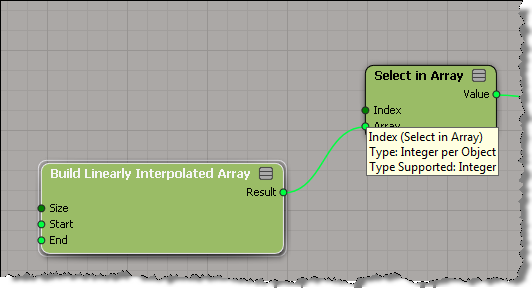
If you plug an array into the Index port, then the structure type changes to “array”.

Sometimes, what’s downstream from Select in Array will determine the structure of the Index port. For example, if you plug Select in Array into the Distance Value of Curve Distance to Curve Location, then Index must be a single value (because Distance Value is a single value).


 eX-SI
eX-SI 