GraphicSpeak » Luxology and Softimage add Bullet to their arsenal


GraphicSpeak » Luxology and Softimage add Bullet to their arsenal.

Bullet and Autodesk Softimage
Exocortex Technologies is distributing a plug-in for Softimage alled Momentum 2.0 for $149. It was developed by Helgee Mathee of the University of Hamburg, a prolific plug-in developer for Softimage. Momentum simulates rigid bodies and is used to simulate ropes, the behavior of plastics, soft bodies, and cloth.

Checking if an ICE node is part of a connected branch


Here’s a little recursive function that checks whether the selected ICE node is part of a branch that is connected to the terminal ICE Tree node.

I used IsConnected to check whether a node is connected to some other node, and then I traverse the output ports, getting the connected nodes, until I reach the ICE Tree node (or not).

var o = Selection(0);
//LogMessage( o.IsConnected );
LogMessage( "isBranchConnected()="+isBranchConnected(o) );


// Given an ICE node, check if the node is part
// of a branch connected to the ICE Tree node
function isBranchConnected( oNode )
{
	if ( !oNode.IsConnected )
	{
		return false;
	}
	else if ( oNode.Type == "ICETree" )
	{
		return true;
	}
	else
	{
		oEnum = new Enumerator( oNode.OutputPorts ) ;
		for (;!oEnum.atEnd();oEnum.moveNext() )
		{
			var oSelItem = oEnum.item() ;
			oEnum1 = new Enumerator( oSelItem.ConnectedNodes ) ;
			for (;!oEnum1.atEnd();oEnum1.moveNext() )
			{
				var oSelItem1 = oEnum1.item() ;
				return isBranchConnected( oSelItem1 );
			}
		}
	}
}

And here’s a Python version. With Python, I always have the nagging feeling that my code code be better.

# Given an ICE node, check if the node is part
# of a branch connected to the ICE Tree node
def isBranchConnected( oNode ):
	if not oNode.IsConnected : 
		return False
	elif oNode.Type == "ICETree" :
		return True;
	else:
		for port in oNode.OutputPorts:
			for node in port.ConnectedNodes:
				return isBranchConnected( node )


o = Application.Selection(0);
Application.LogMessage( "isBranchConnected()=" + str(isBranchConnected(o)) );

Changing the mini-dopesheet Show Keys settings


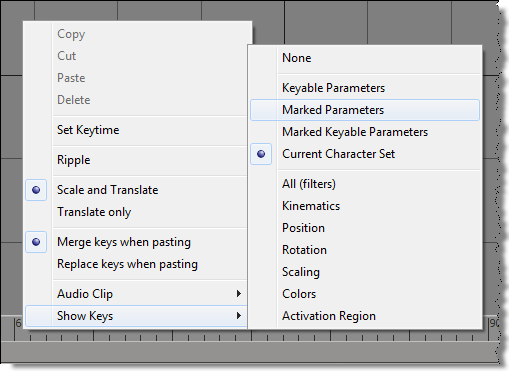
To change the type of keys shown in the mini-dopesheet in the timeline, you set the same preferences used by the full dopesheet:

// Marked Parameters
Preferences.SetPreferenceValue( "dopesheet.timeline_display_keys",2 );

//Current Character Set
Preferences.SetPreferenceValue( "dopesheet.timeline_display_keys", 11 );

So, to toggle between Show Keys > Marked Parameters and Show Keys > Current Character Set, you could do something like this:

var x = Preferences.GetPreferenceValue( "dopesheet.timeline_display_keys" );
x = ( x==2 ) ? 11 : 2;
Preferences.SetPreferenceValue( "dopesheet.timeline_display_keys", x );

Combining mental mill CgFX shaders with Softimage and ICE FX trees


This video demonstrates how to export a CgFX shader from mental mill to softimage and combine it with an Ice Effect tree.
It shows techniques to augment your exported CgFX code by hand editing the exported CgFX code and passing data that was generated by an ICE FX tree in softimage to the shader. This enables you to create a completely new type of effects.

Here’s the corresponding mentallmill.blogspot post.

Getting model.Mixer.CompoundContainer.mixer.normalize with the OM (or how I learned to love the SDK Explorer)


In this video, I show a few common techniques for finding your way through the Object Model (OM) hierarchy with the help of the SDK explorer.
In summary, here are some of the most common ways to navigate an object hierarchy:

  • Object Model methods/properties, like Model.Mixer or Mixer.Transitions.
  • Parameters and Properties collections
  • NestedObjects

http://vimeo.com/23877816

Here’s the JScript from the video:

// I want to get this: "MocapMan.Mixer.CompoundContainer.mixer.normalize"

// One step at a time
var mdl = Dictionary.GetObject("MocapMan");

var oMixer = mdl.Mixer;
var oCompounds = oMixer.NestedObjects("Compounds");
var oAnimation = oCompounds.NestedObjects( "Animation" );
var oCompoundContainer = oAnimation.NestedObjects( "CompoundContainer" );
var oMixer = oCompoundContainer.NestedObjects( "Mixer" );
var n = oMixer.NestedObjects( "Normalize" );

LogMessage( n.Value );

// All on one line:
var n = mdl.Mixer.NestedObjects("Compounds").NestedObjects("Animation").NestedObjects("CompoundContainer").NestedObjects("Mixer").NestedObjects("Normalize");
LogMessage( n.Value );

// Or something a little less ... nested:
var n = Dictionary.GetObject( mdl.Mixer.FullName + ".CompoundContainer.mixer.normalize" );

Python snippets. Had to re-dispatch to get it to work.

import win32com.client

mdl = Application.Dictionary.GetObject("MocapMan")

n = mdl.Mixer.NestedObjects("Compounds").NestedObjects("Animation").NestedObjects("CompoundContainer").NestedObjects("Mixer").NestedObjects("Normalize")
n = win32com.client.Dispatch(n)

Application.LogMessage( Application.ClassName(n) )
Application.LogMessage( n.Value )


n = Application.Dictionary.GetObject( mdl.Mixer.FullName + ".CompoundContainer.mixer.normalize" );
n = win32com.client.Dispatch(n)
Application.LogMessage( n.Value )

Softimage 2012 startup crash on Ubuntu


A customer reported that while he was running Softimage 2011 fine on Ubuntu, Softimage 2012 crashed at startup.

The problem turned out to be the microsecond character (µs) in $XSI_HOME/Application/spdl/MentalRayOptions.spdl:

	Parameter "DiagnosticMaxPixelTime"
	{
		GUID		= {0A2DA6AE-B850-4189-BE71-BD244F8938A4};	// GUID_MentalRayOptions_DiagnosticMaxPixelTime
		Label		= "Max Pixel Time (µs)";

For some reason, this causes problems on some Linux flavors, but not on Fedora.
The solution was to edit the .spdl, and remove the “(µs)” from the string “Max Pixel Time (µs)”.

Hat Tip to Sean Donnelly for the solution.

For reference, here’s the gbd backtrace for the startup crash. Note that it pretty clearly points to some problem related the spdl 😉

Program received signal SIGSEGV, Segmentation fault.
0x00007ffff4bd588a in CSIString::AllocBSTR() const () from /usr/Softimage/Softimage_2012/Application/bin/libsigeneral.so
(gdb) bt full
#0  0x00007ffff4bd588a in CSIString::AllocBSTR() const () from /usr/Softimage/Softimage_2012/Application/bin/libsigeneral.so
No symbol table info available.
#1  0x00007ffff56e59ea in SpdlValue2Variant(miSpdl_PropertyValue const&, tagVARIANT&) () from /usr/Softimage/Softimage_2012/Application/bin/libspdlparse.so
No symbol table info available.
#2  0x00007fffce5976cc in CSpdlPopulate::AddPropertyDefaults(miSpdl_Property*, CComPtr&) () from /usr/Softimage/Softimage_2012/Application/bin/libspdlpop.so
No symbol table info available.
#3  0x00007fffce597a05 in CSpdlPopulate::AddPropertyDefaults(miSpdl_Property*) () from /usr/Softimage/Softimage_2012/Application/bin/libspdlpop.so
No symbol table info available.
#4  0x00007fffce597b04 in CSpdlPopulate::AddToParamDict(miSpdl_Property*) () from /usr/Softimage/Softimage_2012/Application/bin/libspdlpop.so
No symbol table info available.
#5  0x00007fffce597baf in CSpdlPopulate::AddToParamDict(miSpdl_Section*) () from /usr/Softimage/Softimage_2012/Application/bin/libspdlpop.so
No symbol table info available.
#6  0x00007fffce598e90 in CSpdlPopulate::DoAll() () from /usr/Softimage/Softimage_2012/Application/bin/libspdlpop.so
No symbol table info available.
#7  0x00007fffce59513b in CSpdlParser::DoParse(tagS3DSPDLPARSERINFO*) () from /usr/Softimage/Softimage_2012/Application/bin/libspdlpop.so
No symbol table info available.
#8  0x00007ffff5ea0da1 in DSCompileSPDLEx(_GUID const&, IUnknown*, char const*) () from /usr/Softimage/Softimage_2012/Application/bin/libdssdk10.so
No symbol table info available.
#9  0x00007fffca3b7600 in ?? () from /usr/Softimage/Softimage_2012/Application/bin/libmentalray.so
No symbol table info available.
#10 0x00007fffd9a9b041 in C3DActiveData::Initialize(_GUID const&) () from /usr/Softimage/Softimage_2012/Application/bin/libactivedata.so
No symbol table info available.
#11 0x00007fffd9a7f39c in C3DActiveData::Construct() () from /usr/Softimage/Softimage_2012/Application/bin/libactivedata.so
No symbol table info available.
#12 0x00007fffca3b965e in ?? () from /usr/Softimage/Softimage_2012/Application/bin/libmentalray.so
No symbol table info available.
#13 0x00007fffca3c6a76 in ?? () from /usr/Softimage/Softimage_2012/Application/bin/libmentalray.so
No symbol table info available.
#14 0x00007fffca3c8500 in ?? () from /usr/Softimage/Softimage_2012/Application/bin/libmentalray.so
No symbol table info available.
#15 0x00007ffff5e8eab4 in SICreateInstanceEx(_GUID const&, IUnknown*, unsigned int, _GUID const&, void**) () from /usr/Softimage/Softimage_2012/Application/bin/libdssdk10.so
No symbol table info available.
#16 0x00007fffca38f8c2 in ?? () from /usr/Softimage/Softimage_2012/Application/bin/libmentalray.so
No symbol table info available.
#17 0x00007fffced89f50 in ?? () from /usr/Softimage/Softimage_2012/Application/bin/librendercore.so
No symbol table info available.
#18 0x00007fffcedc4c14 in ?? () from /usr/Softimage/Softimage_2012/Application/bin/librendercore.so
No symbol table info available.
#19 0x00007fffcedc5a2c in ?? () from /usr/Softimage/Softimage_2012/Application/bin/librendercore.so
No symbol table info available.
#20 0x00007fffcedc674d in ?? () from /usr/Softimage/Softimage_2012/Application/bin/librendercore.so
No symbol table info available.
#21 0x00007fffd30530af in ?? () from /usr/Softimage/Softimage_2012/Application/bin/libscnmgr.so
No symbol table info available.
#22 0x00007fffd3055bbd in ?? () from /usr/Softimage/Softimage_2012/Application/bin/libscnmgr.so
No symbol table info available.
#23 0x00007fffd3014899 in ?? () from /usr/Softimage/Softimage_2012/Application/bin/libscnmgr.so
No symbol table info available.
#24 0x00007fffd304853a in ?? () from /usr/Softimage/Softimage_2012/Application/bin/libscnmgr.so
No symbol table info available.
#25 0x00007fffd304bc15 in ?? () from /usr/Softimage/Softimage_2012/Application/bin/libscnmgr.so
No symbol table info available.
#26 0x00007fffdf7f4b69 in ?? () from /usr/Softimage/Softimage_2012/Application/bin/libdssdkco.so
No symbol table info available.
#27 0x00007fffdf7f38b2 in ?? () from /usr/Softimage/Softimage_2012/Application/bin/libdssdkco.so
No symbol table info available.

Texturing topology created by ICE modeling


It seems to me that when I apply a texture to a mesh I created with Set Topology, I have to create two texture projections. The first one ends up with an empty TextureProjection_AUTO cluster, but the second one has a good TextureProjection_AUTO cluster.

Or if I first created a weight map or a CAV and did some painting, then I’d have a complete cluster that worked when I applied a texture.

2012 Autodesk Entertainment Creation Suites win Silver Edge Award


via Computer Graphics World – CGW Reveals Its Silver Edge Awards, Names First Winners.

Computer Graphics World (www.cgw.com) has unveiled its Silver Edge Awards, a designation presented to companies whose product represents the best of show at the industry’s leading conferences and exhibitions, including Game Developers Conference, NAB Show, and SIGGRAPH.

“There are a number of products—software, hardware, or possibly something that falls into a totally different category—that cause excitement and buzz at a trade show, or have the potential to greatly impact the industry. We wanted to formally recognize these cutting-edge offerings following the industry’s most important exhibitions, naming them as a CGW Silver Edge Award winner,” says chief editor Karen Moltenbrey.