Thanks to Alan Fregtman for sending me the links.
Softimage 3D promotional video tape 1995 : Digital Domain, Psygnosis, Industrial Light and Magic and more…
Part 1:
Part 2:

Thanks to Alan Fregtman for sending me the links.
Softimage 3D promotional video tape 1995 : Digital Domain, Psygnosis, Industrial Light and Magic and more…
Part 1:
Part 2:
This post is about the latest 2011 service packs:
and the “disconnected shader” issue.
How do I use the Service Pack to fix shader corruption?
The Service Pack repairs corrupted shaders, but it cannot re-connect shaders, so you will still have disconnected shaders. But the shader corruption will be removed.
To repair corrupted shaders:
IMPORTANT: If problems still occur when working with external material libraries, change them to be internal.
What causes the problem, and when can it happen?
What does the Service Pack fix?
The Service Pack repairs corrupted shaders, but it does not re-connect shaders in render trees.
In some situations, corrupted shaders may not be repaired.
For example, if the shader definition is unknown (for example, an Arnold shader) or if the shaderdef was not persisted for the shader (can happen through the loading and saving of a scene with a corrupted shader—at some point you could have a scene that contains the shader but no shaderdef).
To remove these corrupted shaders, you can use shift-delete if delete is not working.
If you’re wondering why we released a service pack instead of another hot fix, here’s an explanation from Luc-Eric, our sw dev mgr:
The thinking is that the scene corruption hot fixes are important enough that you should delete other version of
2012Softimage 2011 and just have this one. With a service pack versioned, you can tell that you have the fixes installed, otherwise there is no telling if you are you using “the good” or “the bad” version of20122011, because we’re just distributing hotfixes as zip with loose DLLs and you can’t tell if you’ve installed it correctly. Hotfixes are normally for things that are important, but not absolutely essential. I think this one is critical.
edit: fixed typo in version number
via Autodesk – Autodesk Softimage Services & Support – Autodesk® Softimage® 2011 Service Pack 2.
The Softimage 2011 Subscription Advantage Pack version of this service pack is available from the Subscription Center.
These service packs are basically a repackaging of HotFix3 into a service pack.
From the README:
Coexistence
Softimage 2011 SP2 is a full build and can co-exist with Softimage 2011 and Softimage 2011 SP1.
Neither Softimage 2011 nor Softimage 2011 SP1 is required to be uninstalled first.Licensing
Softimage 2011 SP2 uses the same license as Softimage 2011. When installing Softimage 2011 SP2:
– Enter the product key 590C1 and your Softimage 2011 serial number, and then click Next.
– If you have a Network license, click Configure to switch to the Network licensing method.Documentation
Softimage 2011 SP2 includes full English and Japanese documentation
The full list of fixes is as follows:
FELX-1993: Scene Corruption and Failed Imports Using Models Containing Corrupted Materials
FELX-1991: Repair Shader corruption for previously persisted scenes
IMPORTANT: If problems still occur when working with external material libraries, change them to be internal.Also included are the fixes that are found in HOTFIX 1 and 2 which addressed the following issues:
FELX-1702: Disconnected shaders when importing Referenced Model
FELX-1651: Scene Corruption due to Material
FELX-785: 3rd party renderers crash on Linux
FELX-670: Custom renderer DirtyList isn’t cleared properly
FELX-120: UVunfold fails to load when in suite license mode
FELX-88: Scene corruption – Softimage crashes when you try to load scene after saving it
UDEV00258435: Saved scene is corrupt
CValue out;
CValueArray pick_args(2);

pick_args[0] = L"Pick an object";
pick_args[1] = L"Pick an object";
Application().ExecuteCommand( L"PickObject", pick_args, out);

CValueArray array = (const CValueArray &)out;
LONG button = (LONG)array[0];
X3DObject pickedObject(array[2]);

Application().LogMessage( pickedObject.GetFullName() );
In this case, the customer reported that when he did a viewport capture, the capture area wasn’t in the right place. In this screenshot of his display properties, the red area is where the viewport capture happened:
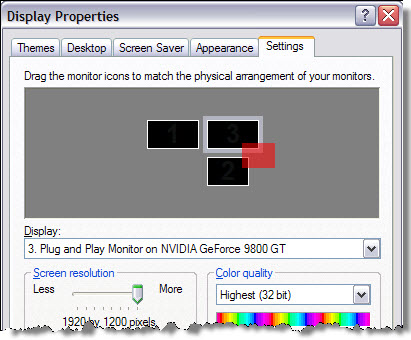
There’s no way to set the position of the viewport capture window (it is all done automatically), so these kinds of problems are most likely a problem with the monitor setup configuration. The customer disabled his third monitor, and the capture viewport worked. So he then lined up all three monitors in a row, and then the viewport capture worked.
From the Autodesk Softimage Hardware Certification FAQ:
Q: What version of Linux does Autodesk use in the Softimage graphics certification process?
A: Autodesk Softimage 2012 graphics certification testing was performed using Fedora Core 14.
OS: Fedora 14 64bit OS
Kernel Version: 2.6.35.11-83.fc14.x86_64
Xorg Version: 1.9.4-1.fc14.x86_64
Glibc Version: 2.13-1.x86_64
The glibc version is missing from the FAQ page, but it’s a safe bet that it’s the same version used for the Maya certification.
The definition of a polynode is not indexed, but you can find it by searching the Softimage User’s Guide. Here’s what I found in the 2011 User Guide (I still tend to use the CHM for searching 😉
“…polynodes (also known as polygon nodes or texture sample points). There is one polynode for every corner of a polygon. At a vertex, there are as many polynodes as there are adjacent polygons.”
–Softimage User’s Guide, About User Normals
“There is one polynode for each polygon attached to a point.”
–Softimage User’s Guide, Displaying Polynode Bisectors
Every polygon has a polynode for each of its corners, so at a given vertex there are as many polynodes as there are polygons that share that vertex.
–Softimage User’s Guide, About Vertex Colors
“Each UV pair in a set of coordinates associates a location on an object, called a “sample point”, to a location on an image. On a polygon object, the sample points are polygon nodes, or polynodes. There is one polynode for each polygon corner. ”
–Softimage User’s Guide, About Texturing in Softimage
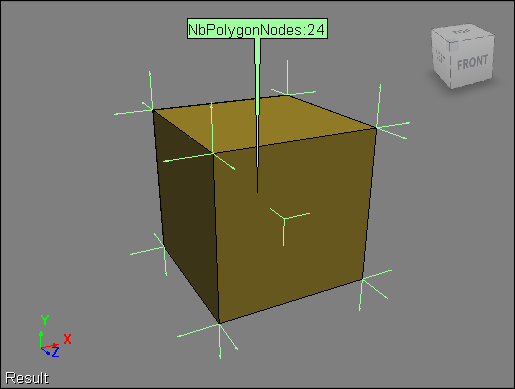
Here’s a default cube with the NbPolygonNodes and NodeNormal attributes displayed. Each of the eight vertices in the cube is shared by three polygons, so there are 8×3=24 polynodes.

 eX-SI
eX-SI 