Friday Flashback


Every Friday I’ll post some image or screenshot from Softimage history…

What we know now as Softimage XSI grew out of the Softimage|DS (Digital Studio) product. Here’s a couple of screenshots from March 1997 that shows a prototype of Sumatra (the codename for XSI). Back then, the first version of DS was almost finished, and XSI was taking shape. Although at that point, XSI did have a distinct “DS” feel to it. Note the “SOFTIMAGE|Digital Studio” in the title bar.

Click to view full size

UPDATE: Comment from Luc-Eric:

I think that was not an actual screenshot, but a photoshop mockup, there countless of them.
This is closer to what the software looked like – but still not quite (it’s missing the jewel-like timeline button)
http://www.softimageblog.com/archives/175
we still have some of those bitmaps somewhere in the source tree..
note the Twister room buttom.

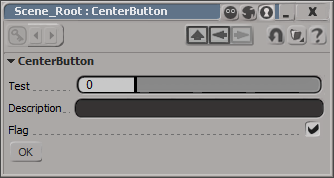
Centering a button on a PPG


By default, buttons are left-aligned.

I don’t think there is any way to center a control on a layout. At least not one that I can find. You could set an X position, which will look centered until a user resizes the PPG.

item = oLayout.AddButton( L"MyButton", L"ddd" ) ;
item.PutAttribute( siUICX, <x position in pixels>) 

Or you could use this hack, which uses group width percentages to approximate the centering a button.

var oGroup = oLayout.AddGroup("", false, 40);
oLayout.EndGroup();

// button is left-aligned within its group
// so the centering is not 'true'
var oGroup = oLayout.AddGroup("", false, 20);
var oButton = oLayout.AddButton( "OK" );
oLayout.EndGroup();

var oGroup = oLayout.AddGroup("", false, 30);
oLayout.EndGroup();

oLayout.EndRow();

Softimage timeline akin to the Dark Ages and the destruction of the library in Alexandria ???


In an article on the latest release of CINEMA 4D, the reviewer wrote something I found kinda interesting:

CINEMA 4D … [is] now up to version 11.5, which is just as many versions, if not more, than the older Maya, Max, and Houdini (I’d mention Softimage, but that went through some weird period akin to the Dark Ages after the destruction of the Library in Alexandria, so its timeline isn’t accurate).

via MAXON’s CINEMA 4D | Animation Magazine.

Getting the shader connected to a material


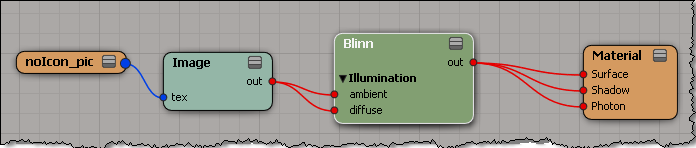
In previous versions of Softimage, you could use Parameter.Source to get the shader/texture connected to a material parameter such as the diffuse port.

As of 2011, Source returns a ShaderParameter. To get the connected shader, use ShaderParameter.Parent (in C++, GetSource().GetParent()).

var m = Dictionary.GetObject( "Sources.Materials.DefaultLib.Material.Blinn" );
var p = m.Parameters("diffuse");
LogMessage( p.Source );
// INFO : Sources.Materials.DefaultLib.Material.Image.out

LogMessage( ClassName( p.Source ) );
// INFO : ShaderParameter

LogMessage( p.Source.Parent );
// INFO : Sources.Materials.DefaultLib.Material.Image

LogMessage( ClassName( p.Source.Parent ) );
// INFO : Texture