ICE: Looping over group members and setting data


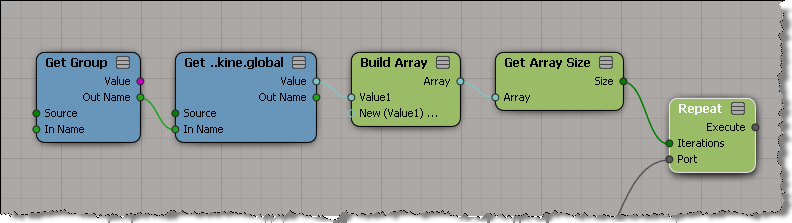
You can get data from the members of a group, and even loop over that data, but you cannot set data on individual group members. I’ve seen this question come up on several forums, mailing lists, and beta lists. You can’t store a reference in an attribute (so you can get it later and plug it into Set Data). You can store a string (eg the object name) in a string, but you cannot convert a string into a reference. And you can’t plug your Get Group into a Set Data.

Things like references and execute ports are part of the pre-evaluation stage. They must be resolved before the ICE tree is evaluated. Everything else in the ICE tree is the stuff that has to be constantly re-evaluated. So driving a reference port with another ICE node doesn’t really fit into the way ICE was designed to work.

For something like (resolving connections), you’re better off using a script to set up your ICE trees.

PS – Looping itself doesn’t seem that hard to figure out.

Lagoa & the Autodesk Subscription Advantage Pack for Softimage 2011


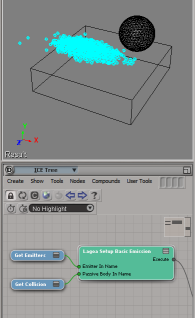
I see that Mark Schoennagel has let the cat out of the bag about Lagoa and the upcoming Advantage Pack release.

So, what’s an Advantage Pack ? It’s basically a collection of product enhancements and new features (like Lagoa) that are available exclusively to Subscription customers. The idea is to increase the [perceived] value of Subscription to customers.

There’s more to the Advantage Pack than Lagoa, but [unlike Mark] I can’t pre-announce stuff 😉 I’ve got to wait for the official announcements.

Softimage, Lagoa, premium Suites, and Autodesk marketing


The announcement of the new Max and Maya premium suites (which include Softimage and Lagoa) together with the relatively low profile of Softimage in the Autodesk marketing materials have caused a bit of a stir in the community.

Chinny (the Softimage product manager) posted this message to address the community’s concerns:

From: softimage-bounces@listproc.autodesk.com [mailto:softimage-bounces@listproc.autodesk.com] On Behalf Of Jason Brynford-Jones
Sent: Tuesday, July 27, 2010 11:13 AM
To: softimage@listproc.autodesk.com
Subject: A Softimage message

I thought the last time I wrote something like this, would be the last time.

I am beginning to sound like a broken record; a record no-one obviously likes listening to. So perhaps this really is the last time I will play this message as it seems to make no difference.

Marketing
It seems now the Softimage community is only focusing on Autodesk’s marketing as the barometer for Soft’s future. Not “no marketing” but “less marketing” than 3ds Max and Maya. Or that the new Max and Maya products WITH Softimage means no more Softimage? This does not make sense.

New Max and Maya Suites
From all our interviews Max and Maya customers want Softimage (not just ICE, but ICE is often a big reason) in their toolsets. At an affordable price, that interops well. OK let’s give it to them, in the way they want it.

There are many more Max and Maya customers than Softimage. Having product suites branded with the name 3ds Max or Maya are obviously targeted at selling to them. This represents a massive potential for Softimage. You might not agree with the naming, but you can’t argue the logic.

Softimage as a standalone product is of course continuing as before (with some very exciting stuff in the works) and having the standalone product available to all Max and Maya users is a huge endorsement of Softimage and commitment by Autodesk..

Development
Since the acquisition there has been repeated fear-mongering about Soft’s future. Even though in that time, we have had two major releases (3 in the last two years) and one minor (check what others have done in this time) and of course there is more to come.

Even though we have exceeded revenue expectations, even though we are expanding our development. Even though fundamentally NOTHING HAS CHANGED, people choose to focus simply on a lack of marketing and not Autodesk Softimage’s track record.

We still manage our own roadmap, with the exception of working well with other Autodesk apps. Something everyone has asked for repeatedly, especially ICE interop.

Our philosophy will continue around ICE as the architecture on which to build – that includes one day moving into modeling. We have not abandoned other parts of the Software (see the list at the end of this mail) far from it – we have a very well defined focus and future.

Final thoughts – for this is the last time I will do this.

If you take one thing away from this mail, it is this.

The future of Softimage is bright… click

It really is…

Chinny

Continue reading

Softimage 2011 always falls back to 127.0.0.1 for network licensing


I’d forgotten about this until the other day when I tried to break my licensing for testing purposes.

I spent 20 minutes trying to get Softimage 2011 to not start! No matter what I did it kept starting up, and to make matters worse, my ProductInformation.pit file has some minor corruption that crashes Softimage when I try to use Help > About Softimage > Product License Information. So I couldn’t check where Softimage was getting its license.

I eventually resorted to using Process Monitor to watch the HKEY_CURRENT_USER\Software\FLEXlm License Manager\ADSKFLEX_LICENSE_FILE registry value, and I saw that xsi.exe was sticking 127.0.0.1 into the registry every time I started Softimage. So all I had to do was stop my local license server.

The Valve Source addon and 64-bit Softimage


You can use the Valve Source ModTool addon with the commerical version of Softimage, but if you are using 64-bit Softimage, none of the compiled Valve Source plugins will be available (because they’re all 32-bit).

So, that means no SMD, Weight, or VMF import and export in 64-bit Softimage. You can use install 32-bit Softimage if you need access to these tools; 32-bit Softimage will run with the same license as 64-bit Softimage.

FindObjects() and shaders in Softimage 2011


Update 10 Dec 2010: See this post about finding shaders using the ProgID.

In Softimage 2011, all [factory] shaders have the same Class ID ({6495C5C1-FD18-474E-9703-
AEA66631F7A7}), so FindObjects returns a collection that contains shaders in the scene.

Note that the returned collection will include the soft_light shader, as well as several hidden Lambert shaders that are used under-the-covers by Softimage.

var x = FindObjects(null, "{6495C5C1-FD18-474E-9703-AEA66631F7A7}" );
LogMessage( x.Count );

oEnum = new Enumerator( x ) ;
for (;!oEnum.atEnd();oEnum.moveNext() )
{
	var oSelItem = oEnum.item() ;
	try {
		LogMessage( oSelItem.fullname );
		i++;
		
	}
	catch(e)
	{
		LogMessage(e.message);
		LogMessage( "\t" + ClassName(oSelItem) + ":" + oSelItem.name);
		LogMessage( "\t" + oSelItem.GetShaderContainer() );
	}
}

You could filter the returned collection for a specific type of shader. For example:

// Get all shaders
var x = FindObjects(null, "{6495C5C1-FD18-474E-9703-AEA66631F7A7}" );
LogMessage( x.Count );
var oShaderCollection = new ActiveXObject( "XSI.Collection" );

// Build up a collection of all Blinn shaders
oEnum = new Enumerator( x ) ;
for (;!oEnum.atEnd();oEnum.moveNext() )
{
	var oShader = oEnum.item() ;
	try {
		//LogMessage( oShader.ProgID );
		if ( oShader.ProgID == "Softimage.material-blinn.1.0" )
		{
			oShaderCollection.Add( oShader );
		}
		
	}
	catch(e)
	{
		LogMessage(e.message);
	}
}

Python not available in 2011 SP1 after you uninstall 2011


A customer reported this last Friday. After he installed Softimage 2011 SP1, he uninstalled 2011, and after that Python did not show up as a scripting language in 2011 SP1.

I uninstalled 2011 and sure enough Python was gone in 2011 SP1.
To get Python back, open a Softimage 2011 SP1 command prompt and run runonce.bat.

Note that on Windows 7 or Vista, you’ll have to use an elevated command prompt (right-click the Command Prompt shortcut and click Run as Administrator).