ICE topology color coding
by grahamef

WeightMap painting
by Mário Domingo

Spliced ICE
https://vimeo.com/72650017
Softimage ICE skin deformation

ICE topology color coding
by grahamef
WeightMap painting
by Mário Domingo
Spliced ICE
https://vimeo.com/72650017
Softimage ICE skin deformation
SOFTIMAGE|3D Matter module: mental ray — DONE. Press Esc or middle mouse.

The scope of variable b is this snippet. That is, the identifier b exists and has the value 1 only while this snippet is running. After that, it doesn’t exist unless some other code defines it.
Consequently, the OnClicked callback is going to fail with a ‘b’ is undefined error.
var myPset = ActiveSceneRoot.AddProperty("CustomProperty",false,"Mytest");
var myLayout = myPset.PPGLayout;

var b = 1;

function a_OnClicked(){
	LogMessage( b );
}

myLayout.AddRow()
myLayout.AddButton("a","button");
myLayout.EndRow()

myLayout.Logic=OnInit.toString() +  a_OnClicked.toString();
myLayout.Language = "JScript" ;

InspectObj(myPset);
The way it works is that Softimage creates a new instance of the JScript ActiveX scripting engine each time it needs to execute some fragment of code. So, the above snippet runs in one instances of the scripting engine (which is destroyed after the code is executed). Then later, when the button is clicked, the OnClicked callback runs in a new and different instances of the scripting engine. And that new instance of the scripting engine, there is no variable named b.
One way around this would be to add b as a parameter:
var myPset=ActiveSceneRoot.AddProperty("CustomProperty",false,"Mytest");
var b =	myPset.AddParameter2("b",siInt4,1,0,100,0,100,siClassifUnknown,siPersistable | siKeyable);

var myLayout=myPset.PPGLayout;

myLayout.AddRow()
myLayout.AddButton("a","button");
myLayout.EndRow()
myLayout.Logic=OnInit.toString() +  a_OnClicked.toString();
myLayout.Language = "JScript" ;

InspectObj(myPset);

function a_OnClicked(){
	LogMessage(PPG.b);
}
Another way would be to use a LogicFile, something like this:
// LogicFile for an on-the-fly custom property
var b = 1;
var c = -1;
function OnInit() {
	LogMessage( "OnInit" );
	c = 99;
}
function a_OnClicked(){
	LogMessage( b );
	LogMessage( c );
}
Then your property would work like this:
var myPset=ActiveSceneRoot.AddProperty("CustomProperty",false,"Mytest");
var myLayout=myPset.PPGLayout;

myLayout.AddRow()
myLayout.AddButton("a","button");
myLayout.SetAttribute( siUILogicFile, "\\some\\path\\LogicFile.js" );

myLayout.EndRow()
myLayout.Language = "JScript" ;

InspectObj(myPset);
And this would give the following output:
// INFO : OnInit
// INFO : 1
// INFO : 99
$XSI_HOME\Application\spdl has 960 spdl files that define 10179 parameters. Some of these spdl files date back to 1998.

“obs.spdl” is for obsolete versions of certain spdl files
You can use MenuItem.Checked to add and remove a checkmark from a menu item.

Modeling with ICE – PointPosition Interpolation
Snow Compound
by mufunya

Counter
by msk

Face Robot and the game export process
1998. The Sumatra logo derives from nautical and navigational imagery, such as a sextant, astrolabe, or compass. It’s also suggestive of a gyroscope, but is not a literal translation of any of these objects. This logo imagery is used to elicit the idea of a vast, unexplored environments as well as to recall the renowned navigability of the product. The “axis” suggest cartesian planes, and the arcs communicate motion/animation about a point of origin. The rough, hand-drawn character of the lines lend it an asiatic quality, in keeping with the graphic design of our other product logos.
— Charles Migos, User Interface Designer

This snippet changes the default value of a single color channel (R in this case) an existing shaderdef:
from siutils import si        # Application
from siutils import log        # LogMessage
from siutils import disp    # win32com.client.Dispatch
from siutils import C        # win32com.client.constants

def dispFix( badDispatch ):
    import win32com.client.dynamic
    # Re-Wraps a bad dispatch into a working one:
    return win32com.client.dynamic.Dispatch(badDispatch)

# Get ShaderDef for the Environment shader
sProgID = "Softimage.mia_material_phen.1.0"
oDef = si.GetShaderDef( sProgID )

# Get ShaderParamDef for the Tranformation parameter
oReflectivity = oDef.InputParamDefs.GetParamDefByName( "reflectivity" )

# Change the default value
oReflectivity.DefaultValue = 0.333

oRefl_Color = oDef.InputParamDefs.GetParamDefByName( "refl_color" )
print si.ClassName( oRefl_Color )

x = dispFix(oRefl_Color).SubParamDefs
oRed = x.GetParamDefByName( "red" )
print oRed.DefaultValue
oRed.DefaultValue = 0.325
If you are adding a new shaderdef, you can do it like this:
shaderParamDefOptions.SetDefaultValue( [0.5, 0.3, 0.2] )
hat tip: Vladimir and Vincent on the Softimage mailing list
For the more recent versions of Softimage, you can get the install location quite easily from the registry. Just look for the HKEY_LOCAL_MACHINE\SOFTWARE\Softimage\Install key:

The GUIDs are the names of C:\Windows\Installer folders:

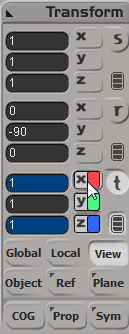
Shift+Right Click the axes icons in the Transform Panel to select the values you want to set. The backgrounds of the number boxes will turn blue. Enter a value in any one of the boxes, and press ENTER.

 eX-SI
eX-SI 