How to periodically delete a random number of particles


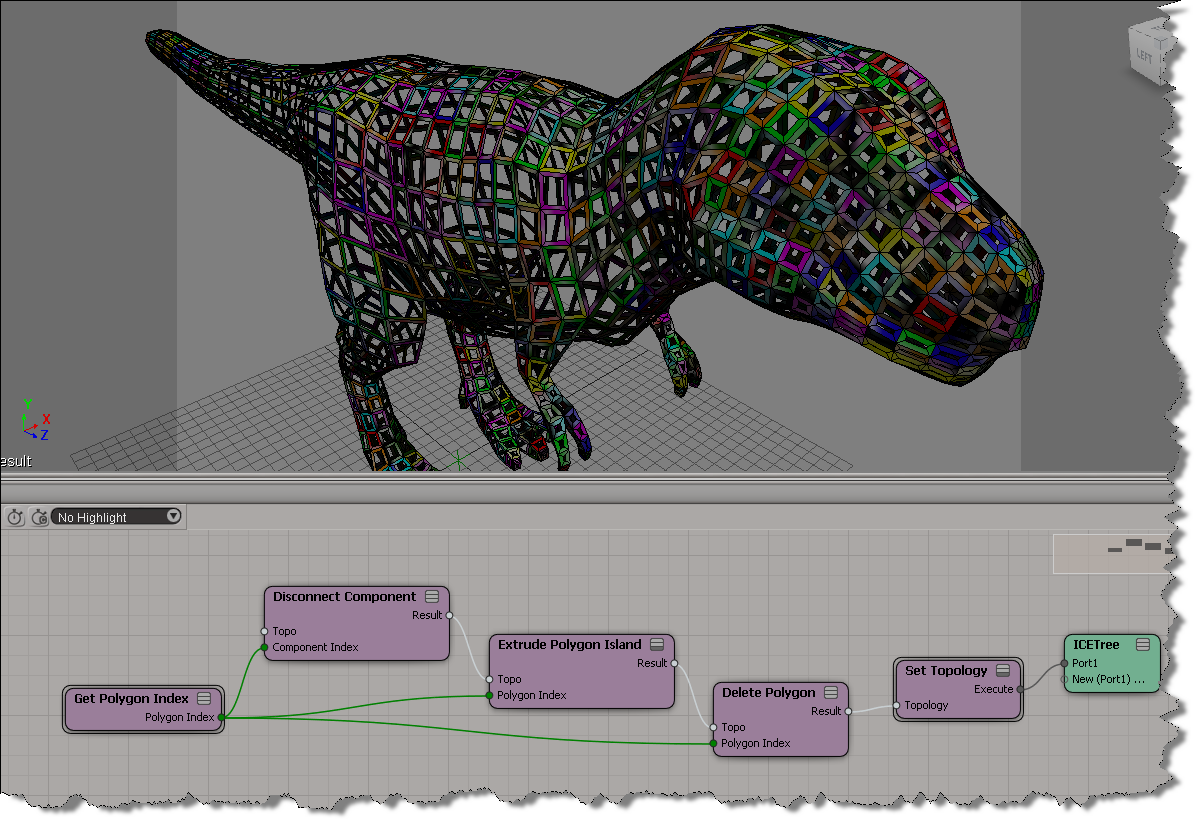
Let’s say you want to delete–oh, I don’t know–let’s say a random 7% of all particles, and you want to do that every N frames. Here’s one way to do it. You won’t get exactly 7%, but you’ll get close (eg I got numbers like 6.8%, 7.2%, and 7.25% when I tested it).

The Every Nth Frame compound is a custom compound that uses modulo:

Scene names and .scn file names


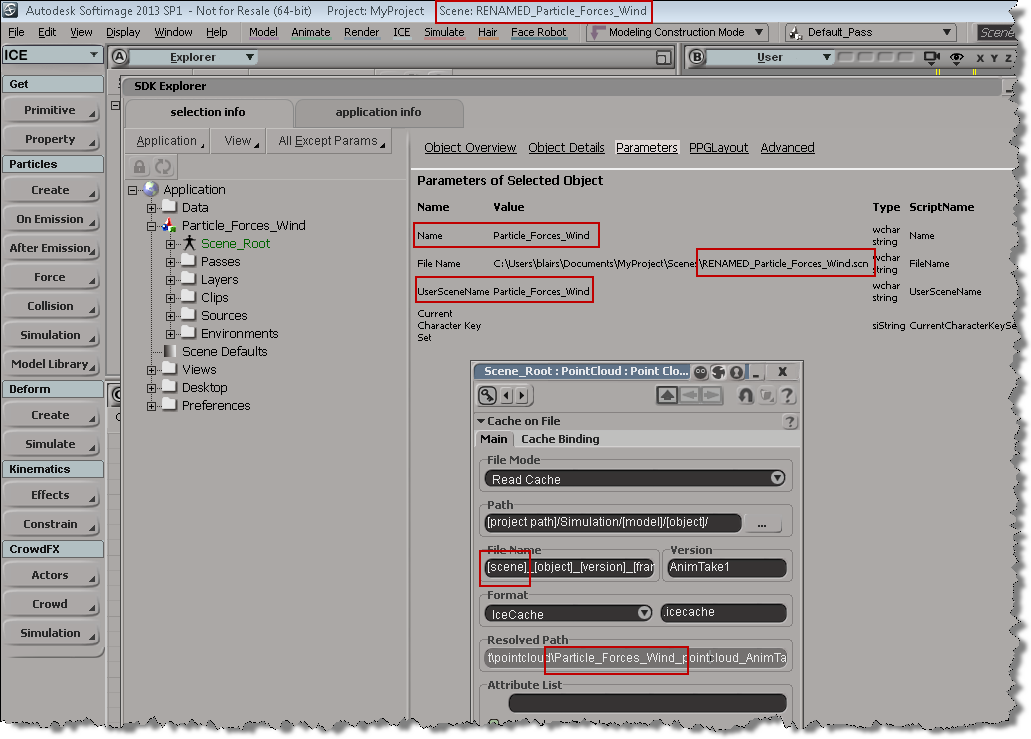
The scene name and the name of the .scn file are usually the same, but if you do something like rename the scene file in the file system, you’ll end up with something like this. Note that the [Scene] token isn’t resolving to the correct file name anymore.

# In the file system, I renamed "Particle_Forces_Wind" to "RENAMED_Particle_Forces_Wind"
# So, open RENAMED_Particle_Forces_Wind and run this:
scn = Application.ActiveProject.ActiveScene
scn.Parameters("Name").Value = "RENAMED_Particle_Forces_Wind"

Running the Python snippet above will fix the naming problem:

Scripting – How to get the active objects for component selection


When you’re in a component selection mode (such as Edge, Polygon, or Point), the active objects are highlighted in orange. The “active objects” are the objects that are “active for component selection”.

When Softimage is in a component selection mode, the Selection will either by empty or it will contain CollectionItems (one for each object with selected components).

So, how do you get the active objects? Here’s one way, using the little known, magical “.[obj].”:

# Python
import win32com.client
oActiveObjects = win32com.client.Dispatch( "XSI.Collection" )
oActiveObjects.Items = ".[obj]."
// JScript
var oActiveObjects = new ActiveXObject( "XSI.Collection" );
oActiveObjects.Items = ".[obj].";

Using wildcards and string expressions to find objects by name


From Ciaran on the XSI mailing list, here’s a good example of how to find all light nulls whose names contain “lamp” or “light”:

oLightNulls =  oModel.FindChildren2("{*light*,*lamp*}",c.siNullPrimType)

The curly brackets {} are used in a string expression to specify a list of objects.

That String Expressions page still looks pretty much the same as it did back in 1999, when I first wrote it!

About the Selection Change Command


In the Selection preferences, there’s a Selection Change Command text box where you can type in a command to run when the selection changes.

Here are two important points about the Selection Change Command:

  1. Use the VBScript syntax to enter the command. It doesn’t matter what the current scripting language is, the preference expects VBScript (so something like Application.LogMessage( “Hello %s” % Application.Selection(0) ) will end up logging an error when you select something).
  2. The Selection Change Command is triggered when you select something in a 3D viewport. The command isn’t triggered when you select an object in the explorer.

Whoops I guess Softimage did need that sitecustomize.py file…


Awhile back, I wrote a little script that used ElementTree to parse the XML returned by GetConnectionStackInfo. I posted the 2013sp1 version of the script here.

Anyway, I was a little surprised when I couldn’t get the script to run in 2012 SAP. I was sure that it used to work, but now it was giving me this error:

# ERROR : Traceback (most recent call last):
#   File "<Script Block >", line 17, in <module>
#     connections = ET.XML(stackInfo)
#   File "C:\Program Files\Autodesk\Softimage 2012.SAP\Application\python\Lib\xml\etree\ElementTree.py", line 962, in XML
#     parser = XMLTreeBuilder()
#   File "C:\Program Files\Autodesk\Softimage 2012.SAP\Application\python\Lib\xml\etree\ElementTree.py", line 1118, in __init__
#     "No module named expat; use SimpleXMLTreeBuilder instead"
# ImportError: No module named expat; use SimpleXMLTreeBuilder instead
#  - [line 17]

After digging into the problem a bit, I found that the Softimage install did indeed include expat, but Softimage wasn’t finding it…because I had deleted the Application\python\Lib\sitecustomize.py file!!! Doh.

I had deleted sitecustomize.py while investigating a problem report from a customer, and then I didn’t bother putting it back, because Python was still working in general.

sitecustomize.py adds paths like %XSI_HOME%\Application\python\DLLs to the sys.path, and pyexpat.pyd is in that DLLs folder.

Another look at IsElement problems


I’ve had some problems with IsElement lately, so I took another look at how to work around problems with IsElement, especially when you’re using it with ICE topology. Also, a quick look under the covers at the connections in the construction stack (aka operator history).

http://vimeo.com/47605597

Here’s the script I was using to print the connection stack info:

#
# This script works in 2013 SP1 only because it uses sipyutils 
#
from sipyutils import si			# win32com.client.Dispatch('XSI.Application')
from sipyutils import siut		# win32com.client.Dispatch('XSI.Utils')
from sipyutils import siui		# win32com.client.Dispatch('XSI.UIToolkit')
from sipyutils import simath	# win32com.client.Dispatch('XSI.Math')
from sipyutils import log		# LogMessage
from sipyutils import disp		# win32com.client.Dispatch
from sipyutils import C			# win32com.client.constants

si=si()
siut =siut()

sisel = si.Selection


from xml.etree import ElementTree as ET

prim = sisel(0).ActivePrimitive if si.ClassName(sisel(0)) ==  'X3DObject' else sisel(0)


stackInfo = siut.DataRepository.GetConnectionStackInfo( prim )
#log( stackInfo )
connections = ET.XML(stackInfo)
currentMarker =''

print "Connections for %s" % prim.FullName
for connection in connections:
		o = connection.find('object').text
		if o == currentMarker:
			continue
	
		if o.endswith('marker'):
			currentMarker = o
			
		print "%s (%s)" % (connection.find('object').text, connection.find('type').text)