Lip synching
Reply

You say backwards, I say forwards…
Backward compatible and forward compatible have specific meanings in the software world, but in collequial/conversational usage, the meanings are usually reversed.
For example, customers never ask me
Is Softimage 2012 forward compatible with Softimage 2013?
Rather, they ask me
Is Softimage 2013 backward compatible with 2012?
What the customer usually wants to know is can 2012 load a scene saved by 2013?
But that’s not backwards compatiblity, that’s forwards compatibility 😉
Softimage is not forwards compatible: it cannot load files from newer versions of Softimage

Softimage is backwards compatible: it can load scene files [and models] saved by older versions of Softimage

In general:

Here’s an ICE tree I was fiddling around with…given some polygons, this ICE tree resizes those polygons by moving points along the vector between the original point position and the polygon position.

Here’s a Python snippet that gets all the shaders in the render tree for a specific material. As usual, I always feel that my Python snippet could be made more pythonic; for now, this will have to do…
PS The Shader reference page has a VBScript example, but that doesn’t work anymore because it was written before ShaderParameters were introduced.
from sipyutils import si		# win32com.client.Dispatch('XSI.Application')
si=si()

import win32com.client
coll = win32com.client.Dispatch( "XSI.Collection" )

def doit( s, coll ):

	for p in s.Parameters:
		if p.Source and p.Source.IsClassOf( C.siShaderParameterID ):
			print p.Source.Parent.Name
			coll.Add( p.Source.Parent )
			doit( p.Source.Parent, coll )

	for l in s.TextureLayers:
		for y in l.Parameters:
			if y.Source and y.Source.IsClassOf( C.siShaderParameterID ):
				print y.Source.Parent.Name
				coll.Add( y.Source.Parent )
				doit( y.Source.Parent, coll )

# Get a material or shader to use as a starting point
mat = si.Dictionary.GetObject("Sources.Materials.DefaultLib.Architectural")
doit( mat, coll )

coll.Unique = True
coll.Add( mat.AllImageClips.GetAsText() )
This snippet worked for this [nonsensical test] render tree:

A location always refers to the same relative place on an object, even if the object moves or deforms.

Since the introduction of ICE modeling, you may have hit context mismatches like this:

or this:

That’s because compounds like Test in Geometry and Randomize Around Value are built to work with points/particles. For example, if you look inside Test Inside Geometry, you’ll see it is getting the point position.
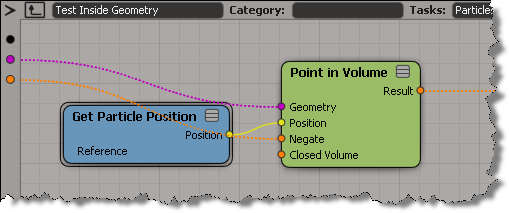
So, when you want to use these convenience compounds in a different context, you’ll have adapt them.

This ICE tree builds an array that holds the point IDs, sorted by their distance from a null:

Now, here’s how to move the “index in sorted array” and the “distance from null” down to per-point data.
(For clarity, I changed the Show Values to show only for tagged points.)

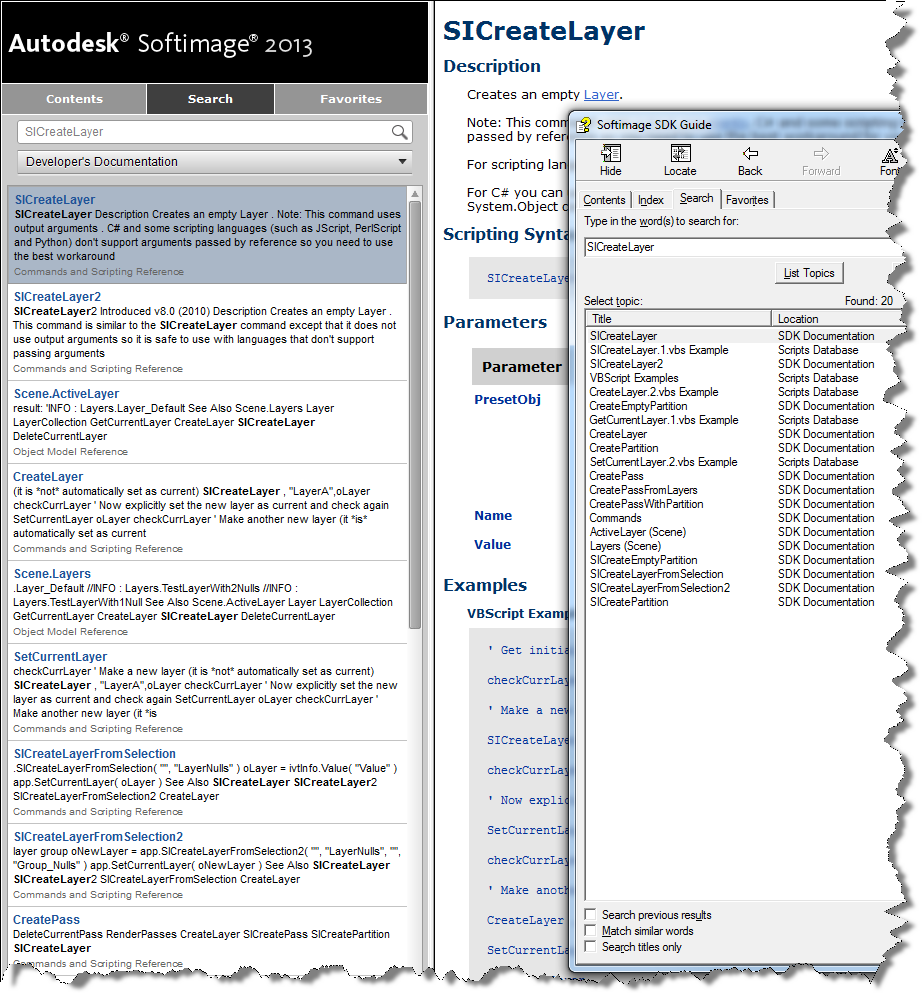
The Search tab is working again for the online Softimage documentation. Previously it wasn’t returning many hits for the SDK searches.
Here’s the search results for “SICreateLayer”, both in the browser and, for comparison, with the old CHM search.
In this case, a Softimage user running Composite 2013 was getting the following error when he started Composite:
---------------------------
composite.exe - Entry Point Not Found
---------------------------
The procedure entry point
?Initialize@CMLFacade@@SAXPEAVCMLWaypoint@@PEB_W11HI_J2_N1@Z
could not be located in the dynamic link library MC3.dll.
---------------------------
OK
---------------------------
The short story is that 3ds Max 2010 was causing this problem with Composite 2013. Here’s the long story…
A “procedure entry point” is basically a function (or method) defined in the DLL. In this case, Composite is trying to call a certain Initialize function in MC3.dll, but that Initialize function isn’t there.
More specifically, Composite is trying to call the Initialize member function of a CMLFacade object. All the other stuff (@@SAXPEAVCMLWaypoint@@PEB_W11HI_J2_N1@Z) that you see in the error message is part of the decorated name generated by the C++ compiler. Different versions of a DLL will have different decorated names for entry points, so it’s reasonable to assume that this error probably means that Composite is loading the wrong version of MC3.dll.
Using Dependency Walker, I verified that the MC3.DLL that ships with Composite 2013 does not include the entry point specified in the error message. You can see that the 2013 version of MC3.dll has a different entry point name for Initialize:

However, I got a Process Monitor log from the customer, and it showed that Composite 2013 was loading right version of MC3.dll.
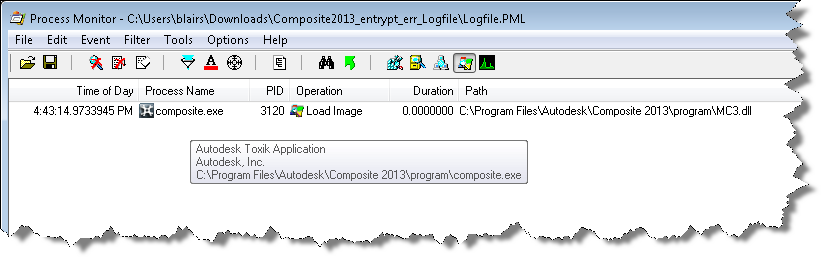
So, right DLL but wrong entry point. Using Dependency Walker again on older versions of MC3.dll, I found that the Composite was looking for an entry point that was in an older version of MC3.dll. But why???
I spent an hour or two looking over the Process Monitor logs, but everything looked normal…except for one thing: Composite 2013 was loading lots of 3ds Max 2010 files. So I renamed the 3ds Max install folder (so Composite wouldn’t find it) and the entry point error went away. My guess is that one of those older Max DLLs was bringing in a reference to the old MC3 entry point, and that was what was causing the problem in Composite.
Renaming the 3ds Max 2010 install folder just to run Composite is pretty hacky, so I tried to find another way. The best I came up with was this:
Value Name: C:\Program Files\Autodesk\3ds Max 2010\UPI\upiconfig.xml
Value Data: C:\Program Files\Autodesk\3ds Max 2010xxx\UPI\UPI.dll
After I did that, I didn’t get the entry point error in Composite, and 3ds Max 2010 still ran ok (well, it started ok, I didn’t really exercise Max after that).
Autodesk products use a cascading sequence to define the order in which they try to check out licenses. Here’s the cascade sequence as an ICE tree 😉

When Softimage tries to get a license, it will “cascade” from one license type to the next in the specified order. For example, if you have five Softimage licenses and one Entertainment Creation Suite Ultimate license, then the first five users to start Softimage will take Softimage licenses, and the sixth user to start Softimage will get the Suite license.
Here’s the Softimage cascade sequence as a plain-old numbered list:
Note that if you start Softimage and check out a Softimage license, and then start a Suite app like Maya, then Softimage will switch over to the Suite license and free up that Softimage license it was using.
I always forget whether licenses cascade up or down. To verify the order, I pointed Softimage at a license server that had just Maya licenses, set FLEXLM_DIAGNOSTICS=3, and started xsi.exe. That gave me this sequence of error messages, which shows that the cascade order starts with a basic Softimage license (85934SFTIM_2013_0F), and then works its way through the different suite licenses.
---------------------------
FLEXible License Manager
---------------------------
FLEXnet Licensing checkout error: License server system does not support this feature.
Feature:       85934SFTIM_2013_0F
License path:  @mtl2ua0150cwy;@127.0.0.1;
FLEXnet Licensing error:-18,147
For further information, refer to the FLEXnet Licensing documentation,
available at "www.flexerasoftware.com".
---------------------------
OK
---------------------------


---------------------------
FLEXible License Manager
---------------------------
FLEXnet Licensing checkout error: License server system does not support this feature.
Feature:       85932SIECS_2013_0F
License path:  @mtl2ua0150cwy;@127.0.0.1;
FLEXnet Licensing error:-18,147
For further information, refer to the FLEXnet Licensing documentation,
available at "www.flexerasoftware.com".
---------------------------
OK
---------------------------


---------------------------
FLEXible License Manager
---------------------------
FLEXnet Licensing checkout error: License server system does not support this feature.
Feature:       85918MXECSP_2013_0F
License path:  @mtl2ua0150cwy;@127.0.0.1;
FLEXnet Licensing error:-18,147
For further information, refer to the FLEXnet Licensing documentation,
available at "www.flexerasoftware.com".
---------------------------
OK
---------------------------


---------------------------
FLEXible License Manager
---------------------------
FLEXnet Licensing checkout error: License server system does not support this feature.
Feature:       85928MYECSP_2013_0F
License path:  @mtl2ua0150cwy;@127.0.0.1;
FLEXnet Licensing error:-18,147
For further information, refer to the FLEXnet Licensing documentation,
available at "www.flexerasoftware.com".
---------------------------
OK
---------------------------


---------------------------
FLEXible License Manager
---------------------------
FLEXnet Licensing checkout error: License server system does not support this feature.
Feature:       85926ENCSU_2013_0F
License path:  @mtl2ua0150cwy;@127.0.0.1;
FLEXnet Licensing error:-18,147
For further information, refer to the FLEXnet Licensing documentation,
available at "www.flexerasoftware.com".
---------------------------
OK
---------------------------


---------------------------
FLEXible License Manager
---------------------------
FLEXnet Licensing checkout error: License server system does not support this feature.
Feature:       85922AAA_2013_0F
License path:  @mtl2ua0150cwy;@127.0.0.1;
FLEXnet Licensing error:-18,147
For further information, refer to the FLEXnet Licensing documentation,
available at "www.flexerasoftware.com".
---------------------------
OK
---------------------------


---------------------------
FLEXible License Manager
---------------------------
FLEXnet Licensing checkout error: License server system does not support this feature.
Feature:       85924ESEC_2013_0F
License path:  @mtl2ua0150cwy;@127.0.0.1;
FLEXnet Licensing error:-18,147
For further information, refer to the FLEXnet Licensing documentation,
available at "www.flexerasoftware.com".
---------------------------
OK
---------------------------
If you think Softimage is not following the right cascade sequence, then this is one way to check what’s really happening.
Another thing to try if you’re having problems (like Softimage taking a Suite license instead of a Softimage license) is to delete the Cascade.cas file and restart Softimage.
 eX-SI
eX-SI 