 If the wiki link isn’t working for you, you can get the CHM version of the 2013 User Guide here.
Downloading the compiled 2013 User Guide CHM
2

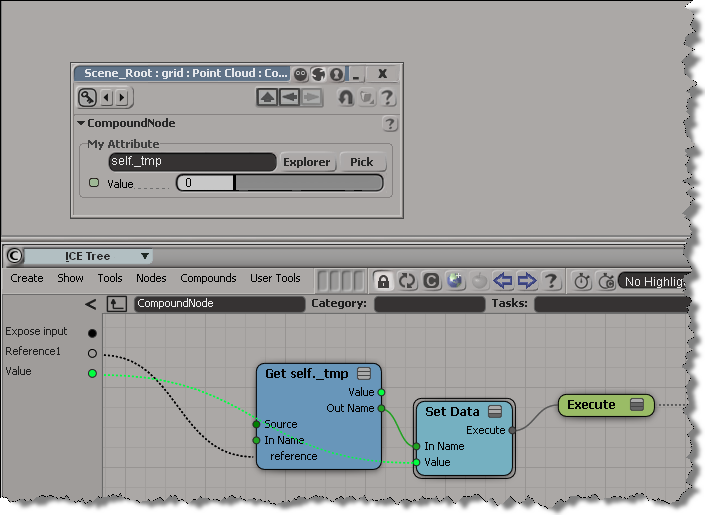
To avoid having too many exposed reference ports in a compound, you can use a Get Data as a kind of passthrough node:

In this example, the name of an attribute is passed through:
Randomize Value by Range doesn’t quite work with integers. Consider what happens when you try get a random integer between 0 and 7.

Randomize Value by Range was not designed to work with integers. By forcing it to integer type, you end up with a Random Value node that has a mean of 3 and a variance of 4 (hence the -1, which is the result of 3 – 4).
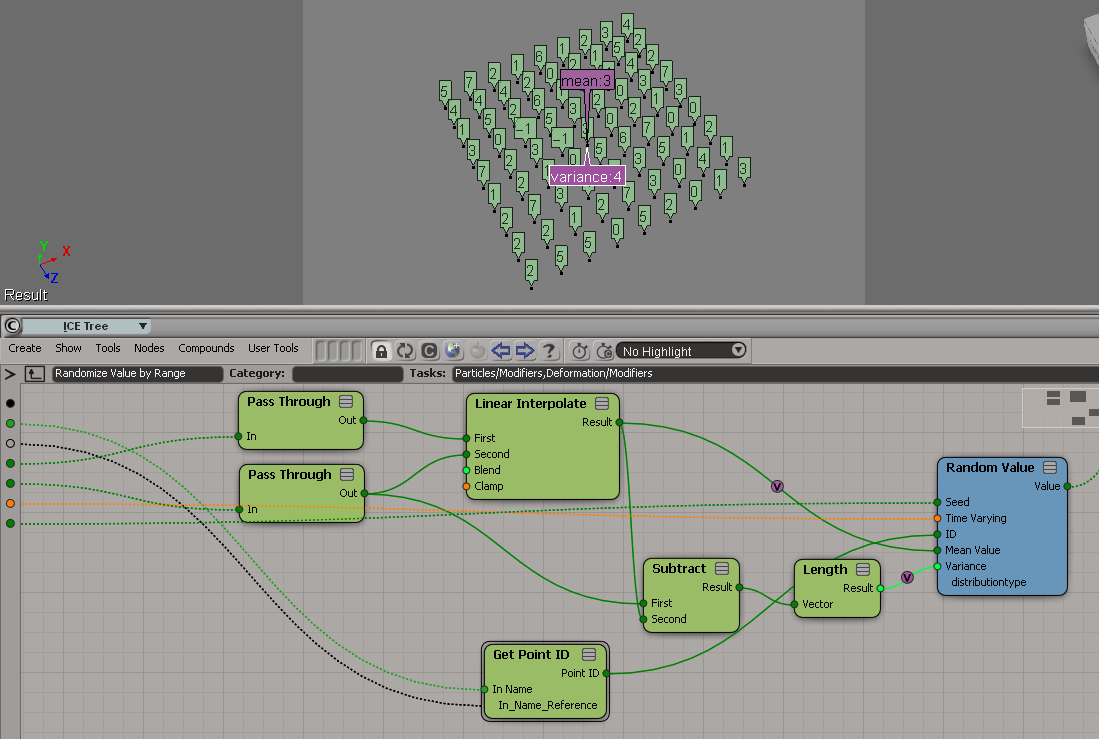
A Random Value node with a mean of 4 and a variance of 3.5 would give you an integer between 0 and 7 (because when you force the random value into an integer, ICE truncates the scalar, so 7.5 would be 7, 0.5 would be 0).
A better way may be to use Floor on the scalar output of Random Value. I know some users have done their own Randomize Integer by Range compounds.
Here’s a little addon that adds a Select Clone Object Master command to the viewport context menu for 3d objects.

The addon is a single self-installed plugin that includes a command, a menu, and a filter:
# SelectCloneMasterObjectPlugin
# Initial code generated by Softimage SDK Wizard
# Executed Thu Jun 7 10:55:31 EDT 2012 by blairs
#
# Tip: To add a command to this plug-in, right-click in the
# script editor and choose Tools > Add Command.
import win32com.client
from win32com.client import constants

null = None
false = 0
true = 1

def XSILoadPlugin( in_reg ):
	in_reg.Author = "blairs"
	in_reg.Name = "SelectCloneMasterObjectPlugin"
	in_reg.Major = 1
	in_reg.Minor = 0

	in_reg.RegisterCommand("SelectCloneMasterObject","SelectCloneMasterObject")
	in_reg.RegisterFilter("Clone",constants.siFilter3DObject)
	in_reg.RegisterMenu(constants.siMenu3DViewObjectSelectContextID,"SelectCloneMasterObject_Menu",false,false)
	#RegistrationInsertionPoint - do not remove this line

	return true

def XSIUnloadPlugin( in_reg ):
	strPluginName = in_reg.Name
	Application.LogMessage(str(strPluginName) + str(" has been unloaded."),constants.siVerbose)
	return true


# Match callback for the CloneFilter custom filter.
def Clone_Match( in_ctxt ):
	Application.LogMessage("Clone_Match called",constants.siVerbose)
	o = in_ctxt.GetAttribute( "Input" )
	c = win32com.client.Dispatch( "XSI.Collection" )
	c.Items = '%s.%s' % (o.ActivePrimitive.FullName, 'CopyOp')
	return c.Count > 0
# 	Return value indicates if the input object matches the filter criterias.


def SelectCloneMasterObject_Init( in_ctxt ):
	oCmd = in_ctxt.Source
	oCmd.Description = ""
	oCmd.ReturnValue = true

	oArgs = oCmd.Arguments
#	oArgs.AddWithHandler("Arg0","Collection")
	oArgs.AddWithHandler("Arg1","SingleObj")
	return true

def SelectCloneMasterObject_Execute( Arg1 ):

	Application.LogMessage("SelectCloneMasterObject_Execute called",constants.siVerbose)
	Application.Selection.Clear()

# by Vladimir Jankijevic
# https://groups.google.com/forum/?fromgroups#!searchin/xsi_list/Finding$20the$20source$20mesh$20of$20a$20clone/xsi_list/cyUYARDMooA/J3JVxc6jJtIJ
	copyop = Arg1.ActivePrimitive.ConstructionHistory[0]
	Application.Selection.Add(copyop.InputPorts[0].Target2.Parent3DObject)

	#
	# TODO: Put your command implementation here.
	#
	return true

def SelectCloneMasterObject_Menu_Init( in_ctxt ):
	oMenu = in_ctxt.Source
	oMenu.AddCommandItem("Select Clone Master Object","SelectCloneMasterObject")
	oMenu.Filter = "Clone"
	return true
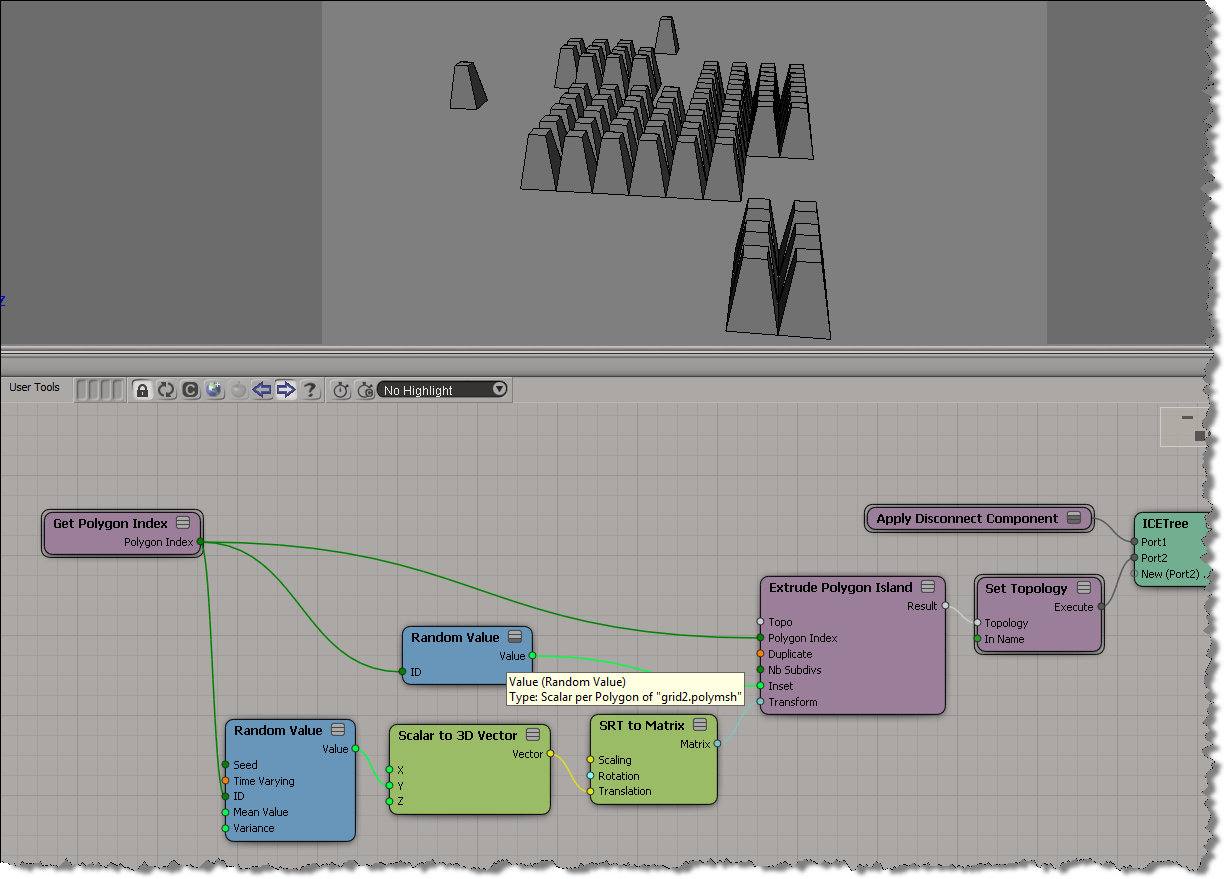
I didn’t look yet at the Random Extrusion compound Guillaume posted yesterday, because I wanted to work through the basics on my own (but do go get his compound, it’s sure to be pretty useful). Here’s a simple ICE tree that uses a different random length for each extruded polygon:
 .
.
You can’t get different extrusion lengths for different polygons without using the Repeat node. That’s because the length, inset, and transform are basically per-object, even though you can plug seemingly per-poly values into those ports.
Move…Creativity without limits…the first scalable, fully programmable crowd simulation and behavioral animation system…
From May 2003, here’s a brochure for SOFTIMAGE|Behavior 1.0.


If you want to know whether a material is used by any objects in the scene, you can check the UsedBy property.

Here’s a Python snippet that finds unused materials in the current material library:
from siutils import si

if Application.Version().split('.')[0]>= "11":
	si = si()					# win32com.client.Dispatch('XSI.Application')

from siutils import log		# LogMessage
from siutils import disp	# win32com.client.Dispatch
from siutils import C		# win32com.client.constants


matlib = si.ActiveProject.ActiveScene.ActiveMaterialLibrary
for mat in matlib.Items:
	if mat.UsedBy.Count == 0:
		log( '%s <Not used>' % mat.Name )
Spawning into different point clouds is [supposed to be] easy to set up and allows you to use different shaders on different clouds, which gives you more control over the look of your particles.
Spawn on Collision, however, doesn’t seem to work with a different point cloud. As soon as you change Self to a different point cloud, everything goes red and there’s all kinds of errors and warnings. Look at the Show Messages for Spawn on Collision:

It’s like that all the way back to 7.01. If there’s a way to do it right, I don’t know it yet.
To spawn particles into a new point cloud, try using Spawn on Trigger instead.
In the video I posted last week, I had ICE trees like this on some mesh objects:

The Per Point Boolean compound looks like this:

bFlag is just the default value.
 eX-SI
eX-SI 