Finding commands you didn’t know about


Here’s a post I recovered from my old and now deleted XSI_Support_Blog page on the Softimage wiki.

XSI ships with over 23002600 commands. Not all of them are logged in the script editor, and not all of them are documented. Here’s a crude way to search for commands with certain strings in their names.

var c = Application.Commands;
LogMessage( c.Count );

oEnum = new Enumerator( c  ) ;

// Search for commands whose scripting name
// contains a specific string of characters.
// The search string is specified between the forward slashes.
// 
var re = /SetGlobal/ig;

for (;!oEnum.atEnd();oEnum.moveNext() )
{
	var oSelItem = oEnum.item() ;
	if ( oSelItem.ScriptingName.match( re ) )
	{
			LogMessage( oSelItem.scriptingname );
			//EditCommand( oSelItem.scriptingname );

	}
} 

Here’s a related post from the Softimage community forumAREA.

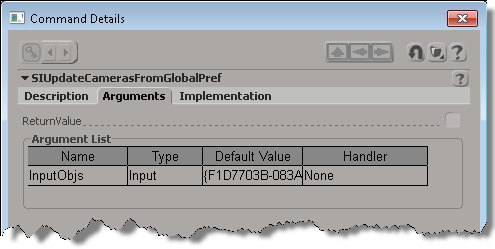
If you want to find out a little more about an undocumented command, uncomment the EditCommand call to pop up the Command Details dialog box.

The case of the slow render, low CPU usage, and framebuffers


In this case, a customer reported low CPU usage and long render times for a pass that had many framebuffers.

After some investigation, we found that disabling On-Disk Framebuffers (mental ray settings, Framebuffer tab, under Advanced Settings) made a big difference:

// Disable On-Disk Framebuffers so framebuffers are stored in memory
SetValue("Passes.mentalray.VirtualFramebuffers", false, null);
OpenView("Render Preview", null);
// INFO : RC   0.4  info : wallclock  0:00:07.27 for rendering


// Enable On-Disk Framebuffers
// Slows down the render, and CPU usage is much lower on all cores
SetValue("Passes.mentalray.VirtualFramebuffers", true, null);
OpenView("Render Preview", null);
// INFO : RC   0.4  info : wallclock  0:01:15.31 for rendering

ERROR : 21000-REND-RegenerateMaps – Unspecified failure


Third-party renderers, like Arnold or Maxwell, don’t support rendermap so you’ll get this error if you try to do a rendermap. In a recent case, the customer told us that he figured out that “the Maxwell render add-on was causing a conflict. Any old models I made with the add-on installed were affected, but new models created without the add on will bake textures just fine.”

Friday Flashback #29


2001 – The FX Tree would be introduced in the soon-to-be-announced XSI 2.0, and this softimage.com banner gave a sneak peak (on the left side, in the background very faintly, you can see a some FX Tree nodes, and on the right, you can see some FX tree scripting).

Click through the image above for a better view of what they’re talking about in this July 2001 thread from the XSI list:

-----Original Message-----
From: Jean-Louis
Sent: Tuesday, July 31, 2001 8:46 AM
To: XSI@Softimage.COM
Subject: Re: 2.0 Rumour+Speculation


And it looks all scriptable too: on the right of that same red banner you can
make out "FxTree.FileInput".
If it all turns out to be true I'll be over the moon.
--
Jean-Louis Billard
Graphics Dept. - Imaj
http://www.imajonline.com/


----- Original Message -----
From: "Meils Dühnforth" 
To: 
Sent: Tuesday, July 31, 2001 2:18 PM
Subject: RE: 2.0 Rumour+Speculation


Look at the interface screenshot shining through the red background at their
homepage top - definitely looks like a compositing tree!

Guess this is XSI 2.0 and not DS 5.0...

Meils Dühnforth
nhb studios


---
Unsubscribe? Mail Majordomo@Softimage.COM with the following text in body:
unsubscribe xsi

Per object data in ICE


When you’re working with a point cloud, and you want to keep some data on a per-object basis, you need to use one of the Set nodes (like Get Set Or or Get Maximum in Set). Or sometimes you can use arrays, as shown below.

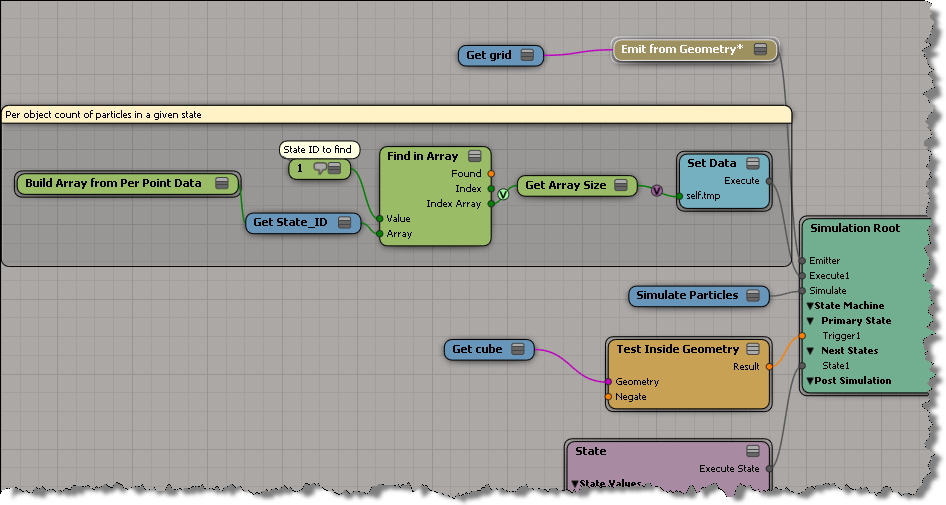
Here we get an array of the points that are in State 1, and then save the size of the array (eg the number of points in State 1) as a per-object value.

The Show Values in the viewport: