Autodesk® Softimage® 2011 Service Pack 2 available for download


via Autodesk – Autodesk Softimage Services & Support – Autodesk® Softimage® 2011 Service Pack 2.

The Softimage 2011 Subscription Advantage Pack version of this service pack is available from the Subscription Center.

These service packs are basically a repackaging of HotFix3 into a service pack.
From the README:

Coexistence
Softimage 2011 SP2 is a full build and can co-exist with Softimage 2011 and Softimage 2011 SP1.
Neither Softimage 2011 nor Softimage 2011 SP1 is required to be uninstalled first.

Licensing

Softimage 2011 SP2 uses the same license as Softimage 2011. When installing Softimage 2011 SP2:
– Enter the product key 590C1 and your Softimage 2011 serial number, and then click Next.
– If you have a Network license, click Configure to switch to the Network licensing method.

Documentation

Softimage 2011 SP2 includes full English and Japanese documentation

The full list of fixes is as follows:

FELX-1993: Scene Corruption and Failed Imports Using Models Containing Corrupted Materials
FELX-1991: Repair Shader corruption for previously persisted scenes
IMPORTANT: If problems still occur when working with external material libraries, change them to be internal.

Also included are the fixes that are found in HOTFIX 1 and 2 which addressed the following issues:

FELX-1702: Disconnected shaders when importing Referenced Model
FELX-1651: Scene Corruption due to Material
FELX-785: 3rd party renderers crash on Linux
FELX-670: Custom renderer DirtyList isn’t cleared properly
FELX-120: UVunfold fails to load when in suite license mode
FELX-88: Scene corruption – Softimage crashes when you try to load scene after saving it
UDEV00258435: Saved scene is corrupt
Calling PickObject() from C++


CValue out;
CValueArray pick_args(2);

pick_args[0] = L"Pick an object";
pick_args[1] = L"Pick an object";
Application().ExecuteCommand( L"PickObject", pick_args, out);
		
CValueArray array = (const CValueArray &)out;				
LONG button = (LONG)array[0];
X3DObject pickedObject(array[2]);

Application().LogMessage( pickedObject.GetFullName() );

The case of the capture viewport that was in the wrong place


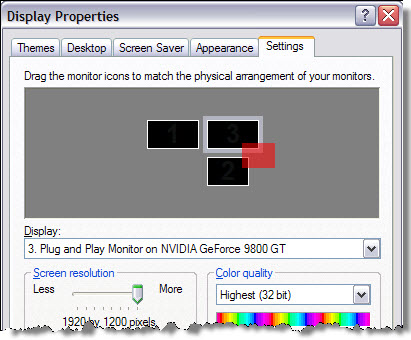
In this case, the customer reported that when he did a viewport capture, the capture area wasn’t in the right place. In this screenshot of his display properties, the red area is where the viewport capture happened:

There’s no way to set the position of the viewport capture window (it is all done automatically), so these kinds of problems are most likely a problem with the monitor setup configuration. The customer disabled his third monitor, and the capture viewport worked. So he then lined up all three monitors in a row, and then the viewport capture worked.

Autodesk Softimage Hardware Certification FAQ


From the Autodesk Softimage Hardware Certification FAQ:

Q: What version of Linux does Autodesk use in the Softimage graphics certification process?
A: Autodesk Softimage 2012 graphics certification testing was performed using Fedora Core 14.

OS: Fedora 14 64bit OS
Kernel Version: 2.6.35.11-83.fc14.x86_64
Xorg Version: 1.9.4-1.fc14.x86_64
Glibc Version: 2.13-1.x86_64

The glibc version is missing from the FAQ page, but it’s a safe bet that it’s the same version used for the Maya certification.

What’s a polynode?


The definition of a polynode is not indexed, but you can find it by searching the Softimage User’s Guide. Here’s what I found in the 2011 User Guide (I still tend to use the CHM for searching 😉

“…polynodes (also known as polygon nodes or texture sample points). There is one polynode for every corner of a polygon. At a vertex, there are as many polynodes as there are adjacent polygons.”
–Softimage User’s Guide, About User Normals

“There is one polynode for each polygon attached to a point.”
–Softimage User’s Guide, Displaying Polynode Bisectors

Every polygon has a polynode for each of its corners, so at a given vertex there are as many polynodes as there are polygons that share that vertex.
–Softimage User’s Guide, About Vertex Colors

“Each UV pair in a set of coordinates associates a location on an object, called a “sample point”, to a location on an image. On a polygon object, the sample points are polygon nodes, or polynodes. There is one polynode for each polygon corner. ”
–Softimage User’s Guide, About Texturing in Softimage

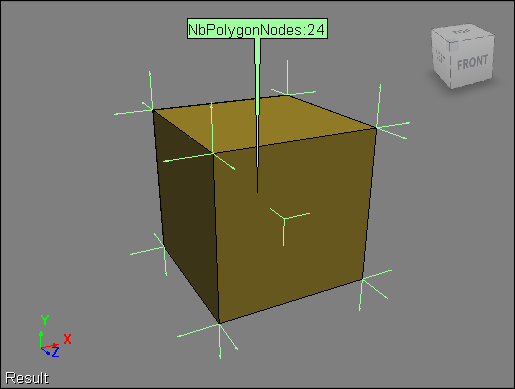
Here’s a default cube with the NbPolygonNodes and NodeNormal attributes displayed. Each of the eight vertices in the cube is shared by three polygons, so there are 8×3=24 polynodes.

ERROR : RCMP 0.4 error: cannot open temporary map file “mrmap0_tmp.a08740” for writing


This is an issue that we recently discovered. When final gathering is enabled, mental ray writes temporary files (such as mrmap0_tmp.a08740) to the Softimage installation folder:

C:\Program Files\Autodesk\Softimage 2012\Application\bin

To workaround this issue, either Run As Administrator (on Vista and Windows 7), or make sure that XSI.exe and xsibatch.exe have write permissions in the Application\bin folder.

In Maya 2012, the file is written in a project folder.
C:\Users\stseve\Documents\maya\projects\default\renderData\mentalray\mrmap1_tmp.a04936

Parent constraint between particles of different point clouds


Based on this xsibase thread, here’s a little video that shows how to make the particles in one cloud act like the children of a particle in another point cloud. Basically, the idea is to have the same behavior as objects in a hierarchy, where the children “inherit” the transformations of the parent.

One thing I forgot to mention in the video is that because both point clouds are at the origin, I don’t have to worry about converting between two different local coordinate systems (aka reference frames).

Example scene here.

http://vimeo.com/23333766