Quick tip for using Select SubArray in Array


The docs for Select SubArray in Array say that

  • Start Index is The start index of the subarray to return.
  • End Index is The end index of the subarray to return.

But the start index is inclusive, while the end index is not.

In standard range notation: [start, end)

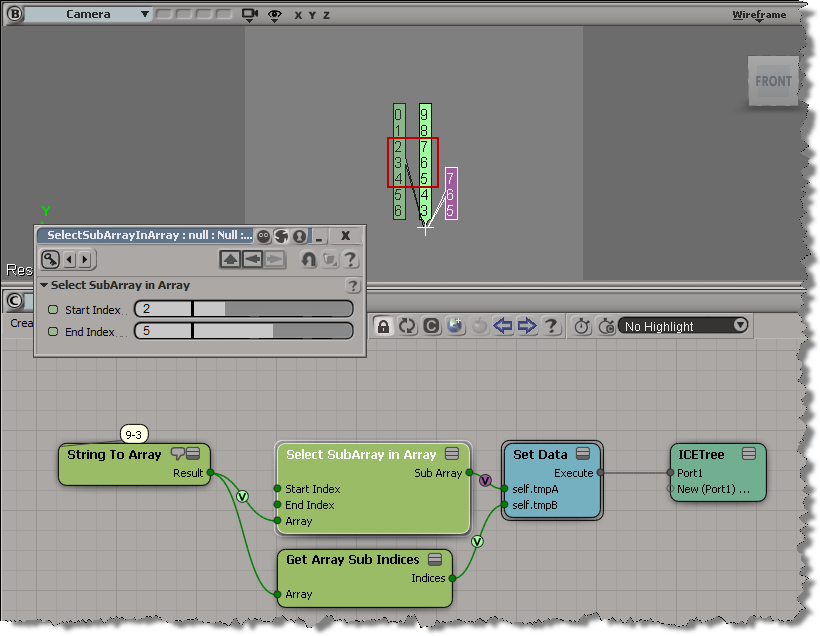
That means if start index = 2 and end index = 5, then Select SubArray in Array selects elements 2, 3, and 4 from the input array.

Scripting: Finding comment nodes in ICE compounds


Unless I missed something in the docs, you have to go through the old NestedObjects routine to do it.
Here’s a JScript version. Python to follow soon…

var n = Selection(0);

oEnum = new Enumerator( get_comments(n) ) ;
for (;!oEnum.atEnd();oEnum.moveNext() )
{
	var oComment = oEnum.item() ;
	LogMessage( oComment.Parameters("Text").Value );
}

//--------------------------------------
// Find comments
// Works with an ICENode or a compound
//--------------------------------------
function get_comments( node )
{
	var oComments = new ActiveXObject( "XSI.Collection" );
	if ( ClassName(node) == "ICENode" )
	{
		var oComment = node.NestedObjects("ICE Comment");
		if ( oComment != null ) oComments.Add( oComment );
	}
	else if ( ClassName(node) == "ICECompoundNode" )
	{
		var nested = Dictionary.GetObject( node.FullName + ".ContainedNodes" ).NestedObjects;
		oEnum = new Enumerator( nested ) ;
		for (;!oEnum.atEnd();oEnum.moveNext() )
		{
			var oItem = oEnum.item() ;
			if ( oItem.Type == "ICETreeComment" )
			{
				oComments.Add( oItem );
			}
		}
		
	}
	return oComments;
}
from siutils import si		# Application
from siutils import sidict	# Dictionary
from siutils import sisel	# Selection
from siutils import log		# LogMessage
from siutils import disp	# win32com.client.Dispatch
from siutils import C		# win32com.client.constants

def get_comments( node ):
	oComments = disp( "XSI.Collection" )
	
	if si.ClassName(node) == "ICENode":
		oComment = node.NestedObjects("ICE Comment")
		if ( oComment != None ):
			oComments.Add( oComment );

	elif si.ClassName(node) == "ICECompoundNode":
		nested = sidict.GetObject( node.FullName + ".ContainedNodes" ).NestedObjects
		for o in nested:
			if o.Type == "ICETreeComment":
				oComments.Add( o )

	return oComments
	
	
n = sisel(0)

# Get comments and print out the text
for c in get_comments(n):
	log( c.Parameters("Text").Value )

The case of Find in Array that didn’t find anything


So, the other day I was trying to use Find in Array , but it wasn’t finding anything. At first I thought there was wrong with the data I was feeding into Find in Array, but then I did a quick test of Find in Array and found out what was going on.

By default (in 2012 SAP at least), the Epsilon is 0 and Find in Array doesn’t find anything. For example, here Find in Array doesn’t find the vector (0, 0, 0) in the array, even though (0,0,0) is in the array three times:

If you bump up the epsilon to 0.001, then Find in Array does find the specified value:

It’s often a good idea to isolate a branch, or create a simple test ICE tree, to figure out how things work.

ICE attributes: user-defined versus built-in


ICE attributes are categorized as built-in or user-defined, so you would assume you could easily find your own custom attributes by checking the AttributeCategory property. However, try this: create an empty point cloud and run this script:

si = Application
attrs = si.Selection(0).ActivePrimitive.Geometry.ICEAttributes;

# There's also a "unknown" category but I'll ignore that here
for attr in attrs:
	si.LogMessage( "Attribute: %s, IsDefined: %s, AttributeCategory: %s" % (attr.Name, attr.IsDefined, "Built-in" if attr.AttributeCategory == 1 else "User-defined" ) )

You’ll see that while some attributes, like NbPoints, PointPostion, and PointVelocity are “built-in” as you would expect, most of the attributes are in the “user-defined” category.

For example, size and shape are listed as user-defined attributes. Why’s that?

I think it is because those attributes are dynamic attributes added by [factory-default] ICE compounds. Until you plug in those compounds, the compounds don’t exist and aren’t initialized (in other words, they are not defined yet). They’re not really built into the system (and the attribute explorer is hard-coded to show them as a convenience).

Built-in attributes like PointPosition are intrinsic attributes.

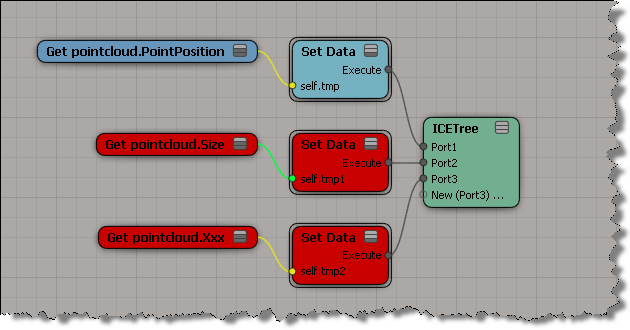
Consider this ICE tree on my empty point cloud. The Size attribute is just like my own custom Xxx attribute, whereas the built-in PointPosition attribute resolves nicely.

If you want to distinguish your own attributes, I’d use a prefix for the attribute names. For example, I sometimes use a “ps” (for Product Support) prefix or a “sisupp” prefix.

Accumulating values in a weightmap


Courtesy of Vladimir Jankijevic on the XSI mailing list, here’s how to accumulate values in a weightmap:

The nice thing about his tree is how it sets things into per-point context so nicely. My own attempt seems crude in comparison:

The thing about setting weight map values is that you can’t do it like this:

ICE will evaluate this tree just once, even if it is in the Simulation stack. Perhaps this is a case of mistaken optimization? (branch is a scalar constant, so no need to reeval?)

If you replace the scalar node with any of these branches, then the weightmap values will change as your play through the timeline.

Offsetting ICE simulations


In this video, I take a look at how to offset ICE simulations, and I look into the role of the Simulation Environment.

  • Use the Limit by Time Range node to control when a simulation (emission) is active.
  • When you create a simulated ICE tree, it is added to the current simulation environment.
  • Models don’t include the simulation environment.
  • Merged scenes usually bring in their own simulation environment, which doesn’t always match the number of frames in the current scene.

http://vimeo.com/31542410

Checking .xsicompounds for no category and no tasks


As I posted yesterday, an ICE compound with no category and no task will not show up in the Preset Manager. Here’s a Python script that checks .xsicompound files and reports any that are missing both the category and tasks attributes.

I use ElementTree to parse the .xsicompound XML, and get the category and tasks attributes from the xsi_file element, which looks something like this:

<xsi_file type="CompoundNode" name="abScatter" author="Andreas Bystrom" url="http://www.wurp.net" formatversion="1.4" compoundversion="1.0" constructionmode="Modeling" backgroundcolor="7765887">

Here’s the script.

from siutils import si		# Application
from siutils import sidict	# Dictionary
from siutils import sisel	# Selection
from siutils import siuitk	# XSIUIToolkit
from siutils import siut	# XSIUtils
from siutils import log		# LogMessage
from siutils import disp	# win32com.client.Dispatch
from siutils import C		# win32com.client.constants

from xml.etree import ElementTree as ET
import os, fnmatch


#
# Generator function for finding files
#
def find_files(directory, pattern):
     for root, dirs, files in os.walk(directory):
         for basename in files:
             if fnmatch.fnmatch(basename, pattern):
                 filename = os.path.join(root, basename)
                 yield filename


#
# Check .xsicompound file for category and tasks attributes
#
def check_xsicompound( f ):
	try:
		tree = ET.parse( f )
	except Exception, inst:
		print "Unexpected error opening %s: %s" % (f, inst)

	# Get the xsi_file element
	xsi_file = tree.getroot()

#	name = xsi_file.attrib['name']

	# Check the category and task elements
	cat = False
	tasks = False 

	if 'category' in xsi_file.attrib and xsi_file.attrib['category'] != '':
		cat = True
		
	if 'tasks' in xsi_file.attrib and xsi_file.attrib['tasks'] != '':
		tasks = True

	# return False if both are blank
	return cat or tasks


#
#
#

# list of compounds with no category and no tasks
compounds = []

# check all compounds in all workgroups
for wg in si.Workgroups:
	d = siut.BuildPath( wg, "Data", "Compounds" );

	for filename in find_files(d, '*.xsicompound'):
		b = check_xsicompound( filename )
		if not b:
			compounds.append( filename )

log( "%d compounds found with no category and no tasks:" % (len(compounds)) )
for f in compounds:
	log( f )