Error 1304 Error writing to file when creating a network deployment


If you get an error that looks like this when you create a network deployment:

Error 1304.Error writing to file \\MTL-server01\PSSMedia\Softimage\Users\BLAIRS\Deployments\SAP
\AdminImage\Softimage\x64\program files\Autodesk\Softimage 2011 Subscription Advantage Pack\Addons\ICEFlowBuilder\Data\Compounds\Particles\Presets\Lagoa Setup Basic Emission from Null.1.0.xsicompound. Verify that you have access to that directory.

followed by this error:

Error 2350.FDI server error

it’s because the path name is too long. The maximum length for a Windows path name is 260 characters.

If the path name of your deployment location is up around 60 characters, you’re going to exceed the 260 character limit. Too bad the deployment tool doesn’t check when you enter the Administrative Image location and deployment name:

The serial number you entered is not valid…(Error 123)


Most Softimage customers have network licenses. Unfortunately, by default Softimage installs in Standalone license mode, and often people get stuck trying to activate their licenses at startup, because they get this error:

The serial number you entered is not valid for the product you are trying to activate. Try again. (Error 123)

Activation at startup is for standalone licenses only. Error 123 almost always means that you have a network license, not a standalone license. And with a network license, you have to:

  • Install the Autodesk Network License Manager (LMTOOLS).
  • Go to autodesk.com/register to download your license file.
  • Install your license in LMTOOLS.
  • Switch Softimage to Network licensing mode.

Here’s a video walkthrough. Unfortunately I forgot explain how to install LMTOOLS (run the Setup and choose Install Tools & Utilities). I forgot because I had to re-record the video (the first time the volume on my microphone was way too low).

Copy error when creating a network deployment


Before you create a network deployment, create an empty toxik folder in the source folder where the you extracted the contents of the downloaded .exe. Otherwise you’ll get this error, even if you clear the MatchMover and Composite checkboxes:

---------------------------
Autodesk Softimage 2011 Subscription Advantage Pack
---------------------------
The copy functions cannot be used.

Failed to copy the following files:

    C:\Autodesk\Softimage_2011_Subscription_Advantage_Pack_English_Japanese_64bit\toxik	
to
    \\EXAMPLE\Deployments\SAP\AdminImage	

---------------------------
OK   
---------------------------

Error 1092 when trying to start raysat service


If you get error 1902 when you try to start the raysat satellite service, it’s probably because there is no entry for the service in the services file.

C:\Program Files\Autodesk\Softimage 2011\Application\bin>raysatsi2011_3_8_1_31server.exe /install
RaySatsi2011_3_8_1_31 Server installed.
Starting RaySatsi2011_3_8_1_31 Server.
raysatsi2011_3_8_1_31server error: (1092) RaySatsi2011_3_8_1_31 Server failed to start

Use a text editor to edit C:\Windows\system32\drivers\etc\services and add an entry that looks like this:

mi-raysatsi2011_3_8_1_31 7004/tcp	#

I’ve used port 7004 in this example, but you’ll have to check that no other service is using that port.

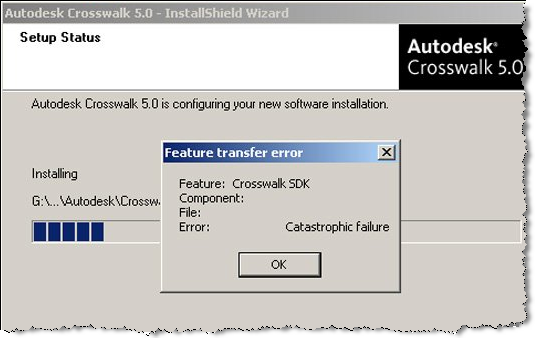
Catastrophic failure


A customer reported this error during the Crosswalk install: “Feature Transfer Error – Catastrophic failure”. Actually, he posted the screenshot on his facebook page, Jennifer Goldfinch saw it, contacted me, and I ended up with the case.

Happily the problem was easily solved. The md5 of his downloaded exe was wrong, so he switched from Google Chrome to Firefox, downloaded again, and Crosswalk installed just fine. Afterwards I downloaded Google Chrome to try it myself, and I didn’t have any problems with the Crosswalk download. Go figure.

I didn’t see the md5 on autodesk.com/softimage-crosswalk, so here it is: 63AF7E5BA1CD27269FE2B1FD135F373C.

Error 0x80040707 DLL function call crashed: gdi32.DescribePixelFormat


A Subscription customer reported getting this error during the Softimage 2010 SP1 install. I also saw this reported on the AREA for ModTool. However, these are the only two reports of this error that I have ever seen.

Error Number: 0x80040707
Description: DLL function call crashed: gdi32.DescribePixelFormat
Setup will now terminate.

The customer worked around the error by installing in Safe mode, but later had problems loading his C# plugins. So we tried a silent install of Softimage 2010 SP1, and that seemed to do the trick.