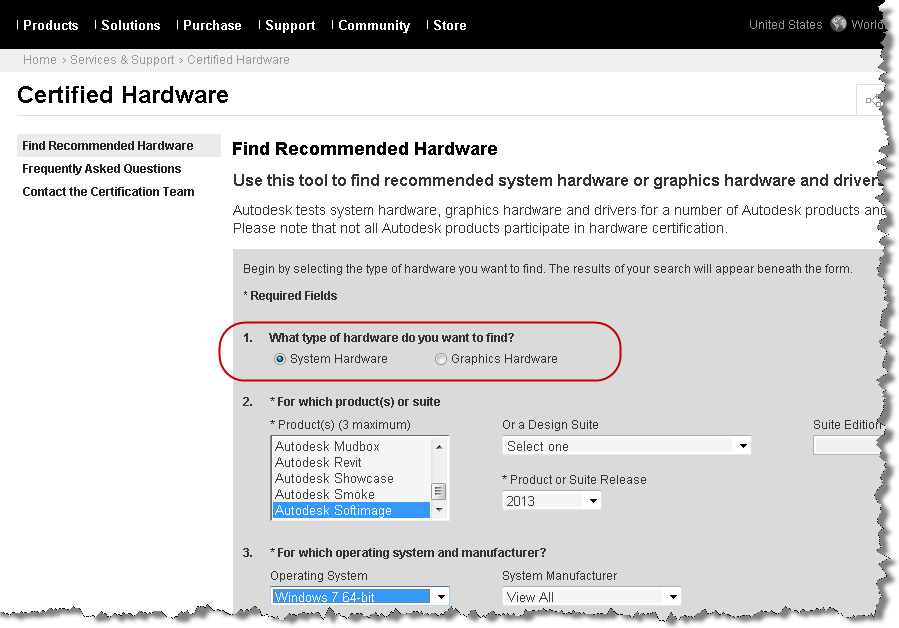
The Certified Hardware page now includes 2013 info, and it lists both System Hardware and Graphics Hardware.

Hat tip: our friends at Up and Ready
The Certified Hardware page now includes 2013 info, and it lists both System Hardware and Graphics Hardware.

Hat tip: our friends at Up and Ready
I see that some of you have found the 2013 docs.
For your convenience, here’s a list of the new commands and Object Model methods, but with actual links 🙂
New Commands
New Methods (Object Model)
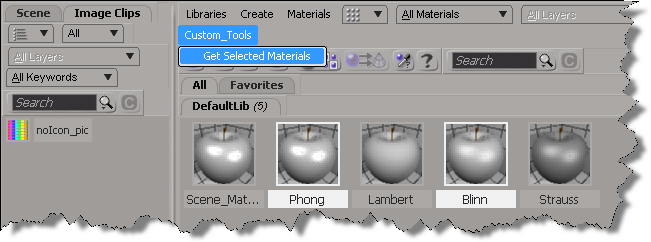
In 2013, you can use the selection view attribute to get the materials that are selected in the Material Manager.
Here’s a python custom menu item that shows how to do it. In summary, you do this:
import win32com.client
from win32com.client import constants
null = None
false = 0
true = 1
def XSILoadPlugin( in_reg ):
in_reg.Author = "blairs"
in_reg.Name = "MaterialsManagerPlugin"
in_reg.Major = 1
in_reg.Minor = 0
in_reg.RegisterMenu(constants.siMenuMaterialManagerTopLevelID,"Custom_Tools",false,false)
#RegistrationInsertionPoint - do not remove this line
return true
def XSIUnloadPlugin( in_reg ):
strPluginName = in_reg.Name
Application.LogMessage(str(strPluginName) + str(" has been unloaded."),constants.siVerbose)
return true
def Custom_Tools_Init( in_ctxt ):
oMenu = in_ctxt.Source
oMenu.AddCallbackItem("Get Selected Materials","OnGetSelected")
return true
def OnGetSelected( c ):
view = c.GetAttribute( "Target" )
Application.LogMessage( view )
Application.LogMessage( view.GetAttributeValue( "selection" ) )
for mat in view.GetAttributeValue( "selection" ).split(","):
Application.LogMessage( mat )
return true
In Softimage 2013, you can use the ViewportCapture.DSCodec parameter to set the codec for your viewport captures.
DSCodec is an string that encodes the codec ID and parameters. To get the DSCodec value, do a viewport capture and set the Codec. Softimage will log the DSCodec value in the script history:
# INFO : ViewportCapture.DSCodec: AAAAFnNwdGxycHphAAAAAAAQAAACAAAAABR0cHJsAAACAAAeAAAAAAAYAAAAGGRyYXQAAAAAAAAAUwAAAQAAAAEAAAAACW1wc28AAAAADG1mcmEAAAAAAAAADHBzZnIAAAAAAAAACWJmcmEAAAAACm1wZXMAAAAAABxoYXJkAAAAAAAAAAAAAAAAAAAAAAAAAAAAAAAKc2RuZQAAAAAADGNtZnJhcHBsAAAAAA==
Here’s a Python snippet that shows how to set the DSCodec parameter:
from siutils import si
si = si() # win32com.client.Dispatch('XSI.Application')
from siutils import log # LogMessage
from siutils import disp # win32com.client.Dispatch
from siutils import C # win32com.client.constants
def dispFix( badDispatch ):
import win32com.client.dynamic
# Re-Wraps a bad dispatch into a working one:
return win32com.client.dynamic.Dispatch(badDispatch)
oViewportCapture = dispFix(si.Dictionary.GetObject( "ViewportCapture" ))
oViewportCapture.NestedObjects("File Name").Value = "C:\\test.mov";
oDSCodec = oViewportCapture.NestedObjects("DSCodec")
#log( oDSCodec.Value )
# INFO : ViewportCapture.DSCodec: AAAAFnNwdGxycHphAAAAAAAQAAACAAAAABR0cHJsAAACAAAeAAAAAAAYAAAAGGRyYXQAAAAAAAAAUwAAAQAAAAEAAAAACW1wc28AAAAADG1mcmEAAAAAAAAADHBzZnIAAAAAAAAACWJmcmEAAAAACm1wZXMAAAAAABxoYXJkAAAAAAAAAAAAAAAAAAAAAAAAAAAAAAAKc2RuZQAAAAAADGNtZnJhcHBsAAAAAA==
oDSCodec.Value = "AAAAFnNwdGxycHphAAAAAAAQAAACAAAAABR0cHJsAAACAAAeAAAAAAAYAAAAGGRyYXQAAAAAAAAAUwAAAQAAAAEAAAAACW1wc28AAAAADG1mcmEAAAAAAAAADHBzZnIAAAAAAAAACWJmcmEAAAAACm1wZXMAAAAAABxoYXJkAAAAAAAAAAAAAAAAAAAAAAAAAAAAAAAKc2RuZQAAAAAADGNtZnJhcHBsAAAAAA=="
In Softimage 2013, the XSICollection object now has a Filter method, so you can filter XSICollections by type, family, or path name.
oFilteredCollection = XSICollection.Filter( [Type], [Families], [Path] )
I updated my find all cameras script to use XSICollection.Filter, and here’s the timing results (form the same scene, but in 2013).
# INFO : getCameras_FindObjects finished in 0.033000 seconds # INFO : Found 8301 cameras # INFO : getCameras_FindObjects_w_Filter finished in 0.269000 seconds # INFO : Found 24 cameras # INFO : getCameras_FindObjects_w_SIFilter finished in 0.044000 seconds # INFO : Found 24 cameras # INFO : getCameras_FindObjects2 finished in 0.001000 seconds # INFO : Found 49 cameras # INFO : getCameras_FindObjects2_w_Filter finished in 0.003000 seconds # INFO : Found 24 cameras # INFO : getCameras_FindChildren2 finished in 0.149000 seconds # INFO : Found 24 cameras # INFO : getCameras_SelectAllUsingFilter finished in 0.035000 seconds # INFO : Found 24 cameras
FindObjects2_w_Filter 0.003000 seconds SelectAllUsingFilter 0.035000 seconds FindObjects_w_SIFilter 0.044000 seconds FindChildren2 0.149000 seconds FindObjects_w_Filter 0.269000 seconds
Here’s the updated script for Softimage 2013:
import time
si = Application
log = si.LogMessage
from win32com.client import constants as C
import win32com.client
oCameraColl = win32com.client.Dispatch( "XSI.Collection" )
si.SetValue("preferences.scripting.cmdlog", False, "")
def timeExecution(func):
def closure(*args, **kwargs):
startTime = time.time()
try:
ret = func(*args, **kwargs)
except Exception, e:
delta = time.time() - startTime
log('Failed in %f seconds' % delta)
raise
delta = time.time() - startTime
log('%s finished in %f seconds' % (func.__name__, delta))
return ret
return closure
@timeExecution
def getCameras_FindObjects():
oCameraColl = Application.FindObjects( "", "{5FC0CCAE-3DC8-11D0-9449-00AA006D3165}" )
return oCameraColl.Count
@timeExecution
def getCameras_FindObjects_w_Filter():
oCameraColl = Application.FindObjects( "", "{5FC0CCAE-3DC8-11D0-9449-00AA006D3165}" )
oCameraColl = oCameraColl.Filter( "camera" )
oCameraColl.RemoveItems( oCameraColl.Filter( "", "", "CopyPaste*" ) )
oCameraColl.RemoveItems( oCameraColl.Filter( "", "", "View*" ) )
return oCameraColl.Count
@timeExecution
def getCameras_FindObjects_w_SIFilter():
oCameraColl = Application.FindObjects( "", "{5FC0CCAE-3DC8-11D0-9449-00AA006D3165}" )
oCameraColl = si.SIFilter( oCameraColl, "camera" )
oCameraColl.RemoveItems( oCameraColl.Filter( "", "", "CopyPaste*" ) )
oCameraColl.RemoveItems( oCameraColl.Filter( "", "", "View*" ) )
return oCameraColl.Count
@timeExecution
def getCameras_FindObjects2():
c = si.FindObjects2( C.siCameraID )
return c.Count
@timeExecution
def getCameras_FindObjects2_w_Filter():
cams = si.FindObjects2( C.siCameraID )
oCameraColl.Items = cams
oCameraColl.RemoveItems( cams.Filter( "", "", "CopyPaste*" ) )
oCameraColl.RemoveItems( cams.Filter( "", "", "View*" ) )
return oCameraColl.Count
@timeExecution
def getCameras_FindChildren2():
cams = si.ActiveSceneRoot.FindChildren2("", "camera")
return cams.Count
@timeExecution
def getCameras_SelectAllUsingFilter():
cams = si.SelectAllUsingFilter("Camera", "siIgnoreComponentVisibility", False, "")
return cams.Count
@timeExecution
def getCameras_Model_FindObjects():
cams = si.ActiveSceneRoot.FindObjects( C.siCameraID )
return cams.Count
log( 'Found %d cameras' % getCameras_FindObjects() )
log( 'Found %d cameras' % getCameras_FindObjects_w_Filter() )
log( 'Found %d cameras' % getCameras_FindObjects_w_SIFilter() )
log( 'Found %d cameras' % getCameras_FindObjects2() )
log( 'Found %d cameras' % getCameras_FindObjects2_w_Filter() )
log( 'Found %d cameras' % getCameras_FindChildren2() )
log( 'Found %d cameras' % getCameras_SelectAllUsingFilter() )
In 2011, there were just under 12K posts on the XSI mailing list. Here’s the top posts, posters, and keywords for 2011.
Top 10 posts:
I listed the top 11 because “Friday Flashback” is an ongoing thread.
Top 10 posters:
Top 10 keywords in Subject lines
I removed words like “Softimage”, “Autodesk”, “using”, “getting”, and “SI” before generating this word cloud.

The 2010 list retrospective, for comparison…
If you prefer Top 25 lists, here you go…
Continue reading
The WordPress.com stats helper monkeys prepared a 2011 annual report for this blog.
Here’s an excerpt:
The Louvre Museum has 8.5 million visitors per year. This blog was viewed about 180,000 times in 2011. If it were an exhibit at the Louvre Museum, it would take about 8 days for that many people to see it.
In 2011, there were 475 new posts, growing the total archive of this blog to 722 posts. There were 542 pictures uploaded, taking up a total of 354mb. That’s about a picture per day.
The busiest day of the year was October 21st with 1,182 views. The most popular post that day was Friday Flashback #40.
The latest Flash Player includes 32- and 64-bit versions of the player, so you can now see Flash content in NetView in 64-bit Softimage.
64-bit Windows 7 only!
Flash Player does not support 64-bit versions of Windows XP and Vista. Flash Player 11 now includes support for Windows 7 64-bit.