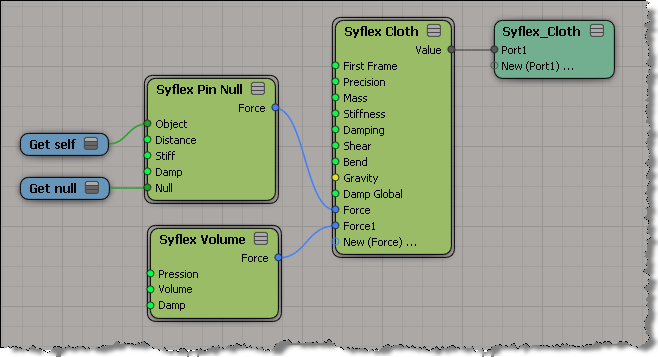
A Syflex on ICE snippet


During his Softimage 2012 demo at GDC, Mark Schoennagel has an amusing [to me at least] little bit where he uses Syflex to inflate and deflate a model. I recreated the effect but not the funny balloon noises that Mark makes while the doggie inflates and deflates.

The Syflex setup is pretty simple: I just pinned the tail and added a volume force.

A little more about the interactive tool SDK


Softimage 2012 includes several examples of custom tools built with the new interactive tool SDK. For example, there’s the Box Transform Tool:

The Box Transform Tool is a complex manipulator-style tool that uses highlighting, shortcut keys, context menus and on-screen controls.

Interactive tools are a new type of custom plugin, implemented in C++. You need to know OpenGL, because it is used for drawing and picking in the viewport. More here…

Area :: Blogs :: Introducing Softimage 2012 with ICE Modeling


Note: There seems to be a technical glitch with the videos at the moment. They don’t load for me in IE or Firefox.

via Area :: Blogs :: Introducing Softimage 2012 with ICE Modeling.

Wow time flies. It was just back in October when we shipped 2011.5 and already we are announcing Softimage 2012. It should only be a few more weeks until we actually ship this too.

Until then here are a few videos made by Chinny and a big list of the features in the release.

Updating the modeling tools has been a pretty common request in the last couple of years. So rather than Softimage building a few new ones, we built the architecture for others to do it in ICE instead. This means while we can build new modeling tools using ICE, so can the community without waiting for us. ICE modeling can be fully procedural, including the ability to create topology from basically nothing… which was not possible before.

Also, for you TDs out there check out what’s new in the SDK. Really sweet stuff like being able to create your own custom manipulators, the OnCommand event and being able to create an undo complex.

Anyway here is the eye candy – enjoy!

The Area :: Autodesk® Softimage® 2012


Autodesk Softimage 2012 Autodesk® Softimage® 2012 software delivers innovative new creative toolsets; enhanced interoperability with Autodesk® Entertainment Creation Suite Premium products; and new tools that embrace recent technology trends.

via The Area :: Autodesk® Softimage® 2012.

Note: I took out the SAP features like Lagoa from the following list.

New features in Softimage 2012 include:

  • ICE Modeling: Create procedural geometry in the Interactive Creative Environment (ICE) based on a set of rules, conditions, and parameters.
  • Enhanced Everyday Workflows: Enjoy greater overall productivity and ease of use, with across-the-board enhancements. The Texture Editor, Explorer, Schematic View, Scene Layer Manager, Render Tree, Bone Primitive, Reference Models, and Weight Editor have all received attention.
  • Syflex on ICE: Use the power of ICE to achieve greater control and flexibility over Syflex cloth simulations.
  • UV Unfolding: Save time and effort with new UV relaxing and pinning options.
  • Single-Step Suites Interoperability: More easily take advantage of the focused toolsets in the Autodesk® Entertainment Creation Suites Premium 2012, with new single-step interoperability between Softimage and Autodesk® Maya®, Autodesk® 3ds Max®, and Autodesk® Mudbox software.
  • ICE Subframe Sampling: Calculate collisions more accurately in ICE simulations, with new support for subframe sampling on a per-object or per-point cloud basis.
  • Vector Displacement Map Support: You can use mental ray® rendering technology to render complex high-resolution details created in Mudbox 2012 software or certain other applications on low-resolution geometry.
  • Consistent F-Curve Editor: More easily switch between multiple products in the Autodesk Entertainment Creation Suites Premium thanks to an updated F-Curve Editor that provides a toolset that offers more consistent functionality and terminology for editing animation curves.
  • SDK Enhancements and Events: Facilities can now more easily customize and extend their tools and pipelines, with the exposure of more core Softimage services and events: Undo Bracketing, onCommand Events, and onRenderPass Events.
  • FBX 2012: Through support for the Autodesk® FBX® 2012 asset exchange technology, artists can transfer stereo camera rigs, vector displacement maps, multiple UVs, and subframe samples for icecache and PC2 in and out of Softimage, making it easier to safely pass production assets between products.

Fixing corrupted models and scenes


As mentioned, the 2011 Hotfix2 will prevent new corruption, but it cannot fix corrupted scenes or models.
Here’s some tips from Yanick on the Dev team for fixing any models or scenes that you may have.

If you have a corrupted scene:

  • In this case you need to load an older version of scene where the shaders are connected, do a New Scene, load the corrupted scene again, and save a clean version of the scene.

If you have a corrupted model, try this to clean it up:

  1. Import the model (some materials may be disconnected because the shaders definitions of the ports are not loaded in the same order they were saved)
  2. Delete the model again (all the shader definitions are still in the scene)
  3. Import the model again (all the shaders are going to be connected because they can find the ports definitions during the load)
  4. Export the model again to save the shaders definitions in the right order

PS In 2012, when you load or import corrupted shaders, an error will be logged in the Script Editor. That`s going to make it easier to find corrupted scene/model than looking at materials one by one.

2011 HotFix 2 for disconnected shader nodes


HotFix 2 contains fixes for some common scenarios that result in corrupted materials and disconnected shader nodes in render trees. The Hotfix will prevent new corruption, but it doesn’t fix corrupted scenes or models. You will have to fix them one by one when possible.

Note: HotFix 2 includes HotFix 1.

Softimage 2011 Subscription Advantage Pack HotFix2
The SAP hotfix is now available on the Subscription Center (link requires login).

Softimage 2011 SP1 HotFix2
This hotfix is available at the Updates and Service Packs page.

Please make sure you install the right version of the hotfix: SP1 hotfix for Softimage 2011 SP1, and the SAP hotfix for Softimage 2011 Subscription Advantage Pack.

The HotFix Readme is below the fold…
Continue reading

Time FX for iPhone, iPod touch, and iPad on the iTunes App Store


Time FX is a cool, attractive clock App for iPhone, iPod Touch and iPad that uses Jos Stam’s amazing fluid dynamics solver to emit the current time in dynamic and interactive ways. Time Fx features both analog and digital effects, alarm functions (including the ability to wake to your own iPod playlists),  and a ton of themes to choose.  You may never leave your iPad sleeping again.

via Time FX for iPhone, iPod touch, and iPad on the iTunes App Store.