You can watch them here:


The shrinking Softimage box set through the years (Softimage|3D, XSI 5, XSI 7, and finally, Softimage 2012).
One of the changes in the 2012 release is that both the User’s Guide and the SDK Guide have moved to the web. There’s no more compiled help files (chm). Everything is now web-based.
The Setup program doesn’t include the help files, but you can download them if you want a local copy.
The General preferences now include some Help Location settings to tell Softimage where to find the online help:

This is part of a wider initiative across all Autodesk products. Some of the potential benefits include:
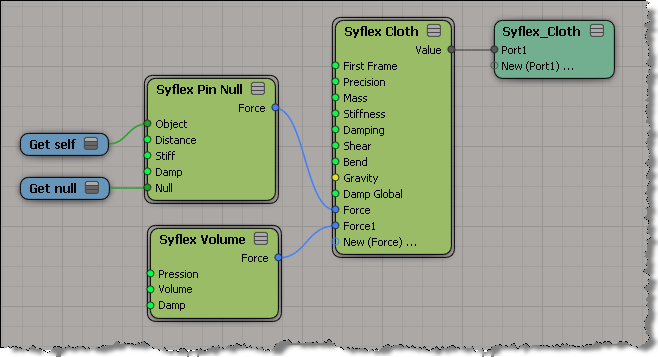
During his Softimage 2012 demo at GDC, Mark Schoennagel has an amusing [to me at least] little bit where he uses Syflex to inflate and deflate a model. I recreated the effect but not the funny balloon noises that Mark makes while the doggie inflates and deflates.

The Syflex setup is pretty simple: I just pinned the tail and added a volume force.
Softimage 2012 includes several examples of custom tools built with the new interactive tool SDK. For example, there’s the Box Transform Tool:

The Box Transform Tool is a complex manipulator-style tool that uses highlighting, shortcut keys, context menus and on-screen controls.
Interactive tools are a new type of custom plugin, implemented in C++. You need to know OpenGL, because it is used for drawing and picking in the viewport. More here…
An example of the new-in-2012 Interactive Tool SDK:
Note: There seems to be a technical glitch with the videos at the moment. They don’t load for me in IE or Firefox.
via Area :: Blogs :: Introducing Softimage 2012 with ICE Modeling.
Wow time flies. It was just back in October when we shipped 2011.5 and already we are announcing Softimage 2012. It should only be a few more weeks until we actually ship this too.
Until then here are a few videos made by Chinny and a big list of the features in the release.
Updating the modeling tools has been a pretty common request in the last couple of years. So rather than Softimage building a few new ones, we built the architecture for others to do it in ICE instead. This means while we can build new modeling tools using ICE, so can the community without waiting for us. ICE modeling can be fully procedural, including the ability to create topology from basically nothing… which was not possible before.
Also, for you TDs out there check out what’s new in the SDK. Really sweet stuff like being able to create your own custom manipulators, the OnCommand event and being able to create an undo complex.
Anyway here is the eye candy – enjoy!
Autodesk Softimage 2012 Autodesk® Softimage® 2012 software delivers innovative new creative toolsets; enhanced interoperability with Autodesk® Entertainment Creation Suite Premium products; and new tools that embrace recent technology trends.
via The Area :: Autodesk® Softimage® 2012.
Note: I took out the SAP features like Lagoa from the following list.
New features in Softimage 2012 include:
Visit the Briefing Room for an overview of Autodesk at GDC 2011.
I don’t think you can expect to hear anything specific about Softimage, Maya, or 3ds Max until much closer to GDC.
As mentioned, the 2011 Hotfix2 will prevent new corruption, but it cannot fix corrupted scenes or models.
Here’s some tips from Yanick on the Dev team for fixing any models or scenes that you may have.
If you have a corrupted scene:
If you have a corrupted model, try this to clean it up:
PS In 2012, when you load or import corrupted shaders, an error will be logged in the Script Editor. That`s going to make it easier to find corrupted scene/model than looking at materials one by one.

