Setting the DataArray2D attribute in scripting


Last time I tried this, I gave up on JScript (it seemed impossible) and got something to work in Python.

In JScript, I kept getting errors like “# WARNING : 3392 – Invalid offset specified while extracting data from this attributeÈ.

si = Application
from win32com.client import constants as C            # win32com.client.constants

oObj = si.Selection(0)
oICEAttrMats = oObj.ActivePrimitive.AddICEAttribute("MyString", C.siICENodeDataString, C.siICENodeStructureArray, C.siICENodeContextSingleton)
oICEAttrMats.DataArray2D = [["a", "b", "c", "d"]]

x = oICEAttrMats.DataArray2D
print x
print len(x)
print len(x[0])
print len(x[0][0])

for d in x[0][0]:
    print d


# (((u'a', u'b', u'c', u'd'),),)
# 1
# 1
# 4
# a
# b
# c
# d

See also this Getting DataArray2D attribute values post.

Finding degenerate polygons by area


Degenerate polygons are usually zero-area polygons.

Here’s a script that uses the ICE attribute PolygonArea to find polygons with area less than a specified epsilon:

si = Application
epsilon = 0.00001

# Get PolygonArea DataArray (which is a tuple)
attr = si.Selection(0).ActivePrimitive.GetICEAttributeFromName( "PolygonArea" )
areaData = attr.DataArray

#
# Find the indices of the bad polys
#
bad = [ x for x,y in enumerate( areaData ) if y < epsilon]

# Select the degenerates with a string like 'cube.poly[112,114,155]'
si.SelectGeometryComponents( 'cube.poly[%s]' % ','.join(str(i) for i in bad) )


### OR ###

#
# Get the actual Polygon objects
#
polys = si.Selection(0).ActivePrimitive.Geometry.Polygons
bad = []
for i in range( len(areaData) ):
	if areaData[i] < epsilon:
		bad.append( polys(i) )

si.SelectObj( polys )

Getting the DataArray2D for the Materials ICE attribute


Here’s the Python way:

Application.SelectObj("Pedestrian_Mesh.Actor_Copies", None, None);
o = Application.Selection(0)

a = o.ActivePrimitive.Geometry.GetICEAttributeFromName("Materials")
print len(a.DataArray2D)
print len(a.DataArray2D[0] )
print a.DataArray2D[0][0]
for s in a.DataArray2D[0][0]:
    print s

# 1
# 1
# (u'', u'Sources.Materials.PedestrianLib.Shoes', u'Sources.Materials.PedestrianLib.Hair', u'Sources.Materials.PedestrianLib.Legs', u'Sources.Materials.PedestrianLib.Skin', u'Sources.Materials.PedestrianLib.Shirt')
# Sources.Materials.PedestrianLib.Shoes
# Sources.Materials.PedestrianLib.Hair
# Sources.Materials.PedestrianLib.Legs
# Sources.Materials.PedestrianLib.Skin
# Sources.Materials.PedestrianLib.Shirt

And here’s how to do it in JScript:

o = Selection(0);

a = o.ActivePrimitive.Geometry.GetICEAttributeFromName("Materials");

x = new VBArray( a.DataArray2D ).toArray();
y = new VBArray( x[0] ).toArray();
for ( var i = 0; i < y.length; i++ )
{
    LogMessage( y[i] )
}

Saturday snippet: Converting strings to objects


XSICollections know how to handle (aka parse) string expressions like ‘cube.pnt[2,4,LAST]’

si = Application
import win32com.client
c = win32com.client.Dispatch( "XSI.Collection" )

#c.SetAsText( 'cube.pnt[2,4,LAST]' )
c.Items = 'cube.pnt[2,4,LAST]'

print c.Count
print si.ClassName( c(0) )
print c(0).SubComponent.ComponentCollection.Count
print si.ClassName( c(0).SubComponent.ComponentCollection(0) )
print c(0).SubComponent.ComponentCollection(2).Index
# 1
# CollectionItem
# 3
# Vertex
# 7

Back in 1999, this code looked something like this:

CreatePrim "Cube", "MeshSurface"
set list = GetCollection( "cube.pnt[2,3,6,LAST]" )

if not typename(list) = "Nothing" then
	logmessage list
end if

function GetCollection( in_str )
	Dim l_myList 

	set GetCollection = CreateObject( "Sumatra.Collection" )

	On Error Resume Next
	GetCollection.items = in_str

	if GetCollection.Count = 0 then
		set GetCollection = Nothing
	end if

end function

Collection methods and the documentation


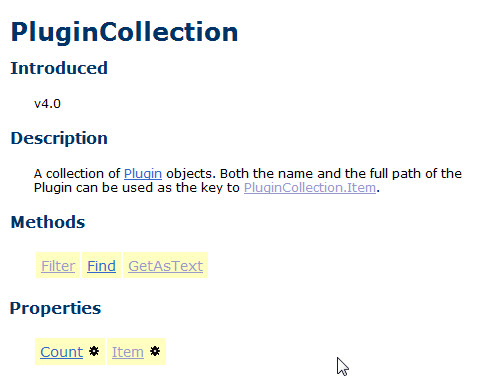
The SDK reference page for PluginCollection says that it implements the inherited methods Find, Filter, and GetAsText.
plugincollectiondoc
But it doesn’t. And according to the object hierarchy, it doesn’t have a base class (so where do those inherited methods come from 🙂

I can’t really remember anymore, but I think all the collection objects derive from a now-undocumented base class; or at least the documentation pretends they do (that made it simpler to auto-generate the pages). That’s why they all have inherited methods and properties, and they all have the same scripting examples.

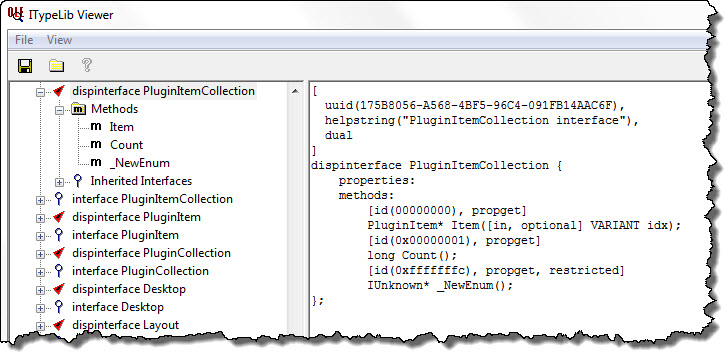
If we use the OLE-COM Object Viewer that comes with the Windows SDK 7.1, we can check out the object model type library and see what methods PluginCollection really does support:
ITypeLib Viewer

Note: On a reference page, the yellow highlighting marks inherited methods and properties.

Saturday snippet: Python classes, __getattr_, lambda, and-or trick, and getattr


Here’s a snippet of some python posted on the Softimage mailing list this week.

from win32com.client import constants
class Softimage:
    __getattr__ = lambda x, a: getattr(Application, a, False) or getattr(constants, a)
softimage = Softimage()

Let’s break this down…

First, this snippet defines a class named Softimage (lines 1 and 2) and then instantiates an instance of that class (line 4).

Once you have an instance of a class, you can access the attributes of the class. Now this Softimage class doesn’t define any attributes, but it does provide a __getattr__ method. For example, if you ask for softimage.GetValue, then that __getattr__ method gives you back the function object Application.GetValue. If you ask for softimage.ActiveSceneRoot, you get back the value of the Application.ActiveSceneRoot property. And if you ask for softimage.siX3DObjectID, you get back constants.siX3DObjectID.

So, how does that work?

__getattr__ is a method that is called when an attribute isn’t found on a class instance.
If you define __getattr__ without using lambda or the and-or trick, it could look something like this:

from win32com.client import constants
class Softimage:
#    __getattr__ = lambda x, a: getattr(Application, a, False) or getattr(constants, a)
    def __getattr__( self, name ):
        a = getattr(Application, name, False) 
        if not a:
            a = getattr(constants, name)
        return a

getattr is a built-in Python function that gets an attribute on a specified object. Here, we’re getting an attribute of the Softimage Application object. For example:

# Get the scene root
a = getattr(Application, "ActiveSceneRoot", False)
print a
print a.Parameters.Count

# Get the selection with the GetValue command
a = getattr(Application, "GetValue", False)
print a
print a( 'SelectionList' )

Getting all visibility.viewvis parameters


From a discussion on the mailing list today, a few of the different ways to get every instance of a specific parameter, and some [crude] timing of the different methods.

I was also glad to see confirmation that using wildcards like “*.visibility” pick up everything (because I’ve never got any variation of “*#3dobject” to pick up all objects).

si = Application
import time
from win32com.client import Dispatch as disp
from win32com.client import constants as c


t = time.clock()
oObj = disp("XSI.Collection")
oObj.Items = "*.visibility"
for o in oObj:
	v = o.viewvis.Value
print 'XSICollection.Items  : count=%s, time=%s' % ( oObj.Count, time.clock() - t )


t = time.clock()
oObj.Items = "*.visibility.viewvis"
for o in oObj:
	v = o.Value
print 'XSICollection.Items  : count=%s, time=%s' % ( oObj.Count, time.clock() - t )


t = time.clock()
items = si.ActiveSceneRoot.FindChildren2()
for obj in items:
    vis = obj.GetPropertyFromName2("Visibility")
    v = vis.viewvis.value
print 'GetPropertyFromName2 : count=%s, time=%s' % ( items.Count, time.clock() - t )


t = time.clock()
items = si.ActiveSceneRoot.FindChildren2()
for obj in items:
    v = obj.Properties('visibility').Parameters('viewvis').Value   
print 'Properties.Parameters: count=%s, time=%s' % ( items.Count, time.clock() - t )


t = time.clock()
items = si.ActiveSceneRoot.FindChildren2()
for item in items:
    si.Tag(item.fullname + '.visibility.viewvis', c.siTag1)
print 'Tag()                : count=%s, time=%s' % ( items.Count, time.clock() - t )

t = time.clock()
items = si.ActiveSceneRoot.FindChildren2()
for item in items:
	p = item.Properties( "Visibility" ).Parameters( "viewvis" )
	p.Tags = c.siTag1
print 'Parameter.Tag        : count=%s, time=%s' % ( items.Count, time.clock() - t )


t = time.clock()
val = si.ActiveSceneRoot.TaggedParameters(c.siTag1, False)
for v in val:
    v = v.value
print 'TaggedParameters     : count=%s, time=%s' % ( items.Count, time.clock() - t )

Notice how turning off command logging speeds up those two commands:

# XSICollection.Items  : count=4367, time=1.18428964264
# XSICollection.Items  : count=4367, time=1.00415073153
# GetPropertyFromName2 : count=4367, time=2.07334397855
# Properties.Parameters: count=4367, time=4.38064481075
# Tag()                : count=4367, time=20.6681847681
# Parameter.Tag        : count=4367, time=5.11316244631
# TaggedParameters     : count=4367, time=0.705648810261
Application.SetValue("preferences.scripting.cmdlog", False, "")
# XSICollection.Items  : count=4367, time=1.16849869148
# XSICollection.Items  : count=4367, time=0.988541493731
# GetPropertyFromName2 : count=4367, time=2.03344763365
# Properties.Parameters: count=4367, time=4.33773781962
# Tag()                : count=4367, time=7.47015675041
# Parameter.Tag        : count=4367, time=4.99573667863
# TaggedParameters     : count=4367, time=0.687065751859

Getting selected text from the script history


Here’s how to get the selection from the script history. This is how the Repeat command works.

def GetScriptHistoryView():
	oLayout = Application.Desktop.ActiveLayout

	# See if the script history is a view of it's own
	oViews = oLayout.Views.Filter( "Script History" )
	if oViews.Count == 0:
		oViews = oLayout.Views.Filter( "Script Editor" )

	return oViews(0)

oLog = GetScriptHistoryView()
text = oLog.GetAttributeValue( "historyline" ) if oLog else "<Nothing>"
print text

Saturday Snippet: Selecting a range of polygons by polygon index


Given a selected polygon, add the next 5 polygons to the selection. For example, if polygon 22 is selected, then add polygons 23,24,25,26, and 27 to the selection.

You can do this without using any loops, by using a string expression for the polygon components.

Here’s some JScript that shows two ways to do it. Method 1 uses a string expression. Method 2 is a loop, which can either use the Polygons collection or a string expression.

var o = Selection(0).SubComponent.Parent3DObject
var p = Selection(0).SubComponent.ComponentCollection(0)
var LAST = o.ActivePrimitive.Geometry.Polygons.Count;

// Method 1
// SelectGeometryComponents("grid.poly[22-27]", null, null);

var sPoly = ".poly["+p.Index+"-"+Math.min( p.Index+5,LAST-1 )+"]"
//SelectGeometryComponents( o.FullName + sPoly );
//Selection.SetAsText( o.FullName + sPoly  );

// Method 2
//for ( var i = p.Index+1 ; i < Math.min( p.Index+5,LAST ) ; i++ )
//{
//	ToggleSelection( o.ActivePrimitive.Geometry.Polygons(i) );
// -or-
//	ToggleSelection( o.FullName + ".poly["+i+"]" )
//}

Here’s some Python that does something similar but different:

si = Application
o = si.Selection(0).SubComponent.Parent3DObject
p = si.Selection(0).SubComponent.ComponentCollection(0)
LAST = o.ActivePrimitive.Geometry.Polygons.Count

s = ".poly[%s-%s]" % ( p.Index, min( p.Index+5,LAST-1 ) )
si.SelectGeometryComponents( s )