Softimage stops working everytime computer is restarted


Each time the computer was restarted, Softimage couldn’t open scene files. Running runonce.bat after a restart fixed the problem, which suggested that something was happening to the registry.

And sure enough, it turned out that Advanced SystemCare Free was installed on the system. It’s a registry cleaner that runs automatically at startup.

Registry cleaners are XSI killers.

Area :: Discussions.

The case of the slow 2011 startup on Fedora 14


In a recent case, a customer reported that Softimage 2011 took forever (four to five minutes) to start on Fedora 14. Softimage 2010 SP1, on the other hand, started up just fine.

It turns out that for Softimage 2011, 2011SP1, and 2011SAP on Fedora 14, you need to put back our x11 patch (this patch was needed for Fedora 8, 9, and 10; Fedora 11, 12, and 13 run with a different compiled version of XCB and don’t need the patch).

Edit the .mwenv file ($XSI_HOME/Application/mainwin/mw/scripts/.mwenv) and change this

if ( "fc8" == "$fcver" || "fc9" == "$fcver" || "fc10" == "$fcver" ) set x11patch="$MWHOME/lib-${MWCONFIG_NAME}_optimized/X11"

to this:

if ( "fc8" == "$fcver" || "fc9" == "$fcver" || "fc10" == "$fcver" || "fc14" == "$fcver" ) set x11patch="$MWHOME/lib-${MWCONFIG_NAME}_optimized/X11"

Then source the .xsi and restart Softimage.

About the x11 patch:

In a previous version of Softimage, we introduced a libX11 workaround because of a problem introduced in FC8 with XCB that can cause freezes during Multi-threaded user interaction. What we did was to place a libX11 binary (compiled _without_ xcb) into a patch directory and then add that directory to the LD_LIBRARY_PATH.

The XCB problem was fixed in FC11, so we modified Softimage. The libX11 binary is still installed with the Linux setup, but the .mwenv script checks the Fedora version you are running and only adds the libX11 patch path to the LD_LIBRARY_PATH for Fedora 8, 9, and 10. So on Fedora 11, 12, and 13 Softimage uses the system installed libX11.

UPDATE: Another symptom of this problem is “EAGAIN (Resource temporarily unavailable)” errors for the tmp/.X11-unix/X0 socket. You’ll see these in the strace log:

socket(PF_FILE, SOCK_STREAM|SOCK_CLOEXEC, 0) = 19
connect(19, {sa_family=AF_FILE, path=@"/tmp/.X11-unix/X0"}, 20) = 0
getpeername(19, {sa_family=AF_FILE, path=@"/tmp/.X11-unix/X0"}, [20]) = 0
uname({sys="Linux", node="homer", ...}) = 0
access("/var/run/gdm/auth-for-xxx-Q2I4go/database", R_OK) = 0
open("/var/run/gdm/auth-for-xxx-Q2I4go/database", O_RDONLY) = 20
fstat(20, {st_mode=S_IFREG|0600, st_size=50, ...}) = 0
mmap(NULL, 4096, PROT_READ|PROT_WRITE, MAP_PRIVATE|MAP_ANONYMOUS, -1, 0) = 0x7f3360deb000
read(20, "\1\0\0\5homer\0\0010\0\22MIT-MAGIC-COOKIE-1"..., 4096) = 50
close(20)                               = 0     
munmap(0x7f3360deb000, 4096)            = 0
getsockname(19, {sa_family=AF_FILE, NULL}, [2]) = 0
fcntl(19, F_GETFL)                      = 0x2 (flags O_RDWR)
fcntl(19, F_SETFL, O_RDWR|O_NONBLOCK)   = 0
fcntl(19, F_SETFD, FD_CLOEXEC)          = 0
poll([{fd=19, events=POLLIN|POLLOUT}], 1, -1) = 1 ([{fd=19, revents=POLLOUT}])
writev(19, [{"l\0\v\0\0\0\22\0\20\0\0\0", 12}, {"", 0}, {"MIT-MAGIC-COOKIE-1", 18}, {"\0\0", 2}, {"\367\371\200\336\321\\\37\4\22\0324\274\3356|\313", 16}, {"", 0}], 6) = 48
read(19, 0x27ae690, 8)                  = -1 EAGAIN (Resource temporarily unavailable)
poll([{fd=19, events=POLLIN}], 1, -1)   = 1 ([{fd=19, revents=POLLIN}])

The strange case of error 211005: timeout waiting for finished rectangles


In this case, Softimage 2010SP1 stopped rendering one day (but strangely, 7.5 and 2011 still worked). If you drew a render region, nothing would happen for a long time, and then you would get this error:

' ERROR : DISP 0.4  error  211005: timeout waiting for finished rectangles

If you tried to render a frame to file, you’d get the same error, and a truncated image file that couldn’t be read. The mental ray diagnostics looked like this:

' INFO : JOB  0.8  progr:    99.4%    rendered on Example.8
' INFO : JOB  0.9  progr:    99.7%    rendered on Example.9
' INFO : JOB  0.14 progr:   100.0%    rendered on Example.14
' ERROR : DISP 0.4  error  211005: timeout waiting for finished rectangles
' INFO : RC   0.4  info : rendering statistics
' INFO : RC   0.4  info :   type                           number   per eye ray
' INFO : RC   0.4  info :   eye rays                        32900          1.00
' INFO : PHEN 0.4  progr: calling output shaders
' INFO : PHEN 0.4  progr: Writing image file 'C:\Softimage\Softimage_2010_SP1\Data\XSI_SAMPLES\Render_Pictures\Default_Pass_Main.1.pic' (Channel 'Main').
' ERROR : DISP 0.4  error  211005: timeout waiting for finished rectangles
' INFO : RC   0.4  progr: rendering finished
' INFO : RC   0.4  info : wallclock  0:03:59.65 for rendering
' INFO : RC   0.4  info : allocated 17 MB, max resident 18 MB
' INFO : GAPM 0.4  info : triangle count (including retessellation) :         112
' ERROR : 21000-REND-RenderPasses - Unspecified failure
RenderPasses "Passes.Default_Pass", 1, 1, 1, siRenderVerbosityDefault
Command failed, returned -2147467259

Softimage would stop responding shortly afterwards.

Eventually we tracked this down to a conflict with the OGRE Exporter.
We removed the exporter, and Softimage 2010 SP1 was able to render again. We then reinstalled the OGRE addon, and Softimage 2010 SP1 still rendered.

I suspected some sort of application conflict all along, but it took awhile to find the root cause of the problem.

The case of Softimage stuck in layout editing mode after a crash


In this case, a customer couldn’t start Softimage again after he crashed while editing a layout.
When he started Softimage, it went into the layout editing mode and stopped responding.

In the past, we’ve fixed problems like this by asking customers to rename the User folder, or to delete any bogus .xsily files (for example, zero-length files) from the Application\layouts folder in their User location.

However, I learned from Luc-Eric that there’s a specific preference that specifies whether Softimage is in the layout editing mode. So, to stop Softimage from starting up in the Layout Editor, we had to edit %XSI_USERHOME%\Data\Preferences\default.xsipref and change this

	xsiprivate.UI_LAYOUT_DEFAULT	= Layout Editor

to this:

	xsiprivate.UI_LAYOUT_DEFAULT	= Default

ERROR : MSG 0.n error 011326: bad message received from host 1, 0xbad0bad


In a recent case, a customer getting a endless repetition of this error message when he used satellite rendering:

// ERROR : MSG  0.n  error  011326: bad message received from host 1, 0xbad0bad
...

By itself, this message doesn’t tell us much more than that something bad happened and now the master and the slave aren’t communicating.

  • MSG means this message is from the module that handles low-level message passing and thread management.
  • 0.n identifies the machine where the error occured. Machine 0 is the client machine where the render was started. The dot (.) separates the machine (host) number from the thread number.
  • Thread n is a special network communication thread that keeps contact with the satellilte machines if network parallelism is used.

Typically, the real error message is output just before all these bad message errors start. To catch this first error, we redirected the xsibatch output to a log file:

xsibatch.bat -render \\server\project\Scenes\test.scn" -verbose on > xsibatch.log

The initial error turned out to be a memory access error. More on that later.

The case of satellite rendering not working in 2011 SAP on 32-bit Windows XP


In this case, a customer was trying to use 64-bit Windows satellites from a 32-bit Windows XP master computer. The problem: it didn’t work. The mental ray diagnostic messages don’t show any usage of the satellites when he rendered on the master computer.

The customer double-checked that ray3hosts had the right computer names and ports, that the raysat service was running on the master and the satellites, and that telnet could connect to the raysat ports. In addition, the customer tried using the 32-bit XP machine as a satellite, and that did work. So it looked to the customer like maybe 32-bit 2011 SAP couldn’t use 64-bit satellites.

I set up a 32-bit Windows XP master with some 64-bit Windows 7 satellites, and sure enough it didn’t work. In addition to checking the mental ray diagnostics on the master, I also run Process Monitor on the satellites to check for raysat activity, and I wasn’t seeing anything.

After double-checking everything again, I tried using WireShark, a network protocol analyzer, on the master to see if Softimage was even trying to connect to the satellite.

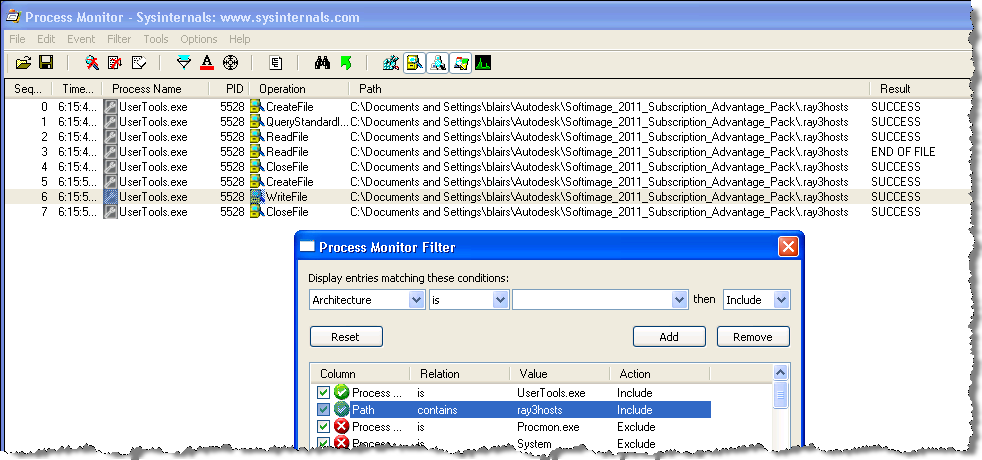
I didn’t see any outgoing TCP traffic to the satellite, so I decided to use Process Monitor on the master to check whether Softimage was loading .ray3hosts. And sure enough, it wasn’t.

So I used Process Monitor to check where UserTools was creating .ray3hosts, and it turned out that on Windows XP, UserTools creates the .ray3hosts file in the “wrong” place:

C:\Documents and Settings\blairs\Autodesk\Softimage_2011_Subscription_Advantage_Pack\.ray3hosts

It’s the wrong place because Softimage looks for .ray3hosts here:

C:\users\blairs\Autodesk\Softimage_2011_Subscription_Advantage_Pack\.ray3hosts

Some workarounds:

  • Manually copy the .ray3hosts file to the right place
  • Edit setenv.bat and set MI_RAY_HOSTSFILE to point to the folder used by UserTools
  • Start UserTools from a Softimage command prompt, so it picks up XSI_USERROOT from the environment set by setenv.bat

Troubleshooting installation failures


When a Softimage (or any other Autodesk product) installation fails, you’ll have to check the install logs to see what went wrong. Typically the only error message you’ll see during the actual install will be too generic to be helpful (for example, Error 1603, which could mean almost anything).

The installation log files are found in your %TEMP% folder.

The main log file is Autodesk_Softimage_IF.log.
If the installation works, you’ll see something like this:

2010/5/4:16:41:15	blairs	MTL-EXAMPLE	=== Setup started on MTL-EXAMPLE by blairs ===
2010/5/4:16:42:17	blairs	MTL-EXAMPLE	Install	Microsoft Visual C++ 2005 Redistributable (x64)	Succeeded	
2010/5/4:16:42:23	blairs	MTL-EXAMPLE	Install	Microsoft Visual C++ 2008 SP1 Redistributable (x86)	Succeeded	
2010/5/4:16:42:30	blairs	MTL-EXAMPLE	Install	Microsoft Visual C++ 2008 SP1 Redistributable (x64)	Succeeded	
2010/5/4:16:44:10	blairs	MTL-EXAMPLE	Install	Autodesk Softimage 2011 Subscription Advantage Pack 64-bit	Succeeded	
2010/5/4:16:58:36	blairs	MTL-EXAMPLE	=== Setup ended ===

If the install failed, Autodesk_Softimage_IF.log tells you which component failed to install.
For each component, there will be a [much] more detailed log.

Depending on whether you installed 64-bit (x64) or 32-bit (x86) Softimage, you’ll see these log files for Softimage:

  • Autodesk_Softimage_x64_Install.log
  • Autodesk_Softimage_x86_Install.log

For the Visual C++ Redistributable, these are the log files to look for:

  • vcredist_x64.log
  • vcredist_x86.log
  • vcredist_x64_2005.log
  • vcredist_x86_2005.log

In these files, I generally look for the point where the install rollback started, and the look back up the file from there. Or I search for things like “error” or “result”.

Once you find the error, it’s off to google to see what you can find.